Understanding Android Battery Cycles To Extend Your Phone’S

Understanding Android Battery Cycles: How They Impact Your Phone’s Performance
If you’ve noticed your Android phone’s battery isn’t lasting as long as it used to, you’re not alone. Many users wonder what exactly causes their device’s battery to lose capacity over time. The key factor here is the concept of battery cycles. Knowing what happens during each cycle can help you better manage your device’s health and extend its lifespan. Let’s take a deep dive into Android battery cycles, exploring how they work, why they matter, and what you can do to keep your battery in good shape.
What Are Battery Cycles?
Battery cycles are the fundamental units of battery wear and tear. A cycle occurs each time your battery goes from fully charged to empty and back again, but not necessarily in one single charge. For example, if you use half of your phone’s battery one day and then recharge it fully, and repeat this process twice, you’ve completed one full cycle. Understanding this is important because batteries are designed to endure a limited number of cycles before their capacity starts to decline noticeably.
| Battery Cycle | How It Happens | Impact on Battery Life |
|---|---|---|
| Partial Cycles | Using about 50% of the battery twice | Decreases overall capacity gradually |
| Full Cycle | Using 100% of the battery in one go | Contributes to battery aging the most |
How Android Devices Track Battery Cycles
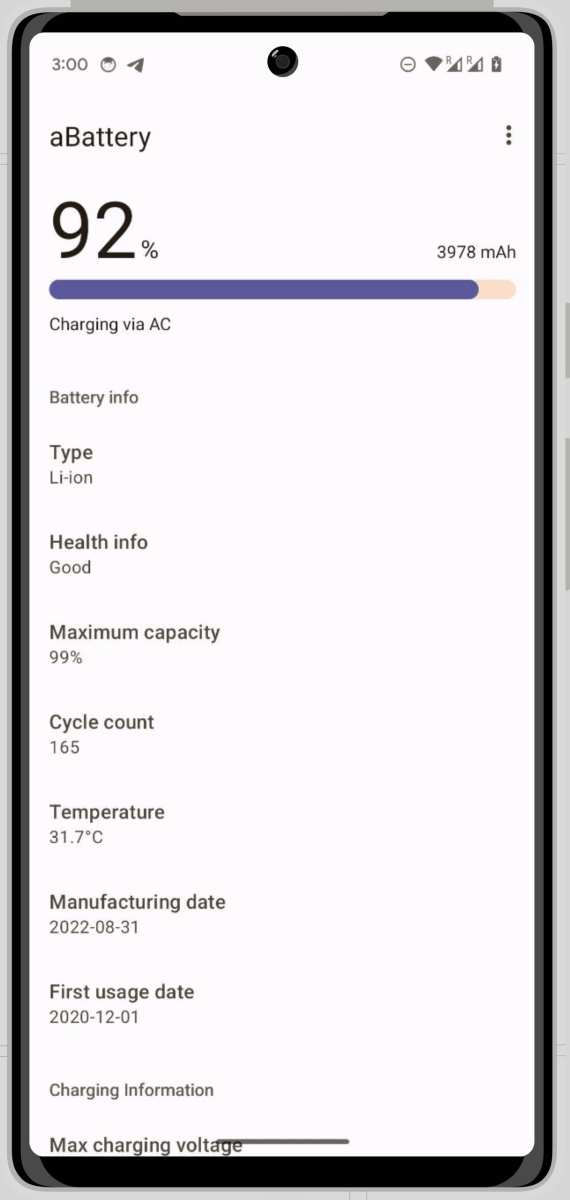
Most Android phones don’t display battery cycle counts directly, but some advanced tools and apps can give you this information. Manufacturers often design their batteries to last through a certain number of cycles, typically around 300 to 500 for standard lithium-ion batteries. When your device approaches this number, you might notice that the battery drains faster, takes longer to charge, or shows other signs of aging.
Why Battery Cycles Matter
The number of charges a battery can undergo before it starts losing significant capacity links directly to its lifespan. Each cycle causes small chemical and physical changes inside the battery, gradually reducing its ability to hold charge. Once the cycle count exceeds the specified limit, your phone’s battery can’t hold as much power as it used to, leading to faster drain times and the need for more frequent charging. This is why understanding and managing your battery cycles can help you extend your device’s usability.
Factors That Accelerate Battery Cycle Wear
While all batteries eventually degrade, certain habits or conditions can hasten this process. Let’s look at some common factors that can lead to faster cycle wear:
- Frequent Full Discharges: Regularly draining the battery completely before recharging speeds up capacity loss.
- High Temperatures: Exposure to heat accelerates chemical reactions inside the battery, reducing its lifespan.
- Overcharging: Leaving your device plugged in after reaching 100% can cause stress on the battery, impacting cycle life.
- Heavy Usage: Intensive activities like gaming or video editing generate more heat and demand more power, increasing cycle wear.
Best Practices to Extend Your Android Battery’s Life
If you’re looking to keep your Android device running smoothly for as long as possible, consider adopting charging habits and device care routines that minimize cycle stress. Here are some practical tips:
- Keep Your Battery Between 20% and 80%: Regularly charging your battery within this range reduces stress and prolongs its cycle life.
- Avoid Full Discharges: Instead of letting your phone die completely, recharge it when it hits around 20-30%.
- Use Original Chargers: Using certified chargers prevents overvoltage and helps maintain battery health.
- Avoid Extreme Temperatures: Keep your device away from direct sunlight and intense heat sources.
- Enable Battery Saver Mode: Using power-saving settings reduces load on the battery and can diminish cycle count stress.
- Limit Fast Charging: While quick charges are convenient, frequent use can generate more heat, which accelerates degradation.
Monitoring Battery Health and Cycle Count on Android
Knowing how your battery performs over time helps you make informed decisions. You can use various apps designed for Android devices to check your battery’s health, cycle count, and other vital statistics. Some popular options include:
- AccuBattery: Tracks battery capacity, charge/discharge cycles, and estimates remaining lifespan.
- Battery Analyzer: Provides detailed information about battery health and cycle statistics.
- GSam Battery Monitor: Analyzes app usage patterns and power consumption to help optimize battery life.
Using these tools periodically allows you to see how many cycles your battery has undergone and assess whether it’s time for a replacement or some maintenance steps.
When to Consider Replacing Your Android Battery
Batteries don’t last forever, and knowing when to replace yours helps keep your device functioning optimally. Here are signs indicating it’s time for a new battery:
- The battery drains significantly faster than before.
- Your phone shuts down unexpectedly even when there’s visible charge.
- Charging takes longer than usual or is inconsistent.
- The device becomes unusually hot during charging or use.
- Your battery health app reports a capacity below 80% or indicates high cycle counts.
If you notice these signs and your device’s battery cycle count is approaching the upper limit, replacing the battery can restore your phone’s performance and lifespan.
Understanding Android battery cycles offers valuable insight into how your device ages and how you can care for it better. By monitoring your battery’s cycle count and adopting smart charging habits, you can extend its effective lifespan and maintain good performance. Remember — your battery’s health is essential for your phone’s longevity, so treat it with care and stay informed about its condition. Small adjustments in how you charge and use your device today can make a significant difference in the long run.
Frequently Asked Questions
How does charging habits influence the number of battery cycles on an Android device?
Charging habits significantly impact the battery’s lifespan. Frequent full charges to 100% or complete discharges to 0% can accelerate battery wear. Instead, charging your device partially and avoiding extreme charge levels helps preserve the battery’s health, reducing the total number of cycles used and extending its effective lifespan.
What are signs that an Android battery has reached its cycle limit?
When an Android battery reaches its cycle limit, you’ll notice reduced battery life, faster drain, and the device may shut down unexpectedly at higher charge levels. The battery percentage may fluctuate unpredictably, and the device might take longer to charge or show an inability to hold a full charge, indicating diminished capacity due to cycle exhaustion.
Can software updates affect the number of battery cycles my Android device can handle?
Yes, software updates can influence battery cycle management. Updates often include improvements in power optimization, which may reduce how quickly your battery cycles are used up. Conversely, some updates may increase background activity, leading to faster battery wear. Installing updates from official sources and adjusting settings for better power management helps conserve your battery cycles.
Is there a way to monitor the remaining battery cycles on my Android phone?
What strategies can I implement to extend my Android battery’s lifespan?
To prolong your battery life, avoid exposing the device to extreme temperatures and refrain from charging to 100% or discharging to 0%. Use shorter charging sessions throughout the day instead of long overnight charges. Enable power-saving modes, reduce screen brightness, and turn off unnecessary background processes. These practices help lessen the number of cycles your battery undergoes, maintaining its capacity longer.
Final Thoughts
Maintaining optimal battery health is essential for Android devices. Monitoring battery cycles helps you understand its longevity and performance. Proper charging habits can significantly extend your device’s lifespan. Being aware of your battery cycles allows you to optimize usage and prevent unexpected shutdowns. Regularly updating your device and avoiding extreme temperatures also contribute to better battery health. In summary, managing your Android battery cycles helps ensure your device remains efficient longer. Paying attention to these cycles is key to maximizing your device’s performance and lifespan.
Similar Posts