Which Is Better Android Tv Or Google Tv For Your Home
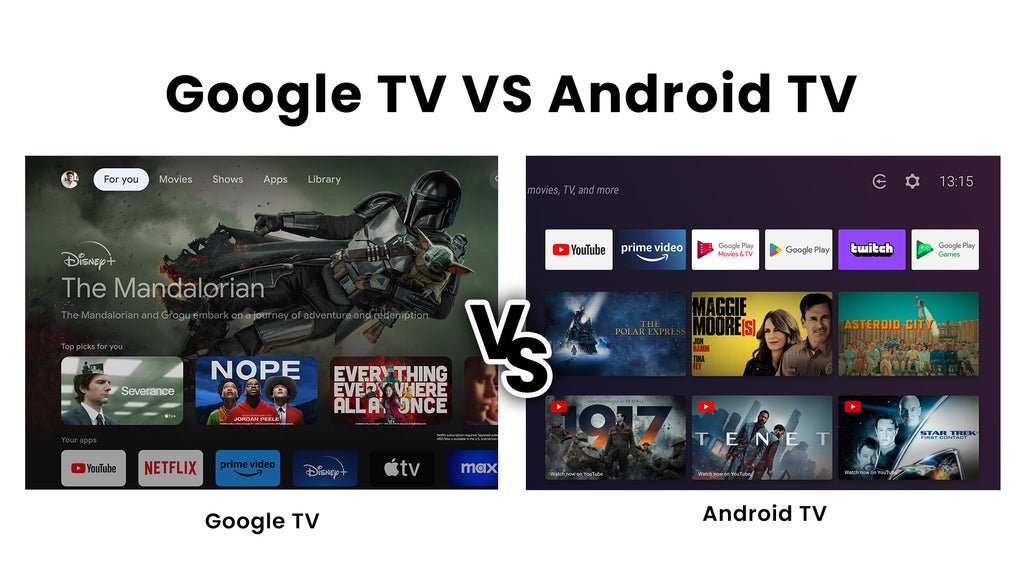
Choosing between Android TV and Google TV can be tricky, but the answer is clear: **Google TV offers a more user-friendly interface and better content management**. When considering which is better Android TV or Google TV, think about your preferences for navigation and app organization. Google TV emphasizes personalized content recommendations, making it easier to find what you want. Both platforms run on Android, but Google TV’s updated design enhances overall usability for a smoother viewing experience.

Which Is Better: Android TV or Google TV?
Choosing between Android TV and Google TV can feel tricky because both offer exciting features that enhance your entertainment experience. To make an informed decision, it’s important to understand the key differences, advantages, and disadvantages of each platform. In this guide, we will explore every aspect of Android TV and Google TV, including their design, user interface, content options, compatibility, and overall performance. Let’s dive into the details to help you figure out which is better suited for your needs.
Understanding Android TV
Android TV is a smart TV platform developed by Google that runs on many different devices. It offers a familiar interface, similar to Android smartphones, making navigation easy for users who already know Android. Android TV was first launched in 2014 as a way to bring Android’s flexibility and apps to the big screen.
Design and User Interface
Android TV’s home screen features a row of app icons and content recommendations, making it simple to access your favorite apps and shows. It emphasizes a content-centric layout, prioritizing what you want to watch. The interface is customizable, so users can organize apps in a way that best suits their viewing habits.
Content and App Support
Android TV supports a wide variety of apps through the Google Play Store. Popular streaming services like Netflix, Hulu, Amazon Prime Video, and Disney+ are available, along with numerous games and utility apps. Additionally, because it operates on Android, it supports voice commands via Google Assistant.
Device Compatibility and Range
Android TV is available on a broad range of devices, from affordable set-top boxes to high-end smart TVs. Brands like Sony, TCL, Hisense, and Xiaomi use Android TV, providing options across different price points.
Understanding Google TV
Google TV is a newer interface and experience designed by Google to enhance content discovery. It is built on the Android TV platform but offers a more refined and personalized user experience. Google TV started rolling out in 2020, initially on Chromecast with Google TV, and has since appeared on some smart TVs.
Design and User Interface
Google TV focuses heavily on content recommendations based on your viewing habits and subscription services. Its home screen displays three main sections: For You, Movies, and Shows, making it easier to find something to watch without digging through multiple apps. The interface offers a more organized and visually appealing layout compared to traditional Android TV.
Content and App Support
While Google TV still supports the vast app ecosystem of Android TV, it emphasizes integration with Google services. It can recommend content from various streaming platforms and even suggest new shows or movies based on your preferences. Google TV also consolidates content from different streaming apps into one place, so you don’t need to switch between apps constantly.
Device Compatibility and Availability
Initially, Google TV was exclusive to Chromecast with Google TV, but now many smart TVs from brands like Sony and TCL incorporate this interface directly. As it is newer, the device variety is growing but still more limited compared to Android TV’s extensive range.
Key Differences Between Android TV and Google TV
While Google TV is built on Android TV, they are not the same. Here are some crucial differences that can influence your choice:
- User Interface: Google TV provides a more personalized and content-focused layout, making it easier to find what you want quickly. Android TV’s interface is more app-centric, with quick access to installed applications and settings.
- Content Discovery: Google TV’s main strength lies in its content recommendations and integration, helping users discover new shows and movies more effortlessly. Android TV relies more on app-specific browsing and search.
- App Support: Both platforms have access to Google Play Store apps, but Google TV emphasizes content aggregation and recommendation features on top of standard app support.
- Device Availability: Android TV is available on a wider selection of devices and brands, making it accessible in more categories and price ranges. Google TV, being newer, is limited to select devices and smart TVs.
Performance and Usability
Performance can depend on the device hardware rather than the platform itself. However, both platforms are designed to run smoothly with proper hardware and updates.
Navigation and User Experience
– **Android TV:** Offers a straightforward navigation style with a row of app icons and a side menu. It is familiar to Android smartphone users, with quick access to settings, search, and apps.
– **Google TV:** Focuses on a visually rich interface with big thumbnails and content recommendations. It uses cards and grouped sections, which many users find more visually appealing and easier to browse.
Voice Control and Assistant Integration
Both platforms leverage Google Assistant for voice commands:
- Search for shows, movies, or specific actors.
- Control smart home devices.
- Get weather updates or set reminders.
Google TV’s enhanced recommendations and content management make voice commands even more useful for finding entertainment quickly.
Compatibility and Future Updates
Choosing between Android TV and Google TV involves understanding compatibility and how future updates will impact your device.
Software Updates
– **Android TV:** Receives regular updates, but the frequency and features depend on the device manufacturer.
– **Google TV:** Being newer, it benefits from Google’s latest software features and improvements, with regular updates on supported devices.
Device Longevity and Support
– Android TV devices usually receive latest Android versions and security patches for several years.
– Google TV devices are expected to get updates in line with Google’s support policies, often for a similar duration.
Cost and Value for Money
Price varies widely depending on the device. Generally:
– Android TV devices are available at lower price points, making them ideal for budget-conscious buyers.
– Google TV-powered smart TVs tend to be a bit more expensive initially but may offer better user experience and content management.
Consider what features matter most, like app support or content discovery, when evaluating value.
Which Platform Is Better for Your Needs?
Here’s a quick guide to help decide:
- If you want a device with extensive options and flexibility: Choose Android TV. It offers a wider selection of devices across various budgets.
- If you prefer a smart TV with advanced content recommendations and a sleek interface: Google TV is better. It simplifies finding entertainment and offers personalized suggestions.
- If you prioritize smart home integration and voice control: Both platforms are excellent, with Google Assistant being seamlessly integrated into Google TV.
- If your focus is on gaming and app variety: Android TV might be more versatile, offering more gaming options and app choices.
Both Android TV and Google TV deliver impressive features that enhance your viewing experience. Android TV remains a solid choice for those who want versatility, affordability, and broad device compatibility. On the other hand, Google TV offers a more refined, content-driven interface, making entertainment discovery smoother and more personalized.
Ultimately, the decision depends on what you value most: broad device options and customization, or streamlined content recommendations and ease of use. As Google continues to update and improve Google TV, expect its features to become even more compelling in the coming years. Whether you go with one or the other, both platforms will continue to evolve, helping you enjoy your favorite shows, movies, and apps with greater convenience.
Frequently Asked Questions
What are the main differences between Android TV and Google TV?
Android TV provides a customizable interface with access to a wide range of apps through the Google Play Store. Google TV, on the other hand, offers a more personalized experience with content aggregation from various streaming services. While Android TV emphasizes app availability and flexibility, Google TV focuses on curated content recommendations and a streamlined browsing experience.
Which platform offers better user interface and navigation?
Google TV is designed to offer a more intuitive and user-friendly interface that highlights content based on your viewing habits. Its interface simplifies navigation with focused sections for movies, shows, and personalized recommendations. Android TV offers a flexible layout that can be customized but might require more effort to find specific content.
Are there differences in app availability and compatibility between Android TV and Google TV?
Both platforms access the Google Play Store, so app availability is generally similar. However, some apps may be optimized specifically for Google TV’s interface, providing a better experience. Android TV may offer more flexibility for app developers to create and customize applications, resulting in a wider range of choices in certain categories.
How do updates and updates frequency compare for both platforms?
Google TV devices often receive updates that enhance content recommendations and interface features more frequently, as Google actively improves the platform. Android TV updates are released regularly, but the pace can vary depending on device manufacturers and their update policies. Both platforms aim to keep their software current, but Google TV tends to prioritize user experience improvements.
Which platform is more suitable for integrating with smart home devices?
Both Android TV and Google TV integrate well with Google’s ecosystem, including smart home devices like Google Nest. However, Google TV’s interface and content recommendations are optimized for Google services, making it slightly more seamless for users invested in Google’s smart home products. Android TV also supports smart home integration but may require additional setup for certain devices.
Final Thoughts
which is better android tv or google tv, depends on user preference. Android TV offers more customization options and a wider app selection. Google TV presents a more user-friendly interface with better content recommendations.
For those valuing simplicity and a polished experience, Google TV often proves superior. However, Android TV suits users seeking extensive control and flexibility.
In conclusion, choosing between Android TV and Google TV hinges on individual needs. Which is better android tv or google tv ultimately depends on what features you prioritize most.

Similar Posts































