Android Tv Vs Google Tv Which Is Better: A Comprehensive

Android TV vs Google TV: Which Is Better?
When it comes to choosing a smart TV system, Android TV and Google TV often come up as the top contenders. Both are popular because they bring a lot of features that make watching TV more enjoyable. But they are different in many ways, and understanding those differences can help you pick the best option for your home. In this article, we will look at what makes each platform special, how they perform, and which one might be better for you.Understanding Android TV and Google TV
Before comparing the two, it’s helpful to understand what each platform is and how they came about.What is Android TV?
Android TV is an operating system developed by Google. It is based on the Android platform used in many smartphones. Android TV has been around for years and is used by many TV brands. It offers a simple and clean interface designed to make browsing easier on a larger screen. Android TV provides access to the Google Play Store, so users can download apps, games, and streaming services directly onto their smart TVs.What is Google TV?
Google TV is a newer platform that builds upon Android TV. It was introduced as a way to organize content more smartly and recommend shows and movies based on your preferences. Google TV offers a more personalized experience by gathering content from different streaming services into one easy-to-navigate interface. It also comes with a redesigned home screen that highlights what’s most relevant to you.Design and User Interface
The look and feel of a smart TV platform can significantly influence how enjoyable it is to use. Let’s compare how Android TV and Google TV present content and how intuitive they are.Android TV Interface
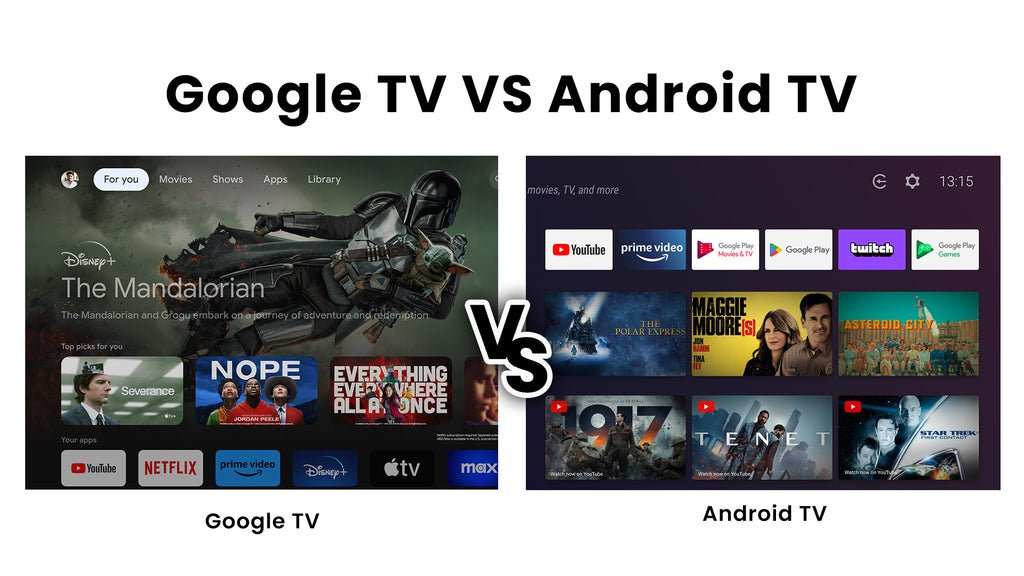
Android TV features a straightforward design with a row of app icons at the top and a recommended content section below. It’s simple, with easy access to installed apps and voice search capabilities. The menu is easy to navigate, especially for those familiar with Android devices.Google TV Interface
Google TV takes things a step further with a more colorful and dynamic interface. It organizes content into categories like “Movies,” “Shows,” and “For You,” making it easier to find what you want. The platform excels at personalized recommendations, saving you time searching for something to watch. The layout adapts based on your viewing habits, making the experience feel tailored just for you.Content Organization and Recommendations
One of the biggest differences lies in how each platform handles content discovery.Android TV Content Organization
Android TV’s content organization is basic. It shows content based on the apps you have installed and your recent activity. While you can search for specific movies or shows, the platform doesn’t automatically suggest new content unless you use specific apps’ recommendation engines.Google TV Content Organization
Google TV excels at bringing together content from multiple streaming services and presenting it in one place. Its smart recommendations consider what you’ve watched before and suggest new shows and movies you might like. This personalized approach makes it easier to find something good without scrolling through multiple apps.Performance and Speed
Fast performance makes all the difference when using a smart TV platform. People want quick responses and smooth navigation.Android TV Performance
Android TV generally performs well, especially on newer devices. It can handle multiple apps running at once and brings quick responses to commands. However, older or cheaper models may experience lag or slowdowns.Google TV Performance
Google TV is built on the same platform as Android TV, so performance is similar. However, because it emphasizes content recommendations and interface animations, it can sometimes require more processing power. On higher-end devices, it runs smoothly, but on budget options, performance can lag slightly.Compatibility and App Support
Having access to a wide range of apps is essential in choosing a smart TV platform.Android TV Compatibility
Android TV has the advantage of a vast app library through the Google Play Store. It supports most popular streaming services like Netflix, Hulu, Disney+, and Amazon Prime Video. Also, many games and utility apps are available for download.Google TV Compatibility
Google TV supports all apps available on Android TV, which means you can access your favorite streaming services without issues. Its focus on content aggregation also makes browsing those apps more integrated and seamless.Voice Control and Search Features
Voice commands make TV watching more convenient. Both platforms support Google Assistant, but there are some differences.Android TV Voice Features
Android TV supports Google Assistant voice commands, allowing you to search for content, control smart home devices, and get answers just by talking to your TV remote or connected Google Assistant device.Google TV Voice Features
Google TV also supports Google Assistant and takes advantage of its features to enhance content search. Its voice search is deeply integrated with content recommendations, making it easy to find and watch something without typing or scrolling.Device Compatibility and Ecosystem
The devices you use with your smart TV matter. Let’s see how Android TV and Google TV fit into your existing ecosystem.Android TV Device Compatibility
Android TV is found in many smart TVs from brands like Sony, Philips, and Sharp. It’s also available on streaming devices like the Nvidia Shield TV and Xiaomi Mi TV. It integrates smoothly with Android smartphones, tablets, and Google services.Google TV Device Compatibility
Google TV is built into newer devices like the Chromecast with Google TV and some smart TVs from Sony and TCL. It offers better integration with Google’s ecosystem, including Google Photos, Gmail, and YouTube. If you’re already part of the Google ecosystem, Google TV offers a more cohesive experience.Additional Features and Customization
Extra features can make or break your overall satisfaction with a platform.Android TV Features
Android TV provides customization options for wallpapers and app layouts. It supports gaming features like Google Stadia and has parental controls and casting options for sharing content from your phone.Google TV Features
Google TV emphasizes personalized recommendations and has built-in support for casting content from Android devices and Chrome browsers. Its interface customization is straightforward, and it often receives updates that improve ease of use.Price and Device Options
Cost can influence your choice, especially if you are budget-conscious or looking for a premium experience.Android TV Devices
Android TV is available on a wide range of devices—from affordable streaming sticks to high-end smart TVs. This variety allows more flexibility, letting you choose a device that fits your budget and needs.Google TV Devices
Most Google TV devices are premium options like the Chromecast with Google TV, which is priced competitively. Some new smart TVs also come with Google TV built-in, providing a seamless experience without additional devices.Which Is Better for Different Users?
Ultimately, the “better” platform depends on what you want from your smart TV.If You Prefer Simplicity and Content Organization
Google TV offers a cleaner, more personalized content experience. If you want easy access to a variety of streaming services and tailored recommendations, Google TV might serve you better.If You Value Customization and App Variety
Android TV provides more flexibility in device options and app choices. It’s suitable for users who enjoy tweaking settings and using a broad range of apps and games.If You’re Already in the Google Ecosystem
Both platforms work well with Google services, but Google TV’s emphasis on content aggregation aligns better with users who use Google Photos, Gmail, and Google Assistant regularly. Choosing between Android TV and Google TV depends on what you value most in a smart TV experience. If you want a simple, highly personalized interface with intelligent content recommendations, Google TV stands out. But if you prefer a platform with a vast app ecosystem and flexibility in device options, Android TV remains a solid choice. Both platforms are continually improving, so your familiarity with Google services and your specific viewing needs will guide you toward the best decision for your home entertainment setup.Frequently Asked Questions
How do the user interfaces of Android TV and Google TV differ?
Android TV offers a straightforward interface with app rows and a customizable home screen. Google TV, on the other hand, provides a content-centric interface that aggregates shows and movies from various streaming services into a single, personalized feed. This makes it easier to find what to watch without switching between apps constantly.
Which platform offers better app integration and updates?
Android TV has a longer presence in the market, resulting in a wider selection of apps and more mature updates. Google TV, built on the same Android TV foundation, benefits from regular updates that enhance user experience and add new features, but app availability can vary slightly depending on device manufacturers.
In what ways do content recommendations differ between Android TV and Google TV?
Google TV focuses heavily on personalized content recommendations based on viewing habits, integrating suggestions from multiple streaming services seamlessly. Android TV’s recommendations are more app-specific and may require manual customization, providing a less integrated but more familiar experience for users sticking to certain apps.
Which platform offers more device options and compatibility?
Android TV is available on a broader range of devices from different manufacturers, giving consumers more choices in terms of price and features. Google TV is integrated into select devices, primarily Google’s own Chromecast with Google TV, limiting options but ensuring consistent performance across supported models.
How do voice assistant capabilities compare between Android TV and Google TV?
Both platforms incorporate Google Assistant, enabling voice commands for searching content, controlling smart home devices, and more. Google TV often provides a more integrated voice experience due to its content-focused interface, allowing users to ask for specific shows or movies directly and get more tailored results.
Final Thoughts
Android TV offers a customizable interface and wide app support, appealing to users who want flexibility. Google TV, on the other hand, provides a more user-friendly layout with personalized content recommendations. Both platforms deliver excellent streaming quality, but Google TV’s interface feels more intuitive for newcomers. When comparing Android TV vs Google TV which is better, it depends on personal preference. Android TV suits those who enjoy customization, while Google TV appeals to users seeking simple navigation. Ultimately, Google TV edges out slightly for ease of use, making it the better choice for most users.
Similar Posts































