What Is The Difference Between Android Tv And Google Tv
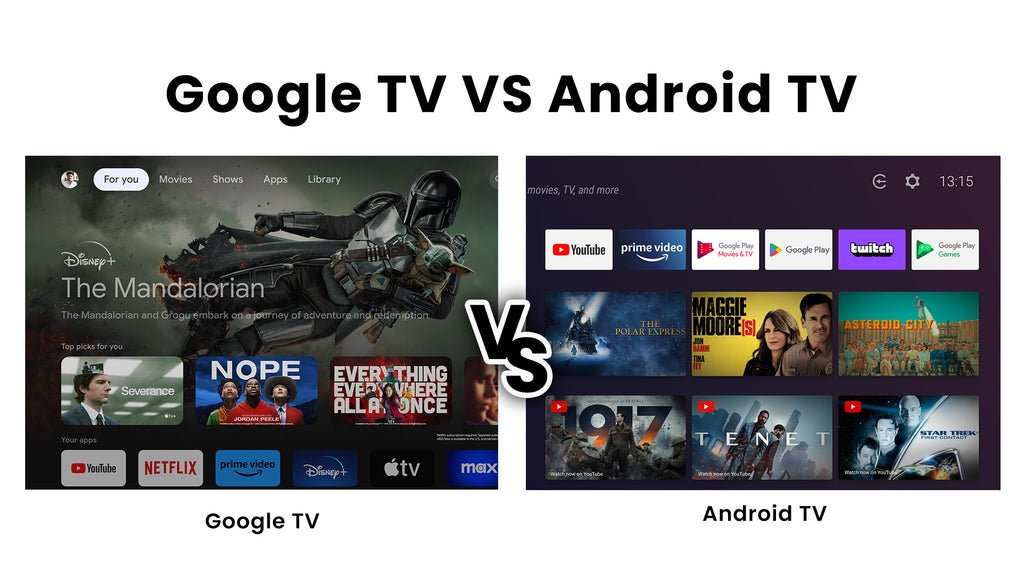
The difference between Android TV and Google TV lies mainly in their interface and content discovery features. **Android TV provides a familiar app-based experience, while Google TV focuses on personalized content recommendations.** If you’re wondering what sets them apart, it’s primarily how they present and organize your viewing options.
Google TV offers a more curated browsing experience, making it easier to find shows across multiple apps. Android TV maintains a straightforward layout rooted in traditional app menus. Understanding these distinctions helps you choose the right platform for your entertainment needs.

What Is the Difference Between Android TV and Google TV
When it comes to smart TVs and streaming devices, terms like Android TV and Google TV often come up. Many people wonder how these two platforms differ, especially since they both come from the same company, Google. Understanding their differences can help you choose the right device for your entertainment needs and ensure you get the most out of your TV experience. Let’s explore what sets Android TV and Google TV apart, highlighting their features, interface, content options, and compatibility.
Introduction to Android TV and Google TV
Before diving into their differences, it’s helpful to get a clear idea of what each platform is.
Android TV is an operating system developed by Google, based on the Android platform that runs on smartphones and tablets. It aims to bring Android’s versatility and apps to your television, offering an easy way to stream content, play games, and access a variety of apps.
Google TV, on the other hand, is a newer interface and platform built on top of the Android TV operating system. It was launched in 2020 as a way to enhance content discovery and provide a more personalized viewing experience. Think of Google TV as an upgraded version of Android TV, focusing heavily on content aggregation and smart recommendations.
Design and User Interface
The way a device looks and how users interact with it play crucial roles in the overall experience.
Android TV Interface
Android TV has a simple, straightforward layout. When you turn on the device, you’ll see a row of apps and content recommendations. Its interface is designed to be easy to navigate using a remote control, with large icons and categories such as Apps, Movies, TV Shows, and Live TV.
The interface is customizable, allowing you to rearrange app icons or add your preferred apps to the homepage. However, it mainly emphasizes quick access to streaming apps like Netflix, Amazon Prime, and YouTube.
Google TV Interface
Google TV offers a more visually appealing and organized interface. It emphasizes content discovery by showcasing recommendations from various streaming services in one place. The homepage includes sections like ‘For You’, ‘What to Watch’, and ‘Top Picks,’ which adapt based on your viewing habits.
This platform pulls content directly from your subscribed streaming services and displays the content in a unified, easy-to-browse grid. The interface is designed to help you find something interesting quickly, whether it’s a new movie or an episode of your favorite show.
Content Aggregation and Discovery
One of the biggest differences between Android TV and Google TV lies in how they handle content discovery.
Content on Android TV
Android TV mainly relies on app-based navigation. You open individual apps to browse content, and the recommendations are limited to what each app suggests. There’s no central place that combines content from different streaming services unless the app itself offers recommendations.
For example, if you want to watch movies from Netflix and Disney+, you’ll switch between the Netflix app and Disney+ app separately. Android TV does support some recommendations, but they are primarily based on the content within individual apps.
Content on Google TV
Google TV takes a different approach by consolidating content from multiple streaming platforms into a single view. It gathers recommendations from Netflix, Hulu, Disney+, Amazon Prime, and more, then displays tailored suggestions based on your viewing habits.
It also includes a Universal Search feature that allows you to search across various apps simultaneously. So, if you’re looking for a specific show or movie, Google TV shows you where it’s available, saving you time and effort.
Personalization and Recommendations
Personalization helps make your viewing experience more enjoyable and relevant.
Android TV Recommendations
Android TV provides personalized recommendations, but they are mostly based on your viewing history within specific apps. The suggestions are presented on the home screen, but they don’t always consider your overall streaming preferences across multiple platforms.
Google TV Recommendations
Google TV excels at personalization. It uses your viewing history and preferences to suggest content from all your streaming subscriptions in one place. The platform learns what you like over time, making suggestions more accurate and tailored to your tastes.
This feature makes it easier to find something good to watch quickly, without having to browse through each app individually.
Compatibility and Devices
Both Android TV and Google TV are compatible with a range of devices, but there are some differences in how they are implemented.
Devices with Android TV
Many smart TVs from brands like Sony, Hisense, and Philips come with Android TV pre-installed. Additionally, streaming devices like Chromecast with Google TV (but also running on Android TV) also use this platform.
Android TV is highly customizable, allowing manufacturers to modify the interface or add their features, which can lead to some variation between devices.
Devices with Google TV
Google TV is primarily found on newer devices such as the Chromecast with Google TV and select smart TVs from Sony (such as the Sony Essential Series). These devices come with the Google TV interface directly integrated into the hardware.
While Google TV is built on Android TV, it features a more refined and consistent user experience across compatible devices, which helps users transition easily from one device to another.
App Availability and Play Store
Since both platforms run on Android, they access the same app store.
Android TV App Store
The Google Play Store for Android TV features thousands of apps, including streaming services, games, and utility apps. However, some apps may not be fully optimized for the TV experience, which can affect usability.
Google TV’s App Ecosystem
Google TV also uses the Google Play Store, providing access to the same wide range of apps. The key difference is in how these apps are presented and integrated into the interface, with Google TV focusing more on content aggregation and personalized recommendations.
Performance and Updates
Performance can vary depending on the device and hardware specifications.
Android TV Performance
Android TV devices are available in a variety of configurations, from budget-friendly options to high-end units. The system generally performs well, but occasional lag or slow navigation can occur on lower-quality hardware.
Updates are released periodically, but some devices might not get the latest features immediately, depending on the manufacturer.
Google TV Performance
Google TV devices are optimized for the interface, often providing smoother navigation and faster performance. Since Google TV is a newer platform, updates tend to come more regularly, especially with the latest Chromecast and flagship smart TVs.
People’s Connecting Experience and Ecosystem
Both platforms integrate well with other Google services and devices.
Android TV Ecosystem
Android TV works seamlessly with Google Assistant, Chrome, and other Google apps. You can easily control your smart home devices, search using voice commands, and cast content from your phone or tablet.
Google TV Ecosystem
Google TV emphasizes content discovery but also supports Google Assistant for controlling smart home devices, searching for content, and setting reminders. It integrates tightly with your Google account, making content recommendations more personalized based on your Google ecosystem.
Choosing Between Android TV and Google TV
If you want a straightforward, app-focused interface, Android TV can meet your needs. However, if content discovery, personalized recommendations, and ease of browsing matter most to you, Google TV offers a more curated experience.
Remember:
- If you already own a smart TV or streaming device with Android TV, it’s a solid platform with a large app store and good performance.
- Google TV is better if you want a more organized content experience with smart suggestions and integrated search.
In the end, both platforms aim to deliver excellent streaming experiences. Your choice depends on whether you prefer a more traditional app-based layout or a more visual, content-driven interface.
This detailed comparison should help you understand what makes Android TV and Google TV unique, ultimately guiding you to make the right decision based on your entertainment preferences.
Frequently Asked Questions
How does the user interface differ between Android TV and Google TV?
Android TV offers a customizable home screen with app-based navigation and recommendations. In contrast, Google TV provides a more curated interface that emphasizes personalized content suggestions and integrates recommendations from multiple streaming services, making it easier to find shows and movies across platforms.
What are the main differences in content aggregation between Android TV and Google TV?
Android TV primarily displays content from installed apps, requiring users to navigate each app separately. Google TV consolidates content from various streaming services into one interface, allowing users to browse all available content seamlessly, regardless of the app or platform.
How does the device compatibility vary between Android TV and Google TV?
Android TV runs on a wide range of devices, including many smart TVs and streaming boxes from various brands. Google TV is built on the Android TV platform but is typically found on newer devices from manufacturers like Chromecast with Google TV, offering a more integrated experience with Google services.
In what ways do software updates differ between Android TV and Google TV?
Android TV devices often receive software updates that add new features and security patches, but update frequency depends on the device manufacturer. Google TV, being closely managed by Google, tends to get updates and feature enhancements more regularly, ensuring a more consistent experience across supported devices.
Are there differences in voice control features between Android TV and Google TV?
Both platforms support voice control through Google Assistant, but Google TV often offers more integrated voice commands and smarter search capabilities because of its tighter integration with Google services. This makes it easier to find content or control compatible smart home devices with voice commands.
Final Thoughts
Android TV offers a customizable interface with access to a wide range of apps through the Google Play Store. Google TV, on the other hand, focuses on an organized content aggregation, making it easier to find shows and movies.
Google TV is built on Android TV but emphasizes personalized recommendations and a more intuitive layout.
What is the difference between android tv and google tv? The main distinction lies in the user interface and content navigation, with Google TV providing a more user-friendly experience.

Similar Posts































