Can An Android Tv Box Be Used As A Pc Benefits And Limits
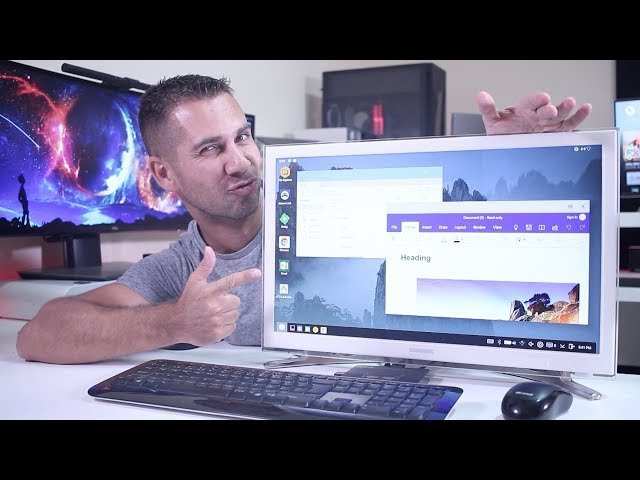

Can an Android TV Box Be Used as a PC?
When you think about an Android TV box, you likely picture streaming your favorite shows on a large screen or browsing the internet casually. But have you ever wondered if an Android TV box can do more? Specifically, can it be used as a full-fledged PC? The idea might sound ambitious, but in many ways, it’s actually possible to turn your Android TV box into a functional computer. Let’s explore this idea in detail, so you understand what you can and cannot do with an Android TV box as a computer.Understanding What an Android TV Box Is
Before diving into whether it can replace a PC, it’s important to understand what an Android TV box really is. These devices are compact computers designed mainly for streaming media content. They run on the Android operating system, which is flexible and familiar to many users. **Key features of an Android TV box:**- Runs on Android OS, similar to Android smartphones and tablets
- Connects to your TV via HDMI for high-quality video output
- Supports Wi-Fi and Ethernet for internet access
- Compatible with various apps from the Google Play Store
- Often includes a remote control, sometimes with voice features
Can You Turn an Android TV Box Into a PC?
The short answer is yes, to some extent. You can upgrade or modify an Android TV box to perform many tasks typical of a computer. However, there are important factors to consider: **What makes an Android TV box suitable as a PC?**- Ability to run productivity apps, web browsers, and office tools
- Connect external peripherals like keyboard, mouse, and external storage
- Have a stable internet connection for web-based activities
- Hardware constraints such as limited RAM, storage, and processing power
- Android OS not optimized for traditional desktop tasks
- Limited support for certain software that runs on Windows or macOS
Setting Up Your Android TV Box as a PC
Turning your Android TV box into a functional PC involves a few steps for setup and upgrades. Here’s how to get started:Connecting Peripherals
The first thing to do is connect the needed peripherals:- USB Keyboard and Mouse: Most Android TV boxes have USB ports, allowing you to connect keyboard and mouse easily.
- External Storage Devices: Plug in a USB flash drive or external hard drive for extra storage.
- External Monitor or TV: Ensure your device is connected to a screen with HDMI or other compatible connections.
Installing Productivity Apps
Android offers many apps similar to desktop software:- Google Chrome or Firefox for browsing
- Google Docs, Sheets, and Slides for productivity
- Microsoft’s Office apps now available on Android
- File management apps like Solid Explorer or File Manager
Using Remote Desktop and Screen Mirroring
If you need more power or want to access your Windows or Mac computer, consider remote desktop solutions:- Install apps like Microsoft Remote Desktop or VNC Viewer
- Connect to your PC or Mac remotely and operate it through your Android TV box
Enhancing Your Android TV Box for PC-Like Performance
While Android TV boxes aren’t built for heavy-duty tasks, some upgrades and tweaks can improve their performance:Installing a Custom Launcher or Desktop Interface
To make your Android TV box feel more like a traditional PC, consider installing custom launchers that provide desktop-like environments. These launchers help organize apps and make navigation easier.Using External Storage and MicroSD Cards
Since internal storage can be limited, add external drives to store larger files, documents, and media. This prevents slowdowns and gives you more space for your work.Upgrading Firmware or Rooting (Advanced)
Rooting your device can open up more options for customization, such as removing pre-installed apps and optimizing performance. However, rooting can be complex and might void your warranty, so proceed carefully.Advantages and Disadvantages of Using an Android TV Box as a PC
Understanding the pros and cons helps you decide if this setup suits your needs. **Advantages:**- Cost-effective alternative to buying a new PC
- Compact and portable setup
- Easy to connect and set up with existing TV and peripherals
- Runs on Android, a familiar operating system with a wide app ecosystem
- Limited hardware capabilities may affect multitasking and performance
- Android OS lacks some features of traditional desktop OSs like Windows or macOS
- Most productivity software is limited compared to desktop versions
- Potential difficulty in running advanced software or legacy applications
Comparison Table: Android TV Box vs. PC
| Feature | Android TV Box | Traditional PC | |————————|——————————|———————–| | Price | Generally affordable | Varies, often more expensive | | Hardware Power | Moderate (ARM-based) | High (x86/x64 processors) | | Operating System | Android | Windows, macOS, Linux | | Software Compatibility | Limited to Android apps | Wide range of software & peripherals | | Portability | Very portable | Usually larger and less portable | | Upgradability | Limited | Often easier to upgrade hardware | This comparison helps you see where an Android TV box fits in your tech setup. Using an Android TV box as a PC is a practical option for light tasks, casual browsing, and multimedia consumption. It’s an affordable way to create a makeshift computer that connects easily to your TV. However, it is not a replacement for a full PC, especially if you need to run demanding software, handle large files, or perform complex tasks. If you decide to turn your Android TV box into a computer, focus on adding peripherals, installing productivity apps, and possibly exploring remote desktop options. Remember that your device’s hardware imposes limits, so managing expectations is important. With the right setup, your Android TV box can serve as a convenient secondary computer or a perfect device for simple everyday tasks. It offers a fun way to experiment with technology and explore what’s possible within the constraints of Android-based hardware.Frequently Asked Questions
Can an Android TV box handle basic computing tasks like document editing and browsing?
Yes, many Android TV boxes can efficiently perform basic computing tasks such as editing documents and browsing the internet. With compatible applications like Google Chrome or Microsoft Office apps, users can open, edit, and save files. Their performance depends on the hardware specifications, but for casual use, they often work smoothly.
What peripherals are compatible if I want to use an Android TV box as a PC?
You can connect various peripherals such as keyboards, mice, and external storage devices to an Android TV box via USB ports or Bluetooth. Many models support HDMI output, allowing you to connect a monitor or TV, making it easier to navigate and work on different tasks comfortably.
Does using an Android TV box as a PC require additional software or setup?
Setting up an Android TV box as a PC usually involves installing suitable apps like remote desktop or productivity suites. You may need to adjust display settings or connect peripherals properly. With proper setup, it can serve as a basic workstation for light tasks or multimedia consumption.
Can I install a full desktop operating system on an Android TV box?
Most Android TV boxes run on Android OS, which is not designed for full desktop environments. However, some users install alternative Linux-based operating systems or custom firmware, but this process can be complex and may void warranties. It’s generally simpler to use the existing Android system with compatible apps for light computing needs.
Are there performance limitations when using an Android TV box as a computer?
Yes, Android TV boxes are primarily built for media consumption, so they often have limited processing power and memory compared to traditional PCs. This limits their ability to handle intensive applications or multitasking. They work best for simple tasks, streaming, and occasional light productivity work.
Final Thoughts
An Android TV box can serve as a basic computer, especially for browsing, streaming, and light productivity tasks. However, it lacks the full capabilities and hardware flexibility of a traditional PC. Using it as a PC works best for simple functions, but complex tasks may face limitations. Can an android tv box be used as a pc? Yes, in certain scenarios, but it won’t replace a dedicated computer for intensive work.
Similar Posts































