What Is The Difference Between Android Tv And Google Tv And?

What Is the Difference Between Android TV, Google TV, and Smart TV?
Understanding the differences between Android TV, Google TV, and Smart TV can feel confusing at first, especially as technology evolves quickly. Many people want to know which option is best for their home entertainment needs. In this detailed guide, we will explore each technology carefully, highlighting their unique features, how they work, and what makes them stand apart. This way, you can make an informed choice and understand exactly what you’re getting with each type of television platform.What Is a Smart TV?
A Smart TV is a television that has built-in internet capabilities. It allows you to connect to the internet without needing extra devices. With Smart TVs, you can watch streaming services like Netflix, Hulu, or Disney+, browse the web, and access apps directly on your TV. They are designed to simplify entertainment because you don’t need a separate device, such as a streaming box or stick. Smart TVs come with their own user interfaces, which vary based on the brand. For example, Samsung uses Tizen, LG uses webOS, and Sony uses Google TV or Android TV. These interfaces help you locate content easily and organize your apps, but the experience can vary from one manufacturer to another. **Key features of Smart TVs include:**- Built-in Wi-Fi or Ethernet connection
- Pre-installed apps and app stores
- Web browsing capabilities
- Remote control with dedicated buttons for popular services
- Regular software updates from the manufacturer
- Limited customization options depending on the brand
- Software updates may be less frequent
- Interface can be slow or cluttered on some models
What Is Android TV?
Android TV is a type of Smart TV platform developed by Google. It runs on the Android operating system, which is the same software used on many smartphones and tablets. Android TV offers a more flexible and customizable experience compared to traditional Smart TVs. When you buy an Android TV, you get access to Google’s Play Store, which hosts thousands of apps, games, and streaming services. It also supports Google Assistant, so you can control your TV using voice commands, search for content, control smart home devices, and more. **Features of Android TV:**- Access to a vast library of apps from Google Play
- Personalized recommendations based on viewing habits
- Built-in Google Assistant for voice control and smart home integration
- Support for Chromecast, enabling easy streaming from your phone or tablet
- Regular updates that improve functionality and security
- Flexible interface that adapts to user preferences
- Compatibility with a wide range of apps and games
- Easy to cast content from Android devices or Chrome browser
- Strong voice control features with Google Assistant
- Some Android TVs may have a cluttered interface with too many options
- Updates depend on the manufacturer and model
- Can be slightly more expensive than standard Smart TVs
What Is Google TV?
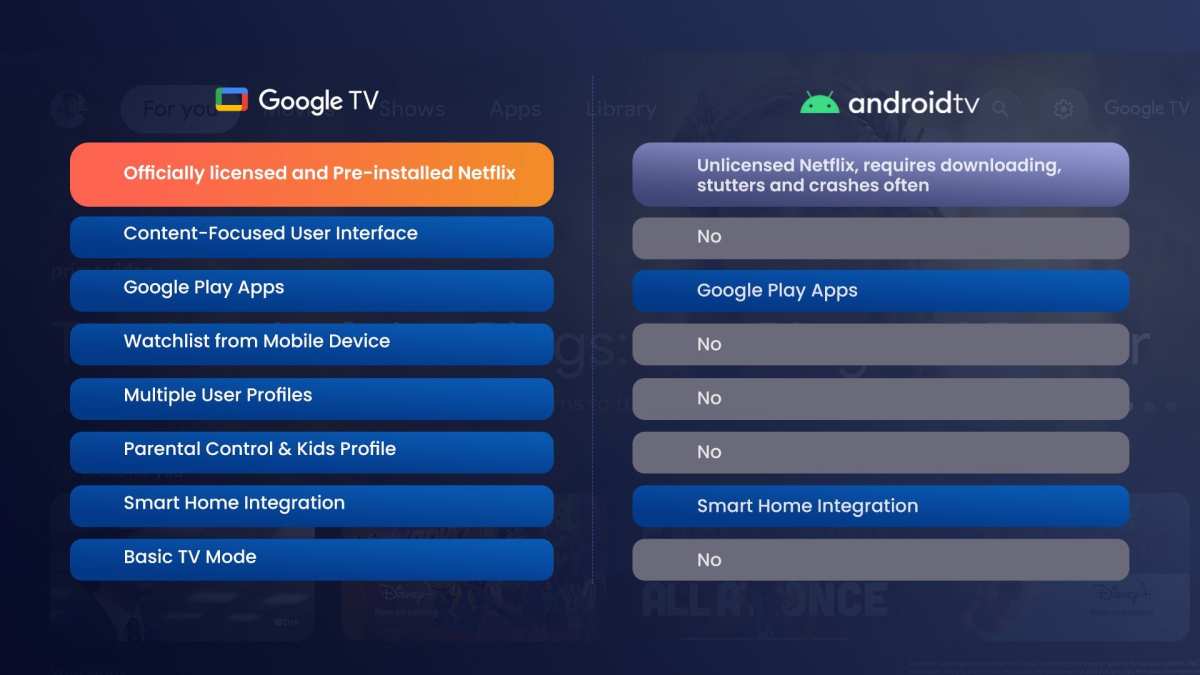
Google TV is the latest evolution in Google’s TV platform, introduced to replace Android TV on certain devices. Despite the name change, Google TV builds on the Android TV foundation but improves the user experience significantly. Google TV focuses heavily on content aggregation; it brings together shows and movies from various streaming services into one interface. Instead of opening multiple apps, you get a centralized menu that suggests what to watch based on your preferences and viewing habits. It also offers better content organization, making it easier to find what you want. **Main features of Google TV:**- Unified content interface bringing together all streaming apps
- Personalized recommendations powered by Google algorithms
- Deep integration with Google services like Google Photos, YouTube, and more
- Supports Google Assistant for voice commands
- Chromecast built-in for streaming from compatible devices
- Google TV has a redesigned user interface focusing on content discovery and organization
- It offers smarter recommendations based on your watching habits
- Google TV often comes pre-installed on newer devices, replacing Android TV as the default platform
- It emphasizes content aggregation from different sources more than Android TV
- Google Chromecast with Google TV
- TCL and Sony devices that upgrade to Google TV
Comparing the Platforms
Now that we understand each platform individually, it’s helpful to compare their features side-by-side to see their differences clearly.| Feature | Smart TV | Android TV | Google TV |
|---|---|---|---|
| User Interface | Varies by brand, often simple with limited customization | Based on Android OS, customizable, a bit cluttered at times | Redesigned, content-focused, easier to navigate with personalized recommendations |
| Content Aggregation | Depends on manufacturer, may require multiple apps | Apps from Google Play, somewhat unified experience | Centralized interface pulling from multiple streaming apps |
| Voice Control | Depends on remote features, some have built-in assistants | Supported via Google Assistant, integrated into the OS | Yes, with enhanced integration and smarter responses |
| App Store & Compatibility | Manufacturer’s app store, limited selection | Google Play Store with thousands of apps and games | Same as Android TV, but with a focus on content discovery |
| Updates & Support | Depends on brand, may be infrequent | Regular updates from Google, but varies by manufacturer | Potentially faster updates and more frequent improvements |
| Price Range | Often cheaper, depending on the brand | Slightly higher, reflecting more features | Similar to Android TV, sometimes more premium due to interface improvements |
Which One Should You Choose?
Deciding between Smart TV, Android TV, and Google TV depends largely on your preferences and how you use your TV. **Opt for a Smart TV if:**- You want a simple, out-of-the-box experience
- You prefer a brand-specific interface and app store
- You’re on a tighter budget and don’t need advanced features
- You want access to a vast library of apps and games
- You enjoy customization and flexibility
- You use Google services frequently and want seamless integration
- You value content organization and smart recommendations
- You want a unified platform that pulls content from multiple streaming services
- You prefer a modern, user-friendly interface with better content discovery
Frequently Asked Questions
How do the user interfaces of Android TV, Google TV, and traditional Smart TVs differ?
Android TV offers a customizable home screen with app icons, recommendations, and access to Google Assistant. Google TV provides a redesigned interface that emphasizes content aggregation from various streaming platforms, making it easier to browse shows and movies across services. Traditional Smart TVs typically feature a basic menu system with apps and input options, but they lack the unified content presentation and personalized recommendations found in Android TV and Google TV.
What are the differences in content discovery features between these platforms?
Android TV allows users to search for content using voice commands and offers recommendations based on viewing habits. Google TV enhances this experience by integrating content from multiple streaming apps into a single interface, making it simple to find what to watch. Conventional Smart TVs generally depend on their native app stores and simple search functions, which can require navigating through individual apps to find content.
In what ways do the operating systems of Android TV and Google TV influence app availability and updates?
Android TV uses the Android operating system, granting access to a wide array of apps available on the Google Play Store, with regular updates ensuring compatibility and new features. Google TV, built on the Android platform, offers similar app access but emphasizes a curated content experience. Both platforms generally support timely updates, whereas traditional Smart TVs might have limited access to new apps and slower update cycles due to manufacturer restrictions.
How do the hardware requirements and compatibility differ among Android TV, Google TV, and standard Smart TVs?
Android TV and Google TV are built on similar hardware requirements, often integrated into devices with specific specifications to support features like 4K streaming and voice control. These platforms typically offer broader hardware compatibility, including support for gaming controllers and external devices. Standard Smart TVs often have more basic hardware, which can limit functionality, resolution support, or the ability to run the latest apps efficiently.
Final Thoughts
The difference between android tv and google tv and smart tv lies in their features and interface. Android TV is a platform that offers a wide range of apps and customization options. Google TV, on the other hand, provides a personalized content experience with a more intuitive interface. Smart TV refers to any TV with internet connectivity, which may run on various operating systems. In summary, what is the difference between android tv and google tv and smart tv depends on their user experience and capabilities. Android TV offers extensive app support, Google TV focuses on content curation, and Smart TV indicates internet connectivity alone.
Similar Posts