Replacement Battery For Android Phone: Best Options & Tips

Replacement Battery for Android Phone: Everything You Need to Know
When your Android phone’s battery begins to drain faster than usual or refuses to hold a charge, it’s a sign that it might be time for a replacement. Instead of rushing out to buy a new phone, replacing the battery can often be a cost-effective solution that extends the life of your device. In this section, we’ll explore what replacement batteries are, why they’re important, and how to choose the right one for your Android phone.Understanding the Importance of a Replacement Battery
Your Android phone’s battery is the heart of its operation. It supplies power that keeps your device running smoothly throughout the day. Over time, batteries wear out due to repeated charging cycles, which leads to reduced capacity and shorter usage times. Here’s why replacing your battery is essential:- Restores Battery Life: A new battery can give your phone several more hours of use, helping you stay connected longer.
- Prevents Sudden Shutdowns: Worn-out batteries can cause your phone to turn off unexpectedly, especially when the battery drops below a certain percentage.
- Cost-Effective: Replacing the battery is usually much cheaper than buying a new phone, especially if your device is otherwise in good shape.
- Enhances Device Performance: A fresh battery can improve overall performance, such as faster charging and better responsiveness.
Signs You Need a Replacement Battery
Knowing when to replace your Android phone’s battery is crucial. Here are some common signs indicating that your battery needs replacement:- Rapid Battery Drain: Notice that your phone’s battery percentage drops quickly even with minimal use.
- Unable to Hold Charge: The battery percentage drops suddenly or the device turns off at high charge levels.
- Overheating: Your phone heats up frequently during charging or use, which can indicate battery issues.
- Physical Damage or Swelling: If the battery looks swollen or shows signs of damage, it needs immediate replacement.
- System Errors or Boot Loops: Sometimes, battery issues cause software crashes or random restarts.
Types of Replacement Batteries for Android Phones
There are different kinds of replacement batteries tailored to various Android devices. Selecting the right type is key to ensuring compatibility and optimal performance.Original Equipment Manufacturer (OEM) Batteries
These batteries come directly from the phone’s manufacturer or official suppliers. They guarantee compatibility and high quality, but tend to be more expensive.Aftermarket Batteries
Produced by third-party manufacturers, these batteries are often cheaper but vary in quality. It’s important to buy from reputable brands to avoid issues like poor performance or safety concerns.Universal or Compatible Batteries
Some batteries are designed to fit multiple models or brands, but they may not fit all devices perfectly. Use these only if you’re sure about compatibility.How to Choose the Right Replacement Battery
Picking the correct battery requires attention to several key factors:- Model Compatibility: Always check your phone’s model number and confirm that the battery supports it.
- Capacity (mAh): Higher capacity batteries last longer but may be bulkier. For example, a 4000mAh battery will generally offer longer use than a 3000mAh one.
- Brand Reputation: Opt for reputable brands known for quality and safety standards.
- Battery Type: Ensure the battery type matches your device’s specifications, such as Lithium-ion (Li-ion) or Lithium-polymer (LiPo).
- Warranty: Look for batteries that come with a warranty, which ensures support if issues arise after replacement.
Steps to Replace Your Android Phone’s Battery
Replacing your battery correctly is vital for safety and device longevity. Here’s a step-by-step guide to help you through the process:Gather Necessary Tools
Before starting, make sure you have the right tools:- Small Phillips-head screwdriver
- Plastic pry tools or opening tools
- SIM card ejector pin
- Replacement battery compatible with your device
- Adhesive strips or glue (if needed)
Power Down and Remove External Components
Turn off your device completely. Remove the SIM card and any microSD card to prevent damage.Open the Device
Carefully use the pry tools to remove the back cover or casing, depending on your phone model. Be gentle to avoid damaging clips or internal components.Disconnect the Battery Connector
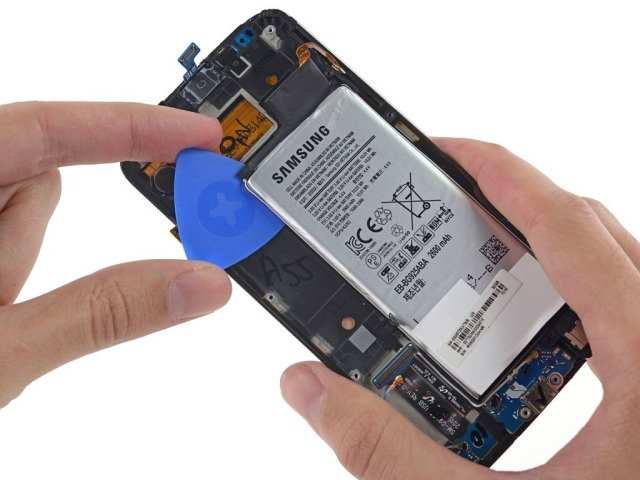
Locate the battery connector and carefully disconnect it from the motherboard. Some devices have multiple connectors, so examine your device’s disassembly guide if needed.Remove the Old Battery
If your battery is glued or taped in place, gently peel off the adhesive strips. Use the pry tools if necessary, and be cautious to avoid puncturing or damaging the battery.Install the New Battery
Place the new battery into the phone, align it properly, and reconnect the connector to the motherboard. Secure it with adhesive strips if required.Reassemble and Test
Carefully put the back cover or casing back on and press it into place. Insert the SIM card and power on the device to check if it recognizes the new battery and functions normally.Safety Tips and Precautions during Battery Replacement
Handling batteries requires care to prevent accidents:- Work in a clean, dry environment away from static or flammable materials.
- Do not puncture or bend the battery, as it can leak or catch fire.
- Use only recommended tools and genuine or certified replacement batteries.
- If you notice swelling, corrosion, or damage, stop immediately and seek professional help.
Where to Buy Replacement Batteries for Android Phones
Buying the right battery from reliable sources ensures quality and longevity. Consider the following options:- Official Retailers: Buy directly from the manufacturer or authorized stores for guaranteed compatibility and quality.
- Reputable Online Marketplaces: Websites like Amazon, Best Buy, or specialized electronics stores offer a wide selection of batteries. Read reviews before purchasing.
- Local Repair Shops: Some stores offer battery replacement services or sell spare parts with installation support.
Cost and Warranty Considerations
Replacing your battery costs vary depending on the phone model and whether you choose OEM or aftermarket parts. Typically, prices range from $20 to $70. Always check if the battery includes a warranty, which protects against defects or poor performance within a specific period.Benefits of Using a Quality Replacement Battery
Investing in a high-quality battery provides several benefits:- Longer usage times on a single charge
- Better overall device performance
- Reduced risk of overheating or swelling
- Improved safety during use and charging
Maintaining Your Replacement Battery for Longevity
To extend your battery’s lifespan, follow these tips:- Avoid letting the battery drain completely before recharging.
- Use the original charger or certified charging accessories.
- Avoid exposing the device to extreme temperatures.
- Keep your device updated with the latest software for optimal battery management.
Frequently Asked Questions
How can I tell if my Android phone’s battery needs replacing?
Signs that your Android phone’s battery may need replacing include rapid battery drain, the device shutting down unexpectedly even when there’s enough charge, excessive heat during use, and noticeable swelling or physical damage. If you experience these issues, replacing the battery can improve your phone’s performance and longevity.
What should I consider when choosing a replacement battery for my Android device?
Ensure the replacement battery is compatible with your specific phone model. Look for batteries from reputable manufacturers that offer reliable performance and proper safety certifications. Additionally, consider the battery capacity and whether it matches or exceeds your original battery’s specifications to ensure optimal usage time.
Is it safe to replace my Android phone’s battery myself?
Replacing your phone’s battery at home is possible with the right tools and instructions, but it carries risks if not done carefully. Follow specific guides for your device model and handle components gently to avoid damage. If you’re unsure or uncomfortable, seeking professional repair services ensures safety and proper installation.
How long does a typical replacement battery last on an Android phone?
A new replacement battery generally lasts between 1.5 to 3 years, depending on usage patterns and charging habits. Proper care, like avoiding overcharging and keeping the device at moderate temperatures, can extend the battery’s lifespan and maintain its capacity over time.
What steps should I follow to replace my Android phone’s battery safely?
Start by turning off your device and removing any external accessories. Use appropriate tools to carefully open the phone’s casing, disconnect the old battery, and replace it with the new one. Make sure the battery connects securely, reassemble the device, and charge it fully before use. If you’re unsure about any step, consulting a professional technician can help ensure a safe replacement.
Final Thoughts
A replacement battery for Android phone offers an effective way to extend device life and improve performance. Choosing the right battery ensures compatibility and safety. Keep your device functioning optimally with a reliable replacement. In conclusion, investing in a replacement battery for Android phone restores your device’s efficiency and saves money. It is a practical solution to avoid premature upgrades and stay connected.
Similar Posts































