Pros And Cons Of Android Tv: Complete Guide
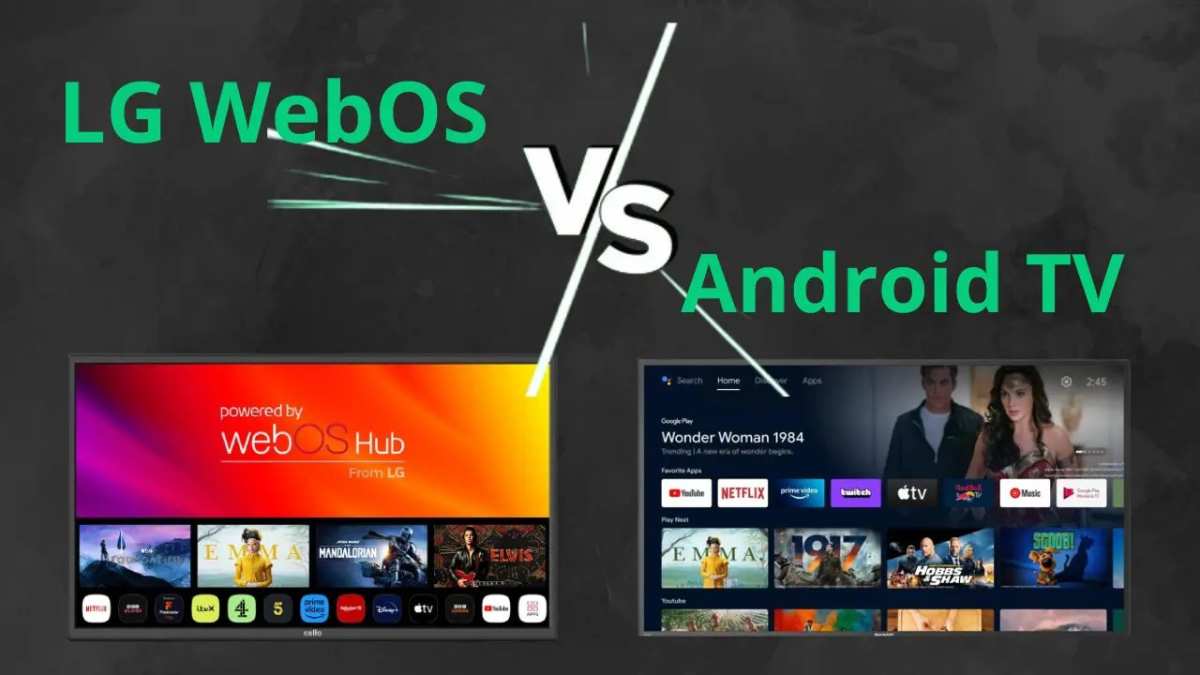
The pros and cons of Android TV often come down to personal needs, but the platform offers excellent customization and a vast app selection. **Android TV provides easy access to popular streaming services and user-friendly navigation.** However, it can sometimes be sluggish and cluttered with ads. While the flexibility appeals to many users, compatibility issues with certain apps may arise. Weighing these factors helps you decide if Android TV suits your entertainment preferences perfectly. 
Pros and Cons of Android TV
Choosing a smart TV can be a challenging task, especially with so many options available today. Among them, Android TV stands out as a popular choice for many users. To help you decide whether it’s the right fit for your entertainment needs, let’s explore the advantages and disadvantages of Android TV in detail.What Makes Android TV Popular?
Android TV comes from Google and is powered by the Android operating system like what you see on smartphones and tablets. It offers a user-friendly interface, access to a huge library of apps, and easy connectivity. Because of these features, Android TV appeals to a wide range of users, from casual viewers to tech enthusiasts.Advantages of Android TV
Understanding the benefits of Android TV can shed light on why it has become a favorite among many consumers. Here are some of the top advantages:Wide Range of App Availability
One of the biggest perks of Android TV is access to the Google Play Store. Users can download countless apps, games, streaming services, and utilities directly onto their TV. This flexibility allows you to customize your entertainment experience.- Streaming Platforms: You can easily install popular apps like Netflix, Hulu, Amazon Prime Video, Disney+, and YouTube.
- Games and Utilities: Play casual games or install helpful apps like weather forecasts or news updates.
- Compatibility: Android TV supports a variety of applications that are optimized for larger screens and remote control navigation.
Integration with Google Ecosystem
If you already use Google services, Android TV offers seamless integration. You can cast content from your Android smartphone or Chromebook directly onto the TV. Google Assistant, the voice command feature, lets you control your TV and smart home devices easily.- Voice Commands: Use Google Assistant to search for content, control playback, or ask questions.
- Smart Home Compatibility: Manage compatible smart devices like lights, thermostats, and security cameras with your voice.
- Personalized Recommendations: Google collects data to suggest content you often watch or enjoy.
User-Friendly Interface and Customization
Android TV has a straightforward and clean interface. Its home screen displays your favorite apps and content in a well-organized manner, making navigation simple for all users.- Personalized Content Feed: Based on your viewing habits, Android TV suggests movies, shows, or apps.
- App Organization: Arrange your apps into categories or favorites for quick access.
- Multiple Profiles: Some Android TVs support profiles for different family members, each with customized content and settings.
Cost-Effective Options and Upgrades
Android TV is available across a broad price spectrum, offering budget-friendly models as well as high-end units. This makes it accessible for many users looking for quality entertainment without overspending.- Affordable Models: Compact TVs with basic features are available at lower prices.
- Mid-Range and Premium: Larger screens with advanced picture quality and sound features come at higher prices but deliver a better viewing experience.
- Upgrade Options: For users already with a regular TV, getting an Android TV box or dongle can upgrade the experience without replacing the entire device.
Possible Drawbacks of Android TV
While Android TV offers many benefits, it also has its limitations. Being aware of these drawbacks can help you determine if it suits your needs.Complexity for Non-Tech Users
Although Android TV is designed to be user-friendly, some users may find the setup and app management a bit overwhelming, especially if they are not familiar with smart devices.- Setup Process: Connecting the TV, Wi-Fi, and accounts might require some patience and technological know-how.
- App Management: Managing updates, permissions, and app permissions can be confusing for those unfamiliar with Android systems.
Performance Variability Based on Hardware
Not all Android TVs run on the same specifications. Lower-end models with less powerful processors may experience lag, slow app loading times, and lower picture quality.- Processing Power: Budget models may struggle with multitasking or high-definition streaming.
- Storage Limitations: Some TVs have limited internal storage for apps and downloads.
- Firmware Updates: Not all manufacturers provide frequent updates, which can impact performance and security over time.
Inconsistent Software Updates
Android TV depends on manufacturers and Google to provide software updates. Sometimes, these updates are delayed or inconsistent, especially with older or budget models.- Security Risks: Outdated software can expose your device to vulnerabilities.
- Feature Access: New features and improvements may not reach all devices equally.
- Bug Fixes: Without regular updates, bugs or glitches might persist longer than necessary.
Ad-Driven Content and Pre-Installed Apps
Some Android TVs come with pre-installed apps that display ads or promote certain services. These can sometimes be intrusive and clutter your interface.- Advertising: Ads may appear on the home screen or within apps, which some users find distracting.
- Bloatware: Unwanted pre-installed apps, which may be hard to remove, can take up storage space and slow down your device.
- Privacy Concerns: Data collection for targeted advertising can make privacy-conscious users uneasy.
Compatibility and Connectivity Issues
Android TV supports a wide array of devices, but compatibility isn’t always perfect. Some users may face issues connecting peripherals or external devices.Limited Support for Certain External Devices
Depending on the TV model, some external devices may not function correctly or require additional adapters.- Soundbars and Speakers: Compatibility issues can arise, especially with older or non-standard models.
- Gaming Consoles and Controllers: While many controllers work, some may need updates or special configurations.
- External Storage: Not all USB drives or external hard drives are supported seamlessly.
Wi-Fi and Bluetooth Connectivity Challenges
Network issues can disrupt streaming and device pairing.- Wi-Fi Stability: Poor Wi-Fi signals can cause buffering or disconnections during streaming.
- Bluetooth Pairing: Some Bluetooth devices may not pair easily or work reliably with Android TV.
Final Thoughts on the Pros and Cons of Android TV
Android TV offers an attractive mix of flexibility, app availability, and smart features. Its broad compatibility with Google services makes it a great choice for users deeply integrated into the Google ecosystem. However, it isn’t perfect; performance can vary depending on the device, and some users might find setup or maintenance a bit complicated. When weighing the benefits against the drawbacks, consider your tech comfort level, what you expect from your smart TV, and your budget. If you want a customizable, app-rich smart TV experience and are comfortable with occasional troubleshooting, Android TV could be an excellent option for your living room. But if you prefer simplicity or minimal maintenance, other platforms might suit you better. In conclusion, Android TV stands out for its vast app library, user-friendly interface, and smart home integration, but it also comes with potential challenges like software updates and device compatibility. Carefully assess these factors to decide if Android TV aligns with your entertainment goals and technical comfort.Frequently Asked Questions
What are the main benefits of using Android TV compared to other smart TVs?
Android TV offers a wide array of applications through the Google Play Store, making it easy to access popular streaming services, games, and utilities. Its user-friendly interface and regular updates enhance the overall viewing experience. Additionally, Android TV integrates well with other Android devices, allowing seamless connectivity and control across your gadgets, which adds convenience to your entertainment setup.Are there any common drawbacks associated with Android TV’s interface or performance?
Some users find that Android TV can feel cluttered due to the abundance of apps and notifications, which may lead to a less streamlined experience. Performance issues also occur on lower-end devices or older models, where multitasking can cause lag or slow response times. Regular updates are essential but sometimes introduce bugs or compatibility issues that disrupt normal functioning.How does the availability of apps influence the overall functionality of Android TV?
The extensive app selection on Android TV provides versatility, enabling access to nearly all major streaming platforms, games, and utilities. However, not all apps are optimized for the TV interface, which can result in subpar experiences or navigation difficulties. Limited app updates or lack of certain popular apps in some regions may also restrict content choices for some users.Can the customization options on Android TV enhance the viewing experience?
Yes, Android TV allows users to personalize their home screens, set favorite apps, and adjust display settings to suit their preferences. This flexibility helps organize content efficiently and makes navigation more straightforward. Customization options contribute to a more tailored entertainment experience, especially for users familiar with Android ecosystems.What limitations might users encounter regarding software updates on Android TV?
Software updates on Android TV can vary depending on the device manufacturer, leading to delays or inconsistent update schedules. In some cases, older models may not receive the latest features or security patches, which could impact performance and security. Users should verify update policies before purchasing to ensure ongoing support and improvements.Final Thoughts
The pros and cons of Android TV highlight its versatility and customization options. Users enjoy a wide range of apps and easy integration with Google services. However, it can sometimes be cluttered with ads and unnecessary pre-installed apps. Performance may vary depending on the device, and software updates are not always prompt. Overall, Android TV offers great value for tech enthusiasts who appreciate flexibility, but it might overwhelm casual viewers.
Similar Posts