Microsoft Copilot Vs Chatgpt: A Comprehensive Comparison
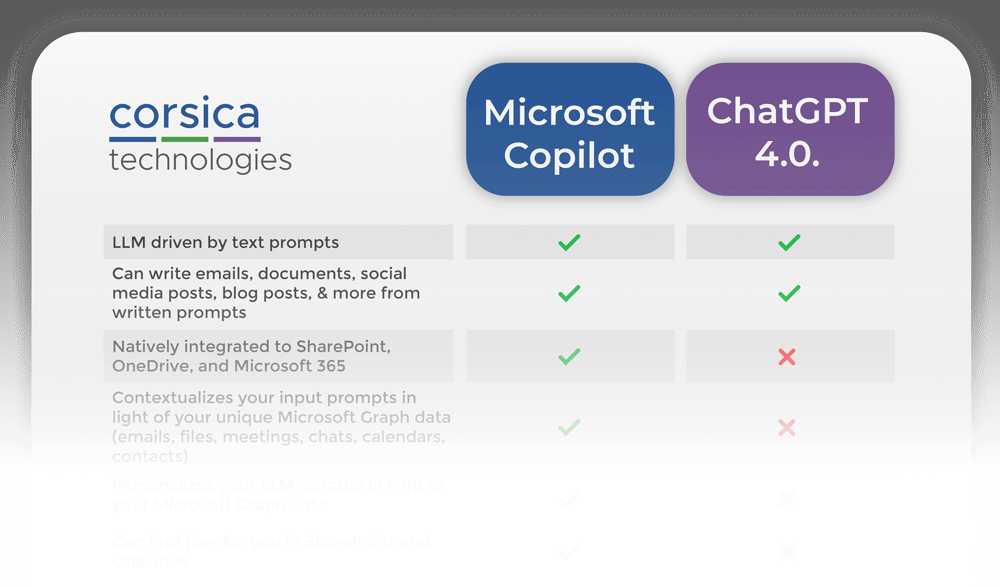
In today’s digital age, choosing the right AI tool can be a game-changer for productivity and creativity. When comparing Microsoft Copilot and ChatGPT, it’s essential to understand their unique strengths and applications.
**Short Summary Answer:** Microsoft Copilot is designed to enhance productivity within Microsoft applications by providing contextual assistance, whereas ChatGPT excels in generating conversational responses and creative content. Both have their advantages, but the right choice depends on your specific needs—whether you seek assistance within a work environment or engaging dialogue and ideas.
Microsoft Copilot seamlessly integrates into applications you already use, supercharging your workflow with efficiency. In contrast, ChatGPT stands out as a versatile conversational AI, ready to tackle questions, brainstorm ideas, and engage in natural dialogue. Let’s dive deeper into these two powerful tools to see which one might be the perfect fit for you.

Microsoft Copilot vs ChatGPT
In the evolving landscape of artificial intelligence, the competition between tools like Microsoft Copilot and ChatGPT is heating up. Both tools leverage the power of AI to assist users, but they serve different purposes and excel in various areas. This article will delve deeply into these platforms, comparing their features, applications, and overall abilities.
Understanding Microsoft Copilot
Microsoft Copilot is an AI-powered assistant integrated into various Microsoft applications. It aims to enhance productivity by offering intelligent suggestions and automating repetitive tasks. Copilot allows users to create content, analyze data, and more by providing contextual assistance.
- Integration: Built into tools like Word, Excel, and Outlook.
- Functionality: Provides writing prompts, data insights, and task automation.
Copilot uses advanced algorithms to learn from user behavior. It adapts its suggestions based on individual preferences, making the experience more personalized. This adaptability can greatly increase efficiency for users who need to work quickly.
Key Features of Microsoft Copilot
There are several key features that set Microsoft Copilot apart from other AI tools:
- Contextual Assistance: Offers help based on the task you are currently working on.
- Data Analysis: Generates insights from spreadsheets or reports.
- Writing Support: Suggests edits, improves grammar, and enhances clarity in documents.
Understanding these features is crucial for users looking to maximize their productivity. Copilot’s ability to integrate seamlessly into existing Microsoft tools makes it a go-to option for many professionals.
The Power of ChatGPT
ChatGPT is an AI language model developed by OpenAI. It specializes in generating human-like text responses, making it an ideal choice for conversational applications. Whether for customer support, content creation, or educational purposes, ChatGPT excels at understanding and generating natural language.
- Conversational Flow: Capable of maintaining context in conversations.
- Content Generation: Creates articles, stories, and poetry, among other things.
The versatility of ChatGPT allows users to engage in dialogues that feel more natural. Its strength lies in understanding prompts and responding appropriately, making it valuable for interactive systems.
Notable Features of ChatGPT
ChatGPT has some standout features that make it unique among AI tools:
- Context Retention: Remembers the context from previous exchanges for coherent dialogues.
- Wide Range of Outputs: Produces diverse content types, from technical writing to casual conversation.
- User-Friendly Interface: Simple design that makes interaction easy for users of all ages.
These features underscore the adaptability of ChatGPT as a conversational agent. It can cater to different user needs, from casual chatting to professional inquiries.
Comparing the Two Tools
While both Microsoft Copilot and ChatGPT utilize AI technology, their applications and user experiences differ significantly. Let’s explore these differences across various dimensions.
Use Cases
Microsoft Copilot is primarily focused on enhancing productivity within the Microsoft ecosystem. It is useful for:
- Office productivity tasks
- Data management and analysis
- Document creation and editing
Conversely, ChatGPT shines in settings that require dynamic conversation and creativity. Its use cases include:
- Customer service automation
- Content generation for blogs and articles
- Interactive learning tools and tutoring
Both tools serve distinct purposes, emphasizing their unique strengths based on user needs.
User Experience and Interface
User experience plays a crucial role in how individuals interact with these platforms. Microsoft Copilot offers a more structured approach integrated into well-known software. This can make it easier for users already familiar with Microsoft products to adopt.
On the other hand, ChatGPT is more flexible and can be accessed via various applications or interfaces. Its conversational format allows for a more relaxed interaction style, which many users appreciate.
Performance and Accuracy
When it comes to performance, both tools exhibit strengths in their respective areas. Microsoft Copilot excels in providing relevant suggestions based on user input. The more you use it, the better it becomes at predicting your needs.
ChatGPT also showcases impressive performance in generating text. Its ability to maintain context and produce coherent responses makes it a powerful tool for conversation. However, it may sometimes provide information that requires verification.
Cost and Accessibility
Microsoft Copilot is generally available as part of a Microsoft 365 subscription. Users investing in Microsoft services might find this cost-effective given the value it adds to productivity.
In contrast, ChatGPT may follow a different pricing model, often offering free access with premium options for advanced features. This flexibility makes it accessible to a broader audience, including students and professionals alike.
The Future of AI Collaboration Tools
As technology continues to evolve, the landscape of AI tools will change significantly. The collaboration between Microsoft and OpenAI shows promise for future innovations. With advancements in machine learning and natural language processing, both Microsoft Copilot and ChatGPT will likely see improvements in capabilities.
Potential Developments
Users can expect notable advancements in AI tools, such as:
- More personalized experiences based on user behavior.
- Improved contextual understanding for better suggestions and responses.
- Greater integration across different platforms and applications.
These developments suggest a future where AI tools become even more intuitive and effective.
Choosing the Right Tool for Your Needs
Deciding between Microsoft Copilot and ChatGPT depends on individual requirements and use cases. Understanding each platform’s strengths can guide users to make informed choices.
- If you work heavily with Microsoft products and need support for tasks like document editing, Copilot is the way to go.
- If you seek a conversational AI for tasks like customer support or creative writing, ChatGPT will likely suit your needs better.
Assessing your specific needs and how these tools align with them will help you make the best choice.
In summary, both Microsoft Copilot and ChatGPT are powerful AI tools that cater to different aspects of productivity and interaction. By understanding their unique features, applications, and potential future developments, users can leverage these technologies to enhance their workflow and engagement. Making an informed decision on which tool to use can lead to significant improvements in efficiency and creativity in your tasks.
MICROSOFT COPILOT vs CHATGPT (PROS AND CONS AI COMPARISON) [2025]
Frequently Asked Questions
What are the main features of Microsoft Copilot?
Microsoft Copilot integrates directly into Microsoft Office applications, providing contextual assistance as users work. It leverages the power of large language models to suggest relevant information, automate tasks, and generate content based on user prompts. Users can receive suggestions for document formatting, writing styles, and data analysis, enhancing productivity and collaboration within their familiar workspace.
How does ChatGPT handle conversational context compared to Microsoft Copilot?
ChatGPT excels in maintaining conversational context across multiple exchanges, allowing for dynamic and engaging interactions. It remembers past messages within a session, ensuring continuity in conversations. Microsoft Copilot, while providing helpful suggestions, focuses more on enhancing productivity in specific tasks rather than engaging in prolonged dialogues, making each interaction more task-oriented.
In which scenarios would one prefer ChatGPT over Microsoft Copilot?
Users might choose ChatGPT when they seek engaging and conversational responses, such as for casual chats, customer service, or generating creative content. It works well for applications that benefit from a natural language interface and allows users to explore topics in-depth. ChatGPT’s adaptability suits a wider range of conversational scenarios compared to Microsoft Copilot’s task-specific assistance.
Can Microsoft Copilot and ChatGPT be used together effectively?
Yes, integrating Microsoft Copilot with ChatGPT can enhance productivity and engagement. Users can utilize Copilot for efficient task management within Microsoft applications while employing ChatGPT for brainstorming ideas or generating creative content. This combination allows for a seamless workflow, where users can shift between task-focused assistance and conversational exploration as needed.
How do the pricing models for Microsoft Copilot and ChatGPT compare?
Microsoft Copilot typically comes as part of the Microsoft 365 subscription, which means users pay a monthly or annual fee for access to its features alongside other Office applications. In contrast, ChatGPT may offer various pricing tiers, including free access with limitations and paid plans for more extensive usage or advanced features. Evaluating the pricing models depends on individual user needs and the tools they intend to utilize most frequently.
Final Thoughts
In comparing Microsoft Copilot and ChatGPT, both tools offer unique advantages depending on user needs. Microsoft Copilot integrates seamlessly with Microsoft 365 applications, enhancing productivity directly within familiar environments. On the other hand, ChatGPT excels in conversational interactions and creative tasks, showcasing its versatility.
Ultimately, the choice between Microsoft Copilot vs ChatGPT hinges on how users wish to leverage AI in their workflows. Each tool serves different purposes and could complement one another in various scenarios. Users should assess their specific requirements to determine the best fit.

Similar Posts