Is Windows 11 Worth Installing Yet A Complete Review

Is Windows 11 worth installing yet?
Introduction to Windows 11 Updates
Many PC users are curious if they should upgrade to Windows 11 now. Microsoft released Windows 11 recently, promising a fresh look and new features. But before installing, it’s important to know if it’s ready for everyday use.System Requirements for Windows 11
To run Windows 11 smoothly, your PC needs certain specs. These include a compatible 64-bit processor, at least 4GB of RAM, and 64GB storage. Microsoft also emphasizes secure features like Trusted Platform Module (TPM) 2.0 and Secure Boot.PC Compatibility Check
You can use the PC Health Check tool to see if your computer meets Windows 11 requirements. Many older computers may not qualify, and upgrading hardware might be necessary for some users.Performance and Stability of Windows 11
Early versions of Windows 11 have shown promising performance improvements. Most users report faster boot times and smoother multitasking. However, some bugs are still fixing in recent updates.Speed and Responsiveness
Benchmark tests reveal that Windows 11 often offers quicker load times and better resource management. This benefits gaming, creative work, and daily tasks.Bug Fixes and Updates
Microsoft consistently releases updates that address bugs and security issues. Installing Windows 11 now means you get ongoing support and improvements.New Features and User Interface
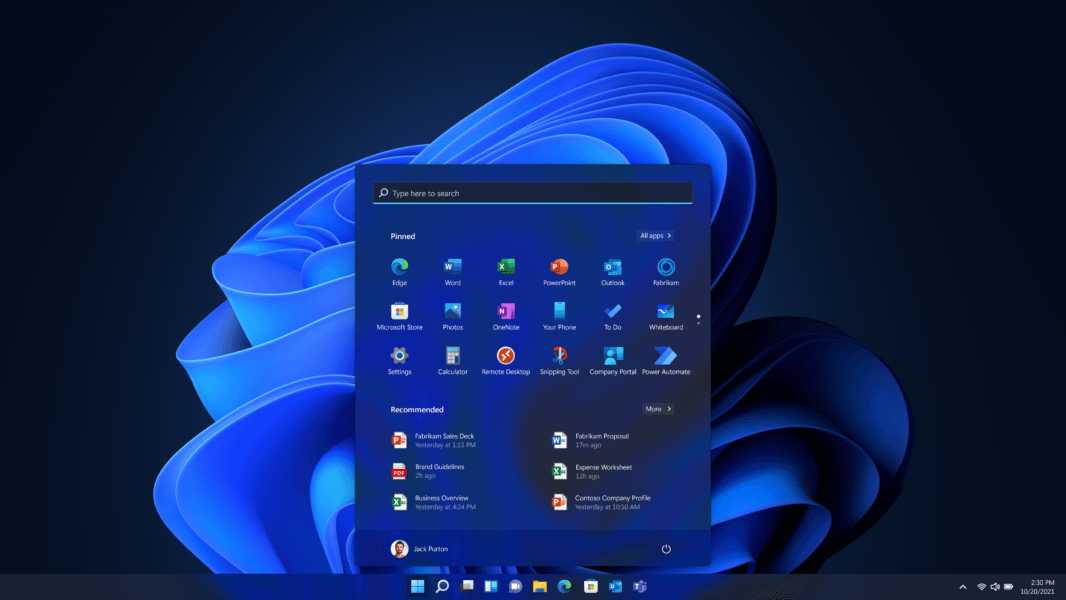
Windows 11 introduces a more modern, centered Start menu and redesigned taskbar. These changes aim to make the interface cleaner and more user-friendly.Enhanced Productivity Tools
Features like Snap Layouts and virtual desktops help organize open apps and multitask efficiently. The new widgets panel offers quick updates on news, weather, and calendar events.Gaming Improvements
Windows 11 includes Auto HDR and DirectStorage for faster game loading and enhanced visuals, especially on compatible hardware.Compatibility with Existing Software and Hardware
Most popular applications run well on Windows 11, but some older programs may face issues initially. Hardware compatibility is also improving as manufacturers update drivers.Application Compatibility
Microsoft has tested major apps and found many compatible. However, niche or legacy software might need updates or alternative solutions.Hardware Drivers
Graphics cards, printers, and other peripherals are gradually receiving Windows 11 drivers. Regular updates from manufacturers help ensure seamless operation.Privacy and Security Features
Windows 11 enhances security with features like hardware-based isolation and improved Windows Hello. Privacy controls are more accessible and user-friendly.Security Enhancements
Secure Boot, TPM 2.0, and Microsoft Defender help protect against malware and unauthorized access. These features strengthen overall system security.Privacy Settings
Users have better control over app permissions and data sharing. Clear privacy menus make managing settings straightforward.Potential Drawbacks and Risks
Upgrading to Windows 11 may have some disadvantages. Compatibility issues, learning new UI, and early bugs can affect user experience.Known Bugs and Glitches
Some users report problems with the taskbar, notifications, and compatibility issues with specific apps. Microsoft is fixing these regularly.Learning Curve for New Users
The updated interface may require some adjustment, especially for those accustomed to Windows 10 or older versions.Should You Upgrade Now or Wait?
Deciding whether to upgrade immediately depends on your needs. If your PC meets the requirements and stability is crucial, early adoption can be worthwhile. Otherwise, waiting for more updates might be wise.Pros of Upgrading Immediately
Enjoy the latest features, better security, and ongoing support from Microsoft. New interface enhancements can improve daily tasks.Cons of Upgrading Early
Potential bugs, compatibility issues, and the need for adjustments might cause frustration. Waiting allows more time for software and hardware stability.How to Prepare for Windows 11 Installation
Preparation is key before installing a new operating system. Back up your data, check hardware compatibility, and ensure your software is up to date.Backing Up Data
Use cloud services or external drives to safeguard important files. This prevents data loss if something goes wrong during installation.Updating Drivers and Software
Ensure all device drivers and applications are current. Compatibility updates from manufacturers can prevent post-installation issues.Creating a Recovery Plan
Have a plan to revert to Windows 10 if needed. Creating recovery disks or system images can save time and trouble.Final Thoughts on Whether to Install Windows 11
In summary, Windows 11 offers many benefits but also presents some risks for early adopters. It works best for users with compatible hardware willing to handle potential bugs. For those who prioritize stability, waiting for more updates might be a better choice.Additional Topics to Consider
- Comparing Windows 10 vs Windows 11 in terms of features and performance
- Best practices for troubleshooting Windows 11 issues
- Upcoming updates and features to watch for in Windows 11
- How Windows 11 impacts gaming and multimedia use
Windows 11 is FINALLY Worth Using
Frequently Asked Questions
What are the main benefits of upgrading to Windows 11 at this stage?
Upgrading to Windows 11 offers users access to a more modern interface, improved multitasking features, and enhanced security. It also provides better support for newer hardware and offers optimized performance for compatible devices. These improvements can make everyday tasks more efficient and secure.
Are most popular applications and software compatible with Windows 11 now?
Yes, most mainstream applications and software have been updated to support Windows 11. Developers actively ensure compatibility, and many programs run seamlessly on the latest OS. However, it’s wise to check your essential applications’ compatibility before upgrading to prevent any disruptions.
Is my current hardware suitable for Windows 11 installation, or do I need to upgrade my device?
To run Windows 11 smoothly, your device needs specific hardware specifications, such as TPM 2.0 and Secure Boot capability. You can use Microsoft’s PC Health Check tool to verify if your current hardware meets these requirements. If your device falls short, upgrading might be necessary for a satisfactory experience.
How stable and reliable is Windows 11 at this time?
Windows 11 has matured through multiple updates, leading to increased stability and fewer bugs. Microsoft continues to release patches that address issues promptly. While some users may encounter minor problems initially, overall, the OS has become a dependable platform for daily use.
Should I wait for further updates before installing Windows 11?
If your current system runs well and you do not rely on critical applications that require more time for compatibility updates, installing Windows 11 now could be beneficial. Waiting allows Microsoft to refine features and fix bugs, but the OS is stable enough for most users at this point.
Final Thoughts
Windows 11 offers a modern interface and new features that can improve your workflow. However, compatibility issues and hardware requirements remain concerns for some users. For those with compatible devices, installing Windows 11 can bring benefits like better multitasking tools. Yet, if your system isn’t fully supported, waiting might be wise. Is Windows 11 worth installing yet? If your hardware meets the criteria and you seek the latest features, it’s a good upgrade. Otherwise, consider holding off until more updates arrive.
Similar Posts