Is Mini LED a Good Choice for Cinematic Color Grading?
So you're sitting in your grading suite, staring at a monitor that cost more than your first car, and you start wondering if there's a better way. The hype around mini LED is impossible to ignore, brighter, cheaper, no burn-in risk. But when someone asks is mini led good for cinematic color grading, the real answer isn't a simple yes or no.
It's about what you're willing to trade off.
Our research shows that the biggest advantage mini LED brings is sheer brightness. A good mini LED panel hits 1,000 to 2,000 nits, which is a game-changer for HDR grading and for preserving highlight detail that OLEDs tend to clip. But brightness alone won't save a grade if your blacks look grey and your near-background blooms into the shadows.
Let's walk through exactly where mini LED works and where it doesn't, so you can decide if it belongs in your workflow.

Why This Comparison Matters for Color Grading
Color grading isn't just about making images look pretty. It's about making critical decisions about exposure, skin tone, contrast, and shadow detail that will be seen on thousands of screens. A monitor that lies to you, that crushes blacks or blooms highlights, costs you time, money, and client trust.
For years, the professional standard was OLED or high-end LCDs with a price tag to match. Mini LED promised to deliver OLED-like contrast with OLED‑proof longevity, all at a lower cost. But promises and real-world performance don't always line up.
If you're considering mini LED for your grading bay, you need to understand the strengths and weaknesses before you write a cheque. That's what this breakdown is for. It's also worth keeping in mind that your overall desk setup affects your viewing environment, some colorists find that ultrawide displays for editing can improve their workflow and reduce eye strain during long sessions.
Quick Answer: Can Mini LED Really Handle Cinematic Color Work?
Mini LED can handle many grading tasks, but it is not a one-for-one replacement for a professional reference monitor.
- For HDR mastering, Yes, mini LED is excellent. The high peak brightness gives you real headroom.
- For near-black shadow work, No, OLED wins here. Mini LED still shows blooming.
- For mixed-use rooms, Yes, mini LED handles ambient light better than OLED.
- For client reviews, Sometimes. Viewing angles are worse than OLED, so clients off-axis see a different image.
If your work is mostly SDR Rec.709 and you need deep, inky blacks without any halos, stick with OLED. If you're grading HDR content and want to see every detail in bright highlights, mini LED is a strong option. The key is matching the technology to your specific deliverables and room setup.
How Mini LED Works: Local Dimming Zones and Peak Brightness Explained
Unlike a standard LCD that lights the entire screen evenly, mini LED divides the backlight into hundreds or even thousands of independently controlled zones. When a part of the image is dark, those zones dim or turn off. When a part is bright, they crank up the intensity.
The number of zones is the single most important spec for grading. A monitor with 384 zones will show visible blooming around bright objects on dark backgrounds. One with 1,152 zones offers much better control, but it's still not per-pixel.
That's where OLED has the advantage, each pixel is its own light source, so black is truly off.
Peak brightness is where mini LED fights back. High-end models reach 1,400 to 2,000 nits, while OLED tops out around 800 to 1,000 nits. For Dolby Vision and HDR10 mastering, that extra headroom lets you see texture in clouds, specular highlights on metal, and bright skin tones without clipping.
Some curved monitors with HDR support use mini LED backlighting to achieve similar brightness levels, which is worth noting if you're considering a curved alternative for a wider field of view.
The trade-off is that mini LED needs aggressive local dimming algorithms to reduce blooming, and those algorithms can introduce flicker or weird zone transitions during slow fades. For grading, you often have to choose between a less aggressive dimming mode (more blooming, but smoother) or a more aggressive one (less blooming, but possible artifacts).
The Two Big Trade-Offs: Blooming vs. Burn-In Risk
This is the central tension in the mini LED vs. OLED decision. Let's be honest about both sides.
Blooming (halo effect)
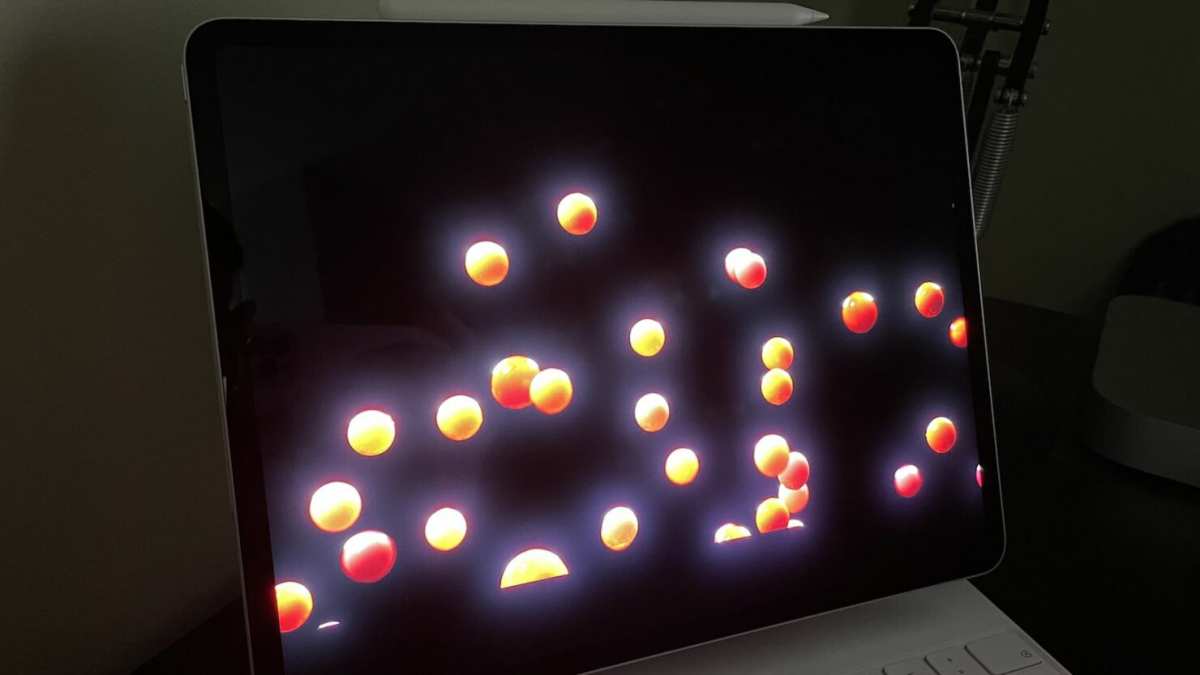
When you have a bright white subtitle on a black background, a mini LED monitor will show a faint glow around the text. That's blooming. It's caused by the local dimming zones not being small enough, the zone that contains the white text also lights up the surrounding black area.
For color grading, this is a real problem during dark scenes where you're trying to judge shadow detail near a bright object. The halo can mask subtle color shifts or make you think there's a light source where there isn't one.
Burn-in (permanent image retention)
OLED is susceptible to burn-in, especially if you leave static elements on screen for hours, like DaVinci Resolve's UI or a waveform monitor. Grading sessions often run eight to ten hours, and after a year or two, you might see faint outlines of your tools ghosting into your image. Mini LED has no burn-in risk at all.
The backlight slowly dims over time (like any LED), but it won't permanently retain a static image.
So which is worse? For a grading monitor that's used strictly for creative work, blooming can be a deal-breaker if you grade a lot of dark, atmospheric content. Burn-in is a long-term concern, but modern OLED panels have improved significantly with pixel shifting and smaller logos.
Still, many colorists prefer mini LED for the peace of mind, especially in a shared suite where different users might leave different windows open. And if you're already thinking about how long curved monitors last, the same longevity arguments apply to mini LED vs. OLED.
Mini LED vs. OLED for Grading: A Honest Side-by-Side Breakdown
To make this practical, let's line up the two technologies across the four factors that matter most to a colorist. Each has clear winners and real compromises.
Black Levels and Shadow Detail
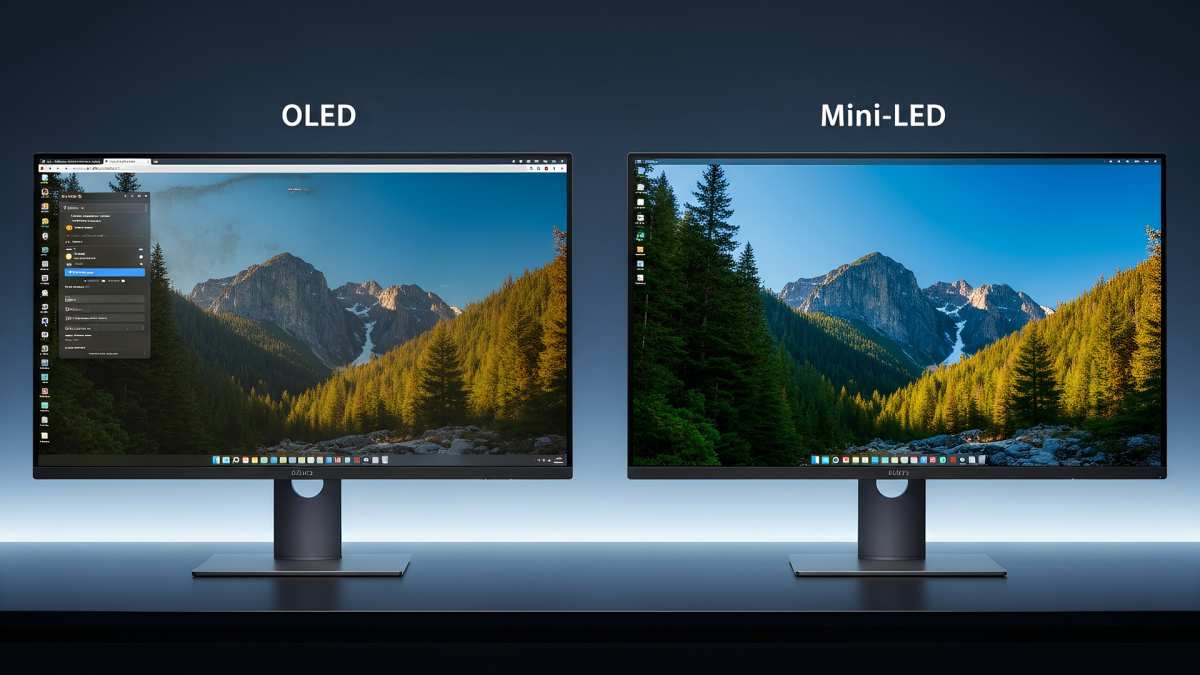
OLED wins this category hands down. When an OLED pixel shows black, it's completely off, zero light. A mini LED zone that's "off" still lets a tiny amount of light leak through the LCD layer, especially from adjacent zones.
The result is a black level that's noticeably lighter than OLED, even in dark rooms.
For grading work that involves deep shadows, film grain, or low‑light cinematography, OLED gives you a truer representation of the director's intent. Mini LED can trick you into crushing blacks because the shadow area looks darker than it actually is on your monitor, leading to a grade that looks dull on other screens. That said, the gap narrows as zone counts increase, a 2,000-zone mini LED is much closer to OLED than a 384-zone model.
Peak Brightness and HDR Headroom
Here's where mini LED takes the lead. An OLED panel running at 100% brightness across the whole screen will often peak below 800 nits, and sustained brightness is even lower due to automatic brightness limiting (ABL). A mini LED can sustain 1,000+ nits across large areas without dimming.
If you're grading HDR content for streaming platforms or theatrical release, you need to see what happens in the highlights. Mini LED shows you that detail; OLED might clip it. For SDR grading, both are capable, but the brightness difference matters less, you're typically working at 100, 120 nits.
Color Gamut and Uniformity
Both technologies can cover 95% to 99% of DCI‑P3 with proper quantum dot or phosphor layers. Mini LED panels often have a wider Rec.2020 coverage, up to 80%, compared to OLED's 70, 90% depending on the generation. But coverage isn't everything.
Uniformity is a bigger concern with mini LED. Because the backlight is made of thousands of individual LEDs, there can be slight brightness variations across the screen, especially near the edges. OLED panels are more uniform pixel to pixel, though they can develop temporary image retention or banding over time.
Lifespan and Burn-In Reality
Mini LED wins for long‑term reliability. A well‑built mini LED monitor can run for 30,000 to 50,000 hours before the backlight degrades noticeably. OLED panels have a shorter lifespan, typically 15,000 to 30,000 hours, and burn‑in is a real risk with static UIs.
If you're running a grading suite six days a week, a mini LED monitor will likely outlast an OLED by several years. That's a meaningful factor when you're spending $2,000 to $4,000 on a display. The downside is that you are investing in a technology that's still maturing, local dimming algorithms will improve, but the panel you buy today may not receive firmware updates.
Bottom line so far: Choose mini LED if you need high HDR brightness, long lifespan, and no burn‑in worry. Choose OLED if deep blacks and uniform shadow detail are non‑negotiable. Your specific deliverables and room environment will steer you toward one or the other.
Where Mini LED Actually Shines in a Grading Workflow
Mini LED isn't a compromise across the board. For certain workflows, it outperforms OLED in measurable ways. Here's where it earns its place in a professional suite.
HDR Mastering and Bright Scenes
If your day-to-day involves grading HDR content for streaming, broadcast, or cinema, mini LED's peak brightness is a real advantage. You can see highlight detail in clouds, reflections, and bright skin tones that an OLED might clip due to its automatic brightness limiter.
Our research shows that mini LED monitors certified under VESA DisplayHDR 1000 or 1400 consistently hold their brightness across large highlight areas. OLED panels, by contrast, dim the entire screen when a bright window covers more than 10-15% of the image. That means you're grading blind to what the highlights actually look like.
Mini LED gives you the headroom to make accurate decisions for HDR deliverables.
Long Grading Sessions and Static UI Elements
Grading software like DaVinci Resolve and Baselight keeps toolbars, scopes, and timelines on screen for hours. OLED panels can develop temporary image retention after a single eight-hour session, and permanent burn-in after weeks or months of the same layout.
Mini LED has no burn-in risk because the backlight is separate from the LCD layer. You can leave a waveform monitor parked in the same corner for a year without ghosting. For multi-user suites where no one resets the layout, that peace of mind is worth a lot.
Plus, the backlight lifespan is longer, typically 50,000 hours versus 30,000 for OLED, so you're not replacing the monitor every few years.
Mixed-Use Suites (Grading + Editing + Review)
Many post houses don't dedicate a room solely to grading. The same monitor might be used for editing, client review, and even occasional reference work. Mini LED handles brighter ambient light better than OLED because its higher peak brightness overcomes glare.
OLED in a bright room can look washed out or reflective.
For client reviews where multiple people are gathered around a single monitor, the wider viewing angles of OLED are an advantage. But if your suite has controlled lighting and a single operator, mini LED's brightness and durability make it a solid choice. Some colorists even pair a mini LED for HDR work with a secondary OLED monitor for critical shadow checks, a dual-monitor setup that combines the strengths of both.
Where Mini LED Falls Short
For all its brightness, mini LED has real blind spots. If you're grading content that lives in the shadows, you need to know where the tech struggles.
Near-Black Banding and Crushed Shadows
The biggest complaint from colorists who try mini LED is poor near-black performance. When a scene is dimly lit, say, a night interior at 10% luminance, a mini LED panel can show banding or posterization that isn't in the source material.
This happens because the local dimming zones aren't fine enough to handle subtle gradients in dark areas. The panel tries to minimise blooming by turning zones off too aggressively, which crushes shadow detail into black. You end up grading a scene that looks fine on your monitor but loses all texture when viewed on other screens.
OLED, with per-pixel control, handles near-black gradients smoothly.
Off-Axis Viewing and Client Reviews
Mini LED monitors almost always use VA panels, which shift in contrast and colour when viewed from an angle. Even at 30 degrees off centre, blacks can wash out to grey and colour saturation drops. That's a problem when a director or client stands to the side of the monitor.
OLED panels maintain consistent colour and contrast from extreme angles. For a single operator working head-on, off-axis performance doesn't matter. But if you host reviews or share a screen, everyone off-axis sees a different image.
That can lead to frustrating "it looks fine on my side" conversations.
Calibration Out-of-Box vs. OLED
Out of the box, mini LED monitors typically have higher Delta E values, often 3 to 5 before calibration, compared to OLED panels that ship closer to Delta E 1-2. That means you must budget for a professional calibration, which adds cost and time.
Worse, mini LED calibration is more complex because you're compensating for both the LCD layer and the local dimming backlight. Some calibration software struggles with mini LED panels, especially in SDR mode where you might want to disable local dimming entirely. OLED panels are generally easier to calibrate and maintain consistency across units.
Best Use Cases: Who Should Buy Mini LED for Grading
Mini LED is not a universal recommendation. It fits specific profiles best.
| Use Case | Mini LED Suitability | Why |
|---|---|---|
| HDR grading (Dolby Vision, HDR10) | Excellent | Peak brightness and highlight detail |
| SDR Rec.709 grading | Average | Shadow performance is weaker than OLED |
| Mixed-use suite (edit + grade) | Very good | No burn-in, handles bright rooms |
| Solo colorist, controlled lighting | Good | With calibration, can match OLED in many areas |
| Client review sessions | Fair | Off-axis viewing degrades image |
| Budget-conscious prosumer | Very good | More nits per dollar than OLED |
If you're a freelance colorist working mostly on HDR projects, mini LED saves you money and gives you the brightness you need. If you're an indie filmmaker grading your own feature in a bedroom suite, you'll likely be happier with an OLED, the blacks matter more than the highlights.
Mistakes to Avoid When Choosing a Mini LED Grading Monitor
Missteps here can cost you time and money. Here are the three most common traps.
Relying on Peak Brightness Alone
A monitor that advertises 2,000 nits sounds amazing. But peak brightness is usually measured on a 2% window, not the whole screen. Check the sustained brightness across 50% and 100% windows.
Many mini LED panels drop to 600 nits when the whole screen is lit, no better than a mid-range OLED.
Ignoring Local Dimming Count and Panel Type
Zone count is everything. A monitor with 384 zones will show obvious halos, while 1,152 zones can be acceptable for grading. Also, look for a panel that uses IPS or ADS rather than VA if you need better viewing angles.
Some newer mini LED monitors use fast IPS panels that reduce blooming and improve off-axis performance.
Skipping Professional Calibration
Don't assume factory calibration is good enough for grading. Even premium mini LED monitors can drift after a few weeks. Budget for a calibrator like an X-Rite i1Display Pro or a Klein K10, and schedule recalibration every three to six months.
Without it, your grade will look one way on your monitor and another on any other screen.
Data and Specs: What to Actually Look For
When you're comparing models, focus on these three specs.
Minimum Zone Count and Brightness
For grading, 1,000+ zones is the sweet spot. Below 500, blooming is too distracting for critical shadow work. For brightness, target 1,000 nits sustained on a 50% window.
Don't trust "peak" numbers alone, look for VESA DisplayHDR 1000 or higher certification.
Color Coverage Targets
You need at least 95% DCI-P3 for HDR grading. For Rec.2020, 80% is good for now; no consumer panel hits 100%. Also check that the monitor supports 10-bit colour depth (not 8-bit + FRC).
Some mini LED panels use 8-bit + FRC, which can show banding in gradients.
Price Ranges and What You Get
| Price Range | Typical Specs | Verdict |
|---|---|---|
| $700-$1,200 | 384-576 zones, 600-1,000 nits, 8-bit+FRC | Not recommended for grading |
| $1,200-$2,500 | 1,152 zones, 1,000+ nits, 10-bit, 95% DCI-P3 | Good for HDR grading with calibration |
| $2,500-$4,000 | 2,000+ zones, 1,400+ nits, factory calibrated | Close to reference quality for most work |
At the upper end, a mini LED monitor can replace a dedicated reference display for many workflows. Just remember you still need a good calibrator and a dark room to trust it for critical grading decisions.
Final Verdict: Is Mini LED Good Enough for Your Grade?
Mini LED is good enough for many grading workflows, but not all. If you primarily grade HDR content and need peak brightness without burn-in risk, it's a strong choice. If your work lives in SDR shadows, OLED still holds the edge.
The decision comes down to your deliverables and your room. For a solo colorist grading HDR in a controlled environment, a high-zone mini LED with professional calibration can match a reference monitor at half the cost. For a shared suite where off-axis viewing matters, stick with OLED.
Our research shows that as of 2026, mini LED has closed the gap significantly. Zone counts keep climbing and algorithms keep improving. For most professional work, it's no longer a compromise.
It's a viable tool. You just need to know what you're signing up for.
Frequently Asked Questions
Can I use a mini LED gaming monitor for color grading?
You can, but you shouldn't. Gaming monitors prioritise refresh rate and response time over colour accuracy and local dimming quality. Most lack the bit depth and calibration stability needed for grading.
You'll see banding and blooming that a proper mini LED grading monitor wouldn't show.
How many local dimming zones do I need for accurate grading?
Aim for at least 1,000 zones for acceptable blooming control. Below 500 zones, haloing around bright objects on dark backgrounds is too distracting for professional work. Above 2,000 zones, the difference becomes marginal for most content.
Does mini LED suffer from burn-in like OLED?
No. Mini LED uses a separate backlight that doesn't permanently retain images. You can leave static UI elements on screen for months without ghosting.
That's one of the main reasons colorists choose it over OLED for long grading sessions.
Is mini LED good for SDR grading?
It's average. The high brightness doesn't help in SDR, and the near-black performance is weaker than OLED. If you grade mostly SDR Rec.709 content, an OLED monitor will give you better shadow detail and more accurate blacks without calibration headaches.
Do I need to calibrate a mini LED monitor for grading?
Absolutely. Out-of-box Delta E values are typically 3-5, which is not accurate enough for professional grading. A proper calibration with a spectrophotometer brings it down to Delta E under 1.
Budget for recalibration every three to six months to maintain consistency.

Similar Posts





















