Wondering if a 1080p monitor is still good for gaming? This guide dives deep into the topic, explaining why 1080p remains a viable and often excellent option for many gamers. We’ll cover performance benefits, cost-effectiveness, and factors to consider when choosing your next gaming display. You’ll learn how to make an informed decision based on your hardware, budget, and gaming preferences.
Is 1080p Monitor Still Good for Gaming
Welcome, fellow gamers! If you’re in the market for a new gaming monitor, or perhaps looking to upgrade your current setup, you’ve likely encountered a sea of jargon: 1440p, 4K, HDR, G-Sync, FreeSync, and of course, 1080p. Amidst the allure of ever-increasing resolutions, a question lingers for many: is a 1080p monitor still good for gaming in today’s landscape? The short answer is a resounding yes, especially for a large segment of the gaming community.
In this comprehensive guide, we’ll dive deep into why 1080p gaming remains a fantastic option, exploring its advantages, disadvantages, and how to make the most of it. We’ll help you understand if a 1080p monitor is the right choice for your gaming needs, budget, and hardware.
Contents
Key Takeaways
- 1080p is Still Relevant: For a significant portion of gamers, especially those with mid-range to budget PCs, a 1080p monitor offers the best balance of performance and visual quality.
- Performance Advantage: Lower resolutions like 1080p demand less from your graphics card, allowing for higher frame rates and smoother gameplay, particularly in competitive titles.
- Cost-Effective Choice: 1080p monitors are generally much cheaper than their 1440p or 4K counterparts, making them an accessible entry point into PC gaming.
- Refresh Rate Matters Most: For many gamers, a high refresh rate (144Hz and above) on a 1080p monitor provides a more noticeable improvement in gameplay feel than a higher resolution.
- Display Size Considerations: The perceived sharpness of 1080p is highly dependent on screen size and viewing distance. On smaller screens (under 24 inches), 1080p often looks perfectly crisp.
- Target Audience: 1080p gaming is ideal for competitive players prioritizing frame rates, budget-conscious gamers, and those with less powerful hardware.
Understanding Display Resolutions
Before we delve into the specifics of 1080p, let’s quickly define what display resolutions mean. A resolution refers to the number of pixels displayed on a screen. The more pixels, the sharper and more detailed the image.
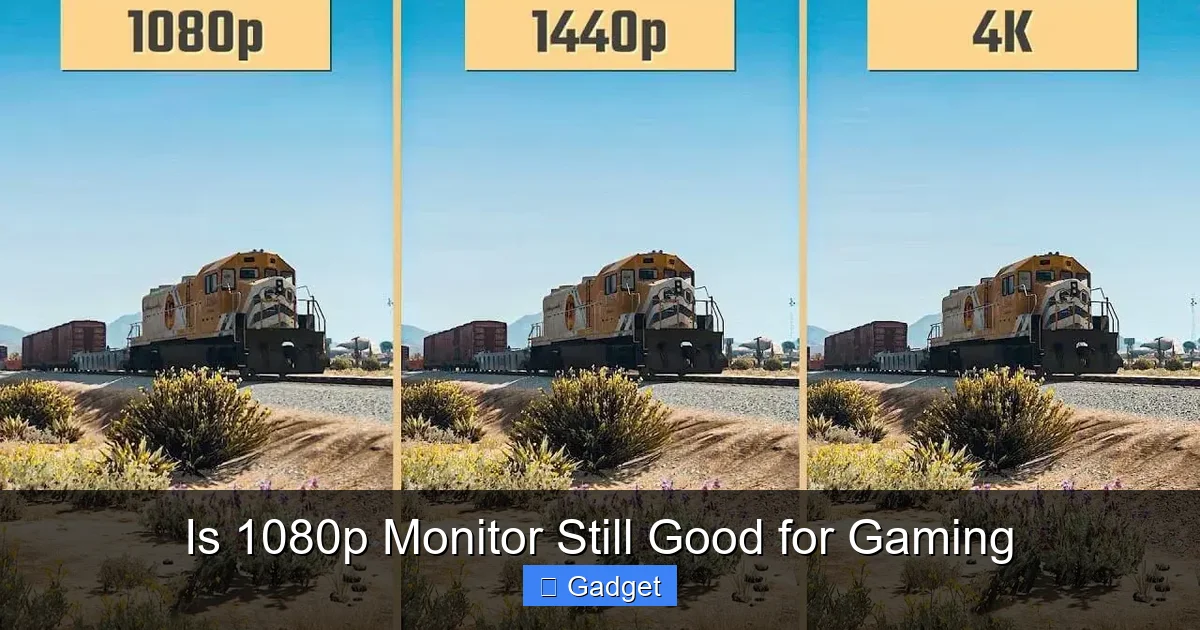
* **1080p (Full HD):** This resolution is 1920 pixels wide by 1080 pixels high, totaling approximately 2 million pixels.
* **1440p (Quad HD or QHD):** This resolution is 2560 pixels wide by 1440 pixels high, about 3.7 million pixels – roughly 78% more pixels than 1080p.
* **4K (Ultra HD or UHD):** This resolution is 3840 pixels wide by 2160 pixels high, a staggering 8.3 million pixels – four times the pixels of 1080p.
As you can see, higher resolutions mean significantly more data for your computer to process. This is a crucial point when considering gaming performance.
Why 1080p is Still a Strong Contender for Gaming
Visual guide about Is 1080p Monitor Still Good for Gaming
Image source: cdn.shopify.com
Despite the rise of 1440p and 4K monitors, 1080p has held its ground for several compelling reasons. Let’s explore them.
1. Performance is King (Especially for Competitive Gamers)
This is arguably the biggest reason why 1080p remains relevant. Rendering images at a lower resolution requires significantly less processing power from your graphics card (GPU) and CPU.
* **Higher Frame Rates:** With less strain on your hardware, your system can render frames much faster. For games where every millisecond counts, like first-person shooters (FPS) or battle royales, higher frame rates translate directly to smoother gameplay, quicker reaction times, and a distinct competitive advantage. Many professional esports players still opt for 1080p monitors specifically for this reason.
* **Smoother Experience on Mid-Range Hardware:** Not everyone has the latest and greatest, most expensive PC components. A 1080p monitor allows gamers with mid-range or even budget-friendly GPUs to achieve excellent frame rates in demanding titles at high settings. Trying to run a modern AAA game at 1440p or 4K on a card that’s not designed for it will result in choppy, unplayable frame rates.
**Example:** Imagine your graphics card can push out 150 frames per second (FPS) in a particular game at 1080p. The same card might struggle to hit 60 FPS at 1440p, and perhaps only manage 30 FPS at 4K. For many gamers, the buttery-smooth experience at 1080p is far more enjoyable and playable.
2. Cost-Effectiveness: More Bang for Your Buck
The price difference between 1080p, 1440p, and 4K monitors can be substantial.
* **Budget-Friendly Entry Point:** 1080p monitors are the most affordable option. This makes them an excellent choice for gamers who are on a tight budget, students, or those who are just getting into PC gaming and don’t want to break the bank.
* **Allocating Budget Elsewhere:** By choosing a 1080p monitor, you can save money that can then be invested in other crucial gaming components, such as a more powerful GPU, a faster CPU, more RAM, or a higher refresh rate.
**Practical Tip:** If your budget is limited, consider this: a high-refresh-rate 1080p monitor can often feel more “premium” and responsive in terms of gameplay feel than a lower-refresh-rate 1440p or 4K monitor.
3. The Importance of Refresh Rate
While resolution is important, for many gamers, refresh rate is the feature that has the most significant impact on the perceived quality of gameplay. Refresh rate, measured in Hertz (Hz), indicates how many times per second the monitor updates the image on the screen.
* **Standard vs. High Refresh Rate:** A standard monitor refreshes at 60Hz. This means it updates the image 60 times per second. A 144Hz monitor refreshes 144 times per second, and a 240Hz monitor refreshes 240 times per second.
* **The Fluidity Factor:** Higher refresh rates result in much smoother motion, reduced motion blur, and a more responsive feel. This is especially noticeable in fast-paced games.
* **1080p and High Refresh Rates:** Fortunately, 1080p monitors are widely available with very high refresh rates (144Hz, 165Hz, 240Hz, and even higher) at relatively affordable prices. This combination allows gamers to experience both smooth gameplay and decent visual clarity.
**Example:** A 1080p 144Hz monitor will provide a far more fluid and responsive gaming experience than a 4K 60Hz monitor if your system can actually push more than 60 FPS.
4. Screen Size and Viewing Distance Matters
The perceived sharpness of any resolution is heavily influenced by the screen size and how far away you sit from it.
* **Pixel Density:** Pixel density (Pixels Per Inch or PPI) is what determines how sharp an image appears. A smaller screen with the same resolution will have a higher PPI and appear sharper than a larger screen with the same resolution.
* **Ideal Screen Sizes for 1080p:** For 1080p resolution, monitors in the 21-inch to 24-inch range typically offer excellent pixel density, making individual pixels difficult to discern and the image appear crisp.
* **Larger Screens and Viewing Distance:** If you prefer a larger screen (e.g., 27 inches or more) and sit at a typical desk distance, you might start to notice the pixels on a 1080p monitor, leading to a less sharp image. For larger screens, 1440p or 4K becomes more advantageous.
**Practical Tip:** If you’re considering a 1080p monitor and want the sharpest image, stick to screen sizes around 24 inches. If you absolutely need a larger screen and want to maintain sharpness, you’ll likely need to step up to 1440p or 4K.
5. The Gap in Visual Fidelity is Shrinking
While 1440p and 4K offer more detail, modern 1080p panels are incredibly good. Manufacturers have improved color accuracy, contrast ratios, and viewing angles significantly over the years, even on budget-friendly 1080p displays.
* **Panel Technologies:** Look for monitors with IPS panels, which generally offer better color reproduction and wider viewing angles compared to older TN panels.
* **Game Settings:** Many games allow for a range of graphics settings. You can often achieve a visually pleasing experience at 1080p by balancing texture quality, anti-aliasing, and other visual effects, even if you’re not hitting ultra settings.
When Might 1080p NOT Be the Best Choice?
Visual guide about Is 1080p Monitor Still Good for Gaming
Image source: m.media-amazon.com
While 1080p is excellent for many, there are scenarios where you might want to consider a higher resolution.
1. You Have a High-End Gaming PC
If you’ve invested in a top-tier graphics card (like an NVIDIA RTX 4080/4090 or AMD RX 7900 XTX) and a powerful CPU, you’re likely leaving performance on the table by gaming at 1080p. This powerful hardware is designed to drive higher resolutions and push more pixels. In this case, a 1440p or 4K monitor would be a better fit to fully utilize your system’s capabilities.
2. You Prioritize Visual Fidelity Above All Else
If your primary goal is to experience games with the absolute best graphical detail, with razor-sharp textures, intricate environments, and photorealistic visuals, then 1440p or 4K will offer a noticeable upgrade. The increased pixel count allows for finer details that are simply not present at 1080p.
3. You’re Using a Very Large Monitor (30 inches+)
As discussed earlier, on very large displays, the pixel density of 1080p can become apparent, leading to a somewhat pixelated or fuzzy appearance. For screens of this size, 1440p or 4K is generally recommended for a sharp image.
Maximizing Your 1080p Gaming Experience
Visual guide about Is 1080p Monitor Still Good for Gaming
Image source: m.media-amazon.com
So, you’ve decided that 1080p is the right choice for you. Here’s how to get the most out of it:
1. Prioritize Refresh Rate
As mentioned, for 1080p gaming, a high refresh rate monitor is often more impactful than a higher resolution. Aim for at least 144Hz, and if your budget allows and your PC can handle it, consider 165Hz or 240Hz.
2. Look for Good Panel Quality
* **IPS Panels:** Generally offer excellent color accuracy and viewing angles, making games look vibrant and allowing you to enjoy them from different perspectives.
* **VA Panels:** Offer deeper blacks and higher contrast ratios than IPS panels, which can be great for darker games, but may have slightly slower response times or color shifting at wider angles.
* **TN Panels:** The fastest response times, making them ideal for competitive gaming, but often sacrifice color accuracy and viewing angles.
3. Ensure Your PC Can Keep Up
Even with a 1080p monitor, you need a GPU and CPU that can deliver frame rates matching or exceeding your monitor’s refresh rate for the best experience.
* **Check Game Requirements:** Research the recommended system requirements for the games you play.
* **Monitor Your FPS:** Use in-game benchmarks or external tools (like Fraps or MSI Afterburner) to monitor your average FPS.
* **Adjust Settings:** If your FPS is too low, consider lowering graphics settings like anti-aliasing, shadows, or texture quality.
4. Consider Adaptive Sync Technologies
* **NVIDIA G-Sync / AMD FreeSync:** These technologies synchronize your monitor’s refresh rate with your GPU’s frame rate, eliminating screen tearing and stuttering for a smoother, more consistent visual experience. Ensure your monitor and GPU support compatible technologies.
5. Use Resolution Scaling Wisely (If Necessary)
Some games offer resolution scaling options. While not ideal, if you have a very demanding game, you *could* theoretically run it at a lower internal resolution and then upscale it to your monitor’s native 1080p. However, this often results in a blurry image and is usually not recommended over simply lowering graphical settings.
Troubleshooting Common 1080p Gaming Issues
Even with a 1080p monitor, you might encounter some issues.
Issue: Screen Tearing
* **Description:** You see horizontal lines or “tears” across the screen as different frames are displayed at different times.
* **Solution:**
* **Enable V-Sync (Vertical Sync):** This is an in-game setting that caps your frame rate to your monitor’s refresh rate. It can introduce input lag, so use with caution.
* **Use Adaptive Sync:** If your monitor and GPU support G-Sync or FreeSync, enable it in your graphics card control panel and in-game. This is the preferred solution for eliminating tearing without significant input lag.
* **Cap Your Frame Rate:** Manually cap your frame rate in the game settings or graphics driver to match your monitor’s refresh rate.
Issue: Input Lag
* **Description:** There’s a noticeable delay between when you press a key or move your mouse and when the action happens on screen.
* **Solution:**
* **Check Game Settings:** Some games have “input lag” or “lag” settings.
* **Disable V-Sync:** While V-Sync helps with tearing, it’s a common cause of input lag. Adaptive sync is a better alternative.
* **Reduce Graphics Settings:** Higher graphics settings can increase rendering times, leading to perceived input lag.
* **Use “Game Mode” on your Monitor:** Many gaming monitors have a dedicated “Game Mode” that reduces post-processing effects and input lag.
Issue: Blurry or Fuzzy Image
* **Description:** The image doesn’t look as sharp as you expect.
* **Solution:**
* **Ensure Correct Resolution:** Double-check that your game is running at your monitor’s native resolution (1920×1080).
* **Check Graphics Driver Settings:** Make sure your graphics card is outputting at 1080p and not using any aggressive scaling or sharpening filters that might be degrading the image.
* **Clean Your Monitor:** Sometimes, a dirty screen can affect perceived sharpness.
* **Consider Monitor Settings:** Some monitors have sharpness settings that might be incorrectly adjusted.
Conclusion: Is 1080p Still Good for Gaming?
Absolutely! For a vast number of gamers, a 1080p monitor is not just “still good,” but often the *best* choice. It provides an excellent balance of performance, affordability, and visual quality that’s hard to beat.
Whether you’re a competitive esports player aiming for maximum FPS, a budget-conscious gamer looking for the best value, or someone with a mid-range PC that excels at this resolution, 1080p gaming offers a fantastic experience. Coupled with a high refresh rate, you can enjoy incredibly smooth and responsive gameplay that many players find more engaging than the eye candy of higher resolutions on less powerful hardware.
Don’t be swayed by the marketing hype around ever-increasing resolutions if it doesn’t align with your hardware, budget, or gaming priorities. A well-chosen 1080p monitor can still be the cornerstone of an amazing gaming setup. Happy gaming!