How To Recycle Old Android Batteries Safely

How to Recycle Old Android Batteries Safely
Recycling old Android batteries is an important step to protect the environment and stay safe. Over time, your smartphone batteries can wear out or stop working properly. Instead of tossing them in the trash, recycling is the best way to handle these batteries responsibly. This section will walk you through everything you need to know about recycling old Android batteries safely, from understanding why it’s necessary to finding nearby recycling centers.Understanding Why Proper Recycling Matters
Before diving into how to recycle, it’s essential to understand why proper disposal is so important. Android batteries contain materials that can harm the environment if not disposed of correctly. These batteries often include chemicals like lithium, cobalt, and nickel, which are hazardous if they leak or get into the soil and water. Improper disposal can lead to:- Environmental pollution, affecting plants, animals, and humans
- Fire hazards due to battery leakage or puncture
- Wasting valuable materials that can be reused in new batteries
Recognizing When Your Android Battery Needs Recycling
Knowing when to recycle your battery is important. Here are signs that your Android battery should be replaced and recycled:- The battery drains very quickly, even after a full charge
- The device heats up excessively during use or charging
- You notice swelling or bloating in the battery or phone
- The phone shuts down unexpectedly or doesn’t hold a charge
- The battery no longer charges or only charges partially
How to Handle Old Android Batteries Safely Before Recycling
Proper handling of batteries before recycling keeps you safe and prevents accidents. Here’s what you should do:Store Batteries in a Safe Place
– Keep old batteries in a cool, dry area away from direct sunlight or heat sources. – Store them in a non-conductive container like a plastic box to prevent accidental short circuits. – Avoid placing batteries in water or humid environments.Prevent Battery Damage
– Don’t puncture, crush, or attempt to open the battery. – If the battery is swelling or leaking, handle it with care and wear protective gloves. – Place damaged batteries in a separate, secure container and take them to a recycling center promptly.Discharge Batteries Before Recycling
– If possible, partially discharge your battery to reduce risk during handling, but do not completely drain or attempt to fully discharge large lithium-ion batteries at home. – Avoid fully discharging, as it can make recycling more difficult and dangerous.Finding a Safe Recycling Location
Locating a proper recycling site is straightforward, especially with today’s digital tools. Here’s how to find the best place to recycle your antique Android battery:- Local Recycling Centers: Many municipalities have designated e-waste disposal sites. Search online with keywords like “electronics recycling center near me” or “e-waste collection.”
- Retail Drop-off Locations: Major electronics retailers, such as Best Buy, Staples, or Walmart, often have dedicated bins for cellphone and battery recycling.
- Professional E-Waste Collection Events: Check if your community schedules periodic e-waste collection drives. These events safely dispose of various electronic devices, including batteries.
- Battery Recycling Programs: Some manufacturers or mobile providers offer free recycling programs. Visit their websites or ask in-store.
Steps to Prepare Batteries for Recycling
Proper preparation makes recycling safer and more efficient. Here are some simple steps:Seal the Terminals
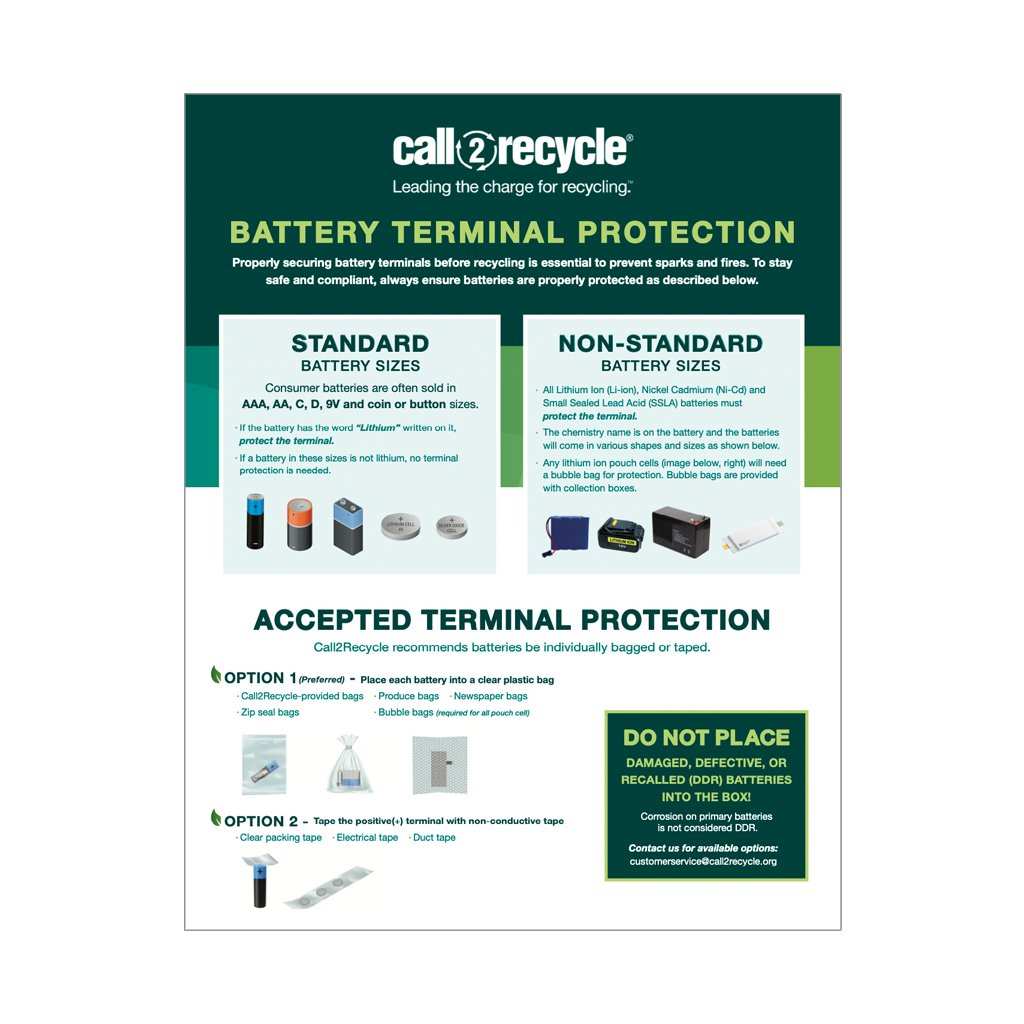
– Use non-conductive tape (like electrical tape) to cover the battery terminals. – Covering terminals prevents accidental short circuits during transportation.Label the Batteries
– If you’re recycling multiple batteries, label each one if possible. – Clear labels help recycling centers identify and handle batteries correctly.Package Batteries Carefully
– Place batteries in a sturdy, non-metallic container or plastic bag. – Avoid stacking batteries directly on top of each other to prevent puncture or damage.What Not to Do When Recycling Android Batteries
Knowing what to avoid is equally important:- Don’t throw batteries in regular trash: It’s illegal in many places and dangerous.
- Don’t puncture or crush: Damaged batteries can leak hazardous chemicals.
- Don’t expose batteries to extreme heat: This increases the risk of fire or explosion.
- Don’t attempt to dismantle batteries at home: Lithium-ion batteries contain chemicals that can be harmful if mishandled.
Benefits of Recycling Old Android Batteries
Recycling isn’t just good for the environment; it offers several advantages:- Reduces pollution and waste in landfills
- Conserves natural resources by reusing materials like lithium and cobalt
- Prevents hazardous chemicals from contaminating water or soil
- Supports the development of new, efficient batteries and electronics
- Promotes responsible and sustainable disposal habits
In Summary
Recycling your old Android batteries safely involves understanding their hazards, handling them carefully before disposal, and finding certified recycling centers in your area. Proper storage and packaging prevent accidents, while avoiding improper disposal keeps everyone safe. Remember, recycling your batteries is a simple but meaningful step toward protecting nature and conserving valuable resources. Taking these actions not only keeps you safe but also supports a sustainable future for all.Frequently Asked Questions
What safety precautions should I take when handling old Android batteries?
Always wear protective gloves and safety goggles to prevent contact with harmful chemicals. Avoid puncturing or damaging the battery, as it can cause leaks or fires. Work in a well-ventilated area and keep a fire extinguisher nearby in case of emergencies. Do not expose batteries to extreme heat or water, and handle them carefully to prevent accidental short circuits.
Are there specific recycling programs or centers I should use for Android batteries?
Yes, look for authorized electronic waste recycling centers or programs that accept lithium-ion batteries. Many electronic stores, mobile service providers, and local recycling facilities partner with certified recyclers. You can also check with your city’s waste management department for designated collection events or drop-off locations dedicated to battery recycling to ensure proper handling and environmental safety.
What steps should I follow before recycling my old Android battery?
First, power down your device and remove the battery carefully if it’s removable. Store the battery in a non-conductive, fire-proof container until you can take it to a recycling center. Avoid storing multiple batteries together, especially if they are damaged or swollen. Clean any residual debris from the battery terminals with a dry cloth, and ensure it is fully discharged to reduce risks during transportation.
Final Thoughts
To recycle old Android batteries safely, start by locating authorized recycling centers or local e-waste facilities. Avoid disposing of batteries in regular trash to prevent environmental harm. Ensure the battery is intact and undamaged before recycling. Following these steps helps protect the environment and promotes responsible disposal practices. How to recycle old Android batteries safely remains simple when you choose proper channels and handle batteries carefully.
Similar Posts































