Many users wonder if curved monitors distort images. This guide explains the science behind curved displays, exploring how their design aims to *enhance* viewing rather than distort it. We’ll delve into the subtle optical effects, the benefits for immersion and ergonomics, and common misconceptions. By understanding the technology, you can make an informed decision about whether a curved monitor is the right choice for your setup, ensuring a visually comfortable and accurate experience.
Do Curved Monitors Distort Images
So, you’re thinking about upgrading your desk setup, and those sleek, curved monitors are catching your eye. They look futuristic, promise a more immersive experience, and generally seem pretty cool. But then the nagging question pops into your head: “Do curved monitors distort images?” It’s a valid concern! After all, we’re accustomed to flat screens, and the idea of a bent display might conjure up images of warped pictures and skewed lines.
In this comprehensive guide, we’re going to dive deep into the world of curved monitors and the truth about image distortion. We’ll explain how they work, what “curvature rating” means, and whether you should really be worried about seeing your favorite images stretched or squashed. By the end of this article, you’ll have a clear understanding of curved monitor technology and can confidently decide if one is the right fit for your needs.
Contents
- 1 Key Takeaways
- 2 Understanding the Curve: How They Work
- 3 What Does “Curvature Rating” Mean?
- 4 The Question of Distortion: Does It Happen?
- 5 The Benefits of the Curve (Why They’re Popular)
- 6 Who Benefits Most from a Curved Monitor?
- 7 When Might a Flat Monitor Be Better?
- 8 Troubleshooting Perceived Distortion
- 9 Conclusion
Key Takeaways
- Curved monitors are designed to reduce perceived distortion by aligning pixels closer to your eye’s natural field of vision, creating a more uniform viewing distance.
- The degree of curvature (measured in ‘R’) significantly impacts the viewing experience; lower ‘R’ numbers mean a more pronounced curve.
- For typical content consumption and gaming, visible distortion is usually minimal or non-existent and is often outweighed by increased immersion.
- Professional applications requiring precise geometric accuracy, like CAD or professional photo editing, might still benefit from flat panels, though this is becoming less of a concern with modern curved technology.
- Individual perception of distortion can vary based on screen size, viewing distance, and personal sensitivity.
- Focusing on the benefits of reduced eye strain and enhanced immersion is often more productive than worrying about theoretical distortion.
Understanding the Curve: How They Work
Before we can talk about distortion, we need to understand *why* monitors are curved in the first place. It all comes down to how our eyes and brains perceive images.
The Human Field of Vision
Our eyes aren’t designed to see the world on a flat plane. We have a natural, wide field of vision that’s somewhat spherical. Think about it: when you look straight ahead, you can see a lot to your sides without even moving your head. Flat screens, especially larger ones, present a challenge because the edges are further away from your eyes than the center. This difference in distance can lead to:
* **Peripheral Blurring:** The further away the edges are, the less sharp they might appear.
* **Color Shifting:** Some display technologies can exhibit minor color shifts at extreme viewing angles.
* **Eye Strain:** Constantly refocusing your eyes to compensate for the varying distances can lead to fatigue.
The Curved Solution
This is where the curve comes in. A curved monitor essentially tries to mimic the natural arc of your vision. By bending the display inwards, the manufacturer aims to keep the entire screen surface at a more uniform distance from your eyes.
Imagine sitting in the center of a circle. If you look at points on the edge of that circle, they are all roughly the same distance from you. A curved monitor is designed to create a similar effect.
What Does “Curvature Rating” Mean?
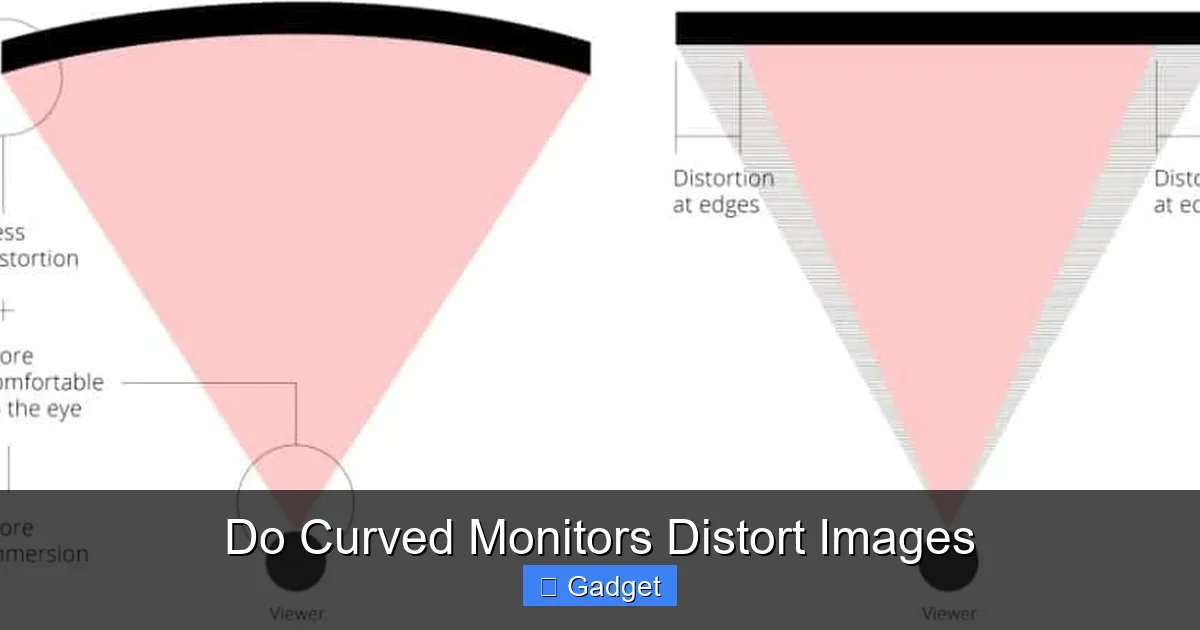
Visual guide about Do Curved Monitors Distort Images
Image source: displayninja.com
You’ll often see curved monitors described with numbers like “1800R,” “1500R,” or “1000R.” What does this mean, and how does it relate to distortion?
The ‘R’ Stands for Radius
The ‘R’ in these ratings stands for radius. The number indicates the radius of a circle, in millimeters, that the curve would form if you were to continue it into a full circle.
* **1800R:** This means the curve forms part of a circle with an 1800mm (1.8-meter) radius. This is a gentler, less pronounced curve.
* **1000R:** This is a much tighter, more aggressive curve, forming part of a circle with a 1000mm (1-meter) radius.
Impact of Curvature on Perception
* **Gentle Curves (e.g., 1800R):** These are generally considered subtle. They offer a bit more immersion and may help reduce eye strain on larger monitors without introducing any noticeable distortion for most users.
* **Aggressive Curves (e.g., 1000R):** These create a much more enveloping visual experience. They can be fantastic for gaming or watching movies, pulling you into the content. However, with very aggressive curves, especially on smaller screens or if you’re sitting too close, there’s a slightly higher *theoretical* chance of perceiving some geometric warping.
The idea behind the curvature rating is to match the curve to the user’s field of view. A 1000R curve is designed to be closer to the “ideal” match for the human eye’s natural curvature.
The Question of Distortion: Does It Happen?
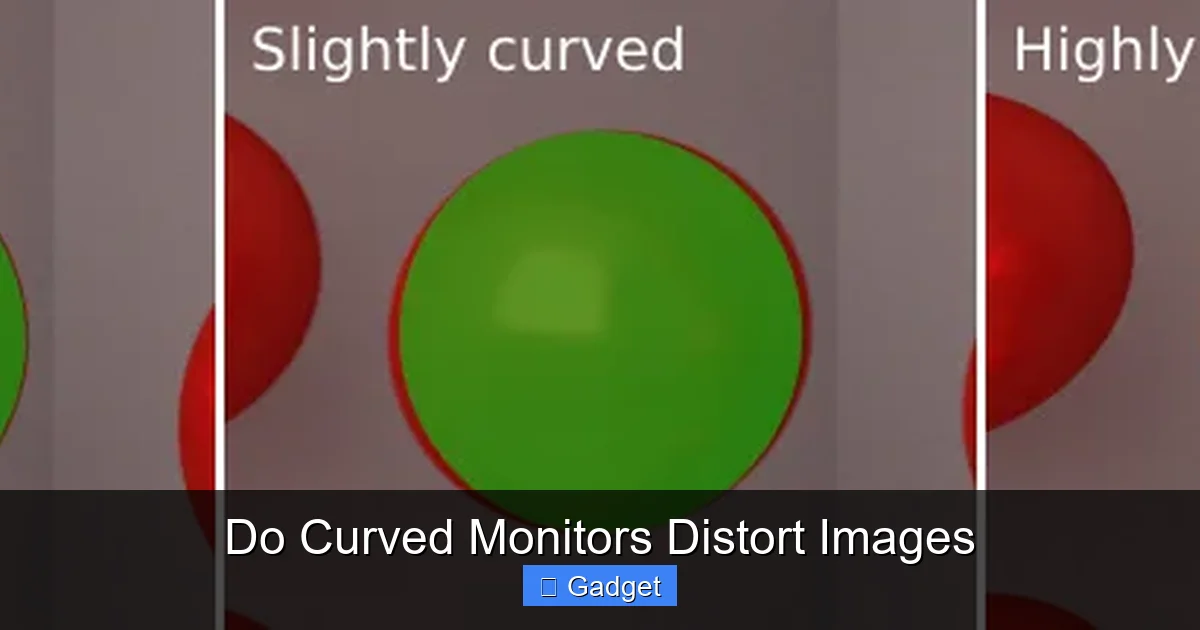
Visual guide about Do Curved Monitors Distort Images
Image source: misc.maartenbaert.be
Now, let’s get to the heart of the matter. Do curved monitors distort images? The short answer is: **not in the way you might initially fear, especially with modern technology.**
The Physics of Light and Lenses
Think about how lenses work. A convex lens (like a magnifying glass) can magnify and sometimes distort. Concave lenses can shrink and distort. A curved monitor screen, when viewed from its intended position, isn’t acting like a single, powerful lens. Instead, it’s a surface that’s been shaped.
The “distortion” some people might perceive is more about the way our brain interprets geometry on a curved surface compared to a flat one.
Types of Perceived Distortion
1. **Geometric Warping:** This is the most common concern. Users worry that straight lines, like the edges of a window in a photo or the grid lines in a spreadsheet, might appear bowed or bent.
* **On most curved monitors, this is minimal.** The curvature is designed to be subtle enough that your brain compensates.
* **For very wide or ultrawide monitors**, a more pronounced curve can sometimes make the edges appear slightly closer or further than they are, leading to a subtle “fish-eye” effect if you’re looking for it. However, this is usually not distracting for general use.
* **The key is viewing distance.** If you sit too close to a very curved monitor, you might start to notice these effects more.
2. **Size Distortion:** Some worry that objects near the edges might appear larger or smaller.
* Again, with well-designed curved monitors, this is very subtle. The goal of the curve is to create a *uniform* viewing distance, which inherently minimizes this type of perceived size distortion.
3. **Brightness and Color Uniformity:** While not strictly “distortion,” some older or lower-quality curved panels might exhibit less uniform brightness or color across the screen compared to their flat counterparts.
* Modern, high-quality curved monitors have largely overcome these issues. The technology has advanced significantly.
When Might You Notice It?
* **Very Aggressive Curves (e.g., 1000R or less) on Small Screens:** If you have a 27-inch monitor with a very tight curve and sit very close, you *might* start to notice some geometric anomalies if you’re actively looking for them.
* **Professional Applications Requiring Absolute Geometric Precision:** For fields like architectural design (CAD), precise 3D modeling, or certain scientific visualizations where every millimeter and angle must be exact, a flat monitor has traditionally been preferred. However, even here, the benefits of immersion and reduced eye strain are making curved monitors a viable option for many.
The Benefits of the Curve (Why They’re Popular)
Visual guide about Do Curved Monitors Distort Images
Image source: i.stack.imgur.com
If distortion is a minor concern, why are curved monitors so popular? The advantages are significant for many users:
1. **Enhanced Immersion:** This is the biggest draw, especially for gamers and movie enthusiasts. The curve wraps around your field of vision, making the on-screen content feel more engaging and less like you’re looking through a window.
2. **Reduced Eye Strain:** By keeping the screen at a more consistent distance from your eyes, the need for constant refocusing is reduced. This can lead to less fatigue, dryness, and headaches, particularly during long work or gaming sessions.
3. **Wider Perceived Field of View:** Even with the same physical screen size, a curved monitor can feel like it has a wider field of view because it’s more effectively filling your peripheral vision.
4. **Improved Ergonomics:** For ultrawide monitors, the curve helps bring the outer edges within easier reach of your eyes, improving comfort and reducing neck strain from turning your head.
Who Benefits Most from a Curved Monitor?
* **Gamers:** The immersive quality of curved monitors is a game-changer for many. Being pulled into the game world is a significant advantage.
* **Multimedia Enthusiasts:** Watching movies and TV shows on a curved screen can feel much more cinematic.
* **Office Workers (with caveats):** For everyday tasks like web browsing, email, and document editing, the reduced eye strain is a major benefit. For highly visual professions requiring perfect geometric accuracy, it’s a more nuanced decision (see below).
* **Anyone with Large Monitors:** The larger the screen, the more pronounced the distance difference between the center and edges of a flat panel. A curved screen mitigates this effect effectively.
When Might a Flat Monitor Be Better?
Despite the advancements, there are still scenarios where a flat monitor might be the superior choice:
* **Precision Graphics Work:** If your job involves tasks like professional photo retouching, graphic design requiring pixel-perfect alignment, or CAD where exact dimensions are critical, you might still find flat monitors offer a more straightforward and predictably accurate geometric representation. However, many professionals in these fields now use curved monitors without issue, especially those with less aggressive curves.
* **Multiple Monitors in a Flat Array:** If you plan on setting up a multi-monitor configuration and want them to be perfectly flush and flat side-by-side, a flat monitor is the obvious choice. Curved monitors will have gaps between them.
* **Very Limited Desk Space:** While curved monitors are designed to be ergonomic, if your desk is extremely shallow, the curve might end up being too close for comfort, potentially increasing perceived distortion.
Troubleshooting Perceived Distortion
If you’ve purchased a curved monitor and are experiencing noticeable distortion, here are a few things to check:
1. **Viewing Distance:** This is the most common culprit.
* **Solution:** Move your monitor further back. Experiment with different distances. For a 32-inch 1800R monitor, a distance of about 2.5-3 feet (75-90 cm) is often ideal. For a more aggressive curve like 1000R, you might need to be slightly further away or it might feel more enveloping.
2. **Monitor Placement:** Ensure the monitor is at eye level and positioned directly in front of you.
* **Solution:** Adjust your chair height or use a monitor stand to get it perfectly aligned. Avoid looking at the screen from extreme off-angles.
3. **Content Type:** Some older games or software might not be optimized for curved displays, leading to minor visual quirks.
* **Solution:** Check for updates for your games or software. Many modern applications and games have settings to adjust aspect ratios or field of view that can help.
4. **Graphics Card Settings:** Sometimes, graphics driver settings can interfere.
* **Solution:** Reset your graphics card control panel settings to default. Ensure your resolution and refresh rate are set correctly.
5. **Monitor Settings:** Explore the On-Screen Display (OSD) menu of your monitor.
* **Solution:** Some monitors have settings related to sharpness, image scaling, or even specific “gaming” modes that might affect image rendering. Experiment with these, or reset them to default.
6. **Screen Size vs. Curvature:** If you have a very large screen with a very aggressive curve and you’re sitting extremely close, you might be pushing the limits of what’s comfortable.
* **Solution:** Consider if the curvature is too much for your setup. While less ideal, you *could* potentially reduce the perceived distortion by slightly angling the monitor inwards, but this often defeats the purpose.
Conclusion
So, do curved monitors distort images? The answer is nuanced. While theoretically, any curved surface can introduce geometric properties that differ from a flat one, **modern curved monitors are engineered to minimize perceived distortion.** They achieve this by aligning the screen with your natural field of vision, aiming for a uniform viewing distance.
For the vast majority of users – gamers, movie watchers, and general computer users – the benefits of increased immersion and reduced eye strain far outweigh any subtle, often imperceptible, geometric warping. The perceived distortion is usually only noticeable if you’re actively looking for it, sitting too close to an aggressively curved screen, or working in a highly specialized field where absolute geometric fidelity is paramount.
Ultimately, the best way to know if a curved monitor is right for you is to try one out. If possible, visit a store and see how it feels. If you’re buying online, check the return policy. But rest assured, the technology has come a long way, and the fear of significant image distortion on a curved monitor is largely a relic of the past. Embrace the curve and enjoy a more comfortable and engaging visual experience!