Best Android Battery Life Tips For Longer Usage
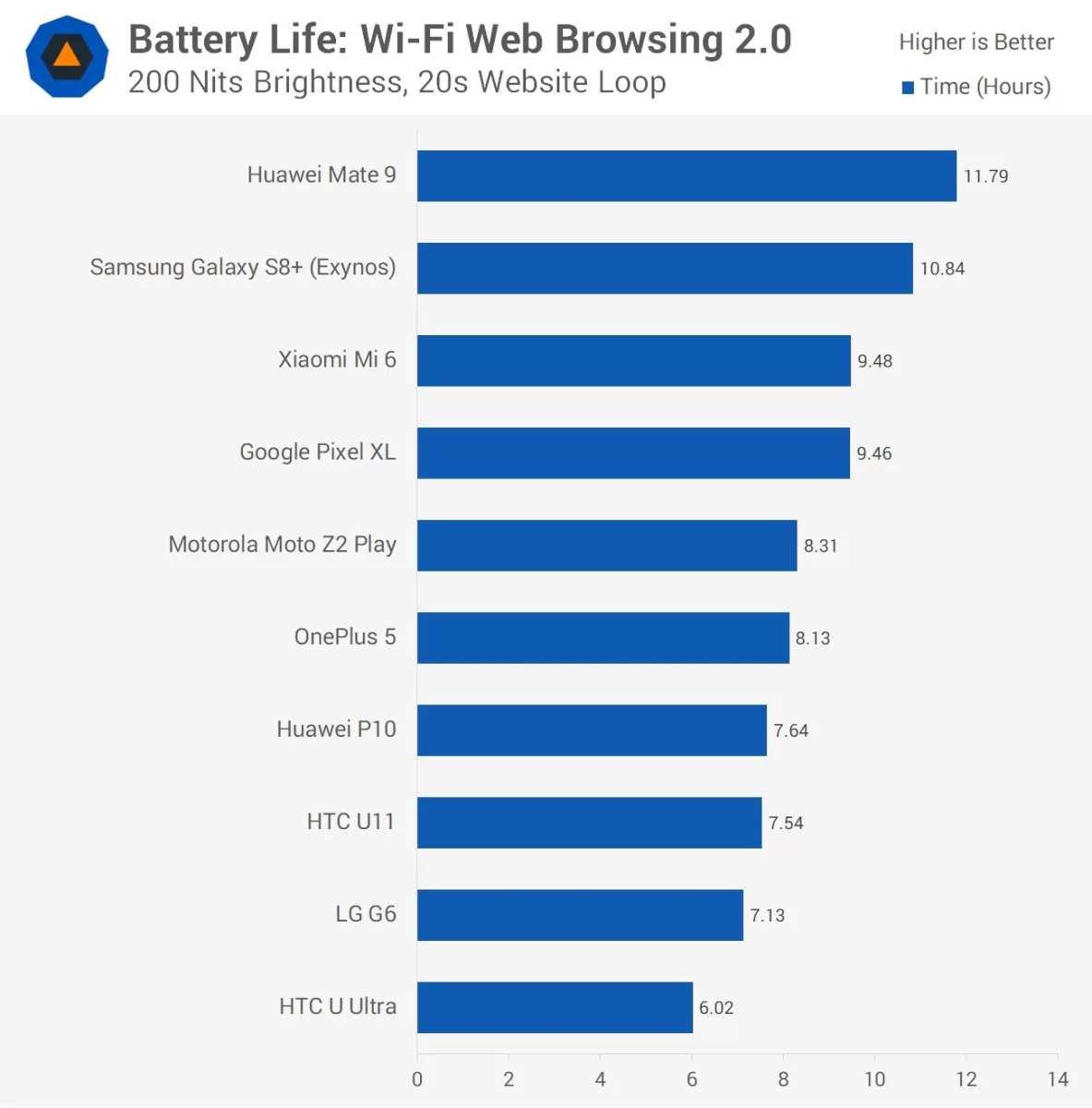
To get the best android battery life, optimize your device’s settings and choose power-efficient apps. **The key is managing screen brightness and background processes effectively.** If you want your phone to last longer without constant charging, these simple adjustments can make a big difference. Many users overlook small tweaks that significantly extend battery life. Staying aware of app usage and turning off unnecessary features helps keep your Android device running smoothly longer throughout the day. 
The Best Android Battery Life: How to Make Your Phone Last Longer
Having a smartphone that lasts all day is a real relief. With so many apps, notifications, and features, it’s easy for your Android device to eat up its battery quickly. The good news is, there are several ways to improve your phone’s battery life so it can keep up with your busy day. In this article, we’ll explore the top tips, settings, and tricks to help your Android phone last longer, no matter what you use it for.Understanding Android Battery Drain
Before jumping into solutions, it’s helpful to understand what causes your Android device to drain its battery faster. Several factors can reduce your battery life, including:- Background Apps: Apps running in the background can consume a lot of power without you realizing it.
- Screen Brightness and Timeout: A bright screen or a long screen timeout setting can drain your battery quickly.
- Network Usage: Constantly searching for Wi-Fi, mobile data, or Bluetooth connections uses up energy.
- Battery Age: Over time, batteries lose their ability to hold a full charge.
- Location Services: GPS and location-based features use significant power when active.
Optimizing Settings for Better Battery Performance
One of the simplest ways to improve your Android phone’s battery life is by adjusting settings. Small tweaks can have a big impact on how long your phone lasts between charges.Adjust Screen Brightness and Timeout Settings
Your screen is the biggest battery consumer. Reducing brightness, either manually or automatically, can save a lot of power. You can also set the screen to turn off faster when you’re not using your phone.- Enable automatic brightness in your display settings.
- Set a shorter screen timeout duration, like 30 seconds.
Use Battery Saver Mode
Most Android devices come with a built-in battery saver mode. This feature limits background activity, reduces visual effects, and limits app notifications to extend battery life.- Turn on Battery Saver when your battery dips below 20% or earlier if you’re in a hurry.
- Customize which features to restrict for maximum efficiency.
Turn Off Unnecessary Connectivity
Switching off features like Wi-Fi, Bluetooth, GPS, or mobile data when you’re not using them can greatly reduce power drain.- Use airplane mode in areas with no signal.
- Disable location services for apps that don’t need them.
Managing Apps to Save Power
Apps are often the biggest drainers on your battery. Managing which apps run in the background and how they use power can make a noticeable difference.Close Unused Apps
Don’t leave apps running unnecessarily. Regularly close apps when you’re done using them.Limit Background Activity
Most Android versions allow you to restrict background data for specific apps.- Go to Settings > Apps & notifications > App info.
- Select an app, then tap Data usage or Battery usage.
- Restrict background activity or background data for apps you don’t need running all the time.
Remove or Disable Unnecessary Apps
Pre-installed or rarely used apps may run in the background without your knowledge. Uninstall or disable these apps to free resources.Utilizing Built-in and Third-Party Tools
Many Android phones include tools specifically designed to extend battery life. Additionally, some third-party apps offer useful features.Use Power Management Features
Check your device’s settings for options like “Adaptive Battery” or “Battery Optimization.” These features analyze your usage patterns and limit background activity on rarely used apps.Clean Your Storage and Manage Notifications
– Clear app caches regularly to prevent apps from consuming unnecessary resources. – Disable unnecessary notifications that wake your screen or run background processes.Install Trusted Battery Saver Apps
There are many apps available that can help extend your battery life further. When choosing one, focus on well-reviewed, trusted options.Battery Maintenance Tips
Proper battery care can help your Android device retain good battery health over time, ensuring longer overall lifespan and better daily performance.Avoid Extreme Temperatures
Heat and cold can damage your battery. Keep your phone in moderate temperatures and avoid exposing it to direct sunlight or freezing conditions.Charge Smartly
– Don’t let your battery completely run out frequently. – Avoid overcharging; unplug once it reaches 100%. – Use your device’s original charger or a reputable, compatible charger.Monitor Battery Usage Regularly
Most Android phones have built-in tools to see which apps use the most power. Use these stats to adjust your habits accordingly.Choosing the Right Android Device for Best Battery Life
If you’re in the market for a new phone, selecting a model with a larger battery can give you a significant advantage.- Look for phones with high milliampere-hour (mAh) ratings.
- Check reviews for real-world battery performance.
- Consider devices with power-efficient processors and displays.
Frequently Asked Questions
What are some effective ways to optimize Android device settings for longer battery life?
To extend your Android device’s battery life, adjust settings such as reducing screen brightness, limiting background app activity, turning off Bluetooth and Wi-Fi when not in use, and disabling location services. Activating battery saver mode and closing unused apps can also help conserve power throughout the day.How does screen usage impact Android battery longevity and tips to manage it?
Screen usage consumes the most battery on Android devices. Keep your screen brightness low or enable adaptive brightness. Set a shorter screen timeout duration to turn off the display quickly when idle. Using dark or black wallpapers and enabling dark mode can also decrease power drain on OLED screens.Are there any apps or features that drain Android batteries quickly?
Many apps, especially those running in the background, can drain your battery rapidly. Games, social media apps, and navigation tools often consume significant power. Regularly check your device’s battery usage in settings to identify and restrict or uninstall apps that use excessive power.What role do updates and maintenance play in maintaining optimal Android battery performance?
Updating your Android system and apps ensures you have the latest optimizations and bug fixes that can improve battery efficiency. Regularly clearing app caches and removing unused apps helps prevent background processes from unnecessarily draining your battery. Restarting your device periodically can also improve performance.Final Thoughts
The best android battery life depends on careful device management and choosing the right settings. Opt for power-saving modes and reduce screen brightness to extend usage. Keep app usage minimal and close background apps regularly. Updating software and uninstalling unused apps also help improve battery longevity. Investing in devices with efficient processors and larger batteries can make a noticeable difference. In conclusion, focusing on these strategies will help you achieve the best android battery life. Proper care and smart choices ensure your device lasts longer throughout the day.
Similar Posts