


What Is the Difference Between Curved and Ultrawide Monitor
Are you in the market for a new monitor and feeling a bit overwhelmed by the jargon? You’ve likely seen terms like “curved” and “ultrawide” thrown around, and perhaps wondered if they mean the same thing. While they sound similar, and can even coexist in a single display, they actually refer to different aspects of a monitor’s design and functionality. Understanding the distinction between curved and ultrawide monitors is crucial for making the right choice for your setup, whether you’re a gamer, a creative professional, or just someone who wants a more comfortable computing experience. This guide is here to demystify these popular monitor types. We’ll dive deep into what makes a monitor curved, what makes it ultrawide, and how these features impact your daily use. By the end, you’ll have a clear understanding of their differences, their individual benefits, and how to decide which one, or perhaps even both, is the perfect fit for you.Contents
Key Takeaways
- Curved monitors bend inward to wrap around your field of view, creating a more immersive and comfortable viewing experience by reducing distortion at the edges.
- Ultrawide monitors are characterized by their extended aspect ratios (typically 21:9 or 32:9), offering significantly more horizontal screen real estate than standard displays.
- The primary difference lies in their shape and function: curvature is about the physical form and viewing experience, while ultrawide refers to the screen’s expansive width.
- While a monitor can be both curved and ultrawide, these features are distinct and offer different advantages depending on your primary use case.
- Curved displays are often favored for gaming and media consumption due to their immersive qualities, whereas ultrawide monitors excel in productivity and multitasking scenarios.
- Choosing between them depends on your desk space, budget, and whether you prioritize immersion (curved) or extra screen real estate (ultrawide).
Understanding Curved Monitors
Let’s start by dissecting what a curved monitor is all about. The name itself is a pretty big clue, but the benefits go beyond just aesthetics.The Physics of Curvature
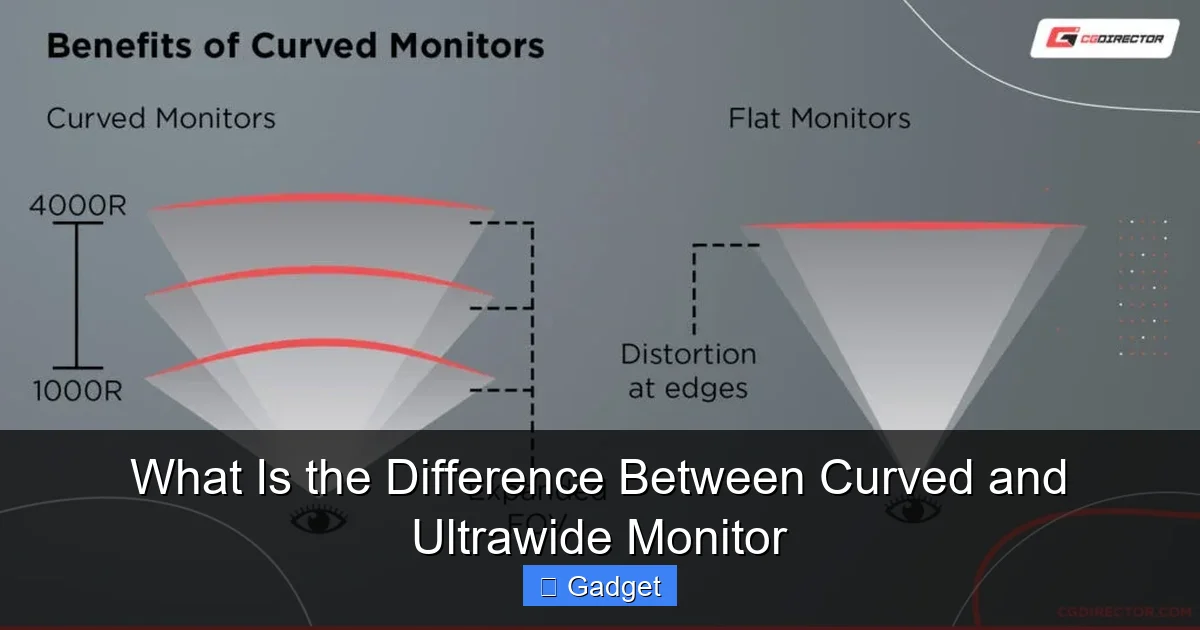
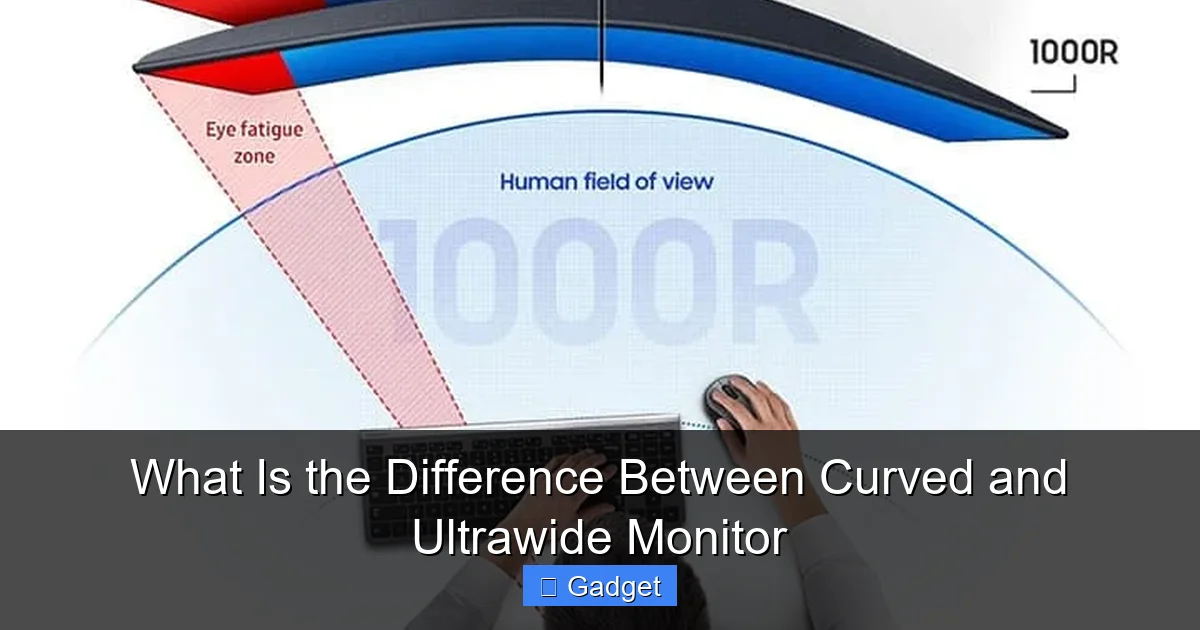
A curved monitor features a screen that is physically bent inward, typically with a radius measured in millimeters (e.g., 1800R, 1500R, 1000R). The ‘R’ stands for radius, and a lower number indicates a tighter, more pronounced curve. This subtle bending is designed to match the natural curvature of your eye. Our eyes aren’t flat; they have a spherical shape. When you look at a flat screen, especially a larger one, your peripheral vision can experience a slight distortion or a feeling of distance from the edges. A curved screen aims to eliminate this by bringing the edges of the display closer to your eyes, creating a more uniform viewing distance across the entire screen.Benefits of a Curved Display
- Enhanced Immersion: This is perhaps the most talked-about benefit. By wrapping the display around your field of view, a curved monitor can make you feel more “in” the content. This is particularly noticeable in games and movies, where the wider peripheral view draws you deeper into the action.
- Reduced Eye Strain: Because the edges of the screen are closer to your eyes, you don’t have to constantly refocus your eyes as much when moving your gaze from the center to the periphery. This can lead to less eye fatigue, especially during long work or gaming sessions.
- Minimized Distortion: On large, flat displays, there can be some visual distortion or warping, especially at the extreme edges. The curve helps to correct this, presenting a more natural and accurate image across the entire panel.
- More Comfortable Viewing Angle: The inward bend naturally directs more of the screen’s light towards your eyes, especially when sitting relatively close. This can make the viewing experience more comfortable and less prone to glare from ambient light.
Who Benefits Most from Curved Monitors?
- Gamers: The immersive quality is a huge draw. It pulls you into the game world, making for a more engaging experience. If you’re wondering what is the best monitor size for gaming, a curved display often enhances the experience at larger sizes.
- Movie Enthusiasts: Watching films on a curved display can feel more like being in a cinema.
- Users with Large Monitors: The larger the monitor, the more pronounced the benefits of curvature become. If you’re using a 30-inch or larger flat panel, you might notice a significant improvement with a curve.
- Those Experiencing Eye Strain: If long hours at the computer lead to tired eyes, a curved display could offer welcome relief.
Understanding Ultrawide Monitors
Now, let’s shift our focus to ultrawide monitors. Unlike curved monitors, which are defined by their physical shape, ultrawide monitors are all about their dimensions – specifically, their extra width.The Aspect Ratio Explained
Ultrawide monitors are characterized by their aspect ratio, which is the ratio of the screen’s width to its height. Standard monitors typically have a 16:9 aspect ratio (like most TVs and 1080p or 4K displays). Ultrawide monitors, however, sport wider aspect ratios, most commonly 21:9 or 32:9. This means they are significantly wider than they are tall, offering a panoramic view. For example, a 21:9 ultrawide monitor displays 33% more horizontal content than a 16:9 monitor of the same height. A 32:9 monitor is even wider, offering a massive 125% more horizontal content.Benefits of an Ultrawide Display
- Superior Multitasking: This is where ultrawide monitors truly shine for productivity. You can comfortably have multiple windows open side-by-side without them feeling cramped. Imagine having your email client open next to a spreadsheet, or a web browser next to a coding editor, all visible at once without constant alt-tabbing.
- Expansive Workspace for Creatives: For video editors, graphic designers, and even music producers, the extra horizontal space is invaluable. Video timelines, layers in image editing software, or MIDI tracks can be spread out, allowing for more detailed work and easier navigation. Learn more about whether an ultrawide monitor is necessary for video editing.
- Immersive Gaming (in a different way): While curved monitors offer a wrap-around immersion, ultrawide monitors provide a wider field of view in games that support the aspect ratio. This can give you a tactical advantage in first-person shooters by letting you see more of the game world at once. In racing games, the expanded view enhances the sense of speed and immersion.
- Cinema-Like Media Consumption: Many movies are filmed in a cinematic aspect ratio that is wider than 16:9. An ultrawide monitor can display these films without the black bars (letterboxing) that you see on standard displays, offering a more complete and engaging viewing experience.
- Reduced Need for Dual Monitors: For many users, a single ultrawide monitor can replace two or even three standard monitors, simplifying your desk setup and eliminating the bezels that separate multiple screens.
Who Benefits Most from Ultrawide Monitors?
- Office Professionals and Multitaskers: Anyone who juggles multiple applications simultaneously will appreciate the screen real estate.
- Content Creators: Video editors, graphic designers, and anyone working with complex timelines or large canvases.
- Gamers (with caveats): Gamers who enjoy wider fields of view and games that support ultrawide resolutions.
- Home Theater Enthusiasts: For those who love watching movies that are formatted for wider screens.
The Core Differences: Curved vs. Ultrawide
Now that we’ve broken down each type, let’s clearly delineate the differences between curved and ultrawide monitors.Shape vs. Screen Dimensions
- Curved refers to the *physical shape* of the monitor’s panel. It’s about how the screen is bent.
- Ultrawide refers to the *aspect ratio* and thus the *dimensions* of the screen. It’s about how wide the screen is relative to its height.
Purpose and Primary Advantage
- Curved monitors primarily aim to improve your *viewing experience* by making it more immersive and comfortable for your eyes.
- Ultrawide monitors primarily aim to increase your *screen real estate*, making them excellent for productivity and a wider visual field.
Interaction with Your Eyes
- Curved: The inward bend brings the edges closer to your eyes, aiming to create a more uniform viewing distance and reducing peripheral strain.
- Ultrawide: The extra width extends your horizontal field of view, allowing more content to be displayed side-by-side, which is beneficial for multitasking and panoramic immersion.
Can a Monitor Be Both Curved and Ultrawide?
Absolutely! In fact, this is a very popular combination. Many of the most premium gaming and productivity monitors on the market are both curved *and* ultrawide.The Best of Both Worlds?
A monitor that is both curved and ultrawide offers the advantages of both features. The ultrawide aspect ratio provides the expansive screen real estate for multitasking or an expansive gaming view, while the curve enhances the immersion and reduces eye strain associated with such a wide panel. For example, a 34-inch 21:9 ultrawide monitor with a 1500R curve can offer a truly engrossing experience. The width gives you plenty of space, and the curve ensures that the edges don’t feel too far away or distorted. If you’re considering such a setup, you might also want to check out how much desk space an ultrawide monitor needs to ensure it fits comfortably.Considerations for Combined Displays
- Curve Radius: As mentioned, a lower ‘R’ number means a tighter curve. For a very wide monitor, a tighter curve can be more effective at pulling the edges in.
- Resolution: Ultrawide monitors often have higher resolutions than standard monitors to take advantage of the extra pixels. A common resolution for 21:9 monitors is 3440×1440 (often called 1440p ultrawide).
- Desk Space: Ultrawide monitors, especially curved ones, can take up a significant amount of desk real estate. Ensure you have the space for it.
Choosing the Right Monitor for You
Deciding between a curved, an ultrawide, or a combination depends entirely on your needs and preferences.When to Choose a Curved Monitor (that might not be ultrawide)
- Your primary goal is to improve comfort during long computer sessions.
- You want a more immersive experience for gaming and movies, and don’t necessarily need the extra horizontal space of an ultrawide.
- You have a standard 16:9 monitor and are finding that the edges feel too far away or distorted.
When to Choose an Ultrawide Monitor (that might not be curved)
- Productivity and multitasking are your top priorities. You want to see more windows open at once.
- Your work involves detailed timelines or canvases, like video editing or graphic design.
- You play games that benefit from a wider field of view, and you’re okay with a flat viewing experience.
- You want to replicate a dual-monitor setup with a single display.
When to Choose a Curved Ultrawide Monitor
- Gamers seeking the ultimate immersive experience with both a wider field of view and a wrap-around effect.
- Power users who want to maximize both multitasking efficiency and visual comfort.
- Anyone who wants a premium, cinematic viewing experience for both work and entertainment.
Practical Tips and Considerations
No matter which type you lean towards, here are some extra tips to help you make the best decision.Desk Space is Key
- Ultrawide monitors, due to their width, require substantial desk space. Measure your desk carefully before purchasing. A 34-inch 21:9 monitor is about as wide as a 27-inch 16:9 monitor, but a 49-inch 32:9 monitor is extremely wide.
- Curved monitors, while not necessarily wider, can feel like they take up more depth due to their physical form.
Budget
Generally, ultrawide and curved monitors, especially high-resolution and high-refresh-rate models, tend to be more expensive than their standard 16:9 flat counterparts. A monitor that is both curved and ultrawide will likely be at the higher end of the price spectrum.Content Support
While most modern games and operating systems support ultrawide resolutions, older games or specific applications might not. You might encounter black bars on the sides, or the image might be stretched. Always check game reviews or forums if you’re concerned about a particular title.Resolution Matters
For ultrawide monitors, resolution is crucial. A 3440×1440 resolution on a 34-inch ultrawide provides a sharp image. A lower resolution on a wider screen can result in a less crisp display. For 32:9 monitors, resolutions like 5120×1440 are common.Troubleshooting Common Issues
While both curved and ultrawide monitors offer great benefits, you might encounter a few minor hurdles.Issue: Black Bars or Stretching in Games
Solution: Ensure your game settings are configured to support your monitor’s aspect ratio (21:9 or 32:9). Many games have an “ultrawide support” option. If not, you might need to look for community patches or mods for specific games. Some users also find adjusting the in-game resolution and aspect ratio settings manually can resolve this.

Visual guide about What Is the Difference Between Curved and Ultrawide Monitor
Image source: robots.net
Visual guide about What Is the Difference Between Curved and Ultrawide Monitor
Image source: cgdirector.com
Visual guide about What Is the Difference Between Curved and Ultrawide Monitor
Image source: displayninja.com
Issue: Eye Strain on a Very Wide Flat Ultrawide Monitor
Solution: If you’re experiencing eye strain on a flat ultrawide, a curved ultrawide monitor might be a better fit for you. Alternatively, try adjusting your seating position, monitor distance, and taking more frequent breaks.
Issue: Difficulty Fitting Everything on the Desk
Solution: Consider a monitor arm. This can free up desk space and allow for better positioning of a large ultrawide monitor, whether it’s curved or flat.
