Why Does My Android Phone Battery Die So Fast Best Tips

Why Does My Android Phone Battery Die So Fast?
Have you ever charged your Android phone in the morning, only to find it’s nearly dead before noon? If this sounds familiar, you’re not alone. Many smartphone users face the frustrating issue of quick-draining batteries. But why does your Android phone battery die so fast? Understanding this problem involves looking at several factors—from the way you use your phone to hardware and software issues. Let’s explore these reasons in detail so you can better manage your phone’s battery life.Understanding How Android Phone Batteries Work
To get a clear picture of why your battery drains quickly, it’s essential to understand what batteries do and how they work. Android phones mainly rely on lithium-ion batteries, which store energy and release it to power the device.- Charging cycles: Each time you fully charge your phone from 0% to 100%, you complete a charging cycle. Batteries have a limited number of these cycles before their capacity declines.
- Battery capacity: Usually measured in milliamp-hours (mAh), a higher capacity means the battery can hold more energy, leading to longer usage times.
- Battery health: Over time, batteries wear out, reducing the amount of charge they can hold, resulting in quicker power drain.
How Usage Habits Impact Battery Life
Your daily habits significantly influence how quickly your Android battery drains. Some activities consume more power than others, especially when they involve the screen, data use, or background processes.Screen Brightness and Screen Time
The display is one of the biggest power consumers on your device. Keeping your screen brightness high or leaving the screen on for extended periods quickly drains your battery.- Adjust brightness: Lower the brightness manually or use auto-brightness to help conserve energy.
- Limit screen time: Set your screen timeout to a shorter duration so it turns off quickly when not in use.
Background Apps Running Unnecessarily
Many apps continue to run in the background even when you’re not actively using them. These apps can perform tasks like syncing data or fetching updates, which consume power.- Close unused apps: Regularly close apps running in the background.
- Disable background activity: Go to your settings and restrict background data for apps you don’t need running all the time.
High Data Usage and Connectivity
Using mobile data, Wi-Fi, or Bluetooth constantly can quickly drain your battery.- Turn off unnecessary connections: Switch off Wi-Fi, Bluetooth, or mobile data when not in use.
- Use Wi-Fi when possible: Wi-Fi consumes less power than mobile data on most devices.
Location Services and GPS
Navigation apps and other location-based services are power-intensive.- Disable GPS when not needed: Turn off location services when you aren’t using navigation or location-based apps.
- Use battery-saving mode for GPS: If you need GPS, enable the battery saver option in location settings.
Software Factors That Affect Battery Drain
Your Android operating system and apps can impact your battery life significantly. Sometimes, software issues cause your battery to drain faster than expected.Outdated Software and Firmware
Running an old version of Android or outdated apps can create bugs or inefficiencies that drain power.- Keep your system updated: Regularly install updates for Android and your apps to benefit from bug fixes and improvements.
- Update your apps: Developers release updates that often optimize power consumption.
Background App Refresh and Notifications
Apps that frequently refresh or send notifications can cause increased battery activity.- Manage app refresh settings: Limit background activity for apps or turn off background refresh altogether.
- Control notifications: Turn off notifications for apps you don’t use often.
High CPU Usage and Overloaded Apps
Apps that require a lot of processing power can increase power drain.- Identify power-hungry apps: Use built-in battery usage tools to see which apps consume the most power.
- Uninstall or disable: Remove apps that are unnecessarily draining your battery or are no longer needed.
Hardware-Related Causes of Fast Battery Drain
Sometimes, hardware issues can cause your battery to deplete rapidly, especially if your device has been dropped or exposed to water.Damaged Battery
Over time, batteries lose their capacity, especially if charged improperly or subjected to extreme temperatures.- Signs of wear: Battery percentage drops rapidly, or the phone heats up during charging or use.
- Replacement needed: If your battery is old or damaged, replacing it can restore normal battery life.
Overheating Devices
Excess heat can damage the battery and reduce its lifespan.- Avoid high temperatures: Keep your phone away from direct sunlight or hot environments.
- Allow cooling: If your device gets hot, turn it off and let it cool down before using it again.
Defective Hardware Components
Faulty hardware, such as a malfunctioning charging port or faulty sensors, might also cause battery issues.- Seek professional help: If hardware problems persist, take your device to an authorized repair center.
How to Improve Your Android Phone Battery Life
Now that you understand the causes of quick battery drain, let’s discuss practical steps you can take to extend your battery life.Use Battery Saver or Power Saving Mode
Most Android phones come with built-in power-saving features that limit background activity, reduce screen brightness, and restrict location services.Optimize Screen Settings
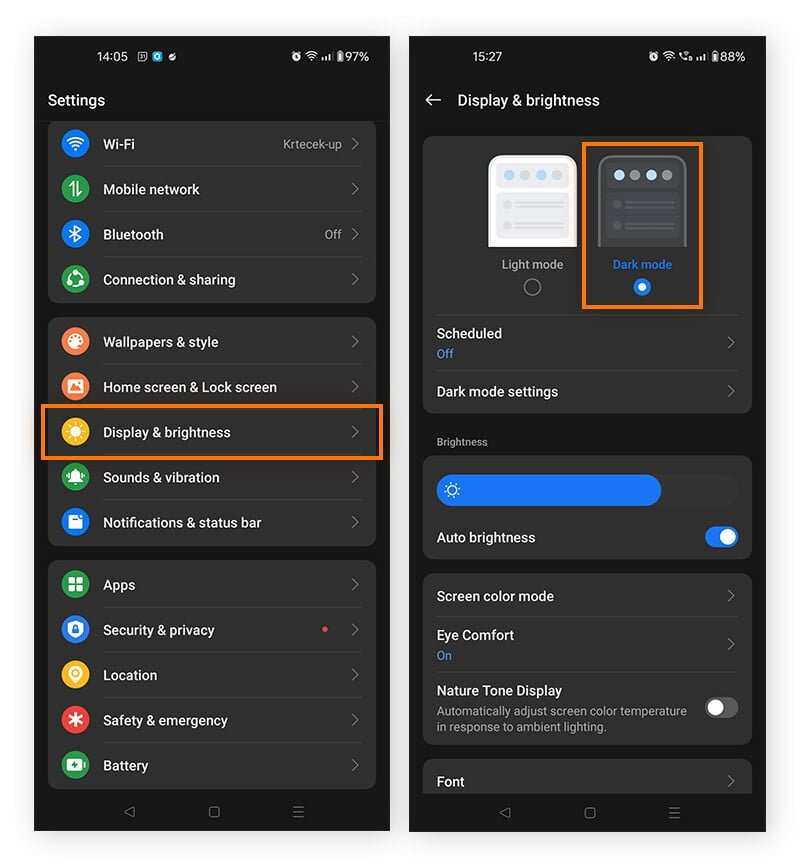
– Reduce screen brightness manually or enable auto-brightness. – Set a shorter screen timeout. – Use dark mode if supported, as it consumes less power on OLED screens.Manage App Notifications and Background Processes
– Turn off notifications for non-essential apps. – Restrict background data through app settings. – Close apps when they are not needed.Keep Software Updated
Always install the latest updates for Android and your apps. Developers often release patches that improve efficiency and fix bugs that could be causing excessive power drain.Monitor Battery Usage
Use your device’s battery menu to identify apps or services that consume the most power. Uninstall or disable apps that are unnecessary or draining excessive energy.Proper Charging Habits
– Avoid letting your battery fully drain frequently. – Do not overcharge your phone; unplug it once it reaches 100%. – Use original or high-quality chargers.Additional Tips for Maintaining Battery Health
– Avoid exposing your phone to high temperatures. – Replace old batteries when performance declines significantly. – Use battery health apps to monitor your battery’s condition.When to Seek Professional Help
If you’ve tried all these tips and your phone’s battery still dies quickly, it might be time to seek professional assistance. Your device could have a hardware problem, or the battery might need replacing. Visit an authorized repair shop or contact customer support for guidance. By taking these steps and understanding the factors that contribute to battery drain, you can improve the lifespan of your Android phone’s battery significantly. Regular maintenance, smart usage habits, and timely upgrades will ensure your device lasts longer between charges.Frequently Asked Questions
How can background apps affect my Android phone’s battery life?
Apps running in the background consume power even when you’re not actively using them. They can refresh data, send notifications, and perform tasks, gradually draining your battery. To conserve energy, close unnecessary apps and restrict background activity for apps you don’t need running constantly.
What impact do screen brightness and display settings have on battery duration?
High screen brightness and certain display settings, such as auto-rotate or high refresh rates, increase power consumption. Lowering the brightness or switching to adaptive brightness, as well as adjusting display timeout settings, helps extend your battery life significantly.
How do software updates influence my phone’s battery performance?
Software updates often include improvements that optimize system efficiency and fix bugs that cause battery drain. Ignoring updates can lead to increased power consumption, so it’s best to keep your device updated to benefit from these enhancements.
In what ways do connectivity options drain my Android’s battery quickly?
Features like Wi-Fi, Bluetooth, GPS, and mobile data use a considerable amount of power when active. Keeping these services on when not needed, especially location services constantly tracking your position, accelerates battery depletion. Turn off or disable unnecessary connectivity features to save power.
Can battery health impact how quickly my Android device loses charge?
Over time, batteries degrade and hold less charge, leading to faster drain and reduced usage time. If your battery’s health deteriorates, consider replacing it to restore better performance and prolong your device’s lifespan.
Final Thoughts
La raison pour laquelle votre téléphone Android se décharge si rapidement peut souvent résider dans l’utilisation excessive des applications ou des fonctionnalités en arrière-plan. Les notifications constantes, la luminosité élevée et le Wi-Fi ou Bluetooth activés peuvent également accélérer la drain de la batterie. Vérifier ces réglages et fermer les applis inutilisées aide à prolonger la durée de vie de la batterie. En résumé, why does my android phone battery die so fast ? La réponse réside dans la gestion de l’utilisation, des paramètres et des applications. En optimisant ces éléments, vous pouvez améliorer la longévité de votre batterie et éviter les décharges rapides.
Similar Posts































