What Is The Difference Between Android Tv And Fire Tv
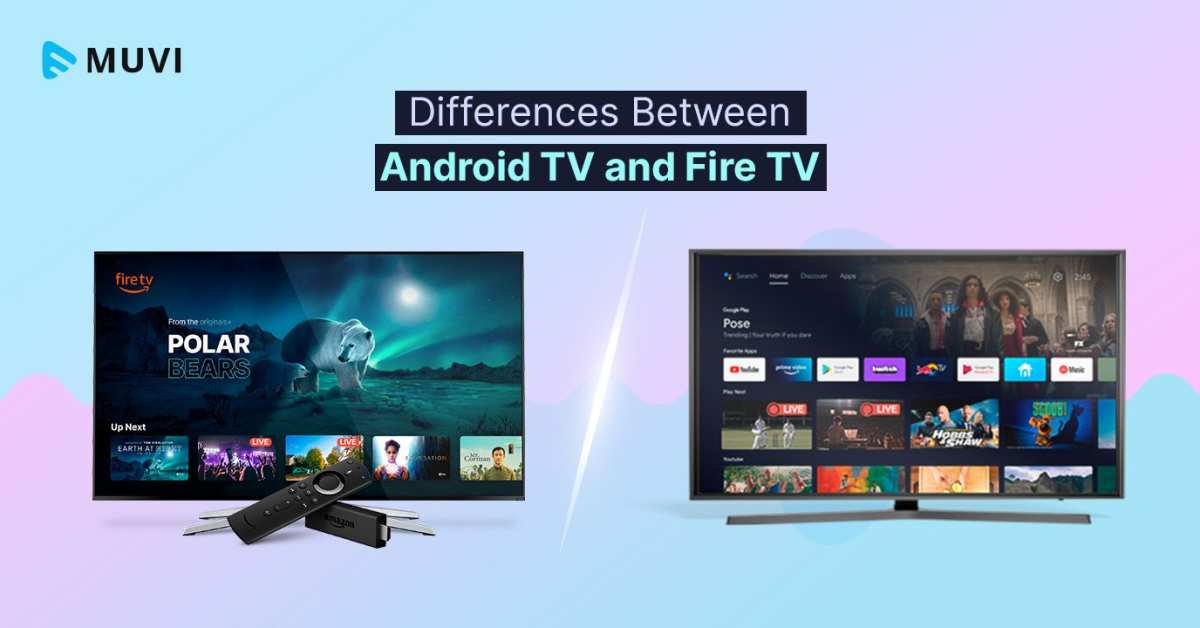
The difference between Android TV and Fire TV lies mainly in their user interface, app availability, and integration options. **Android TV offers a more customizable experience with access to the Google Play Store, while Fire TV is closely tied to Amazon’s ecosystem and services.** When comparing the two, you’ll notice unique features that cater to different preferences. Understanding these distinctions helps you choose the device that best fits your entertainment needs without feeling overwhelmed.

What Is the Difference Between Android TV and Fire TV?
Understanding the differences between Android TV and Fire TV can feel overwhelming at first, especially when you’re trying to choose the best streaming device for your home. Both platforms offer a rich selection of apps, smooth streaming, and easy-to-use interfaces, but several key features set them apart. In this section, we’ll look closely at what makes each platform unique, so you can make an informed decision based on your needs, preferences, and budget.
Overview of Android TV and Fire TV
Before diving into specific differences, let’s briefly review what Android TV and Fire TV are.
Android TV is a smart TV platform developed by Google. It’s built into many smart TVs and also available as a standalone device like the Xiaomi Mi Box or Sony’s Android TV models. Android TV offers access to Google Play Store, Google Assistant, and a wide variety of apps and games.
Fire TV, created by Amazon, is a streaming media player that connects to your TV. It runs on a customized version of Android, called Fire OS, and provides access to Amazon’s ecosystem, including Prime Video, Alexa voice control, and numerous third-party apps.
Hardware Options and Compatibility
One of the first things to consider is what hardware each platform supports and how flexible each system is.
Android TV Devices
- Built-in smart TVs from brands like Sony, Sony Bravia, Philips, and others
- External streaming boxes like Xiaomi Mi Box, Nvidia Shield TV, and TCL models
- Supporting a broad range of devices, with varying prices and features
Fire TV Devices
- Amazon’s own streaming sticks, such as Fire TV Stick Lite, Fire TV Stick 4K, and Fire TV Cube
- Fire TV editions integrated into smart TVs from brands like Toshiba, Insignia, and others
- Limited to Amazon’s ecosystem but offers an easy setup process
Operating System and User Interface
The user experience differs significantly due to the operating systems and interfaces.
Android TV Interface
Android TV features a clean, minimalist interface with a focus on content discovery. The home screen displays rows of recommended apps, movies, or shows, based on your viewing habits. Google Assistant is integrated into the interface, enabling voice control and quick searches across apps and services.
Fire TV Interface
Fire TV offers a highly customizable homepage, emphasizing Amazon’s content like Prime Video and Amazon Music. The interface prominently displays your favorite apps, recent content, and personalized recommendations. Alexa voice control is deeply integrated, allowing easy search and device control.
Content Library and App Support
Both platforms provide access to thousands of apps, but differences exist in the ecosystem.
Android TV Content and Apps
- Access to Google Play Store, offering a wide variety of apps, games, and streaming services
- Supports popular apps like Netflix, Hulu, Disney+, YouTube, and more
- Some apps are optimized better for Android TV’s interface
Fire TV Content and Apps
- Access to Amazon Appstore, which features most major streaming apps
- Strong integration with Amazon Prime Video and Amazon Music
- Supports popular apps like Netflix, Hulu, Disney+, YouTube, and more, with some exclusives
Voice Control and AI Integration
Voice commands have become essential in smart TVs, but each platform uses different virtual assistant technology.
Android TV with Google Assistant
Google Assistant allows you to control your TV, search for content, get weather updates, and control smart home devices. You can activate it through the remote or via voice commands. The assistant offers detailed responses and integration with Google services.
Fire TV with Alexa
Amazon’s Alexa provides voice control for searching content, opening apps, controlling smart home gadgets, and even ordering products. Alexa is known for its wide skill set and integration with Amazon’s ecosystem, making it a favorite for those already invested in Amazon products.
Pricing and Value
Cost can influence your decision heavily.
Android TV Devices
- Prices vary depending on the hardware, starting from budget-friendly options around fifty dollars for basic streaming sticks to over two hundred dollars for premium devices like Nvidia Shield
- Many smart TVs with Android TV come at different price points, often providing a better value when built-in
Fire TV Devices
- Most Fire TV sticks are affordable, with prices starting at around thirty dollars for the Lite model and increasing for 4K or Cube options
- Great value for Amazon Prime members due to the tight integration with Amazon’s content and services
Privacy and Data Sharing
Privacy concerns can influence user choice, especially with smart devices collecting viewing data.
Android TV Privacy
Android TV, like other Google products, collects data to personalize content and improve services. You can adjust privacy settings through your Google account, but some data sharing remains automatic.
Fire TV Privacy
Fire TV devices also collect data to optimize recommendations and ads. Amazon provides options to limit data sharing, but some level of data collection is standard to enhance user experience.
Ease of Use and Setup
Finally, consider how easy it is to set up and navigate each platform.
Setting Up Android TV
Setup generally involves connecting the device, signing into your Google account, and installing desired apps. The process is straightforward, especially on built-in smart TVs.
Setting Up Fire TV
Fire TV devices are known for quick setup, often just needing internet connection and signing into your Amazon account. The interface guides you step-by-step, making it accessible even for non-tech-savvy users.
Compatibility with Smart Devices and Ecosystems
Your existing smart home setup might influence your choice.
Android TV Compatibility
- Works seamlessly with Google smart home devices such as Nest thermostats, Google Home speakers, and more
- Supports many third-party smart home products with Google Assistant integration
Fire TV Compatibility
- Works well with Amazon Alexa-compatible devices, including smart lights, cameras, and smart plugs
- Offers routines and automation via Alexa that can control multiple devices simultaneously
Final Thoughts on Choosing Between Android TV and Fire TV
Choosing between Android TV and Fire TV ultimately depends on your preferences, existing devices, and which ecosystem you prefer. If you’re deeply integrated with Google services and want a wide range of device options, Android TV fits well. On the other hand, if you’re invested in Amazon Prime and want a user-friendly device with excellent Alexa voice control, Fire TV is the way to go.
Both platforms offer excellent streaming experiences, but the subtle differences in interface, app ecosystems, and smart home compatibility can make a significant difference in your satisfaction. Consider how you use your smart devices, your content preferences, and your budget when making your choice. Whichever platform you pick, both are capable of transforming your TV into a hub of entertainment and smart home control.
Frequently Asked Questions
How do the user interfaces differ between Android TV and Fire TV?
Android TV offers a customizable interface that allows users to personalize the layout and app organization. It provides a clean, streamlined menu with easy access to recommended content, apps, and settings. Fire TV, on the other hand, features a more branded interface focused on Amazon services. Its home screen prominently displays Amazon content, along with recommendations based on user viewing habits, which can make navigation feel more integrated with Amazon’s ecosystem.
What are the differences in app availability and compatibility on Android TV and Fire TV?
Android TV provides access to the Google Play Store, granting a wide selection of apps, games, and streaming services. It supports both Google and third-party apps, offering greater flexibility for users. Fire TV mainly relies on the Amazon Appstore, with some apps available through sideloading. While Fire TV covers most popular streaming apps, it might have fewer options for certain niche or less common applications compared to Android TV.
How does content search and voice assistant functionality vary between Android TV and Fire TV?
Android TV integrates Google Assistant, enabling voice commands for searching content, controlling smart home devices, and getting answers to questions. Fire TV uses Alexa, which also offers voice search, device control, and smart home features. Both platforms provide voice recognition capabilities, but the effectiveness and available commands can differ based on the voice assistant’s ecosystem and integration with other devices.
In what ways do hardware options differ between devices running Android TV and Fire TV?
Devices with Android TV come from various manufacturers like Sony, Sony, and Hisense, offering multiple design choices and hardware configurations. Fire TV is primarily developed by Amazon, with popular devices such as Fire TV Stick and Fire TV Cube, designed to be affordable and easy to set up. The hardware specifications, including processing power, resolution support, and additional features like voice control, vary across devices within both ecosystems.
What are the differences in system updates and software support for Android TV and Fire TV?
Android TV devices receive updates based on the manufacturer’s support policies, which can vary significantly. Some devices get regular updates, while others may lag behind. Fire TV devices typically receive software updates directly from Amazon, ensuring consistent updates across their hardware lineup. This can result in a more uniform experience with Fire TV, though the timing of updates depends on Amazon’s release schedule.
Final Thoughts
Android TV offers a seamless experience with a wide range of apps and customization options, making it versatile for users. Fire TV provides a user-friendly interface with integrated Amazon services, ideal for Prime members.
While Android TV emphasizes flexibility, Fire TV focuses on simplicity and ecosystem integration.
In conclusion, what is the difference between android tv and fire tv lies in their customization, app availability, and ecosystem focus. Both cater to different preferences, ensuring options for a broad audience.

Similar Posts