What Does It Mean When It Says Android Tv
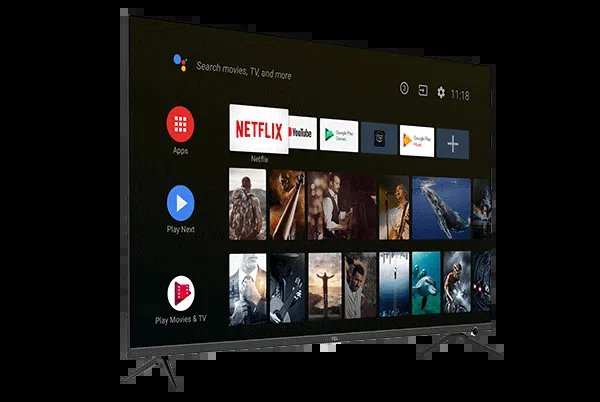
When you see the phrase ‘what does it mean when it says android tv,’ the answer is simple: your TV runs on Google’s Android platform, allowing access to apps and services similar to a smartphone. **It means your TV offers a smart experience with a user-friendly interface.** But understanding the specifics can be tricky without details.
Knowing this helps you navigate your device better and utilize its features fully. Whether browsing apps or customizing settings, recognizing what Android TV entails makes your viewing experience more enjoyable.

What Does It Mean When It Says Android TV?
When you see the words “Android TV” on your screen or product, it can leave you wondering exactly what it is and what it does. In simple terms, Android TV refers to a type of smart television operating system developed by Google. It’s built on the Android platform, which many people recognize as the operating system for smartphones and tablets. But when it comes to TVs, Android TV offers a whole new level of entertainment, convenience, and customization. Let’s explore in detail what Android TV really means and how it impacts your viewing experience.
Understanding Android TV: The Basics
At its core, Android TV is a version of Google’s Android operating system designed specifically for larger screens like televisions. Unlike traditional TV systems with limited apps and features, Android TV brings a variety of smart capabilities directly to your TV.
Here are some key features of Android TV:
- Access to a vast app library: You can download apps from the Google Play Store, just like on your smartphone.
- Voice control: Use Google Assistant to search or control your TV with your voice.
- Personalized recommendations: The system suggests shows, movies, or apps based on your viewing habits.
- Integration with other devices: Android TV easily connects with smartphones, smart home devices, and more.
When you see the term “Android TV” on your device or in a product description, it indicates this kind of smart, versatile system that allows you to enjoy a wide array of digital content.
Why Is Android TV Different From Other Smart TV Systems?
Many smart TVs come with their own operating systems, like Tizen (used by Samsung) or webOS (used by LG). Android TV stands out because of its open-source nature and access to Google’s extensive ecosystem.
Here’s a comparison to clarify the differences:
| Feature | Android TV | Other Smart TV Systems |
|---|---|---|
| App availability | Access to Google Play Store with thousands of apps | Limited app stores, often fewer options |
| Voice control | Built-in Google Assistant support | Varying voice assistants, some less capable |
| Customization | Flexible interface with customizable home screens | More restricted interface |
| Compatibility | Works well with Android smartphones and devices | Less integration unless specified |
Basically, Android TV offers a more open, flexible experience, making it easier for users to find and use their preferred apps, control devices with their voice, and connect with other gadgets they own.
How Android TV Enhances Your Viewing Experience
Many people seek smart TVs to make their entertainment more fun and accessible. Android TV aims to do just that by providing features that make it easier to find and watch content.
Some of the ways Android TV improves your viewing include:
- Faster content discovery: The home screen displays your favorite apps, trending titles, and personalized suggestions, helping you find what to watch quickly.
- Voice search: Instead of typing, you can simply say what you want to see, saving time and effort.
- Streaming options: Popular platforms like Netflix, Hulu, Disney+, and YouTube are available, giving you access to a huge library of movies and shows.
- Screen mirroring: Easily share content from your mobile device to the big screen without complicated setups.
- Smart home integration: Control compatible smart devices like lights, thermostats, and security cameras directly through your TV interface.
This makes Android TV not just a device for watching TV but a hub for controlling your digital life.
The Hardware Behind Android TV
Android TV isn’t just about software; it’s also a term for a variety of devices designed to run this operating system. You can find Android TV in:
- Smart TVs: Many brands offer Android TV models, allowing seamless integration with the software.
- Streaming devices: Devices like Google’s Chromecast with Google TV or third-party Android TV sticks and boxes turn regular TVs into smart ones.
- Set-top boxes: Some cable companies or internet providers bundle Android TV boxes with their services.
Whatever the device, the goal remains the same: delivering an enjoyable, rich viewing experience with easy access to apps, content, and smart features.
Setting Up Android TV: What To Expect
Getting started with Android TV is straightforward, even if you’re not tech-savvy. Here’s what typically happens during setup:
- Power on your device: Turn on your Android TV or compatible device.
- Select language: Choose your preferred language for the interface.
- Connect to Wi-Fi: Use your remote to connect to your home Wi-Fi network.
- Sign in with Google: Enter your Google account details to access apps, subscriptions, and settings.
- Download apps and customize: Browse the Google Play Store and install your favorite apps and streaming services.
Once set up, you’re ready to enjoy everything Android TV offers without complex configurations.
What Are Common Challenges With Android TV?
While Android TV offers many benefits, some users face challenges that are good to understand:
- Updates and bugs: Sometimes, software updates may cause bugs or glitches, needing fixes or resets.
- Compatibility issues: Not all apps work perfectly on every Android TV device, especially older models.
- Navigation: The UI might seem overwhelming for new users, especially if transitioning from traditional TV systems.
- Privacy concerns: As with smartphones, some users worry about data collection and privacy, especially with voice commands.
Being aware of these issues helps you better manage your device and enjoy its features.
Different Brands and Android TV Devices
Many brands produce Android TV devices, each offering unique features and designs. Some popular options include:
- Sony: Known for high-quality picture and sound, Sony Android TVs are a favorite among many users.
- Philips, TCL, and Sharp: Offer affordable options with decent performance and features.
- Google Chromecast with Google TV: Turns any TV into a smart device by plugging into an HDMI port.
- NVIDIA Shield TV: Popular among tech enthusiasts for its performance and gaming capabilities.
Choosing the right Android TV device depends on your budget, needs, and preferred features.
Is Android TV Safe and Secure?
Security is an important factor when using any connected device. Android TV benefits from Google’s security features, but users must also follow best practices:
- Keep your device updated to benefit from the latest security patches.
- Use strong, unique passwords for your Google account.
- Review app permissions before installation.
- Be cautious when granting access to your smart home devices or sensitive information.
When used properly, Android TV maintains a secure environment for streaming and controlling smart devices.
Understanding what Android TV means helps you appreciate the many ways it can enhance your entertainment and smart home setup. It’s more than just a smart TV platform — it’s a bridge to a world of digital content, connected devices, and personalized experiences. Whether you’re watching the latest blockbuster, catching up on your favorite series, or controlling your smart home gadgets, Android TV serves as an accessible, flexible, and user-friendly interface. As technology continues to evolve, Android TV is likely to become an even more integral part of our digital lives, making it easier than ever to enjoy the content and connectivity we crave.
Frequently Asked Questions
What features differentiate Android TV from other smart TV platforms?
Android TV offers a wide selection of apps through the Google Play Store, including popular streaming services, games, and utilities. Its user-friendly interface allows for easy navigation and search capabilities via voice commands or keyboard. Additionally, Android TV supports Google Assistant integration, enabling users to control their devices, ask questions, and manage smart home devices seamlessly.
How does an Android TV enhance the overall viewing experience?
Android TV provides access to a diverse range of content tailored to user preferences. Its personalized recommendations help users discover new shows, movies, and apps quickly. The platform also supports high-quality streaming with support for 4K and HDR content, ensuring crisp visuals and immersive audio to improve entertainment quality.
Can I install apps and games on an Android TV, and how does this benefit me?
Yes, Android TV allows users to download and install apps and games directly from the Google Play Store. This flexibility broadens entertainment options, letting users access popular gaming titles, streaming platforms, fitness apps, and more. It turns the TV into a versatile multimedia device suitable for various interests.
What hardware requirements are necessary for an Android TV to work properly?
Android TV typically requires a compatible smart TV or streaming device with sufficient processing power, RAM, and storage. Most modern Android TV models come pre-installed with the system, but for custom builds or updates, a stable internet connection and a display that supports HD or 4K resolution are essential. Ensuring compatibility with the latest Android TV version guarantees smooth operation and access to new features.
How does Android TV integrate with other smart devices in my home?
Android TV seamlessly connects with various smart home gadgets, thanks to Google Assistant integration. Users can control smart lights, thermostats, cameras, and more directly through their TV using voice commands. This interoperability makes managing your entire smart home ecosystem straightforward and convenient from a single interface.
Final Thoughts
Lorsque vous voyez ‘android tv’ sur un appareil, cela signifie qu’il fonctionne avec le système d’exploitation Android conçu pour les téléviseurs.
Ce système offre une interface conviviale, facilitant l’accès à vos applications préférées, comme Netflix ou YouTube.
En somme, ‘what does it mean when it says android tv’ indique que votre téléviseur peut profiter de fonctionnalités intelligentes et d’une compatibilité étendue avec diverses applications.

Similar Posts