Battery Performance: Iphone Vs Android Smartphones Battery
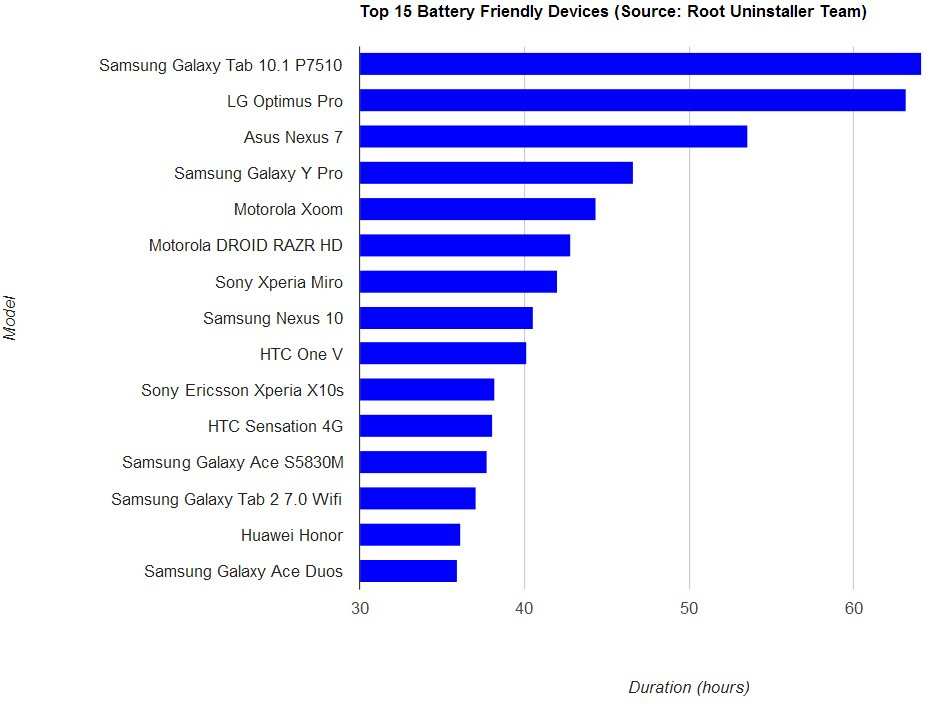

Comparing Battery Life: iPhone vs. Android Smartphones
When it comes to smartphones, battery life remains one of the most critical features users consider. Whether you rely on your device for work or entertainment, a long-lasting battery keeps you connected and productive throughout the day. But how do iPhones hold up against Android phones? This question sparks much debate among tech lovers and everyday users alike. Let’s explore this topic in depth to understand the differences, common misconceptions, and what factors influence how long your phone’s battery lasts.Understanding How Smartphones Use Battery Power
Before diving into the specifics of iPhone and Android battery life, it helps to understand what drains a smartphone’s battery. Several components and activities contribute to battery consumption:- Screen usage: The screen is the biggest power hog in most devices. Brightness levels and screen activity significantly affect battery drain.
- Processor activity: Running intensive apps, gaming, or multitasking requires more processing power, which increases energy consumption.
- Background apps: Apps that update or run in the background use battery even when you’re not actively using them.
- Connectivity features: Using Wi-Fi, Bluetooth, GPS, and mobile data can lead to faster battery drain, especially if these services are running constantly.
- Battery health: Over time, the battery’s ability to hold a charge diminishes, leading to shorter usage periods between charges.
The Design and Hardware Factors Impacting Battery Life
The physical design and internal hardware of smartphones play a vital role in battery longevity. Let’s examine some main hardware influences:Screen Size and Resolution
Larger screens with higher resolutions tend to consume more power. For example, a 6.7-inch OLED display, common in many flagship Android phones, requires more energy than a smaller display. The type of display matters too—OLED screens often use less power to display black, while LCD screens might use more overall energy.Battery Capacity (mAh)
Battery capacity, measured in milliampere-hours (mAh), indicates how much energy a device can store. Larger capacity batteries typically last longer, but this isn’t the only factor at play. For example:| Device | Battery Capacity (mAh) | Estimated Screen Time |
|---|---|---|
| iPhone 13 | 3,240 | up to 17 hours |
| Samsung Galaxy S21 | 4,000 | up to 11 hours |
Processor Efficiency
Newer processors are more energy-efficient. Apple’s custom-designed A-series chips have long been praised for their optimized performance and low power consumption. Many Android phones now feature processors like Snapdragon’s latest chips, which also focus on efficiency. The better the processor manages power, the longer your phone can operate without a charge.Operating Systems and Software Optimization
While hardware impacts battery life, software optimization plays an equally crucial role. Operating systems (OS) manage how hardware components work together and can either conserve or drain battery life.iOS and Battery Optimization
Apple tightly controls iOS, allowing it to optimize how the system manages power. Features like background app refresh, automatic brightness adjustment, and intelligent app management help stretch battery life. iOS also limits how much data apps can use in the background, reducing unnecessary drain.Android’s Flexibility and Customization
Android offers more customization options, which can be both a blessing and a curse. Many manufacturers include their own battery management tools and settings to help improve longevity. However, the open nature of Android sometimes leads to inefficient app behavior or background activity if users don’t manage settings carefully. Updates and OEM-specific tweaks can significantly affect battery performance.Real-World Battery Usage Scenarios
Theoretical battery capacity or optimized software might not tell the full story. Real-world usage depends on various factors, including user habits.Browsing and Streaming
Watching videos, browsing websites, or streaming music consumes a lot of power, especially if the screen stays on for extended periods. Devices with larger batteries might last longer in these scenarios, but if you keep your screen brightness high and use 4G or 5G, drain increases.Gaming
Gaming is intensive on the processor and GPU, causing faster battery depletion. Many Android phones with high-refresh-rate screens and powerful hardware are built for gaming but may run out of juice quicker during gameplay.Standby Usage
When your phone is idle but connected to networks and apps check for updates, battery still drains. Apple’s software tends to manage background activity better, giving iPhones a slight advantage in standby hours.Battery Saving Tips for Both iPhone and Android Users
No matter what device you use, there are practical steps to extend battery life:- Lower screen brightness: Bright screens use more power. Use auto-brightness or manually reduce brightness.
- Disable unnecessary connectivity: Turn off Wi-Fi, Bluetooth, or GPS when not needed.
- Close background apps: Especially apps that use location or data in the background.
- Enable battery saver modes: Both iOS and Android offer built-in features to limit background activity and reduce power usage.
- Update apps and software: Developers often improve battery efficiency with updates.
Are There Significant Differences in Battery Life Between iPhone and Android Devices?
While some general trends exist, the answer varies a lot depending on specific models and user habits. On average:- iPhones: Tend to have optimized hardware and software, providing good battery life that often lasts a full day for most users.
- Android phones: Offer a broad range of options. Flagship models with large batteries and efficient processors can match or outperform iPhones, but budget or older models might struggle with longevity.
Frequently Asked Questions
How do iPhone batteries compare to Android smartphones in terms of longevity?
iPhones often benefit from optimized hardware and software integration, which can lead to more efficient power management. While both platforms have models with varying battery capacities, iPhones tend to perform well in daily use scenarios, providing consistent battery life. However, high-end Android devices sometimes have larger batteries that can offer longer usage times, especially during intensive tasks. Overall, the longevity depends on individual device specifications and usage habits.
What factors influence battery life differences between iOS and Android devices?
Battery life varies based on hardware components like processor efficiency, battery capacity, and display technology. Software optimization plays a significant role too; iOS is closely integrated with hardware, which can improve power efficiency. Android devices may have more customizable settings and a wider range of hardware options, affecting battery performance differently. Background app activity, screen brightness, and network use also impact how long the batteries last on each platform.
Which platform offers better power-saving features to extend battery life?
Both iOS and Android provide power-saving modes designed to extend battery life. iOS offers a Low Power Mode that reduces background activity and visual effects. Android devices often include Battery Saver modes with adjustable settings, like limiting background data and disabling certain features. The effectiveness of these modes depends on how well they are implemented, but both platforms enable users to maximize their device’s battery lifespan when needed.
Are there any notable differences in charging speed between iPhones and Android smartphones?
Many Android smartphones support faster charging technologies, allowing them to reach higher battery levels in less time. Some Android devices can charge to 50% or more within 30 minutes, depending on the charger used. iPhones generally support fast charging as well, but their maximum charging speeds tend to be slightly lower. Overall, Android phones often have more advanced charging options, but actual speed varies based on the device and charger compatibility.
How does the display technology affect battery consumption on iOS and Android devices?
Display technology significantly impacts battery consumption for both platforms. OLED screens, common in high-end Android phones and some iPhones, can turn off individual pixels, providing better energy efficiency when displaying dark images. LCD screens, used in many budget devices, tend to consume more power, especially at high brightness levels. Choosing a device with an efficient display can help extend battery life during regular usage.
Final Thoughts
In conclusion, when comparing battery life, ‘vs. android smartphones battery life’ reveals notable differences. iPhones typically offer longer daily usage on a single charge due to optimized hardware and software integration. Android devices vary widely, with some models providing impressive stamina and others falling short. Choosing between the two depends on your preferences for device flexibility versus consistent battery performance. Ultimately, understanding these distinctions helps you select a smartphone that best fits your lifestyle.
Similar Posts































