How To Make Your Tiktok Account Public On Android
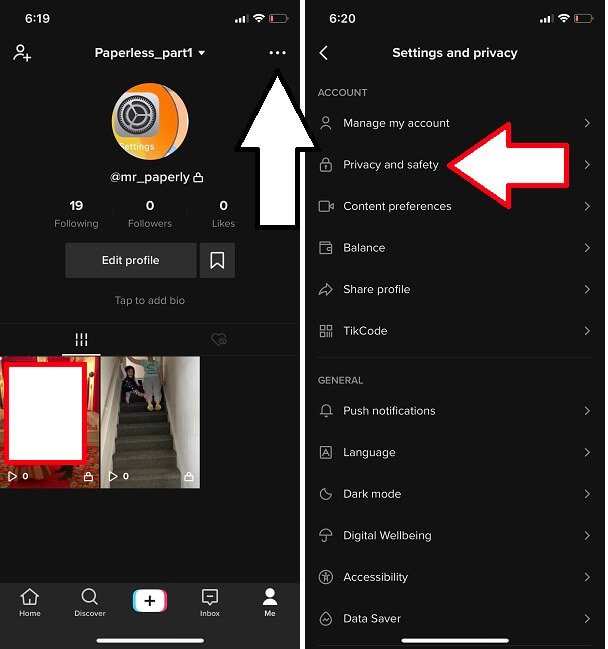
To make your TikTok account public on Android, you simply need to change your privacy settings. **Go to your profile, tap the three dots, and select Privacy.** Then, toggle the “Private Account” switch off. This quick step allows anyone to view your videos without restrictions. Knowing how to make your TikTok account public on Android is straightforward and lets you share your content more freely. No complicated processes—just a few taps, and your profile becomes accessible to everyone.
How to Make Your TikTok Account Public on Android
Making your TikTok account public on an Android device is a straightforward process that allows your videos and profile to be visible to everyone. Whether you want to grow your audience, share your creativity, or simply enjoy connecting with others, setting your account to public plays a vital role. In this section, we’ll walk through every step in detail, ensuring you have no trouble changing your privacy settings.
Understanding Privacy Settings on TikTok
Before diving into the steps, it’s helpful to understand what privacy options TikTok offers. When your account is set to private, only approved followers can see your videos and profile information. Conversely, a public account allows anyone to view your content, making it ideal for creators seeking a broader audience.
Key points to consider:
- Public accounts increase content visibility on the platform.
- Private accounts restrict content to approved followers.
- You can switch between private and public at any time.
Adjusting your privacy settings is quick, but knowing the implications helps you make an informed decision about your social media presence.
Step-by-Step Guide to Making Your TikTok Account Public on Android
Follow these detailed steps to change your TikTok account from private to public easily:
Access Your TikTok Profile
First, open your TikTok app on your Android device. Locate the profile icon, which is usually at the bottom right of the screen, and tap it to go to your profile page.
Open Settings and Privacy Menu
Once on your profile:
- Tap the three dots or hamburger menu icon in the top right corner to access the menu.
- From the dropdown, select “Settings and Privacy.”
Navigate to Privacy Settings
In the Settings and Privacy menu:
- Scroll down to find the “Privacy” section.
- Tap on “Privacy” to open the privacy options.
Change the Account Privacy Option
Within the Privacy settings:
- Look for the toggle labeled “Private Account.”
- If the toggle is active (colored), tap it to deactivate, making your account public.
- Once deactivated, the toggle will turn gray, indicating your account is now accessible to everyone.
Verify Your Changes
After switching to public:
- Return to your profile and check that your content is visible to others.
- Consider checking your profile from another account or incognito mode to confirm your account is now public.
Tips for Managing Public Accounts
Changing your account to public is simple, but keep these tips in mind:
- Review your profile information to ensure it presents the image you want to share publicly.
- Be aware that your videos will be visible to all users, including potential followers and viewers from around the world.
- Use appropriate privacy settings for individual videos if you want to restrict certain content, even on a public account.
Additional Privacy Considerations
While making your account public is beneficial for reach, consider balancing privacy:
- If you share personal details, be cautious about revealing sensitive information.
- Use the “Comment Privacy” options to control who can comment on your videos.
- Review your follower list regularly to ensure you’re comfortable with who can see your content.
Troubleshooting Common Issues
Sometimes, changing privacy settings may not work as expected. Here are common problems and solutions:
Privacy toggle is greyed out or not responsive
- Ensure your TikTok app is updated to the latest version.
- Restart your device and try again.
- If issues persist, reinstall the app.
Account still appears private after changes
- Double-check the privacy toggle again.
- Log out and log back in.
- Contact TikTok support if necessary.
Making your TikTok account public on Android is an easy process that can significantly impact how many people see your videos. By following the detailed steps and tips outlined above, you ensure your content reaches a wider audience while maintaining control over your privacy. Remember, adjusting your privacy settings is flexible— you can switch your account back to private whenever you choose. Keep your profile engaging, respectful, and aligned with your online goals.
Frequently Asked Questions
What steps can I follow to change my TikTok account from private to public on an Android device?
To make your TikTok account public on Android, open the TikTok app and go to your profile. Tap the three-dot menu icon in the top right corner to access settings. Select “Privacy” from the options. Under the “Account Privacy” section, toggle off the “Private Account” option. Once disabled, your account becomes visible to everyone, allowing others to view your videos and follow you without approval.
How do I verify if my TikTok account is now visible to the public after changing privacy settings?
After switching your account to public, visit your profile and look for the visibility indicator, which should no longer display a lock icon. You can also log out and search for your username to see if your profile appears in search results. Additionally, ask a friend who isn’t following you to check if they can find and view your profile on TikTok.
Can I make my TikTok account public while using the app on an Android phone without deleting any data?
Yes, you can change your account privacy settings without deleting any data. Simply navigate to your profile, access the settings menu, select “Privacy,” and turn off the “Private Account” toggle. This process only alters your privacy status and does not affect your videos, followers, or other account information.
Are there any restrictions on switching my TikTok account from private to public on Android?
There are no restrictions on changing your TikTok account privacy from private to public. You can update these settings at any time based on your preference. Keep in mind, making your account public means your videos will be accessible to everyone, so consider your privacy before making the switch.
What should I do if I cannot find the privacy settings to switch my TikTok account to public on Android?
If you cannot locate the privacy settings, ensure you have the latest version of the TikTok app installed. Update the app if necessary. Once updated, open your profile, tap the three-dot menu, and navigate to “Settings and Privacy.” From there, select “Privacy,” where you will see the option to toggle off “Private Account.” If issues persist, restarting your device or reinstalling the app can also help.
Final Thoughts
Pour rendre votre compte TikTok public sur Android, accédez à votre profil. Ensuite, appuyez sur l’icône des trois points pour ouvrir le menu des paramètres. Dans la section confidentialité, désactivez l’option « Compte privé ».
En suivant ces étapes simples, vous pouvez facilement rendre votre compte visible au public. aider à atteindre un public plus large.
En résumé, pour faire ‘how to make your tiktok account public on android’, suivez ces instructions simples. Cela vous permet d’augmenter l’engagement et d’attirer plus de followers.

Similar Posts