How To Make Tv Tuner For Android Step-By-Step Guide

How to Make a TV Tuner for Android
Building a TV tuner for your Android device might sound complicated at first, but with the right steps and a little patience, you can do it yourself. This guide will walk you through the process of creating a basic TV tuner that connects to your Android smartphone or tablet, allowing you to watch live TV anywhere you go. Throughout this article, we’ll cover everything from selecting the right hardware components to setting up your Android device to receive TV signals effectively. Whether you’re a tech enthusiast or just someone eager to access your favorite shows on the go, this step-by-step approach will help you create a functional TV tuner tailored to your needs.Understanding the Basics of TV Tuner for Android
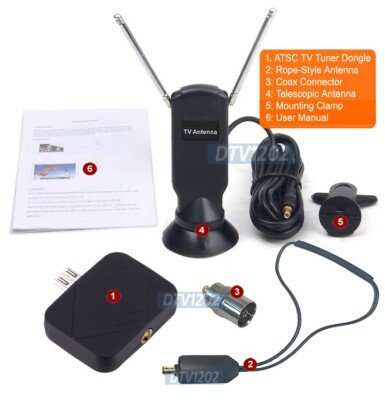
Before jumping into building your TV tuner, it’s important to understand what a TV tuner does and how it works with Android devices. A TV tuner is a hardware device that receives television signals and converts them into digital data your device can process. These signals can come from various sources such as terrestrial broadcast, cable, or satellite. For Android devices, a TV tuner typically connects via USB, Wi-Fi, or Bluetooth, and requires specific software or apps to display live television. The key components involved are:- Hardware tuner device: Usually a USB dongle or small external box with a tuner chip.
- Antennas: To receive the broadcast signals; size and type depend on your location and signal source.
- Android device: Smartphone or tablet compatible with OTG (On-The-Go) or other connection methods.
- Software or app: To process and display the live TV content.
Selecting Hardware Components for Your DIY TV Tuner
The success of your TV tuner depends on choosing the right hardware. Let’s explore what you’ll need:Choosing a Compatible Tuner Chipset
The core of a TV tuner is its chipset, which handles signal processing. Some common chipsets include:- RTL2832U: A popular DVB-T/DAB/FM tuner chipset that supports digital TV signals.
- AF9033/AF9035: Compatible with DVB-T and DVB-T2 signals.
- Realtek RTL2832U + R828D: A combination often used in small, inexpensive USB dongles.
Picking the Right Antenna
An antenna’s strength and range play a critical role in receiving clear signals. Consider these factors:- Type: Indoor or outdoor. Indoor antennas are suitable for urban areas with strong signals, while outdoor antennas work better in rural or mountainous regions.
- Frequency range: Make sure the antenna covers the broadcast frequencies in your area.
- Size and gain: Larger antennas with higher gain provide better signal reception for weak signals.
Choosing the Connection Method
Most hardware tuners connect to Android devices via USB. For this:- USB OTG (On-The-Go) cable: Allows your Android device to connect directly to USB devices like tuner dongles.
- Wireless options: Some tuners connect via Wi-Fi; ensure your Android device supports the necessary wireless protocols.
Assembling Your DIY TV Tuner
Once you’ve gathered your components, assembling your tuner is the next step. Follow these steps:Building the Hardware
1. **Connect the tuner chipset to the antenna:** Attach your antenna to the input port on the tuner device. 2. **Ensure proper power supply:** Some tuner modules may require an external power source; others can draw power from the USB connection. 3. **Connect the tuner to your Android device:** Use a USB OTG cable to link the tuner to your device. 4. **Secure the assembly:** Use casing or housing to protect your hardware, especially if using outdoor antennas.Testing Hardware Connection
After assembly:- Plug the tuner into your Android device using the OTG cable.
- Ensure the device recognizes the hardware. Most Android devices will prompt you to allow access or install necessary drivers.
- Use a compatible app to verify that signals are being received.
Setting Up the Software Environment
Once your hardware is ready, you’ll need the right software to view live TV. Here’s how:Choosing the Correct App
Select an app that supports external tuners. Some popular options include:- TVHeadend: An free, open-source TV streaming server you can set up on your Android device or a separate server.
- TuneIn Radio: Supports a limited selection but can be useful for some tuner hardware.
- Live TV apps: Many apps like Kodi or VLC can be configured to work with external tuners through plugins or extensions.
Installing and Configuring the App
Steps: 1. Download the app from the Google Play Store or sideload the APK if necessary. 2. Open the app and grant all required permissions. 3. Scan for available channels or input device settings manually. 4. Adjust the settings for optimal reception, such as signal strength, antenna type, and frequency.Optimizing Signal Reception
To improve your viewing experience:- Position your antenna for the best signal reception.
- Adjust the antenna orientation gradually while monitoring signal strength.
- Use signal boosters or amplifiers if signals are weak.
- Ensure your Android device is close enough to the antenna to avoid interference.
Additional Tips and Troubleshooting
– **Ensure your device supports OTG**: Not all Android devices handle OTG connections well. Check your device specifications beforehand. – **Update firmware and drivers**: Keep your hardware and apps updated to avoid compatibility issues. – **Check signal strength regularly**: Use apps that display signal quality to find the best antenna positioning. – **Use shielded cables**: To reduce interference, opt for high-quality, shielded USB cables. – **Experiment with antenna placement**: Sometimes slight adjustments significantly improve reception.Enhancing Your DIY TV Tuner Experience
Once your TV tuner setup is complete, you can explore additional features:- Recording Live TV: Use compatible apps to record your favorite programs for later viewing.
- Time-shifting: Pause and rewind live TV where supported.
- EPG (Electronic Program Guide): Integrate guides for easier channel browsing.
- Multi-channel recording: Set up a server to record multiple channels simultaneously.
Frequently Asked Questions
What hardware components are needed to build an Android TV tuner?
To build an Android TV tuner, you need a USB TV tuner dongle compatible with Android devices, a device with a USB port, and appropriate power supply if necessary. Additionally, ensure your Android device supports OTG (On-The-Go) functionality to connect external hardware. Installing the correct drivers or apps is also essential to enable the tuner to communicate effectively with your device.
How can I select the right app for my custom TV tuner on Android?
Choose an app that supports external TV tuner hardware and offers features such as channel scanning, electronic program guides, and recording options. Popular choices include TV tuner apps compatible with your specific device and hardware. Check user reviews and developer updates to ensure the app is reliable and regularly maintained for optimal performance.
What steps should I follow to connect a TV tuner to my Android device successfully?
First, connect the USB TV tuner to your Android device using an OTG adapter if needed. Next, launch a compatible TV tuner app and allow it to detect the connected hardware. Then, perform a channel scan based on your region’s broadcast frequencies. Once the scan completes, you can start viewing live TV channels directly on your device.
How do I troubleshoot common issues when making my Android TV tuner work?
Ensure your USB tuner is compatible with your device and that your device supports OTG functionality. Check if the tuner requires specific drivers or app permissions, and update them if necessary. Restart your device after connecting the hardware, and verify the app settings for proper configuration. If problems persist, test the tuner on another device or contact the manufacturer for support.
Is it necessary to root my Android device to use a custom TV tuner?
No, you usually do not need to root your Android device to use a USB TV tuner. Most compatible tuners work with standard Android permissions through USB OTG functionality. However, in some cases, rooting might provide additional control or access to advanced features, but it is not a requirement for basic TV tuner setup and operation.
Final Thoughts
Making a tv tuner for android involves choosing the right hardware components like a tuner chip and a compatible antenna. Develop an app that seamlessly connects with the hardware to receive and display signals. Test the device thoroughly to ensure clear reception and user-friendly operation. In conclusion, how to make tv tuner for android requires selecting suitable hardware and creating an intuitive app. Focus on integrating these elements smoothly to produce a functional device. Proper assembly and testing guarantee optimal performance.
Similar Posts































