Do Curved Monitors Reduce Eye Strain

How this helps: By having the entire screen surface at a more uniform distance from your eyes, a curved monitor can reduce the amount of refocusing your eyes need to do. This can lead to less fatigue in the eye muscles.
Think of it this way: Imagine looking at a very long, straight road. The sides of the road appear to converge in the distance. A curved monitor “straightens” this perceived convergence for the user.
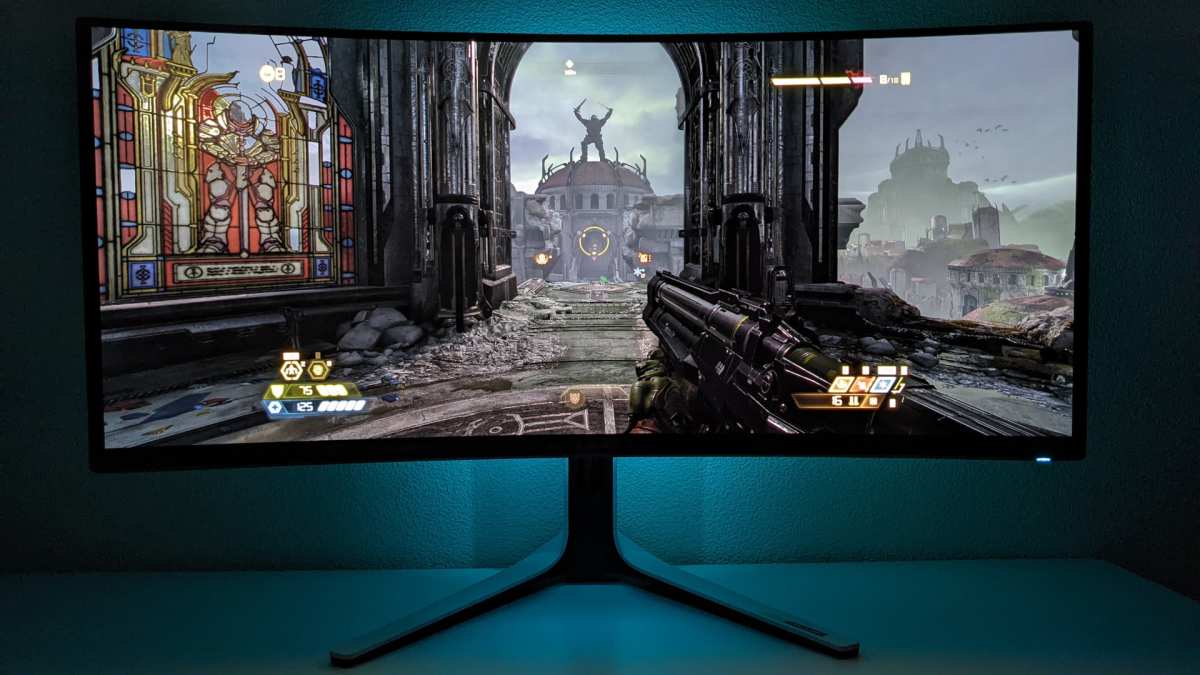
### Enhancing Immersion and Reducing Head Movement The wrap-around effect of a curved monitor can create a more immersive viewing experience. This can be especially beneficial for gaming and watching movies, pulling you deeper into the content.Indirect benefit: When you feel more immersed, you tend to keep your focus within the screen’s boundaries. This can indirectly reduce eye strain by minimizing the need to dart your eyes around or look away frequently. Furthermore, for ultrawide monitors, it reduces the need for excessive head turning to take in the whole screen, which can also contribute to neck and shoulder strain alongside eye strain.
## Do Curved Monitors *Always* Reduce Eye Strain? It’s important to temper expectations. While curved monitors offer potential benefits, they are not a magic bullet for all eye strain. Here’s why: * Individual Differences: Everyone’s eyes are different. Some people might find the curvature incredibly comfortable, while others might not notice a significant difference or even find it slightly distracting. * Screen Size and Curvature Ratio: The effectiveness of a curved monitor often depends on its size and the degree of its curvature. A very large flat monitor can cause more strain than a smaller curved one. Similarly, a very subtle curve on a small screen might not offer much benefit. * Other Contributing Factors: As mentioned earlier, factors like screen brightness, contrast settings, ambient lighting, blue light filtering, and your working habits play a massive role in eye strain. If these are not optimized, even a curved monitor might not alleviate your discomfort. * Viewing Angles: While the center of a curved monitor is ideal, viewing from extreme side angles can sometimes be less optimal than on a flat screen. This is less of an issue for single users but can be a consideration for presentations or collaborative work. ## Choosing the Right Curved Monitor for Eye Strain Relief If you’re considering a curved monitor to reduce eye strain, here’s what you should look for: ### 1. Understand Curvature Ratings (The “R” Factor) Curved monitors are rated by an “R” number, such as 1800R, 1000R, or 4000R. This number refers to the radius of the circle (in millimeters) that the curve would form if you were to lay out multiple monitors edge-to-edge. * Smaller R Number (e.g., 1000R, 1800R): This indicates a tighter, more pronounced curve. These are often found on ultrawide monitors and are designed for a more immersive experience. * Larger R Number (e.g., 3000R, 4000R): This indicates a gentler, less noticeable curve. These might be more suitable for general office work where extreme immersion isn’t the primary goal.Tip: For general computer use and if you’re new to curved monitors, a gentler curve like 3000R or 4000R might be a good starting point. If you’re a gamer or a media enthusiast and want that “wrap-around” feel, a tighter curve like 1800R or 1000R might be more appealing, but be aware it can take some getting used to.
Recommendation: If you’re looking for significant eye strain relief specifically due to the display’s width, an ultrawide curved monitor is often a better investment than a curved standard widescreen monitor. Learn more about the advantages of ultrawide displays in our guide on what is the best budget ultrawide monitor.
### 3. Screen Resolution and Pixel Density While not directly related to curvature, ensure the monitor has a good resolution for its size. A higher resolution (like QHD or 4K on larger screens) means sharper text and images, which can reduce the effort your eyes need to make to decipher details. ### 4. Refresh Rate and Response Time (Especially for Gaming) If you’re a gamer, a high refresh rate and fast response time are crucial for smooth motion. While these don’t directly reduce eye strain, a smoother visual experience can prevent your eyes from having to work harder to track fast-moving objects, indirectly contributing to comfort. For more on this, check out our article on does monitor response time matter for gaming. ### 5. Brightness and Contrast Settings Look for monitors with good brightness control and adjustable contrast ratios. Being able to fine-tune these settings to match your ambient lighting is essential for reducing glare and visual fatigue. ### 6. Blue Light Filter and Flicker-Free Technology Many modern monitors, both flat and curved, come equipped with blue light filters and flicker-free technology. * Blue Light Filters: These reduce the amount of blue light emitted by the screen, which can help reduce eye strain and improve sleep quality, especially when used in the evening. * Flicker-Free Technology: This ensures the backlight of the monitor doesn’t flicker imperceptibly, which can be a significant contributor to eye strain and headaches.Crucial Tip: Always prioritize monitors that offer these features, regardless of whether they are flat or curved. They are fundamental for digital eye health.
## Practical Tips for Reducing Eye Strain (With or Without a Curved Monitor) Even with the best curved monitor, good eye care habits are paramount. Here are some essential tips: ### The 20-20-20 Rule This is perhaps the most widely recommended tip for combating eye strain.How to do it: Every 20 minutes, look at something 20 feet away for at least 20 seconds. This allows your eye muscles to relax and refocus.
### Adjust Your Monitor Settings * Brightness: Match your monitor’s brightness to the surrounding environment. It shouldn’t be significantly brighter or dimmer than your room. * Text Size: Increase the text size on your computer so you don’t have to squint. * Contrast: Adjust the contrast for comfortable readability. ### Optimize Your Ergonomics * Distance: Position your monitor at arm’s length (about 20-28 inches) from your eyes. * Height: The top of the screen should be at or slightly below eye level. This helps you look slightly downwards, which is more comfortable for your eyes. * Posture: Sit up straight with your feet flat on the floor. Good posture supports overall comfort, including your eyes. If you’re using an ultrawide monitor, make sure your desk setup accommodates its size—read our guide on how much desk space does an ultrawide monitor need to optimize your workspace. ### Take Regular Breaks Beyond the 20-20-20 rule, get up and walk away from your screen periodically. Stretch, rest your eyes, and give your body a break. ### Ensure Proper Lighting Avoid working in a dark room with only your screen for light. Ensure your room is adequately lit, but be mindful of glare. Position your monitor so that bright lights or windows are not directly behind or in front of it. ### Use Artificial Tears If you experience dry eyes, over-the-counter artificial tears can provide relief. ## Troubleshooting Common Issues with Curved Monitors While generally reliable, you might encounter a few minor issues: * “Curved screen sickness” or motion sickness: Some users, especially those new to curved monitors, might experience a slight feeling of disorientation or motion sickness, particularly with very tight curves. This usually subsides with acclimatization. If it persists, a gentler curve might be necessary. * Reflections: While curved monitors can help with glare from specific angles, they can still reflect light from other sources. Experiment with monitor placement and ambient lighting. * Color accuracy on edges: In some cases, very wide curved monitors might have slight color shifts or brightness inconsistencies at the extreme edges compared to the center. This is more common on budget models and less of an issue with higher-end displays.Solution: For acclimatization issues, give yourself a few days to get used to it. If reflections are a problem, consider anti-glare screen protectors or adjusting your room’s lighting. For color inconsistencies, check professional reviews of specific models or consider it a trade-off for the immersive experience.
## Conclusion: Do Curved Monitors Help with Eye Strain? So, to answer the big question: **do curved monitors reduce eye strain?** The answer is **they can, and often do, for many users.** The inherent design of curved monitors, which mimics the natural shape of the human eye and reduces peripheral distortion, offers tangible benefits for visual comfort, particularly on larger and ultrawide displays. By allowing your eyes to maintain a more consistent focus across the entire screen, they can alleviate some of the strain caused by prolonged computer use. However, it’s crucial to remember that a curved monitor is not a standalone solution. For optimal eye health, combine your curved display with good ergonomic practices, regular breaks using the 20-20-20 rule, and appropriate screen settings like brightness and blue light filters. If you’re experiencing significant digital eye strain, a curved monitor is definitely worth considering, especially if you use a wide or ultrawide display. It offers a scientifically grounded approach to improving your viewing experience and can be a valuable tool in your quest for more comfortable screen time.Key Takeaways

Similar Posts