Using Airplane Mode In Low Signal Areas To Prevent Drain
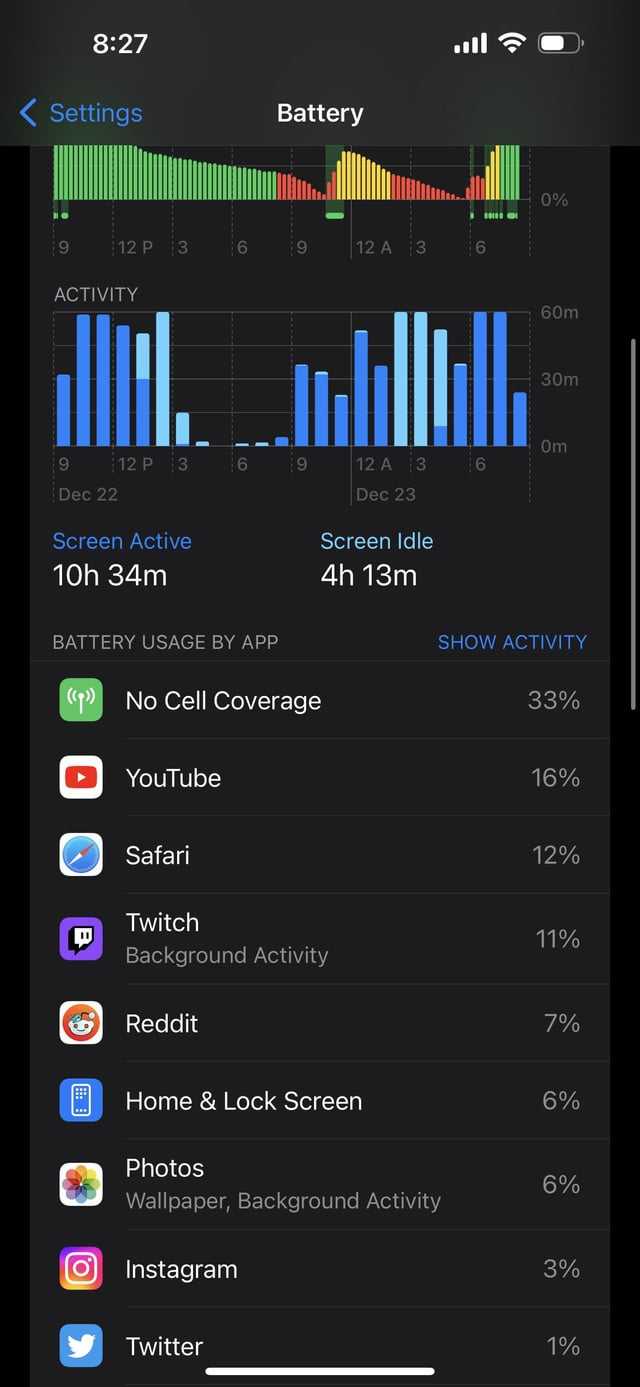

Using airplane mode in low signal areas to prevent drain
Understanding Why Phones Drain Battery in Low Signal Areas
When your phone struggles to find a signal, it works harder to connect to cellular towers. This increased effort causes your device to continually search for a network, which consumes more battery power. The more difficult it is for your phone to connect, the faster your battery drains. In low signal zones, your phone may repeatedly switch between networks or boost its antenna to find a signal, further draining power. This process can happen even if you’re not actively using your device, leading to rapid battery loss. Recognizing this pattern helps you take steps to conserve your battery when signals are weak.How Airplane Mode Prevents Battery Drain
Turning on airplane mode disables all wireless communication functions on your phone, including cellular, Wi-Fi, and Bluetooth. When enabled, your device won’t try to scan for signals or connect to networks. This prevents the phone from working hard to find a connection in low signal areas. Using airplane mode effectively stops the constant battery drain caused by searching for signals. It allows you to preserve your device’s power without completely turning it off. This feature is especially useful when you’re in a remote place or underground where signals are weak or nonexistent.When and Why to Turn on Airplane Mode in Low Signal Areas
If you find your phone’s battery depleting quickly in certain locations, switching to airplane mode can help. Common situations include underground parking garages, remote rural areas, or large buildings with poor reception. Turning on airplane mode during these times helps avoid unnecessary power consumption. It also prevents your phone from trying to connect to multiple networks, which can cause additional battery drain. Remember, you can always turn off airplane mode later to reconnect when you’re in a better signal zone.Steps to Enable Airplane Mode for Battery Savings
Most phones have a quick-access button or menu option for airplane mode. To activate it, simply:- Swipe down from the top of your screen to open quick settings.
- Look for the airplane icon and tap it.
- Your device will turn off all wireless signals, indicating airplane mode is active.
Additional Tips to Reduce Battery Drain in Low Signal Zones
While airplane mode is effective, there are other strategies to conserve power:- Reduce Screen Brightness: Dimming your display lowers battery consumption.
- Turn Off Unnecessary Features: Disable Bluetooth, Wi-Fi, or location services if not needed.
- Limit Background Apps: Close apps that run in the background and use data or GPS.
- Use Power-Saving Mode: Many devices have a mode that restricts background activity and optimizes battery use.
- Carry a Portable Charger: Keep a portable battery pack handy to recharge on the go.
Understanding the Impact on Phone Functionality
While in airplane mode, you won’t be able to make or receive calls, send messages, or access the internet directly. If you need to stay connected, consider enabling Wi-Fi if available, as it consumes less power and remains active in airplane mode on some devices. For situations where you need to use your device intermittently, toggle to airplane mode to save power and then turn it off briefly when necessary. This approach balances connectivity needs with battery conservation effectively.Situations When Using Airplane Mode Is Not Recommended
In emergencies, turning off wireless features might delay your ability to communicate quickly. If you need to stay reachable or use navigation apps, leaving your device in normal mode might be better. Also, some apps and services require an active internet connection to function properly, making airplane mode less suitable. Always weigh the importance of connectivity against battery saving in crucial moments.Benefits and Limitations of Using Airplane Mode
The main benefit is clear: it significantly reduces unnecessary battery drain caused by weak signals. It’s a simple yet powerful tool to extend device usability in low signal situations. However, the limitation remains that it cuts off all wireless communication. Therefore, it’s best used temporarily or when you don’t need to stay connected. Understanding when and how to toggle airplane mode makes it a versatile feature.Related Topics to Consider
Beyond conserving battery life, other related topics include:- Using Wi-Fi Calling: Makes calls over Wi-Fi networks when cellular signals are weak.
- Optimizing Mobile Data Usage: Reduces power and data consumption in low signal environments.
- Choosing the Right Phone Settings: Adjusting power, network preferences, and notifications for efficiency.
- Battery Maintenance Tips: Proper charging habits to prolong battery health over time.
Choosing the Best Time to Use Airplane Mode
Deciding when to activate airplane mode depends on your needs. If you’re traveling through remote areas or during times of poor reception, it’s best to enable it beforehand. During extended periods without signal, activating airplane mode will preserve your battery and prevent unnecessary background activity. Conversely, disable it when you approach better reception to reconnect quickly.Monitoring Your Device’s Battery Life in Low Signal Environments
Keep an eye on your device’s battery percentage to gauge how effective airplane mode is for you. Some phones offer battery usage insights, showing which apps or features drain power the fastest. Regularly checking this data helps you adjust your strategy for conserving battery. It also encourages mindful usage of your device in challenging conditions. Using airplane mode in low signal areas is a straightforward and efficient way to prevent unnecessary battery drain. It stops your device from constantly searching for a network, saving power for when you really need it. By understanding when and how to activate airplane mode, along with complementary power-saving tips, you can extend your device’s battery life significantly. This approach ensures your phone remains functional longer, even in challenging signal environments.The Shocking Truth Behind Airplane Mode Revealed !
Frequently Asked Questions
How does activating airplane mode in low signal areas help conserve battery life?
When you turn on airplane mode in areas with weak signals, your device stops attempting to connect to cellular networks. This prevents your phone from continuously searching for a signal, which can drain the battery quickly. As a result, your device uses less power and extends its operational time in low coverage zones.
Can enabling airplane mode improve the performance of other apps during low signal situations?
Yes, switching to airplane mode reduces background activities related to network connectivity, such as automatic updates, syncing, and location services. This can help other applications run more smoothly and reduce overall device stress, especially when connectivity is limited or unreliable.
Is it better to manually disable mobile data or enable airplane mode for saving battery in weak signal areas?
Enabling airplane mode effectively disables all wireless communications, including mobile data, Wi-Fi, and Bluetooth, which conserves the most battery. Turning off mobile data alone may still allow Wi-Fi or Bluetooth connections, which can drain power if they are active. Therefore, airplane mode offers a more comprehensive solution for saving battery in low signal zones.
Will turning on airplane mode prevent my device from receiving important notifications?
Yes, activating airplane mode stops all wireless signals, meaning you won’t receive notifications, calls, or messages until you turn it off. If you need to stay connected to specific networks or receive updates, consider turning on airplane mode temporarily, then enabling Wi-Fi or Bluetooth separately to maintain some connectivity.
How can I re-enable network connectivity quickly after using airplane mode in poor signal areas?
Simply disable airplane mode to restore your device’s connection to cellular networks, Wi-Fi, and Bluetooth. This quick toggle allows your device to reconnect to available networks, ensuring you resume communication and data transfer as needed without delays.
Final Thoughts
Using airplane mode in low signal areas to prevent drain effectively conserves your device’s battery. When signals are weak, your phone works harder to connect, consuming more power. Activating airplane mode stops this process immediately. In such regions, this simple step extends your device’s usability and ensures you’re not left without a charge. It’s a quick, practical solution to avoid unnecessary battery drain in low signal zones.
Similar Posts































