

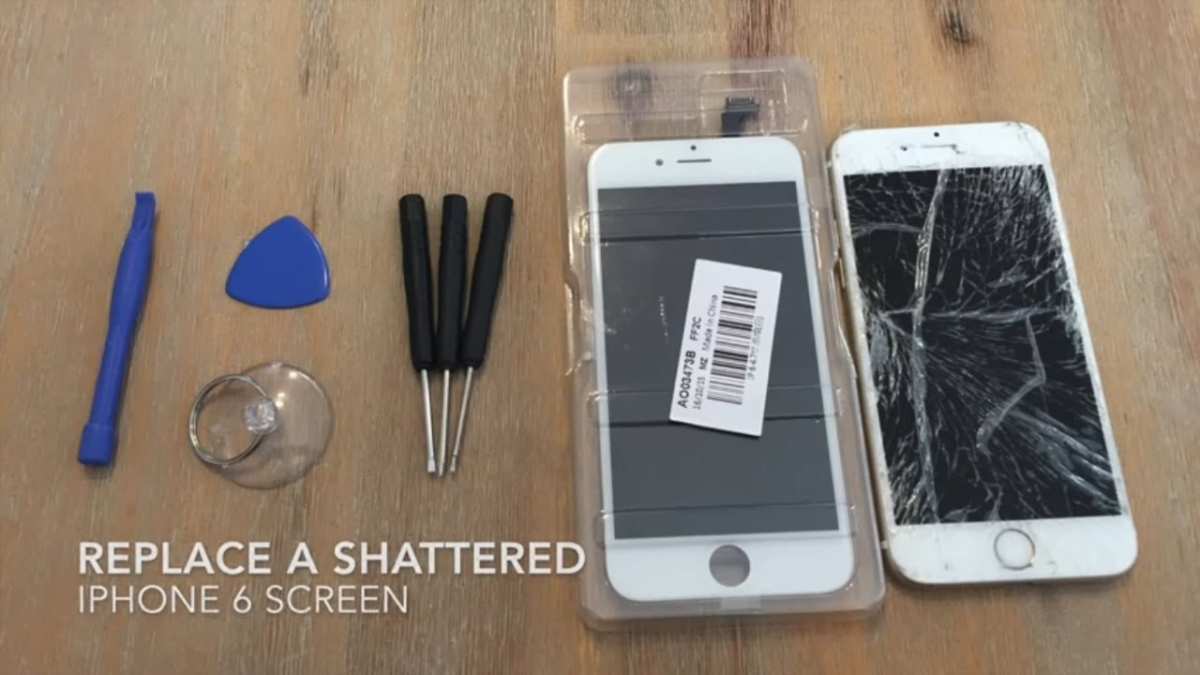
A cracked iPhone screen can be frustrating, but fixing it isn’t impossible. **Replacing the glass or screen assembly is the most effective solution.** If you’re comfortable with DIY repairs, you can follow step-by-step guides and use the right tools. Alternatively, visiting a professional repair shop guarantees a quick fix. Knowing how to repair iPhone cracked screen helps you decide whether to repair it yourself or seek expert assistance. Either way, addressing the damage promptly ensures your device stays functional and looks great again.

How to Repair iPhone Cracked Screen
If your iPhone screen has cracked, don’t panic. While it might seem like a big problem, you can repair it with the right steps. Whether you want to fix it yourself or get professional help, knowing what to do can save you time and money. Let’s walk through everything you need to know about fixing a cracked iPhone screen.
Understanding the Damage
Before jumping into repairs, it’s good to know what kind of damage your screen has. Cracks can vary from tiny spiderwebs to large shattered glass. This helps you decide whether to repair it yourself or seek professional help.
- Minor cracks: Small lines that don’t affect screen visibility or touch sensitivity.
- Deep cracks: Larger fractures that can interfere with touch function or cause glass shards.
- Shattered screen: The glass is completely broken, often with pieces falling off or dangerous edges.
Understanding the extent of the damage helps you choose the best repair method. Sometimes, minor cracks can wait, but big breaks usually need quick action.
Should You DIY or Get Professional Help?
Deciding whether to repair your iPhone screen yourself or visit a repair shop depends on your skills, tools, and the damage level.
DIY Screen Repair
If you like working with small parts and have patience, fixing your screen at home can save money. But it requires proper tools and careful handling.
Professional Repair Services
Taking your iPhone to a certified technician guarantees quality work. Professionals have specialized tools and replacement parts. This option is safer if you’re unsure about fixing it yourself or if your screen is badly damaged.
Tools and Materials Needed for DIY Repair
If you decide to fix your screen yourself, gather all necessary tools:
- Replacement screen: Make sure it’s compatible with your iPhone model.
- Precision screwdriver set: For removing screws.
- Plastic opening tools: To pry open the case without damaging it.
- Tweezers: For handling small parts and connectors.
- Suction cup: To lift the screen easily.
- Adhesive strips: To secure the new screen.
- Anti-static wrist strap: To prevent static damage.
Using the right tools can prevent further damage and make the repair smoother.
Step-by-Step Guide to Replacing Your iPhone Screen
Follow these steps carefully to replace your cracked screen. Remember, patience is key.
Preparation
– Power off your iPhone completely.
– Work in a clean, well-lit space.
– Gather your tools and replacement parts.
Disassemble Your iPhone
– Remove the screws at the bottom of your device using a precision screwdriver.
– Attach the suction cup near the bottom edge of the screen.
– Gently pull the suction cup while inserting a plastic opening tool to separate the screen from the casing.
– Carefully work around the edges, prying open the display without applying too much force.
Disconnect the Battery and Screen Cables
– Remove metal shields covering the connectors.
– Use tweezers to disconnect the battery cable to avoid electrical issues.
– Carefully disconnect the display connectors, noting their positions.
Transfer Components from Old to New Screen
– If your replacement screen doesn’t come with parts like the front camera, earpiece, or home button, transfer them carefully.
– Remove these components from the old screen and install them on the new one following reverse order.
Reassemble Your iPhone
– Reconnect the display and battery cables.
– Replace the metal shields and screws securely.
– Align the new screen with the case and press gently to snap it into place.
– Power on your device to check if the screen works correctly.
Tips for Ensuring a Successful DIY Repair
– Watch tutorial videos specific to your iPhone model.
– Work slowly and carefully to avoid damaging internal parts.
– Keep track of screws and small components.
– Avoid forcing parts apart; gentle prying works best.
– Use an anti-static wrist strap to prevent static damage.
When to Seek Professional Help
If your screen is shattered into many pieces, or if your iPhone has other issues (like a broken LCD or unresponsive touch), professional repair might be better. Also, if you feel uncomfortable about opening your device, visiting a certified repair shop ensures safety and quality.
Cost Comparison: DIY vs. Professional Repair
| Method | Cost Range | Pros | Cons |
|————————–|——————————|————————————————|—————————————-|
| DIY Repair | $30 – $80 depending on parts | Saves money, feels rewarding | Risk of damage, voids warranty |
| Professional Repair | $100 – $300 depending on model | Guarantees quality, quick turnaround | Higher cost |
Remember, cheap parts or inexperienced repairs could cause more damage later. Weigh your skills before choosing.
Maintenance Tips to Prevent Future Crackings
– Use a durable protective case with shock absorption.
– Apply a tempered glass screen protector.
– Avoid dropping your iPhone from high places.
– Keep your device away from busy or rough environments.
– Be mindful when handling your iPhone, especially when taking it out of pockets or bags.
Fixing a cracked iPhone screen is manageable with proper tools and patience, whether you choose to do it yourself or seek professional help. By understanding the damage, preparing your tools, following careful step-by-step instructions, and taking preventive measures, you can restore your iPhone to good condition. Remember, if at any point you feel unsure, visiting a trusted repair shop ensures your device stays safe and functions correctly. Taking care of your phone now can help avoid more costly repairs later, and with the right approach, you can have your device looking and working like new.
Frequently Asked Questions
What are the steps to temporarily fix a cracked iPhone screen at home?
If your iPhone screen is cracked and you want a temporary fix, start by turning off your device to prevent further damage. Clean the screen gently with a soft cloth to remove dust and small glass shards. Apply clear tape over the crack to hold loose pieces in place and prevent injury. Avoid using sticky tapes that can leave residue. This temporary method can help protect your fingers and minimize additional damage until you can get professional repair or screen replacement.
How can I determine if my iPhone screen needs a full replacement or just a repair?
Inspect your iPhone screen for signs of extensive damage such as persistent dead spots, discoloration, or touch responsiveness issues. If the cracks are limited to the surface with no impact on display quality or touch functions, a professional repair focusing on the cracked glass might suffice. However, if you notice display issues, dead pixels, or unresponsive touch areas, replacing the entire screen becomes necessary to restore full functionality.
Are there risks involved with repairing an iPhone cracked screen myself?
Yes, attempting to repair your iPhone screen yourself carries risks. You may accidentally damage internal components or worsen the cracks if you do not have proper tools and experience. Furthermore, improper reassembly can cause issues like loose connections or dust inside the device. For safety and to ensure the repair lasts, consider professional services or authorized repair centers, especially if your device is still under warranty.
What should I consider before choosing a repair service for my cracked iPhone screen?
When selecting a repair service, check if they use genuine parts and offer warranties on their repairs. Confirm their experience with your iPhone model to ensure quality work. Look for reviews or testimonials from previous customers to gauge their reliability. Additionally, compare prices and turnaround times, choosing a provider that balances affordability with trustworthiness to protect your device from further damage or reduced performance.
Final Thoughts
To repair an iPhone cracked screen, start by turning off your device and gathering the necessary tools. Carefully remove the screen using a pentalobe screwdriver and plastic pry tools.
Replace the damaged screen with a new one, ensuring all connectors are securely reattached. Testing the device before sealing it completely helps confirm the repair was successful.
In conclusion, knowing how to repair iPhone cracked screen empowers you to handle minor damages confidently. Following proper steps ensures your phone stays functional and looks great again.
