How To Make Rpg Games On Android: Step-By-Step Guide
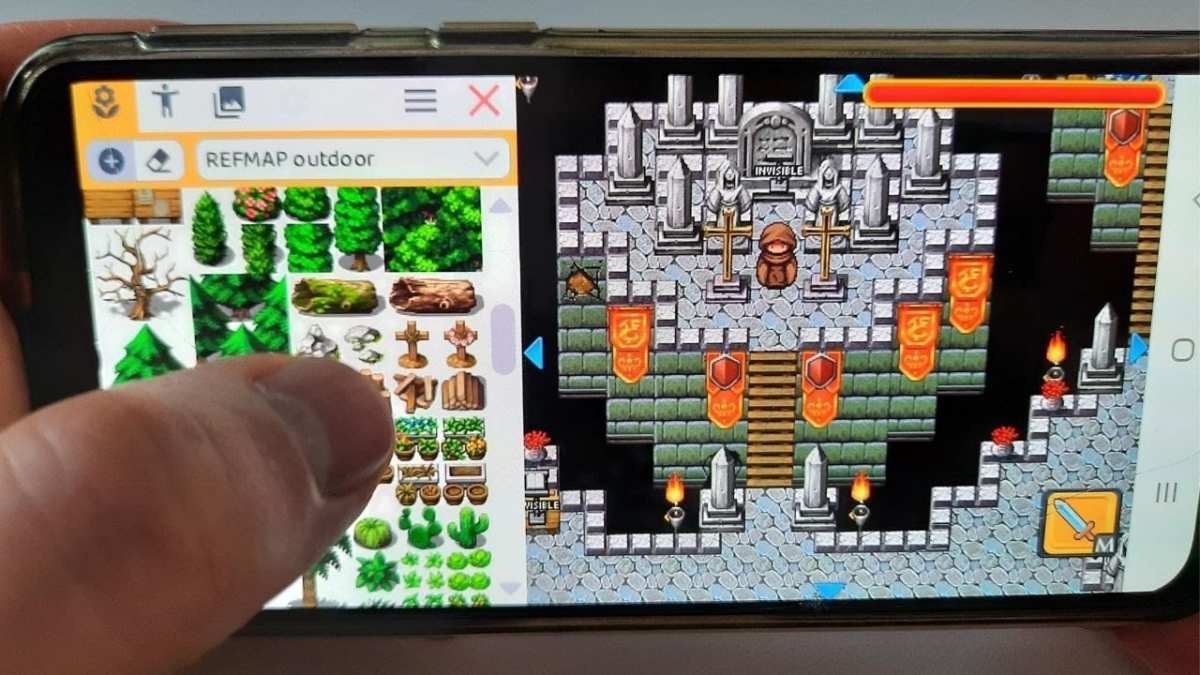
To create RPG games on Android, start by choosing the right development tools. **Using beginner-friendly platforms like Unity or Godot simplifies the process.** These tools offer built-in features ideal for RPG design, helping you focus on storytelling and gameplay mechanics. Understanding the essentials of scripting and game design keeps your project on track. With clear steps and resources, you can develop engaging RPGs directly on your Android device or PC, making the process accessible for all levels. 
How to Make RPG Games on Android
Creating an RPG (Role-Playing Game) for Android devices can be both exciting and rewarding. This process involves planning your game’s story, designing characters, coding gameplay mechanics, and ensuring it runs smoothly on various Android devices. If you’re just starting out or looking to improve your skills, this guide will walk you through each step with clear explanations and helpful tips. Let’s explore how to develop your own RPG game on Android from scratch.Understanding the Basics of RPG Game Development
Before diving into the technical details, it’s important to understand what makes an RPG game special. RPGs usually feature deep stories, character progression, quests, and immersive worlds. They often involve players making choices that influence the story and gameplay. In making an RPG for Android, think about these core elements:- Story & Setting: Create an engaging narrative and a believable world that players will want to explore.
- Characters: Design memorable characters, including heroes, villains, and NPCs (Non-Player Characters).
- Game Mechanics: Decide how players will interact with the game — combat, exploration, dialogue, and skill systems.
- Visuals & Sound: Use art and music that match your game’s vibe and keep players immersed.
Selecting the Right Tools for Android RPG Development
You can develop RPGs on Android using various software tools and game engines. Picking the right one depends on your experience and project needs.- Unity: A popular game engine that supports Android development. It offers a visual editor, scripting with C#, and a vast community. Perfect for creating 2D or 3D RPGs.
- Unreal Engine: Known for high-quality graphics, suitable for more detailed RPGs. It uses Blueprint visual scripting and C++.
- Godot: An open-source engine that’s lightweight and beginner-friendly. Supports multiple platforms, including Android.
- RPG Maker: Focused on making RPGs with minimal coding. It has an easy-to-use interface, but Android export options may be limited or require additional steps.
Designing Your RPG Game
Designing your game involves multiple creative steps. Here’s how to approach each:Creating a Compelling Story and World
– Write a simple but engaging storyline. Think about what challenges and adventures your characters will face. – Map out your game’s world, including towns, forests, dungeons, and other locations. – Design quests that guide players and add depth to the story.Developing Characters and Enemies
– Sketch character sprites or models. – Define character classes, skills, and equipment. – Design enemy types with unique behaviors.Planning Gameplay Mechanics
– Decide how combat will work (turn-based, real-time, card-based, etc.). – Set up character leveling, experience points, and item collection. – Include puzzles, exploration, and dialogue systems to enrich gameplay.Building Your RPG Step by Step
Once you have your design, start building the game gradually. Break down the development into manageable phases:- Prototype: Create a simple version to test core gameplay features.
- Level Design: Build levels and maps based on your world plan.
- Character and NPC Creation: Add your characters and their animations.
- Implement Game Mechanics: Coding combat, quests, inventory, and dialogue systems.
- Testing & Feedback: Playtest regularly, gather feedback, and fix bugs.
Programming & Scripting for Android RPGs
Programming lies at the heart of game development. Here are key points:- Choose a language: Unity uses C#, while Godot uses GDScript or C#.
- Learn the basics: Get comfortable with programming fundamentals, such as variables, functions, and control flow.
- Implement gameplay features: Write scripts for movement, combat, dialogue, and other interactions.
- Optimize performance: Ensure your game runs smoothly on different Android devices.
Creating Art, Sound, and Music
Visual and audio elements greatly influence player experience. Here’s how to approach content creation:- Art Assets: Use tools like Photoshop, GIMP, or Inkscape to create sprites, backgrounds, and tiles.
- Animations: Animate characters and effects using software like Spine, Aseprite, or built-in engine tools.
- Sound Effects & Music: Incorporate sounds that match actions and environments. Use royalty-free libraries or compose your own music.
- Optimization: Keep assets lightweight so your game loads quickly and runs smoothly.
Testing and Publishing Your RPG on Android
Testing ensures your game works correctly across devices. Follow these steps:- Playtest extensively: Try every feature, quest, and gameplay mechanic.
- Gather feedback: Ask friends or community members to try your game and share their impressions.
- Optimize performance: Fix bugs, reduce load times, and improve user interface responsiveness.
- Prepare for publishing: Create app icons, screenshots, and descriptions for the Google Play Store.
- Build and export: Use your engine’s tools to generate an APK file suitable for Android devices.
- Publish on Google Play: Follow the submission guidelines, set your price or free status, and promote your game.
Tips for Success in Making RPG Games on Android
Developing an RPG for Android is exciting but can be complex. Here are some helpful tips:- Start small: Make a simple game first before tackling a large project.
- Use tutorials and online courses: Plenty of free and paid resources are available to learn game development.
- Join developer communities: Forums like Stack Overflow, Reddit, and Unity forums offer support and advice.
- Plan your project: Keep an organized development schedule and document your progress.
- Focus on user experience: Make controls intuitive and game interfaces easy to navigate.
- Stay persistent: Creating a game takes time, patience, and continuous learning.