

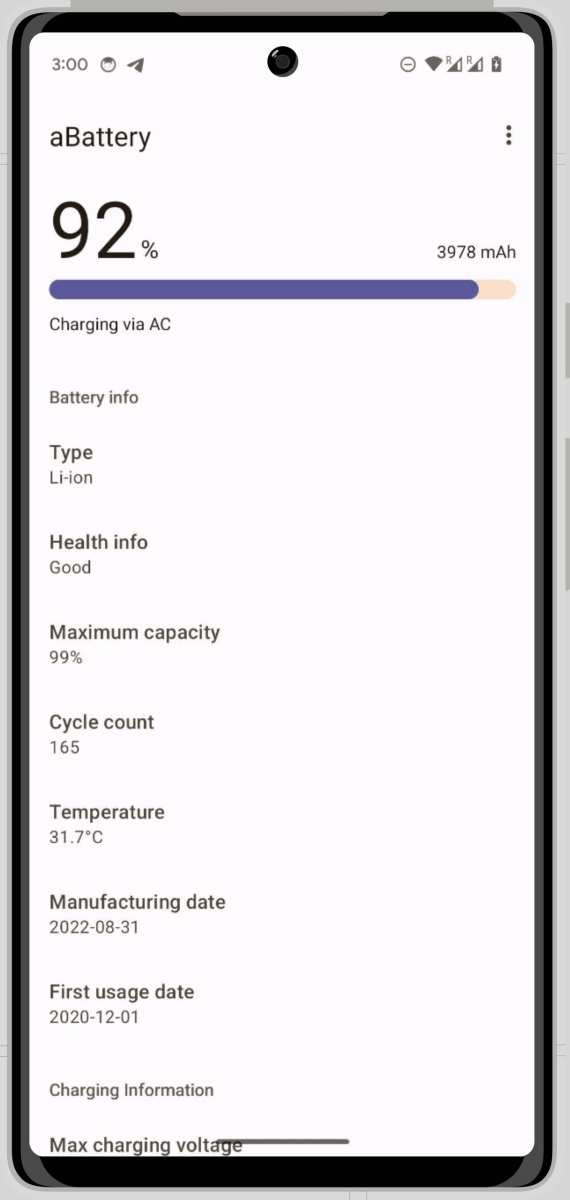
Maintaining your Android device’s battery health is essential for optimal performance. **The android battery charge cycle count indicates how many complete charge and discharge cycles your battery has undergone.** Monitoring this number helps you understand when your battery may start to decline. Typically, a battery begins to degrade after a certain number of cycles, affecting its capacity. Checking the charge cycle count regularly allows you to plan for replacements or optimize usage to extend battery life. Stay aware of this metric to keep your device running smoothly for longer.

Understanding Android Battery Charge Cycle Count
When you use your Android device daily, you might notice that your battery doesn’t seem to last as long as it used to. One important factor that affects your battery’s health is the number of charge cycles it has gone through. But what exactly is an Android battery charge cycle count? How does it impact your device, and what should you know to keep your battery healthy? Let’s explore this topic in detail.
What Is a Charge Cycle on an Android Device?
A charge cycle is a way to measure how many times your battery has been charged and used. Think of it like a laundry cycle: each time you use your battery from 100% down to a lower level and then recharge it, you’ve completed part of a cycle.
To be precise, a charge cycle isn’t just about charging from 0% to 100%. Instead, it sums up the total amount of energy used, regardless of how many partial charges it takes. For example, if you use 50% of your battery one day and recharge, and then use another 50% and recharge again, that’s considered one full cycle.
Understanding charge cycles helps you get a clear idea of how much your battery has been used and how much longer it could last before needing replacement.
Why Is Charge Cycle Count Important?
Knowing your Android device’s charge cycle count offers several benefits:
- Battery longevity: Batteries have a limited number of charge cycles before they start degrading. Keeping track can help you predict when it’s time to replace the battery.
- Performance management: Batteries tend to hold less charge after numerous cycles, leading to reduced device performance and shorter usage times.
- Health monitoring: Regularly checking the cycle count allows you to maintain your device’s health and avoid unexpected shutdowns or performance issues.
Manufacturers usually specify a maximum number of charge cycles, after which the battery’s capacity drops significantly, usually to about 80% of its original capacity.
How to Check Your Android Battery Charge Cycle Count
Finding out your device’s charge cycle count isn’t always straightforward because Android doesn’t display this info directly. However, you can access this data through various methods:
Using Built-in Settings or Apps
Most Android phones don’t provide a built-in option to view charge cycles, but some brands like Samsung or OnePlus offer tools in their settings or dedicated apps that might give some battery information. If your device doesn’t include this feature, you can:
- Use third-party apps: Applications like AccuBattery or Battery Health provide detailed battery usage statistics, including estimated cycle counts.
- Check system logs: Some Android devices store battery information accessible via hidden menus or engineer modes, but these require more technical know-how.
Using ADB Commands
For tech-savvy users, you can connect your device to a computer and run commands via Android Debug Bridge (ADB). By doing so, you can access detailed battery information, including cycle counts if supported.
Consulting Manufacturer Resources
Some manufacturers provide tools or manuals that allow you to check battery health and cycle count. Visit your device’s support website for specific instructions.
The Limit of Android Batteries and How Cycle Count Affects Them
Batteries in Android devices, typically lithium-ion or lithium-polymer, are designed to last for a certain number of charge cycles. Here’s what you need to know:
- Average cycle lifespan: Most batteries sustain around 300 to 500 charge cycles before their capacity diminishes significantly.
- Capacity degradation: After reaching this limit, your battery might only hold around 80% of its original charge, leading to shorter usage time.
- Signs of aging: Besides cycle count, look for symptoms such as overheating, rapid discharge, or the device shutting down unexpectedly.
It’s essential to monitor your charge cycles as part of regular device maintenance, especially if you rely heavily on your Android device throughout the day.
How to Extend Your Phone’s Battery Life and Maximize Cycle Count
You can take practical steps to prolong your battery’s lifespan and keep the cycle count manageable:
Optimize Charging Habits
- Charge your device before it drops to very low levels, such as below 20%. Deep discharges can accelerate battery wear.
- Avoid keeping your battery at 100% for prolonged periods. Instead, try to stay between 20% and 80% when possible.
- Use quality chargers that match the device manufacturer’s specifications to prevent overcharging or overheating.
Manage Phone Usage
- Reduce screen brightness and timeout times.
- Turn off unnecessary features like Bluetooth, Wi-Fi, or GPS when not in use.
- Close apps running in the background that drain power.
Keep Your Software Up-to-Date
Regular updates often include battery optimization features, bug fixes, and improvements that can help your device run more efficiently, thereby reducing unnecessary strain on your battery.
The Impact of Overcharging and Overusing Your Battery
Overcharging or frequently discharging your battery can increase wear and speed up the cycle count:
- Overcharging: Continuously charging your device past 100% can generate heat, damaging the battery over time.
- Discharging to 0%: Letting your battery fully drain regularly can stress the battery and decrease its capacity faster.
Using smart charging techniques and avoiding extreme battery levels can help keep your charge cycle count in check while maintaining optimal battery health.
What to Do When Your Battery Reach Its Cycle Limit
If your battery hits its maximum number of cycles, you’ll notice decreased battery life and performance drops. At this stage, consider the following:
- Replace the battery: Some Android devices allow battery replacements, either by an authorized service provider or yourself if it’s user-accessible.
- Upgrade your device: If battery replacement isn’t feasible, and your device is aging, it might be time to consider a new phone.
- Use power-saving modes: Activate battery saver features to maximize remaining battery life until you can replace or upgrade.
Summary
Keeping track of your Android device’s battery charge cycle count is a key step in maintaining overall device health. It helps you understand how much your battery has been used and guides you on when to replace it to keep your phone running smoothly. Remember, practicing good charging habits, avoiding deep discharges, and monitoring your device’s battery condition can extend its lifespan and improve your overall user experience.
By understanding the importance of charge cycles and how to manage them, you take a proactive stance toward your device’s longevity. Stay vigilant about your battery’s health to enjoy longer-lasting performance and avoid unexpected issues down the road.
Frequently Asked Questions
How can I check the number of charge cycles my Android device’s battery has gone through?
To check the charge cycle count on your Android device, you can use third-party battery monitoring apps like AccuBattery or CPU-Z. These apps access system data to provide information about your battery’s health and usage statistics, including the number of full charge cycles completed. Some devices might also display this information in their built-in battery settings or through device-specific diagnostic tools accessible via certain codes or manufacturer apps.
What does the charge cycle count indicate about my Android battery’s condition?
The charge cycle count reflects how many complete times your battery has been charged from 0% to 100%. As this number increases, the battery’s capacity to hold a charge tends to decline. Monitoring this figure helps determine whether your battery is nearing the end of its optimal lifespan or requires replacement to maintain device performance.
Are there ways to extend my Android battery’s cycle lifespan?
Yes, you can extend your battery’s cycle lifespan by avoiding full discharges, keeping your device within moderate temperature ranges, and limiting rapid charging sessions. Using adaptive brightness, turning off unnecessary background processes, and charging your device before it reaches very low battery levels also help reduce stress on the battery, thereby prolonging its overall cycle life.
How frequently should I check my Android device’s cycle count to maintain battery health?
It’s advisable to check your battery’s cycle count every few months or when you notice a significant drop in battery performance. Regular monitoring allows you to identify early signs of battery degradation and plan for replacements before performance issues impact your device’s usability.
Can a high cycle count cause my Android device to perform poorly?
Yes, a high number of charge cycles can lead to reduced battery capacity, which may cause your device to have shorter usage times between charges. Over time, this can result in slower overall performance, as the battery struggles to supply consistent power, and may require battery replacement to restore optimal device functionality.
Final Thoughts
Understanding your Android battery charge cycle count helps you monitor battery health effectively. When your cycle count gets high, it indicates your device may start showing signs of battery deterioration.
Keeping an eye on this number allows you to extend your device’s lifespan by taking timely actions. Regularly checking the android battery charge cycle count can prevent unexpected battery failures.
In summary, tracking the android battery charge cycle count offers valuable insights into your device’s performance, enabling better maintenance and longevity.
