

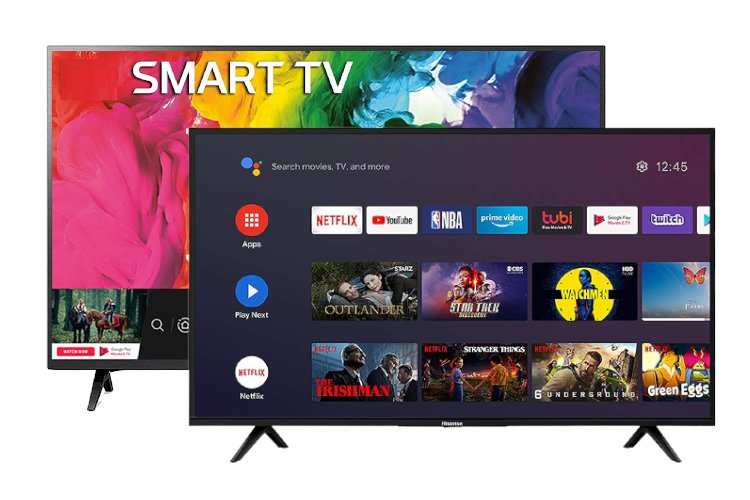
The difference between Android TV and Smart TV lies in their operating systems and capabilities. **Android TV offers a more customizable experience with access to a vast app store and Google services, while Smart TVs typically run proprietary platforms.** When choosing between them, consider how much control and app variety you desire.
Android TV tends to support more apps and updates, whereas Smart TVs may be easier to use with simpler interfaces. Knowing these distinctions helps you pick the device that best meets your entertainment needs.

What Is the Difference Between Android TV and Smart TV?
When shopping for a new television, you might come across two popular options: Android TV and Smart TV. Both are modern TVs packed with features that let you stream movies, play games, and access apps. But they aren’t exactly the same. Understanding the differences can help you pick the right TV for your needs and make your entertainment experience more enjoyable. Let’s explore what makes Android TV and Smart TV unique, how they compare, and which might be better for you.
Understanding Smart TV
Smart TV is a broad term that describes any television capable of connecting to the internet. Almost all new TVs today are smart, but the way they connect and operate can vary from brand to brand.
Features of Smart TVs
Smart TVs come with built-in Wi-Fi or Ethernet connections, allowing you to access the internet directly. They include pre-installed apps such as Netflix, YouTube, Hulu, and many others. Here are some key features:
- Preloaded Apps: Most smart TVs come with popular streaming services right out of the box.
- App Store Access: You can browse and install additional apps just like on a smartphone.
- Voice Control: Many models include voice recognition to search for content more easily.
- Screen Mirroring and Casting: Easily project content from your phone or tablet onto the TV screen.
- Built-in Operating Systems: Brands develop their own operating systems, such as Samsung’s Tizen, LG’s webOS, or Vizio’s SmartCast.
Limitations of Basic Smart TVs
While smart TVs are convenient, they have some limitations:
- Limited App Selection: The app store may be smaller compared to platforms like Android TV.
- Slower Updates: Operating system and app updates can be limited or infrequent.
- Less Customization: You are bound to the OS and app ecosystem provided by the manufacturer.
- Less Powerful Hardware: Basic smart TVs might run slower or have fewer features compared to more advanced platforms.
Understanding Android TV
Android TV is a type of smart TV platform developed by Google. It is designed to bring the familiar Android experience from smartphones and tablets to the big screen.
Features of Android TV
Android TV offers a more flexible and customizable experience. Here are some notable features:
- Access to Google Play Store: You can download a wide variety of apps, games, and streaming services.
- Google Assistant Integration: Use voice commands to search for content, control smart home devices, and more.
- Personalized Content Recommendations: Android TV analyzes your viewing habits to suggest shows and movies.
- Screen Mirroring and Chromecast Built-in: Easily cast content from your phone, tablet, or laptop to the TV.
- Regular Software Updates: Android TV receives timely updates, improving security and features over time.
Hardware and Device Options
Android TV is available on a range of devices:
- Smart TVs from brands like Sony, TCL, and Hisense come with Android TV built-in.
- Streaming devices such as Chromecast with Google TV plug into your existing TV, transforming it into an Android TV device.
- Set-top boxes and gaming consoles may also run a version of Android TV or Android-based operating systems.
Comparing the User Interface and Experience
The user experience is a vital aspect when choosing between Android TV and other smart TVs.
Ease of Navigation
Android TV offers a clean, intuitive interface that resembles a tablet or smartphone. The home screen displays rows of content, easy to scroll through using a remote or voice commands. On the other hand, many smart TVs have a less standardized interface:
- Samsung’s Tizen OS features a sleek but sometimes less customizable home screen.
- LG’s webOS emphasizes a card-based layout that is simple but less unified.
- Vizio’s SmartCast focuses on casting and quick app access.
Android TV’s interface makes it easier to find content and switch between apps seamlessly. Its recommendations are both personalized and integrated, making your viewing choices more accessible.
Search Capabilities
One big advantage of Android TV is the universal search function, which lets you search multiple apps with a single query. For instance, searching for a new movie or show can instantly show results from Netflix, Disney+, Hulu, and other platforms. Many smart TVs require searching separately in each app, which can be time-consuming.
App Availability and Compatibility
The ecosystem of apps is a crucial comparison point.
App Store Comparison
- Android TV has access to Google Play Store, offering thousands of apps, games, and streaming services.
- Smart TVs’ app stores vary by brand, and generally, the selection can be smaller and less frequently updated.
With Android TV, you can find most popular streaming apps and even some lesser-known ones. You also have the opportunity to play Android games or use apps with more advanced features.
Custom Apps and Additional Features
Android TV supports sideloading apps, which means you can install apps not available in the Play Store. This extra flexibility is important for tech enthusiasts or those wanting specific apps.
In contrast, some smart TVs do not support sideloading, limiting what you can add or customize significantly.
Hardware Performance and Compatibility
The hardware behind the TV affects performance, streaming quality, and overall user experience.
Processing Power
Android TV devices tend to have more powerful CPUs and better graphics support, enabling smooth video playback, fast app launches, and gaming capabilities. Basic smart TVs might have less processing power, leading to lag or slower navigation.
Connectivity Options
Both platforms typically support Wi-Fi and Ethernet connections, but Android TV devices often include additional options like Bluetooth for wireless headphones or game controllers.
Smart Home Integration
Android TV’s compatibility with Google Assistant allows for integration with smart home devices like lights, thermostats, and security cameras. Many smart TVs have their own proprietary voice assistants, but they might not offer the same level of compatibility.
Cost and Value for Money
Price is another factor that influences your choice.
Price Range
- Basic smart TVs tend to be more affordable, especially from brands like Vizio or older models.
- Android TV models, especially from well-known brands like Sony or TCL, can be more expensive but often include better hardware and more features.
- Streaming devices like Chromecast with Google TV are budget-friendly and can turn an existing TV into an Android TV device.
Value Considerations
While Android TV models might cost more initially, they usually provide more options, better app selection, and smarter integration. If you want a simple TV for casual streaming, a basic smart TV might suffice. For tech-savvy users who want more control and flexibility, Android TV offers significant advantages.
Which Is Better for You?
Deciding between Android TV and a regular smart TV depends on your needs:
- If you want a highly customizable experience with a wide app selection, consider Android TV.
- If you prefer a straightforward, easy-to-use interface without much setup, a smart TV from a reputable brand can be great.
- For budget-conscious buyers, basic smart TVs or streaming devices like Chromecast may be enough.
- For tech lovers who want to integrate their entertainment and smart home devices, Android TV offers more options.
In summary, both platforms provide excellent entertainment options but cater to different preferences. Assess your priorities, budget, and desired features before making a decision.
With so many choices available, understanding these differences will help you pick the right TV that fits your lifestyle and enhances your viewing experience. Whether you choose Android TV for flexibility and customization or a smart TV for simplicity and affordability, both options are designed to bring your favorite content to your living room.
Frequently Asked Questions
How does the user interface differ between Android TV and standard smart TVs?
Android TV offers a user interface that is highly customizable and intuitive, with a dedicated app store and personalized home screens. Standard smart TVs often have a less flexible interface, which may vary depending on the brand and include pre-installed apps or proprietary menus. Android TV’s interface provides easier navigation and quick access to a wide range of streaming services and apps.
What are the capabilities of app availability on Android TV compared to other smart TVs?
Android TV provides access to the Google Play Store, giving users a vast selection of apps, games, and streaming services. Many standard smart TVs have limited app stores or only allow access to specific applications approved by the manufacturer. This broad app support makes Android TV a more versatile platform for content consumption and customization.
How does hardware compatibility influence the performance of Android TV versus regular smart TVs?
Android TV models typically feature hardware specifications that allow for smoother performance, including faster processors and more RAM. Some smart TVs may have limited hardware, which can affect app performance and responsiveness. Android TV’s optimized hardware integration generally results in a more seamless user experience.
In what ways do software updates differ between Android TV and other smart TVs?
Android TV benefits from regular updates provided by Google, ensuring access to new features, security patches, and performance improvements. Many standard smart TVs depend on manufacturers for software updates, which may be less frequent or inconsistent. This difference impacts the longevity and security of the device’s software environment.
Can Android TV integrate with other smart devices and services more effectively than typical smart TVs?
Android TV supports broader integration with various smart home devices and services through Google Assistant and compatible apps. This allows users to control smart appliances, lights, and security systems from their TV more easily. Traditional smart TVs might have limited or proprietary integration options, restricting the compatibility and control of connected devices.
Final Thoughts
Android TV runs on Google’s operating system, offering access to the Google Play Store and Google Assistant for voice commands. Smart TV, on the other hand, refers to any TV with internet connectivity and apps, regardless of the platform.
Android TV provides a more customized user experience with a wide range of apps and updates. Smart TV might use different OS like Tizen or WebOS, which can vary in app availability and features.
In conclusion, what is the difference between android tv and smart tv? Android TV offers more flexibility and app options, while smart TV covers a broader range of devices with varying operating systems.
