

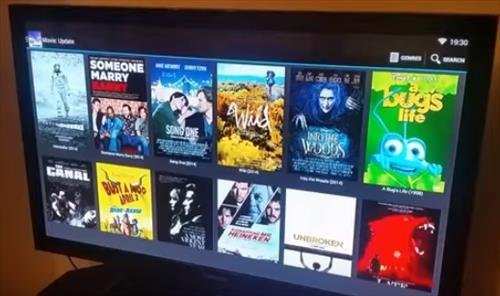
A Android TV box is a device that connects to your television, allowing you to access streaming apps, games, and other digital content. **It works by running the Android operating system, which enables you to navigate and customize your viewing experience easily.**
When you ask what is android tv box and how does it work, the answer is simple: it acts as a mini computer for your TV, turning it into a smart device. It processes internet data and displays a user-friendly interface on your screen.
In essence, an Android TV box makes your TV smarter, giving you access to a world of entertainment at your fingertips.

What is an Android TV Box and How Does It Work?
When you hear about streaming movies, TV shows, or playing games on a big screen, you might wonder how it all happens. An Android TV box is a device that makes your regular TV smarter and more fun. It brings internet entertainment straight to your television, turning it into a smart TV without needing to buy a new one. But how does this small device do all that? Let’s explore what an Android TV box is and the way it works in detail.
Understanding What an Android TV Box Is
An Android TV box is a compact digital device designed to connect to your television. It runs on the Android operating system, which is the same software many smartphones use. Once connected, this box allows your TV to access a wide range of online content—movies, TV series, music, games, and much more.
Think of it as a mini-computer that tricks your TV into becoming an internet-connected smart device. It usually connects to your TV via an HDMI port, which is the same port used to connect high-definition devices. With an Android TV box, you can enjoy streaming from popular platforms like Netflix, YouTube, Hulu, and many others.
How Does an Android TV Box Work?
Understanding how an Android TV box works involves looking at its main components and how they interact to deliver content. At its core, the device acts as a bridge between the internet and your television.
Key Components of an Android TV Box
To get a better picture, let’s look at the main parts that make an Android TV box functional:
- Processor (CPU): Acts as the brain of the device. It processes instructions and runs applications.
- Memory (RAM): Helps run multiple apps smoothly without slowing down.
- Storage: Space where apps, games, and media files are stored.
- Operating System (Android): The software platform that manages hardware and runs apps.
- Wi-Fi and Ethernet: Enable internet connection to stream content.
- HDMI Output: Connects the device to your TV screen, transmitting high-quality audio and video.
Step-by-Step: How Content Reaches Your TV
Here’s how an Android TV box functions from turning on to streaming content:
- Powering Up: When you turn on the device, it boots up its operating system, just like a smartphone or computer.
- Connecting to the Internet: The device connects via Wi-Fi or Ethernet, establishing an internet connection necessary for streaming.
- Launching Apps: You navigate to pre-installed apps like Netflix or YouTube or download new ones from the app store.
- Choosing Content: You select what to watch or listen to. The app fetches the content from the internet.
- Streaming Data: The device streams data from servers over the internet, decoding it into audio and video signals.
- Output to TV: The decoded signals travel through the HDMI cable to your TV screen, delivering clear visuals and sound.
Connecting Your Android TV Box to Your TV
To get started, you need to connect your Android TV box correctly. Here are the simple steps:
- HDMI Connection: Plug one end of the HDMI cable into the Android TV box and the other into your TV’s HDMI port.
- Power Supply: Connect the device to a power source using the included power adapter.
- Internet Connection: Set up Wi-Fi by selecting your network and entering the password or connect with an Ethernet cable for a wired connection.
- Initial Setup: Turn on your TV and select the HDMI input source. Follow the on-screen instructions to complete the setup.
Once connected and set up, your Android TV box is ready to deliver a whole new level of entertainment experience.
Popular Features of Android TV Boxes
Android TV boxes come with various features to enhance your viewing experience. Some of these features include:
Pre-installed Apps and App Store Access
Most boxes come with popular apps like Netflix, Amazon Prime, Disney+, and YouTube ready to use. You can also access the Google Play Store to download more apps, games, or tools.
Voice Control and Remote Functionality
Many Android TV boxes support voice commands through remotes or compatible smart assistants like Google Assistant. This makes searching for content or controlling the device easier.
Compatibility with External Devices
Connect your smartphone, tablet, or gaming controllers via Bluetooth or USB ports. This expands your entertainment options and makes navigation more fun.
Gaming Capabilities
Android TV boxes support Android-based games, so you can enjoy casual gaming on your big screen. Some devices even come with game controllers for a better gaming experience.
Types of Android TV Boxes Available
Different models offer varying features, so choosing the right one depends on your needs:
- Entry-Level Models: Affordable devices suitable for basic streaming and browsing.
- Mid-Range Devices: Offer higher processing power, better graphics, and more storage options.
- High-End Models: Equipped with advanced features such as 4K or 8K video support, faster processors, and larger RAM capacity.
Know what you want to do most—whether it’s streaming, gaming, or using smart home features—helps determine which type suits you best.
Benefits of Using an Android TV Box
Using an Android TV box offers many advantages:
- Enjoy a Wide Range of Content: Access to multiple streaming platforms and apps from one device.
- Cost-Effective Entertainment: Upgrading your TV with an Android box is cheaper than buying a new smart TV.
- Flexibility and Customization: Install or remove apps as you please, customize your interface, and expand features.
- Easy to Use: Simple interface and remote control make navigating content straightforward.
- Regular Software Updates: Keep your device secure and add new features with updates from the manufacturer or Google.
Final Thoughts on How Android TV Boxes Work
In essence, an Android TV box acts as an extension of your TV, turning it into a powerful, internet-connected entertainment hub. It processes data, streams content, and allows you to explore countless apps, games, and streaming services. The device’s hardware components work together seamlessly to provide entertainment in high quality. Whether you want to watch movies, listen to music, play games, or browse the web, an Android TV box makes it all possible on your big screen.
By understanding how an Android TV box functions, you can better decide which model to buy and how to set it up for maximum enjoyment. With its affordable price and versatile features, it remains one of the best ways to make your TV smarter and your entertainment experience richer.
Frequently Asked Questions
What types of content can I access on an Android TV box?
An Android TV box provides access to a wide range of content, including popular streaming services like Netflix, Hulu, and Amazon Prime Video. It also allows you to browse the internet, watch live TV channels, and play games. Additionally, you can view your personal media library, such as photos, videos, and music stored on connected devices or cloud services.
How does an Android TV box connect to other devices and networks?
Android TV boxes connect to the internet primarily through Wi-Fi or Ethernet cables, ensuring a stable connection for streaming and browsing. They also support Bluetooth, enabling you to pair wireless headphones, game controllers, or keyboards. To connect with other devices like smartphones or external storage devices, Android TV boxes typically include USB and HDMI ports for seamless integration and sharing media content.
What is the setup process for an Android TV box?
Setting up an Android TV box involves connecting it to your television via an HDMI cable. Once plugged in, you power on the device and follow on-screen instructions to connect to your Wi-Fi network. You then sign in with your Google account, which allows you to download apps and access personalized settings. After completing these steps, you can start exploring available content and customizing your viewing experience.
Can I install third-party apps on an Android TV box?
Yes, Android TV boxes allow you to install a wide range of third-party applications outside the pre-installed apps. You can access the Google Play Store to browse and download apps compatible with your device. Additionally, some models support sideloading apps from other sources, giving you flexibility to expand your entertainment options beyond official app stores.
How does the hardware of an Android TV box influence its performance?
The hardware components, such as the processor, RAM, and storage, significantly impact an Android TV box’s performance. A more powerful processor and sufficient RAM ensure smooth playback of high-definition content and quick navigation through menus. Adequate storage allows you to install multiple apps and store media files locally. Overall, better hardware translates to a more responsive and enjoyable user experience.
Final Thoughts
A concise conclusion highlights that an Android TV box is a compact device that connects to your TV, providing access to various streaming services and apps. It operates by running an Android operating system, allowing easy navigation and customization.
What is android tv box and how does it work? It simplifies the process of turning an ordinary TV into a smart one, offering a versatile entertainment experience with minimal setup.
