

To make your speaker louder on Android, simply access the volume settings or adjust equalizer options. **Increase the volume to the maximum level and tweak the sound settings for a louder output.** If you’re wondering how to make speaker louder on Android, you can also explore third-party apps or check your device’s sound enhancements.
Some Android devices have built-in sound optimization features that boost loudness. Adjusting these settings can make a noticeable difference without needing extra software. Whether you want louder music or clearer calls, these simple steps can help you get more sound from your device.

How to Make Speaker Louder on Android
Making your Android device’s speaker louder can greatly improve your listening experience, whether you want to enjoy music, watch videos, or participate in a video call. Sometimes, the default volume settings just aren’t enough, and knowing how to boost your speaker volume can save you from frustration. In this guide, we’ll explore various ways to increase your Android speaker volume, from adjusting basic settings to using advanced apps and hardware solutions.
Understanding Android Volume Settings
Before diving into methods to make your speaker louder, it’s essential to understand how Android handles sound. Most Android devices have multiple volume controls for different functions:
- Media Volume: Controls the volume for music, videos, and games.
- Ring Volume: Controls the volume for incoming calls and notifications.
- Alarm Volume: Controls the intensity of alarm sounds.
- System Volume: Controls sounds like keyboard clicks, touch sounds, and screen locks.
Knowing these distinctions helps you target the right settings when trying to boost your speaker’s loudness.
Adjusting Volume Using Built-in Settings
The most straightforward way is to increase your volume through your device’s native controls:
Using Volume Buttons
– Press the volume up button located on the side of your Android phone.
– A volume slider appears on the screen.
– Drag the slider to the maximum level.
– Ensure you are adjusting the **Media Volume** for audio playback, not just the ringtone or alarms.
Accessing Volume Settings in the Settings Menu
– Open the Settings app on your device.
– Tap on “Sound” or “Sound & vibration” depending on your device.
– Adjust the sliders for **Media**, **Ring**, and **Alarm** to their highest levels.
– Some Android versions have additional options for controlling media and system sounds separately.
Enabling Sound Enhancements on Your Android
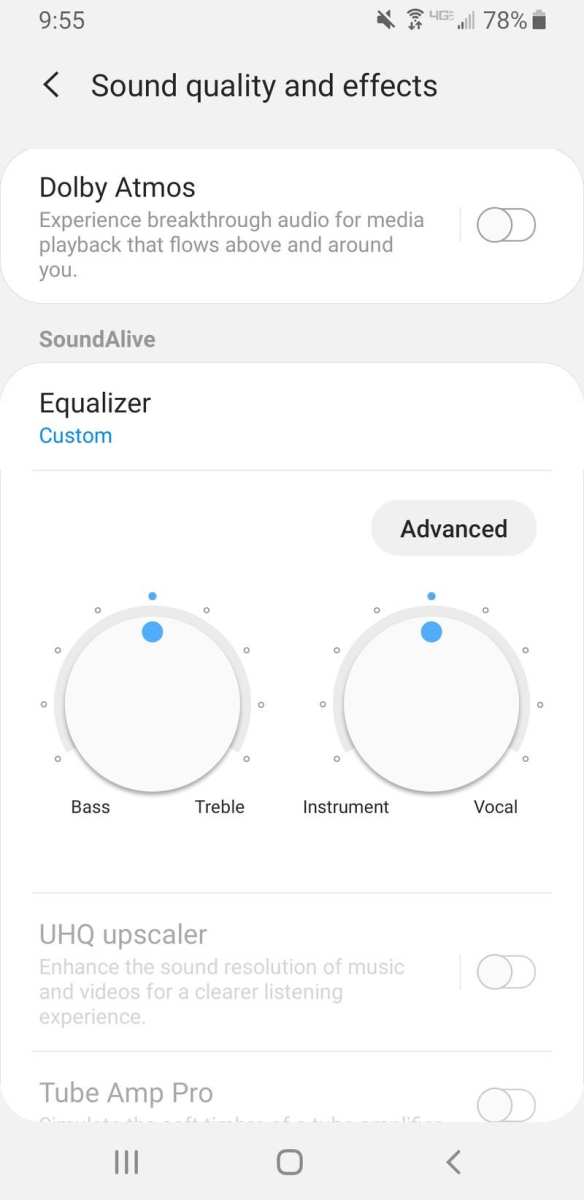
Many Android phones come with built-in sound enhancement features. These can help increase sound quality and volume:
Use Equalizer Settings
– Open your music or sound app.
– Look for “Equalizer” in the app’s settings menu.
– Increase the bass and treble sliders.
– Some devices also allow you to boost volume with preset sound profiles like “Loud” or “Bass Booster.”
Activate Dolby Atmos or Other Surround Sound Features
– Navigate to your device’s Settings.
– Tap on “Sound and vibration” or similar.
– Find options labeled “Dolby Atmos,” “Sound Effects,” or “Sound Quality & Effects.”
– Enable these features to enhance loudness and clarity.
Using Third-Party Apps to Boost Volume
When built-in options aren’t enough, third-party volume booster apps can help. These apps amplify sound output and sometimes add features like equalizers and bass boosters. Be cautious, as some apps can damage your speakers if they push volume beyond safe levels.
Recommended Volume Booster Apps
- Volume Booster GOODEV: Simple app that amplifies media volume without complicated settings.
- Super Volume Booster: Provides a quick way to increase your device’s volume with a single tap.
- Equalizer FX: Offers extensive sound customization and volume boosting capabilities.
How to Use Volume Booster Apps Safely
– Download from a trusted source like Google Play Store.
– Install and open the app.
– Adjust the boost slider slowly — avoid setting it to maximum immediately.
– Test the sound quality and volume.
– Remember that pushing volume too high might lead to distortion or speaker damage over time.
Utilizing Hardware Solutions to Increase Sound
If software adjustments don’t provide enough volume, hardware solutions can offer a significant difference:
External Bluetooth Speakers and Portable Speakers
– Connect your device to an external speaker via Bluetooth or auxiliary cable.
– External speakers are often louder and produce clearer sound than built-in speakers.
– Look for speakers with high wattage ratings for maximum volume.
Phone Cases with Built-in Amplifiers
– Some custom cases feature amplifiers that can boost sound output.
– While not as powerful as external speakers, they can provide a slight increase in volume.
Wired Headphones and Earphones
– High-quality headphones often have powerful drivers that can make audio louder.
– Some models include built-in amplifiers to enhance volume.
Protecting Your Speakers While Increasing Volume
Boosting speaker volume is nice, but it’s crucial to prevent damage:
- Avoid setting volume to maximum for extended periods.
- Use sound enhancement features sparingly.
- If you hear distortion, reduce the volume immediately.
- Regularly clean your speaker grills to ensure clear sound transmission.
Additional Tips to Improve Overall Sound Experience
Beyond just making your speaker louder, consider these tips for better audio:
- Keep your device updated — software updates often improve sound performance.
- Use high-quality audio files for streaming or playback.
- Adjust equalizer settings for your listening environment.
- Make sure your device isn’t obstructed — case or debris can muffle sound.
Summary of Effective Methods
| Method | Ease of Use | Effectiveness | Potential Risks |
|---|---|---|---|
| Using Volume Buttons | Easy | Moderate | Low |
| Adjusting Settings in Device Menu | Easy | High | Low |
| Sound Enhancements & Equalizers | Moderate | High | Low if used responsibly |
| Third-Party Apps | Easy | Variable | Moderate — avoid over-amplifying |
| External Hardware | Moderate | Very High | Low |
Making your Android’s speaker louder can be simple or more technical, depending on how much volume you need. Always start with the built-in controls, and if that’s not enough, proceed with sound enhancements or external hardware. Remember, pushing volume levels too high can harm your device over time, so use these methods responsibly. By understanding and applying these tips, you can enjoy louder, clearer sound from your Android device whenever you want.
Frequently Asked Questions
How can I increase the volume level on my Android device without using external speakers?
To increase the volume on your Android device, press the volume up button on the side of your phone. You can also access the volume slider by tapping the volume icon that appears on your screen when you press the volume keys. Additionally, check the sound settings in your device’s settings menu to ensure the media volume is set to maximum. Some devices offer a separate volume for different functions like notifications and alarms, so make sure those are also turned up.
What app settings can I adjust to boost my speaker volume on Android?
Many Android devices include built-in audio enhancement features in the settings menu. Navigate to Settings > Sound or Sounds & Vibration, where you might find options like ‘Sound effects,’ ‘Equalizer,’ or ‘Dolby Atmos.’ Adjust these settings to improve audio output. Some third-party apps also offer volume boosting features; however, use these carefully to avoid damaging your speakers. Always ensure your device’s software is up to date for optimal performance.
Are there any hardware solutions I can use to make my Android speaker louder?
Yes, hardware solutions include using external speakers or Bluetooth speakers that connect wirelessly to your device. These external options often provide much louder and clearer sound compared to built-in speakers. You can also consider using a portable amplifier designed for smartphones, which amplifies the audio signal before it reaches your speaker. Always make sure such accessories are compatible with your device model and follow manufacturer instructions for best results.
Final Thoughts
To make a speaker louder on Android, start by increasing the volume with the physical buttons. Check the sound settings and disable any volume limitations or enhancements that might reduce volume output. You can also adjust equalizer settings within music apps for clearer, louder sound. Using external speakers or Bluetooth devices can significantly boost audio levels if built-in speakers are insufficient.
In conclusion, knowing how to make speaker louder on Android allows you to enjoy clearer and more powerful sound. Experiment with volume settings, sound enhancements, and external devices to improve audio output easily.
