What Is The Difference In Apple Ipad Generations Explained

What Is the Difference in Apple iPad Generations
Understanding the differences between various iPad generations helps users choose the right device for their needs. Each new release tends to bring improvements, new features, and design changes. These updates can impact performance, usability, and overall value.Overview of Apple iPad Generations
Apple has released multiple iPad models since the first version debuted in 2010. Over the years, the lineup has expanded to include standard iPads, iPad Airs, iPad Pros, and iPad Minis. Each series targets different user needs and price points.Design and Build Changes Across Generations
Early iPads had thicker bezels and a more plastic-like back. Recent models feature sleek aluminum bodies and slimmer profiles. For example, the iPad Air 4 and iPad Pro 12.9 showcase edge-to-edge screens with rounded corners, making them more modern and easier to hold.Display Size and Quality
The display has evolved significantly from the first to the latest generations. The original iPad had a 9.7-inch display, while newer models like the iPad Pro 12.9 feature a large 12.9-inch Liquid Retina display. Resolution improvements include higher pixel density, true tone color, and ProMotion technology for smoother visuals.Material and Weight
Newer iPads often use lighter aluminum, reducing weight for easier handling during extended use. The thickness has also decreased, making them more portable. For instance, the iPad Air 5 weighs just around 0.7 pounds, compared to the original’s 1.5 pounds.Performance and Hardware Upgrades
Performance enhancements are key differences across iPad generations. They include faster processors, better graphics, and improved RAM.Processors and Chipsets
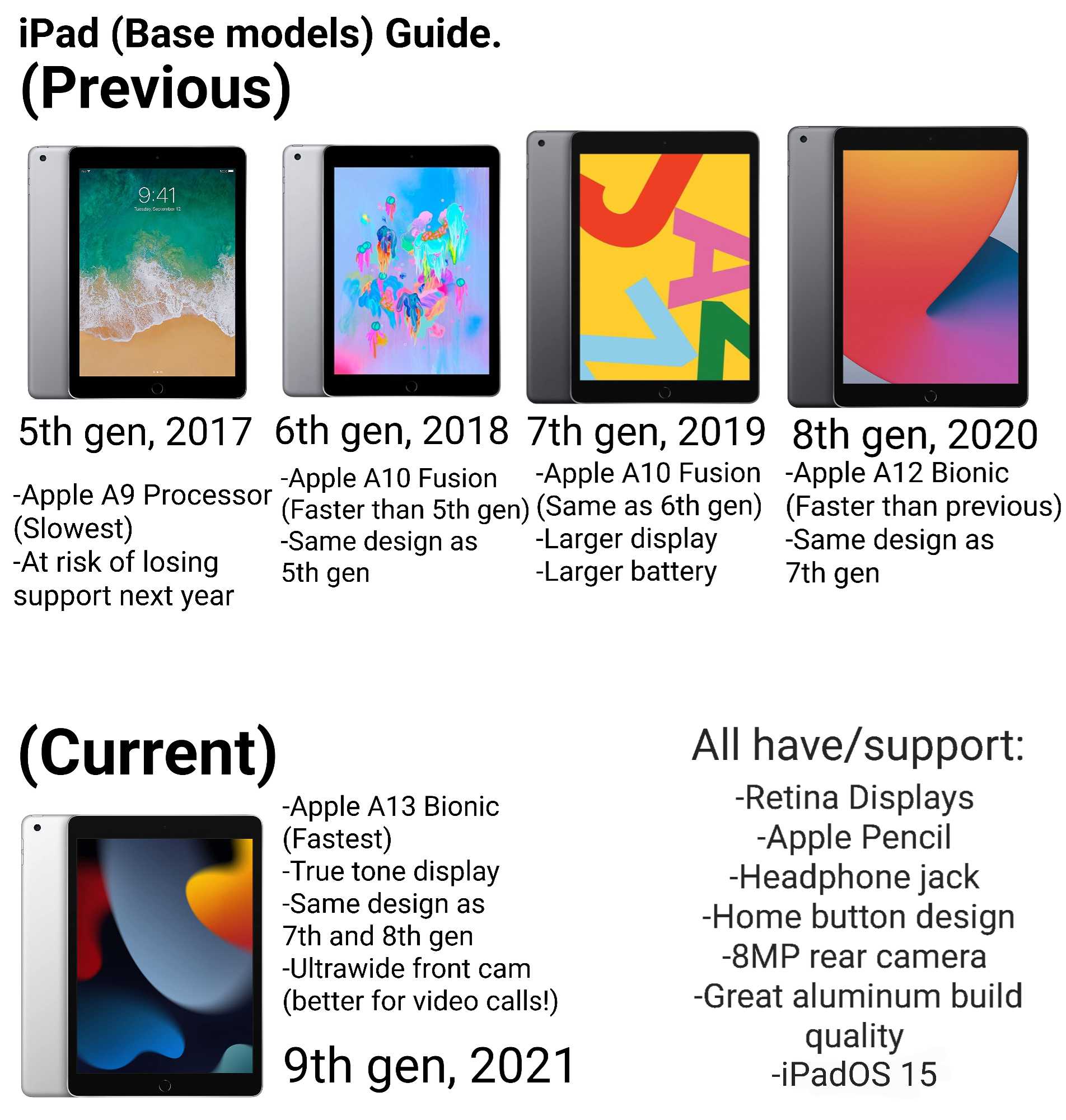
The first-generation iPad used an A4 chip, while recent models like the iPad Air 5 use the A15 Bionic chip. This upgrade means faster speeds, improved multitasking, and more efficient energy use. For example:| Model | Chipset |
|---|---|
| iPad (1st Gen) | A4 |
| iPad (2020) | A12 Bionic |
| iPad Air (2022) | A15 Bionic |
Memory and Storage Options
Memory options have expanded with newer models, improving multitasking abilities. Storage options have also increased, with latest iPads offering up to 1TB for professional workflows.Camera and Audio Improvements
Camera technology has seen notable upgrades, especially in models like the newer iPad Air and iPad Pro.Rear and Front Cameras
Earlier iPads had basic cameras suitable mainly for video calls. Now, newer models offer 12MP or higher rear cameras with features like Smart HDR and 4K video recording. The front camera has also improved, supporting Center Stage technology for better video calls.Audio Enhancements
The number of speakers has increased, providing richer sound. Recent models feature stereo speakers that deliver clear, balanced audio suitable for media consumption.Connectivity and Compatibility
Updates in connectivity impact how users connect to the internet and peripherals.Wi-Fi and Cellular Options
Newer iPad models support faster Wi-Fi standards like Wi-Fi 6 and 6E, ensuring better internet speeds. Cellular models include 4G LTE and 5G options, offering more reliable mobile connectivity.Ports and Accessories
Most recent iPads have shifted to USB-C ports, replacing the older Lightning connector. This change allows for faster data transfer and wider accessory compatibility.Software and Operating System Features
While hardware improvements are significant, software features also evolve with each generation.iPadOS Enhancements
Newer iPads run the latest iPadOS versions, offering better multitasking, improved file management, and new gaming and productivity features. For example, iPads released after 2021 support widgets on the home screen and improved split view.Compatibility With Accessories
Later generations support newer accessories like the second-generation Apple Pencil, Magic Keyboard, and Smart Keyboard Folio, enabling tasks from drawing to productivity.Price and Value Proposition
Price varies depending on generation, storage, and connectivity options. Newer models often carry a premium but provide enhanced features worth the investment for power users.Price Trends Over Generations
While early models were more affordable, recent models like the iPad Pro command higher prices due to advanced features. Second-hand options can be a good way to find older models at lower prices.When to Upgrade
If you need the latest features like 5G or the newest processor, upgrading makes sense. For basic tasks, older models still deliver solid performance and good value.Summary of Key Differences
To help compare, here’s a quick overview:- Design: Slimmer, lighter, and more modern in recent models.
- Display: Larger screens with better resolutions and color accuracy.
- Performance: Faster processors, more RAM, and improved graphics.
- Camera: Significantly better in newer models with features like 4K video and Smart HDR.
- Connectivity: USB-C, Wi-Fi 6, and 5G support in recent models.
- Software: Access to the latest iPadOS updates with improved multitasking and compatibility.
Related Topics to Consider
Additional considerations include accessories, battery life, and specific use cases. For example, professional artists might prioritize iPad Pro’s display and Apple Pencil support, while students may prefer the affordability of earlier models. Understanding these differences helps ensure you select an iPad that aligns with your needs and budget. Each generation builds upon the last, offering better performance, features, and usability for a range of users.Frequently Asked Questions
How do the hardware specifications vary between different iPad models over the years?
Each new iPad generation generally introduces updated hardware components, such as faster processors, improved display quality, and enhanced cameras. For example, recent models often feature Apple’s most recent A-series chips, which provide better performance and efficiency. Additionally, newer iPads tend to have increased storage options, better battery life, and updated connectivity features like improved Wi-Fi and 5G support, making them more capable for a variety of tasks compared to earlier generations.
What are the main design differences across various iPad versions?
Design changes across iPad generations include alterations in size, weight, and build materials. Recent models typically feature slimmer profiles, lighter weights, and more refined edges for easier handling. Screen sizes may also evolve, with some models adopting edge-to-edge displays and reducing bezels. These design adjustments aim to enhance portability and user comfort, making newer iPads easier to carry and use for extended periods.
In what ways do software capabilities and features differ among iPad generations?
Newer iPad models support the latest versions of iPadOS, offering advanced multitasking, improved input options, and updated software features. Older iPads might not support the newest OS updates, limiting access to new functionalities like enhanced AR experiences or improved Apple Pencil integration. As each generation upgrades hardware, it often comes with software improvements that optimize the user experience and enable new productivity and creative tools.
How do camera systems and multimedia features change across iPad releases?
Over different generations, iPads have seen significant improvements in their camera systems, with recent models offering higher-resolution sensors, better image stabilization, and advanced video recording capabilities. These enhancements make iPads more suitable for high-quality video calls, photography, and content creation. Additionally, multimedia features such as speakers, display quality, and support for accessories like external microphones have seen upgrades to improve overall media consumption and creation experiences.
Are there differences in compatibility with accessories and peripherals between iPad models?
Yes, newer iPad models often introduce support for the latest accessories, such as updated Apple Pencil versions, magnetic keyboards, and external displays. They may also feature improved port options, like the transition from traditional Lightning connectors to USB-C in some models, enabling faster data transfer and broader accessory compatibility. Conversely, older iPads might not support these new peripherals, limiting their integration with the latest accessories.
Final Thoughts
Les différentes générations d’iPad offrent des améliorations en termes de performance, de design et de fonctionnalités. Chaque nouvelle version intègre souvent un processeur plus rapide, un écran de meilleure qualité et des capacités accrues. Les modèles récents proposent également des améliorations en matière de connectivité et de compatibilité avec de nouveaux accessoires. En conclusion, what is the difference in apple ipad generations réside principalement dans leurs avancées technologiques et leur conception. Ces évolutions garantissent que chaque génération répond mieux aux besoins des utilisateurs tout en restant élégante et efficace.
Similar Posts