Learn Android App Development Step By Step For Beginners

Learn Android App Development Step by Step: Your Complete Guide
Understanding What Android App Development Is
Android app development involves creating applications that run on Android devices like smartphones, tablets, and wearable devices. It requires understanding programming languages, development tools, and the overall app creation process. Knowing what makes Android apps different helps you plan your learning journey effectively.Prerequisites for Learning Android App Development
Before diving into development, it’s helpful to have a basic understanding of programming concepts. Familiarity with Java or Kotlin, the main languages for Android, will make learning easier. Additionally, having a computer with Windows, Mac, or Linux is necessary to install development tools.Getting Started with the Right Tools
The primary tool for Android app development is Android Studio. This is an official IDE that provides everything needed to write, test, and debug Android apps. Download and install Android Studio from the official website and set up your environment for optimal performance.Learning Programming Languages: Java and Kotlin
Java has been used for Android development for years, but Kotlin is now the preferred language. Both are powerful and versatile. Start with basic syntax, control structures, and object-oriented programming concepts in either language to build a solid foundation.Java Basics for Android Development
Learn how to declare variables, write functions, and understand classes. Practice with simple programs to get comfortable with Java syntax and structure.Kotlin Basics for Android Development
Focus on understanding functions, data classes, and null safety. Kotlin’s concise syntax minimizes boilerplate code, making programming faster and clearer.Understanding the Android Development Components
Android apps are built with various components that work together. Familiarize yourself with activities, fragments, layouts, and views.Activities and Fragments
Activities represent individual screens within an app, while fragments are reusable portions of UI that can be embedded in activities. Learning how to manage these helps you create dynamic interfaces.Layouts and Views
Layouts define how elements are arranged on the screen, such as buttons or text fields. Views are the UI elements themselves. Mastering layout design is key to crafting user-friendly apps.Designing Your First Android App
Start with simple projects like a calculator or a to-do list to apply what you’ve learned. Use Android Studio’s layout editor for visual design and preview your app on emulators or real devices.Creating a New Project
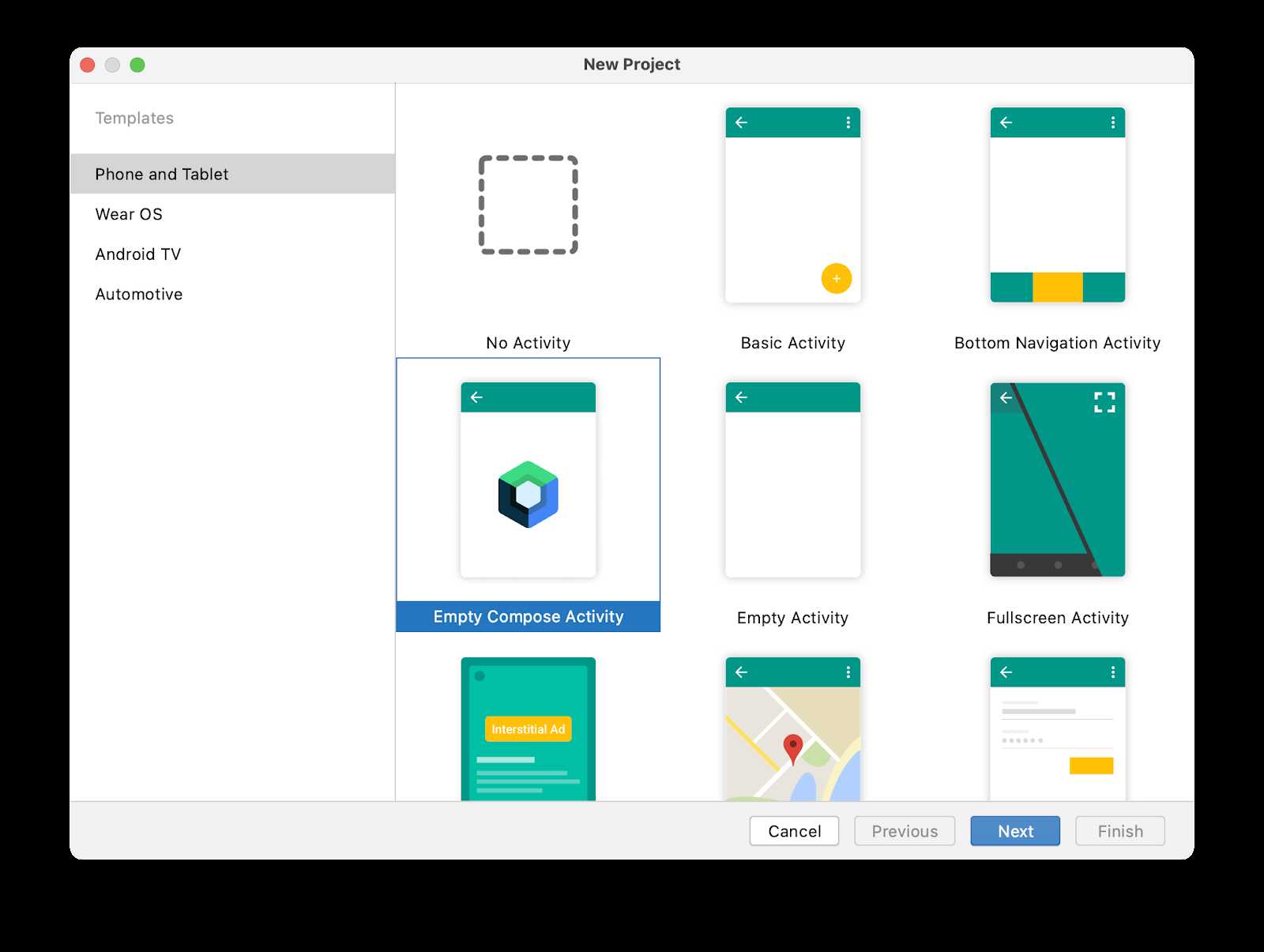
Choose an appropriate project template in Android Studio. Name your project and select the programming language. Set the minimum SDK version to ensure compatibility.Designing the User Interface
Use XML to design your layout or drag-and-drop components in the visual editor. Add buttons, text fields, and images to make your interface engaging and intuitive.Writing Basic Code
Link your UI components to Java or Kotlin code to handle user interactions. For example, make a button display a message when clicked.Understanding App Lifecycle and Architecture
Knowing how Android manages apps helps you write efficient code. Study the activity lifecycle to understand how your app responds to user actions and system events.Activity Lifecycle Methods
Learn methods like onCreate, onStart, onResume, onPause, onStop, and onDestroy. Properly handling these ensures your app runs smoothly and saves data appropriately.Implementing Best Practices
Keep your code organized with MVC or MVVM architecture patterns. Use ViewModels and LiveData to manage data efficiently and update the UI seamlessly.Testing and Debugging Your Apps
Thorough testing helps find bugs early. Use Android Studio’s debugging tools and emulators to identify issues and fix them.Using Emulators and Real Devices
Test your app on various virtual devices to see how it performs across screen sizes and configurations. Also, connect real devices for a more realistic testing environment.Debugging Tools and Techniques
Utilize breakpoints, logs, and the Logcat window to trace problems. Analyze crash reports and fix bugs to improve app stability.Adding Features and Functionality
Gradually enhance your app by integrating new features such as location services, camera access, or network communication.Using APIs and Libraries
Incorporate third-party libraries to save development time and add complex functionalities like maps or social media sharing.Implementing User Input and Data Storage
Use forms and input fields to gather user data. Store information locally with SQLite databases or remotely using cloud services.Publishing Your Android App
Once your app is ready, prepare for deployment by creating signed APK files and submitting your app to the Google Play Store.Preparing for Launch
Ensure your app complies with Google Play policies. Optimize app size and performance to provide a smooth user experience.Publishing and Marketing
Create compelling app descriptions, high-quality screenshots, and use relevant keywords to attract users. Promote your app through social media and other channels.Continuing Your Learning Journey
Android app development is constantly evolving. Keep up with the latest updates, new libraries, and best practices through forums, tutorials, and courses.Staying Updated
Subscribe to official Android blogs, participate in developer forums, and attend webinars or conferences to stay informed about industry trends.Building a Portfolio
Create multiple apps to showcase your skills. Share your projects on platforms like GitHub to attract potential clients or employers.Related Topics to Explore
To deepen your knowledge, explore related areas such as:- Mobile UI/UX design principles
- Implementing responsive layouts for varied devices
- Security best practices for mobile apps
- Using Firebase for backend services
- Understanding Google Play policies and app monetization
Learning Resources and Courses
Utilize online platforms like Udemy, Coursera, or official Android developer documentation for structured learning. Watching tutorials and participating in coding challenges can accelerate your progress.Building Real-World Projects
Practice by developing projects that solve real problems. This practical experience boosts your confidence and prepares you for professional app development.Final Tips for Beginners
Start small, focus on understanding core concepts, and don’t rush through learning. Patience and consistent practice are key to mastering Android app development step by step. With dedication and the right resources, you can create impressive Android apps that serve users worldwide. Follow this structured approach, and you’ll find yourself developing apps with confidence and skill.Android App Development Tutorial for Beginners – Your First App
Frequently Asked Questions
What are the essential prerequisites for beginning Android app development?
To start developing Android apps, you should have a basic understanding of Java or Kotlin programming languages. Familiarity with object-oriented programming concepts is also beneficial. Additionally, installing Android Studio, which is the official Integrated Development Environment (IDE) for Android development, is necessary. Having a Windows, macOS, or Linux computer with sufficient RAM and storage helps ensure a smooth setup and coding experience.
How should I structure my learning path to build Android applications effectively?
Begin with learning the fundamentals of Java or Kotlin, focusing on syntax, control structures, and object-oriented principles. Next, explore the Android Studio environment and understand how to create and run a simple app. Progress to studying UI design, layout management, and core components like Activities and Fragments. As you grow more comfortable, practice adding features such as navigation, data storage, and network connectivity to develop more complex applications.
What resources are most helpful when learning Android development step by step?
Official documentation from Android developers provides comprehensive guides and API references. Online platforms like Udacity, Coursera, and Udemy offer structured courses tailored to different skill levels. Additionally, reading books focused on Android development and engaging with developer forums like Stack Overflow can help clarify doubts and provide practical insights. Practice through small projects and coding exercises actively reinforces your learning process.
How can I test my Android app during the development process?
Use the Android Emulator integrated into Android Studio to simulate different devices and screen sizes. Testing on real devices is also crucial because it reveals performance issues and device-specific behaviors. Enable developer options and USB debugging on your Android device, then connect it to your computer to deploy and test your app directly. Regular testing helps you identify bugs early and improves app stability.
What are the common challenges faced when learning Android app development, and how can I overcome them?
New developers often encounter difficulties understanding the app lifecycle, managing UI components, and handling asynchronous tasks. To overcome these challenges, break down complex concepts into smaller parts and practice coding regularly. Use tutorials and sample projects to see how experienced developers solve similar problems. Joining developer communities and seeking feedback also provides valuable support and insights as you progress.
Final Thoughts
learn android app development step by step offers a clear pathway to becoming proficient. Focus on understanding the fundamentals of programming and familiarizing yourself with Android Studio. Practice building small projects to solidify your skills and gain confidence. Persistent effort and continuous learning are key to progressing smoothly in app development.
Similar Posts































