How To Learn How To Make Android Apps Effectively

How to Learn How to Make Android Apps
Creating your own Android app can seem like a big challenge at first. But once you understand the steps involved and the tools you’ll use, it becomes much easier. If you’re asking yourself, “How do I learn to make Android apps?” you’re in the right place. This guide will walk you through everything you need to know, from understanding the basics to building your very first app. Whether you’re a complete beginner or someone with a little programming experience, this article will help you learn effectively and enjoy the process.Understanding What Makes an Android App
Before jumping into coding, it’s important to understand what an Android app actually is. Think of an app as a collection of files that work together to perform a specific task. These files include layouts (what users see), code (how the app functions), and resources (images, sounds, etc.). Here are some key points about Android apps:- Application Structure: An app is built with components like Activities (screens), Services (background tasks), and Broadcast Receivers (responding to system-wide events).
- Programming Language: Most Android apps are written in Java or Kotlin. Kotlin is newer and more modern, but Java remains widely used.
- Design: Apps have a visual interface designed with XML layout files that specify how elements are arranged on the screen.
Getting the Right Tools
To start creating Android apps, you need the right software tools. The main tool is the Android Studio IDE (Integrated Development Environment). Here’s what you should do:Downloading Android Studio
- Visit the official Android Developers website
- Download the latest version compatible with your operating system (Windows, Mac, Linux)
- Follow the installation instructions provided on the site
Setting Up Your Development Environment
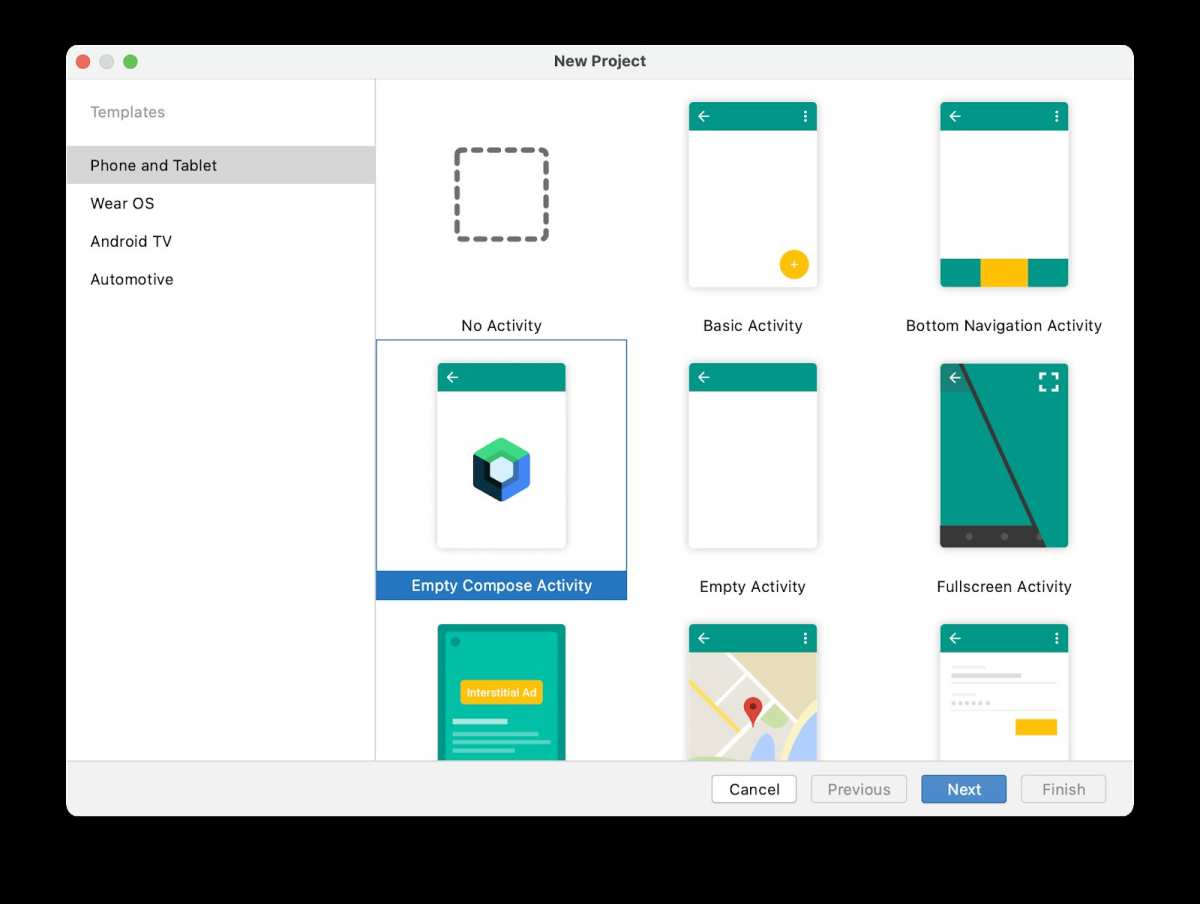
Once installed, open Android Studio. It will walk you through some initial setup steps:- Create a new project, choosing a name and save location
- Select the type of app you want to build (for beginners, a basic empty app is best)
- Choose the programming language (Kotlin or Java)
- Set the minimum Android version your app will support (lower versions have more users but fewer features)
Learning the Programming Languages
You should pick either Java or Kotlin to write your apps. Kotlin is recommended for beginners because it’s easier to learn and more concise, but knowing Java can also be helpful.Getting Started with Kotlin or Java
- Use online tutorials or courses designed for beginners
- Practice writing simple programs to get familiar with syntax
- Focus on understanding variables, functions, conditionals, and loops
Designing Your App’s User Interface
A good user interface makes your app enjoyable to use. Android Studio provides a visual editor called the Layout Editor. Here’s how to get started:Using the Layout Editor
- Open the activity_main.xml file under the “res/layout” folder
- Drag and drop elements like buttons, text fields, and images onto the design surface
- Arrange elements and set their properties in the attributes panel
Understanding Layouts
Different layout types control how elements are organized:- LinearLayout: Arranges elements in a straight line (vertical or horizontal)
- RelativeLayout: Positions elements relative to each other
- ConstraintLayout: Offers flexible positioning and responsiveness
Writing Your First App Code
Once your layout is ready, you can start adding functionality. Here’s a simple example:Adding a Button that Responds to Clicks
“`java // In your activity file (MainActivity.java or MainActivity.kt) Button myButton = findViewById(R.id.my_button); myButton.setOnClickListener(new View.OnClickListener() { @Override public void onClick(View v) { Toast.makeText(MainActivity.this, “Button clicked!”, Toast.LENGTH_SHORT).show(); } }); “` This code makes a button respond when users tap it, showing a message.Testing Your App
Android Studio includes an emulator that simulates different devices:- Click the “Run” button
- Select a virtual device or connect your real Android device via USB
- Watch your app come to life on the screen!
Learning About App Functionality and Features
As you get more comfortable, explore adding more features, such as:- Accessing device sensors like GPS or cameras
- Storing data locally or in the cloud
- Implementing animations or multimedia
Practicing and Building Projects
The best way to learn is by doing. Start small projects:- A calculator app
- A to-do list
- A simple game
Joining Developer Communities and Learning Resources
Learning to develop Android apps is easier if you connect with others:- Visit forums like Stack Overflow to ask questions
- Join Android development groups on social media
- Follow tutorials on popular sites like Udemy, Coursera, or freeCodeCamp
Keeping Up with Android Development Trends
Android development evolves fast. To stay current:- Read official Android developer blogs
- Attend online webinars and workshops
- Experiment with new tools and APIs as they release
Building Your Portfolio and Publishing Your Apps
Once you build a few apps, consider publishing them:- Create a developer account on the Google Play Store
- Prepare your app’s listing with clear descriptions and screenshots
- Follow Google’s guidelines for publishing
Final Tips for Aspiring Android Developers
– Stay patient and persistent; learning takes time – Practice regularly; even small projects help – Break down big ideas into manageable steps – Don’t hesitate to ask for help or look for tutorials – Keep experimenting with new ideas and features By following these steps, learning how to make Android apps becomes an exciting and rewarding journey. Each app you develop builds your confidence and skills, moving you closer to building the creative, functional apps you imagine.Frequently Asked Questions
What are the best resources to start learning Android app development?
Begin with official documentation from Google, such as Android Developers. Explore online courses on platforms like Udacity, Coursera, or Udemy that offer comprehensive tutorials from beginner to advanced levels. Additionally, follow tutorials on YouTube and join developer communities like Stack Overflow and Reddit to seek advice and share experiences. Practice regularly by building small projects to reinforce your understanding.
Which programming language should I learn for creating Android apps?
Focus on learning Kotlin, as Google officially recommends it for Android development due to its modern syntax and safety features. Java is also a viable option, especially if you have prior experience or plan to work on legacy codebases. Both languages are supported by Android Studio, but Kotlin often provides a smoother development experience for new developers.
How can I gain practical experience in Android app development?
Create simple projects such as a to-do list or weather app to apply your knowledge. Experiment with different features like user interfaces, data storage, and networking. Participate in coding challenges and hackathons to test your skills under real-world conditions. Collaborate with other developers or contribute to open-source projects to broaden your understanding and improve your coding capabilities.
Are there specific tools or software I need to start developing Android apps?
Download and install Android Studio, the official integrated development environment (IDE) for Android development. It includes all necessary tools such as a code editor, emulator for testing apps, and debugging features. Familiarize yourself with the Android SDK and set up virtual devices to test your applications across different devices and screen sizes.
How long does it typically take to become proficient in Android app development?
The learning curve varies based on your prior programming experience and dedication. On average, dedicating a few hours weekly, you can start building basic apps within a few months. To reach an intermediate level where you can develop more complex applications, expect to spend six months to a year practicing and expanding your skills through projects and continuous learning.
Final Thoughts
To learn how to make android apps, start with basic programming skills such as Java or Kotlin. Use online tutorials and official documentation to build a strong foundation. Practice regularly by creating small projects to understand app components better. Join developer communities to get feedback and stay motivated. Consistent effort and hands-on experience pave the way to becoming proficient. Focus on understanding user interface design and app functionality. Following these steps, you’ll confidently learn how to make android apps and turn your ideas into reality.
Similar Posts