

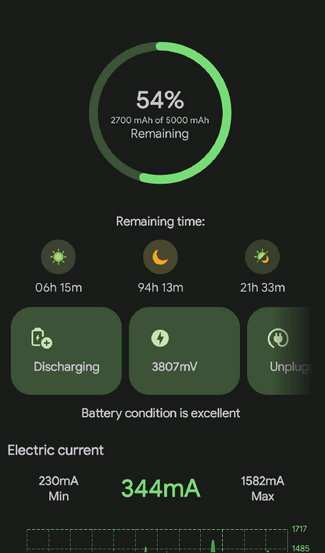
Need a quick way to keep your phone’s battery healthy? **An android battery monitor app provides real-time insights into your device’s power usage and helps extend battery life.** These apps track which apps drain your battery the most and suggest ways to optimize performance. With just a few taps, you can identify energy hogs and adjust settings accordingly. Choosing the right android battery monitor app makes managing your phone’s power more efficient and less frustrating.

Comprehensive Guide to Android Battery Monitor Apps
When it comes to smartphones, battery life remains one of the most important factors for users. Whether you rely on your Android device for work, entertainment, or staying connected with loved ones, knowing how your battery performs can help you make smarter decisions about usage and extensions. This is where Android battery monitor apps come into play. These tools provide valuable insights into battery health, usage patterns, and app activity, empowering users to optimize their devices for longer battery life.
In this guide, we’ll explore everything you need to know about Android battery monitor apps. From understanding their core features to selecting the right app for your needs, we’ll cover all aspects in detail. Let’s dive into how these apps work and how they can help you get the most out of your Android device.
What Is an Android Battery Monitor App?
An Android battery monitor app is a program designed to track and display information related to your device’s battery. These apps give users real-time data on battery status, consumption, and health. They can identify which apps or processes drain the battery most, how much time you have left before your battery runs out, and ways to improve battery longevity.
Some key features of these apps include:
- Battery Level Tracking: Shows current battery percentage and estimated time remaining.
- Power Consumption Analysis: Breaks down which apps and system functions use the most power.
- Battery Health Checks: Monitors the overall health and capacity of the battery over time.
- Usage History: Keeps records of battery performance over days or weeks.
- Notification Alerts: Notifies you when your battery is low or a certain app consumes too much power.
Using an Android battery monitor app helps you stay aware of your device’s power consumption, allowing you to make informed choices like closing unnecessary apps or adjusting settings to save energy.
How Do Android Battery Monitor Apps Work?
These apps gather data by interfacing with your device’s hardware and operating system. They leverage built-in Android APIs that provide battery statistics, such as the levels, temperature, voltage, and health status. The apps analyze this data to generate user-friendly reports and insights.
Typically, battery monitor apps do the following:
- Data Collection: Constantly collect battery-related data from your device.
- Data Processing: Analyze consumption patterns over time to identify power-hungry apps or processes.
- Reporting: Present information in graphs, charts, and summaries for easy understanding.
- Recommendations: Offer tips on how to reduce battery drain, such as disabling unnecessary features or closing specific apps.
Some apps also incorporate advanced features like dark mode support, customizable alerts, and integration with system settings, making battery management more intuitive.
Popular Android Battery Monitor Apps
There are many battery monitor apps available on the Google Play Store, each offering unique features. Here are some of the most recommended options:
AccuBattery
- Provides accurate estimates of battery capacity and health.
- Tracks detailed app usage to pinpoint power drainers.
- Offers charging alarms and tips to extend battery lifespan.
GSam Battery Monitor
- Displays real-time battery statistics with detailed breakdowns.
- Shows which apps consume the most power during the day.
- Includes a widget for quick access to battery stats.
- Offers a simple, clean interface for battery stats.
- Provides quick access to detailed information with a tap.
- Supports multiple widget sizes and themes.
Battery Doctor
- Focuses on battery saving features and cleaning junk files.
- Provides a one-tap boost to improve performance and save power.
- Includes scheduled task features to optimize battery life.
Each app caters to different needs, so selecting the right one depends on your preferences for interface, detailed insights, and additional features.
Choosing the Right Battery Monitor App for Your Android Device
When selecting an app, consider the following factors:
- User Interface: Is the app easy to navigate and understand?
- Features: Does it provide detailed usage stats, health checks, and alerts?
- Performance: Does the app run smoothly without draining additional power?
- Reviews and Ratings: What do other users say about its reliability and usefulness?
- Compatibility: Is the app compatible with your Android version and device model?
Test a few apps to see which one provides the insights you need in an easy-to-understand format. Remember, some apps may include ads or in-app purchases, so choose accordingly.
How to Maximize Battery Life Using Android Battery Monitor Apps
A battery monitor app isn’t just for checking stats; you can actively use it to extend your device’s battery life. Here are practical tips:
Identify and Close Power-Hungry Apps
- Review the list of app usage to see which ones drain the most power.
- Close or uninstall apps that aren’t essential.
Adjust Settings Based on Usage Patterns
- Enable battery saver mode when running low.
- Reduce screen brightness and timeout duration.
- Disable Wi-Fi, Bluetooth, or location services when not needed.
Optimize Charging Habits
- Avoid overcharging your device; unplug once it hits 100%.
- Use recommended chargers and avoid fast charging unless necessary.
- Monitor charging speed and temperature via the app if possible.
Enable Notification Alerts
- Set alerts for low battery to prevent abrupt shutdowns.
- Use app notifications to identify unexpected power drainers.
Implementing these strategies not only helps preserve your battery life but also improves overall device performance.
Understanding Battery Health and Maintenance
Battery health degrades over time due to repeated charge cycles. Monitoring this decline allows you to replace the battery before it affects your daily use. Many Android battery monitor apps include features that track battery capacity and estimate remaining lifespan.
Here are some signs of battery wear:
- Battery drains faster than usual.
- Device heats up during charging or use.
- Unexpected shutdowns even with a high percentage.
To maintain healthy batteries:
- Avoid frequent deep discharges—try to keep the charge between 20% and 80%.
- Use high-quality chargers and cables.
- Enable battery optimization features.
Regularly checking your battery’s health with an app can alert you when it’s time to consider replacement or repairs, ensuring your device stays reliable and efficient.
Advanced Features in Modern Android Battery Monitor Apps
As technology advances, newer apps incorporate several sophisticated features:
- AI-Powered Usage Predictions: Some apps use artificial intelligence to forecast how long your battery will last based on current patterns.
- Background Activity Restrictions: These apps can suggest which background processes to limit or disable.
- Customizable Power Saving Profiles: Switch between different modes (like gaming, reading, or normal) for optimally balanced performance and battery life.
- Battery Temperature Monitoring: Keep track of temperature levels to prevent overheating.
- Widget Integration: Access real-time stats directly from your home screen.
Using these features helps you keep your device running smoothly and prevents unexpected shutdowns caused by overheating or excessive drain.
A good Android battery monitor app becomes an essential tool for anyone eager to extend their device’s lifespan and improve battery performance. By understanding your usage patterns and making smart adjustments, you can avoid unnecessary power drain and ensure your Android device stays reliable throughout the day. Whether you choose a simple app for basic insights or a comprehensive tool with advanced features, the right app can make a significant difference in how you manage your device’s power.
Utilize these apps regularly, keep an eye on your battery health, and adopt smart habits to enjoy longer-lasting charges and better device performance every day.
Frequently Asked Questions
How can I extend my Android device’s battery life using a monitoring app?
To extend your Android device’s battery life, use a battery monitor app to identify which apps consume the most power. Limit background activity for those apps, reduce screen brightness, and disable unnecessary features like Bluetooth or GPS when not in use. Regularly monitoring your battery helps you make informed decisions to optimize overall device performance and longevity.
What features should I look for in an effective Android battery monitor app?
An effective Android battery monitor app should offer real-time usage stats, detailed breakdowns of app consumption, temperature alerts, and suggestions for optimizing battery life. Additionally, it should provide easy-to-understand visualizations and allow you to customize alerts to stay informed about your device’s power status at all times.
Can these apps help identify battery drain caused by specific apps or processes?
Yes, battery monitor apps can analyze your device to pinpoint which apps or processes drain the most power. They provide insights into usage patterns, enabling you to decide whether to restrict certain apps, disable background activity, or uninstall unnecessary applications to improve your device’s overall battery health.
Are there any risks associated with using battery monitoring apps on Android?
Most reputable battery monitoring apps carry minimal risks when downloaded from trusted sources like the Google Play Store. However, some apps may request excessive permissions that could compromise your privacy or device security. Always review app permissions carefully and choose well-rated apps to ensure safe usage.
How often should I check my battery status with a monitoring app?
It is beneficial to check your battery status regularly, especially if you notice rapid battery drain or if you’re planning to be away from charging points for an extended period. Daily checks can help you stay aware of power consumption trends and take proactive steps to conserve battery life effectively.
Final Thoughts
An android battery monitor app helps users keep track of their device’s power consumption efficiently. It provides real-time data and alerts, enabling better management of battery life. With features like usage statistics and optimization tips, users can extend their device’s longevity. In conclusion, an android battery monitor app proves essential for maximizing battery performance and ensuring your device stays charged throughout the day.
