

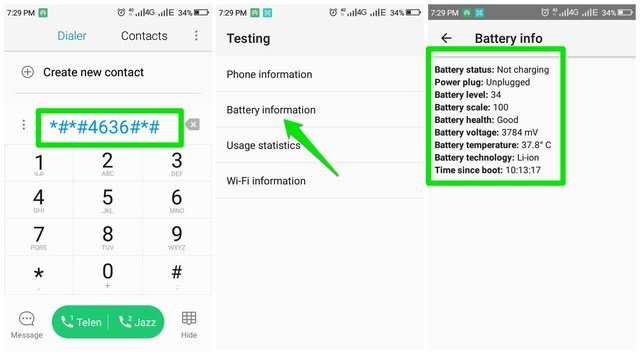
Checking your Android battery quickly? **Dialing *#*#4636#*#* on your device opens the hidden menu for detailed battery information.** Codes for battery test android allow you to view current charge levels, health status, and usage details instantly. These codes can save you time and effort without needing third-party apps. With just a few taps, you gain insights into your battery’s condition directly from your phone. This makes monitoring your device’s performance straightforward and efficient.

Codes for Battery Test Android
When it comes to checking the health of your Android device’s battery, using specific codes can make the process quick and easy. These codes are special sequences of numbers and symbols you can enter directly into your phone’s dialer to access hidden menus and diagnostic tools. These features can provide detailed information about your battery status, usage, and overall health, helping you understand if your battery is performing well or needs replacement.
In this detailed guide, we will explore various codes for battery testing on Android devices. Whether you are a tech enthusiast, a casual user, or someone troubleshooting battery issues, understanding these codes can save you time and help you make informed decisions about your device’s maintenance.
Why Use Battery Test Codes on Android?
Using codes for battery testing offers several advantages:
- Quick access to detailed battery information without installing third-party apps
- Ability to identify if your battery is deteriorating or functioning normally
- Access to diagnostics tools for troubleshooting hardware issues
- Easy way to monitor battery health over time
While many Android devices come with built-in diagnostic tools, these codes extend those capabilities, providing more detailed insights.
Common Android Battery Test Codes
Different brands and models may have their own specific codes, but some common ones work across many Android devices. Here are the most frequently used codes:
*#*#4636#*#*
This code opens the “Testing” menu, which offers detailed information about your device’s network, usage statistics, and battery health. When you dial *#*#4636#*#*, a menu appears with several options, including battery information.
*#*#4986*xml#*#*
(sometimes varies)
This code is used on certain smartphones to access hardware information, including the battery status and other hardware diagnostics.
*#*#0842#*#*
This code specifically tests the device’s vibration and flashlight. While not directly related to battery health, it helps test hardware components that are battery-related.
*#*#1575#*#*
Used on some Samsung devices, this code accesses GPS testing tools. It’s useful for checking location services, which can indirectly affect battery consumption.
Using the Battery Test Code *#*#4636#*#*
This is one of the most popular and useful codes because it provides comprehensive battery information. Let’s look at what you can find:
- Battery Level: Shows the current percentage of charge, helping you determine if the battery is holding a charge properly.
- Battery Health: Displays whether the battery is in excellent, good, or poor condition.
- Battery Temperature: Monitors the temperature to ensure it’s within normal ranges. Overheating can damage the battery.
- Voltage and Technology: Provides details like voltage levels and battery type (Li-ion, Li-polymer, etc.), which can be useful for diagnostics.
- Usage Statistics: Shows how much time is spent on various apps and services, allowing you to identify power drains.
To use this code:
- Open the dialer app on your Android device.
- Type *#*#4636#*#*.
- A testing menu will appear automatically.
- Navigate to the “Battery Information” section for detailed data.
Interpreting Battery Test Data
Once you access the battery info, understanding what each element means is vital:
- Battery Level: Should stay above 80% for optimal performance and longevity.
- Health Status: “Good” is ideal. If it indicates “Replace Soon” or “Bad,” it might be time to consider a battery replacement.
- Temperature: Normal operating temperatures are typically between 20°C and 35°C. Temperatures above 45°C can damage the battery.
- Voltage: Standard voltage for most batteries ranges from 3.7V (nominal) to 4.2V (fully charged). Fluctuations outside these ranges can indicate issues.
Monitoring these parameters regularly helps you maintain your device’s health and identify potential problems early.
Other Useful Codes for Battery Diagnostics
Apart from *#*#4636#*#*, here are some additional codes that can help analyze battery and hardware:
*#*#0*#*#*
This code opens the hardware test menu, allowing you to test display, sensors, cameras, and other components. While not directly about the battery, it’s useful for diagnosing hardware issues that may influence battery life.
*#*#0289#*#*
This code performs a sound test, including checking vibration and speaker functions, which can impact how your device uses power.
*#*#1111#*#* and *#*#2222#*#*
These codes are for Samsung devices and provide firmware and hardware versions, useful if your battery issue is linked to firmware problems.
Third-Party Apps and Codes for Battery Testing
While dialer codes offer quick insights, dedicated apps provide in-depth battery diagnostics. Some popular options include:
- AccuBattery: Monitors actual battery usage and health over time.
- Battery HD: Offers detailed battery stats and estimates remaining charge time.
However, using built-in codes is often faster and doesn’t require installation.
Precautions When Using Battery Test Codes
While these codes are safe to use, keep these tips in mind:
- Only dial codes from trusted sources or manufacturer guides to avoid unintended changes.
- Don’t modify settings unless you know what they do, especially in hardware testing menus.
- If your device behaves unexpectedly after entering a code, restart your phone.
- Regularly check your battery health, especially if you notice rapid draining or overheating.
Understanding how to use codes for battery testing on Android devices helps you keep your phone in good shape. With just a few dialer commands, you can access critical information about your battery’s health, temperature, voltage, and usage patterns. Regularly checking these parameters can extend your device’s lifespan and prevent sudden battery failures. Whether through built-in codes like *#*#4636#*#* or third-party apps, diagnosing battery issues has become more accessible than ever. Keep an eye on your battery’s performance, and don’t hesitate to seek professional help if you notice significant problems.
Frequently Asked Questions
What are some common codes used to test a battery on Android devices?
Several codes can be entered into Android phones to access battery diagnostic information. One frequently used code is *#\*#4636#\*#*, which opens a menu with detailed battery health, usage statistics, and device information. Additionally, codes like *#*#6484#*#* provide hardware testing features, including battery status. These codes help users quickly assess battery performance without needing third-party apps.
How can I check the battery health status using Android dialer codes?
To check your battery health, you can dial *#*#info#*#* or *#*#0842#*#*. These codes display information about the battery’s current capacity, temperature, and voltage. Keep in mind that support for these codes varies across device models and manufacturers. Using these codes provides a quick way to determine if your battery needs replacement or service.
Are there specific codes to test battery charging and discharging performance on Android?
Yes, some codes allow you to test charging and discharging performance. Entering *#*#0289#*#* activates a sound and vibration test, which indirectly indicates battery responsiveness. Also, *#*#0228#*#* can show real-time battery statistics, including capacity and voltage, helping you monitor how well your device charges and discharges over time. These tests assist in diagnosing potential battery issues.
Final Thoughts
Codes for battery test android provide a quick way to check your device’s battery health and performance. Using these codes allows you to access detailed information about battery status, capacity, and other essential metrics directly from your phone.
By entering specific codes, users can diagnose potential issues early and ensure their device operates efficiently. This simple method helps save time and avoids unnecessary visits to service centers.
In conclusion, understanding and utilizing codes for battery test android equips users with a handy tool for maintaining optimal device health and longevity.
