

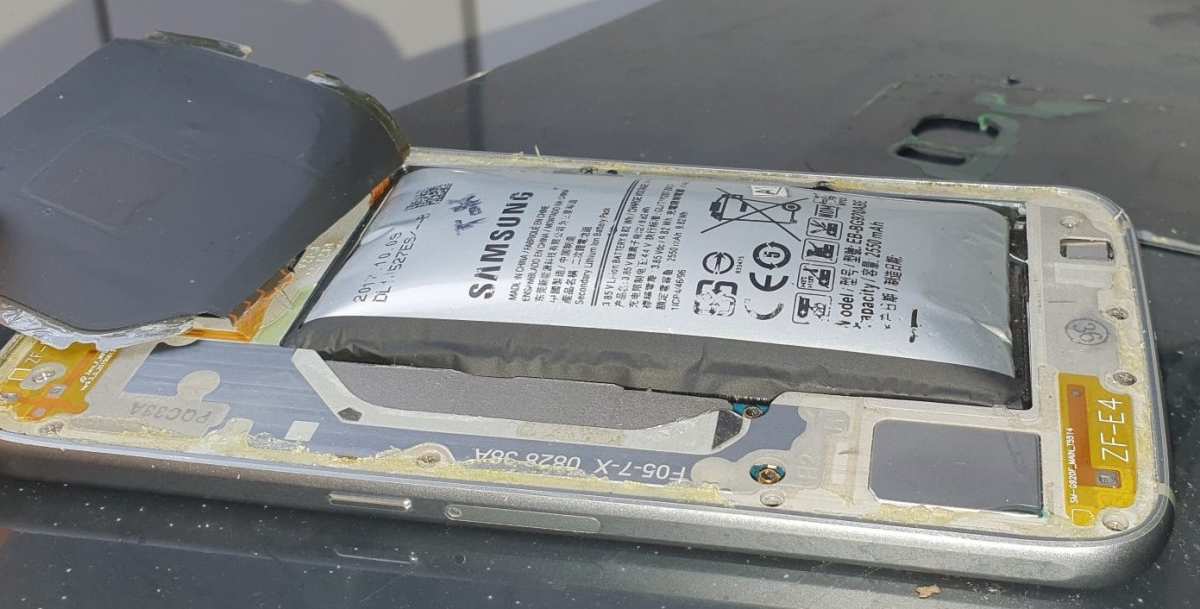
If you notice your Android battery bloated, **the best step is to turn off your device immediately and seek professional repair or replacement**. A bloated battery poses safety risks and can damage your phone. Often, this issue occurs due to overcharging, extreme temperatures, or battery age. Addressing it quickly prevents further damage and ensures your device stays safe.

Understanding Android Battery Bloated: What It Is and How to Fix It
When your Android phone starts acting strange and the battery drains faster than usual, one common culprit might be a bloated battery. But what exactly does it mean for a battery to be bloated? And why does it happen? In this section, we’ll explore what an Android battery bloated is, how to recognize it, and why it’s a serious issue that needs attention.
What Is an Android Battery Bloated?
A bloated battery is an Android battery that has expanded or swelled beyond its normal size. This swelling occurs because of internal damage or deterioration, often caused by the build-up of gases inside the battery. When a battery is bloated, it pushes against the device’s casing, which can cause various problems like screen misalignment or difficulty closing the phone properly.
How Do You Know If Your Android Battery Is Bloated?
Recognizing a bloated battery is crucial for your safety and device health. Here are some signs to look out for:
- Bulging Device: The back cover or screen may feel puffed or warped.
- Difficulty Closing the Phone: The phone might not close properly because the battery pushes outward.
- Unusual Screen Behavior: Screen edges may be lifting or bulging, causing touch issues.
- Rapid Battery Drain: The battery may drain much faster than usual.
- Overheating: The phone gets excessively hot even when not in use.
If any of these signs appear, it’s best to stop using the device immediately to prevent damage or potential safety hazards.
What Causes Android Batteries to Bloat?
Many factors can lead to battery swelling. Understanding these causes helps you prevent future issues:
Overcharging the Device
Charging your phone beyond 100% can stress the battery, leading to deterioration over time. Using incompatible or cheap chargers can also cause voltage irregularities, speeding up the breakdown of internal components.
High Temperatures
Exposure to excessive heat accelerates chemical reactions inside the battery, leading to gas build-up. Leaving your phone in hot places, such as a parked car or under direct sunlight, can cause swelling.
Old or Damaged Battery
Batteries have a lifespan and degrade with use. After many charge cycles, the internal components wear out, and gases may form, resulting in swelling.
Physical Damage
Dropping your phone or exposing it to water can harm the internal structure of the battery, causing internal short circuits and swelling.
Manufacturing Defects
Sometimes, batteries have manufacturing flaws that cause them to swell prematurely. Always buy devices from reputable brands and vendors.
Potential Dangers of a Bloated Battery
A bloated battery isn’t just an inconvenience; it poses serious safety risks:
- Fire Hazard: The gases inside can ignite, causing fires or explosions.
- Device Damage: The swelling can crack the screen or damage internal components.
- Health Risks: Leaking chemicals from a damaged battery can harm your skin or eyes.
Because of these dangers, anyone noticing signs of a bloated battery should act quickly and safely.
What To Do If Your Android Battery Is Bloated
Handling a bloated battery requires caution. Here’s how to address the problem safely:
Power Off the Device
Immediately turn off the device to prevent further damage or a fire risk. Don’t attempt to press or puncture the battery, as this can cause it to rupture.
Remove the Battery Carefully
If your device has a removable battery, take it out carefully using appropriate tools. For non-removable batteries, it’s best to visit a professional repair center.
Do Not Use or Charge the Device
Avoid charging or using the device until the battery is replaced. Continued use can worsen the problem or create hazards.
Proper Disposal of the Battery
Recycle the battery at a certified disposal center. Do not throw it in household trash, as damaged batteries can leak chemicals and pose fire hazards.
Replacing a Bloated Battery
Getting a new battery is the best solution once you’ve identified a swollen one. Here are steps to follow:
- Visit an authorized service center or professional technician for replacement.
- Choose a genuine replacement battery to ensure safety and performance.
- Avoid third-party batteries that aren’t certified, as they may pose additional risks.
Replacing the battery restores your device’s normal functionality and ensures safety.
Preventing Future Battery Bloats
Prevention is key to keeping your Android device safe and running smoothly. Here are some practical tips:
Use Quality Chargers
Always use chargers and cables recommended by your device manufacturer. Low-quality chargers can supply inconsistent voltage, harming the battery.
Avoid Overcharging
Disconnect your device once it reaches 100% and avoid leaving it plugged in overnight. Consider using smart chargers that cut off power when charging is complete.
Keep Your Phone Cool
Don’t expose your device to high temperatures. Keep it away from direct sunlight and refrain from using it heavily in hot environments.
Limit Charging Cycles
Try to keep your battery level between 20% and 80% rather than letting it drain completely or charging it to 100% all the time.
Handle Your Device Carefully
Avoid dropping or applying pressure to your phone to prevent internal damage that might lead to swelling.
Monitor Battery Health
Most Android phones now come with built-in tools to check battery health. Regularly monitor this to catch potential issues early.
Tools and Apps to Check Battery Health
Several apps help you get detailed insights into your battery’s condition:
- AccuBattery: Tracks battery usage and estimates health status.
- GSam Battery Monitor: Offers detailed data about app consumption and battery capacity.
- Battery Widget Reborn: Provides usability and health information in a simple interface.
Using these tools can help you spot early signs of battery deterioration and plan for timely replacements.
A bloated Android battery is a warning sign that something is wrong inside your device. Recognizing the signs early and taking prompt action can prevent safety hazards and further damage. Always prioritize safety by turning off your device and seeking professional help when needed. Proper maintenance, smart usage habits, and quality accessories go a long way in ensuring your phone remains safe and functional for longer. Remember, replacing a bloated battery keeps your device in good shape and helps you avoid potential dangers, giving you peace of mind every time you pick up your phone.
Frequently Asked Questions
What are the common signs indicating your Android battery might be swollen?
Look out for physical signs such as the back cover bulging or swelling, difficulty in closing the device, or unusual gaps around the battery area. You might also notice rapid battery drain or overheating during normal use. These signs suggest the battery is experiencing issues and may be swollen.
Can using a damaged or swollen battery harm my device?
Yes, a swollen or damaged battery can cause further harm to your device. It increases the risk of leakage, overheating, or even explosion, which can damage internal components. Continuing to use a compromised battery can also lead to data loss and safety hazards.
What steps should I take if my Android device’s battery appears swollen?
Immediately power off your device and avoid applying pressure on the swollen area. Remove the battery if possible, and do not attempt to puncture or disassemble it. Visit a professional repair service or authorized technician for proper handling and replacement to ensure safety.
Is it safe to continue using my Android device with a swollen battery?
No, it is unsafe to keep using a device with a swollen battery. The risks include fire, explosion, and internal damage. It’s best to turn off the device and seek professional assistance to replace the battery as soon as possible.
How can I prevent battery swelling in my Android device?
Avoid exposing your device to high temperatures, keep software updated, and use only authorized chargers and accessories. Regularly monitor battery health and avoid overcharging or letting the battery completely drain. These practices help maintain battery integrity and reduce the chances of swelling.
Final Thoughts
In conclusion, addressing android battery bloated requires staying alert to app behavior and managing background processes. Regularly check for unnecessary apps draining power and clear cache files to improve performance. Recognizing signs of battery bloating helps prevent unexpected shutdowns and extends your device’s lifespan. Handling android battery bloated issues promptly ensures smoother operation and better device longevity.
