

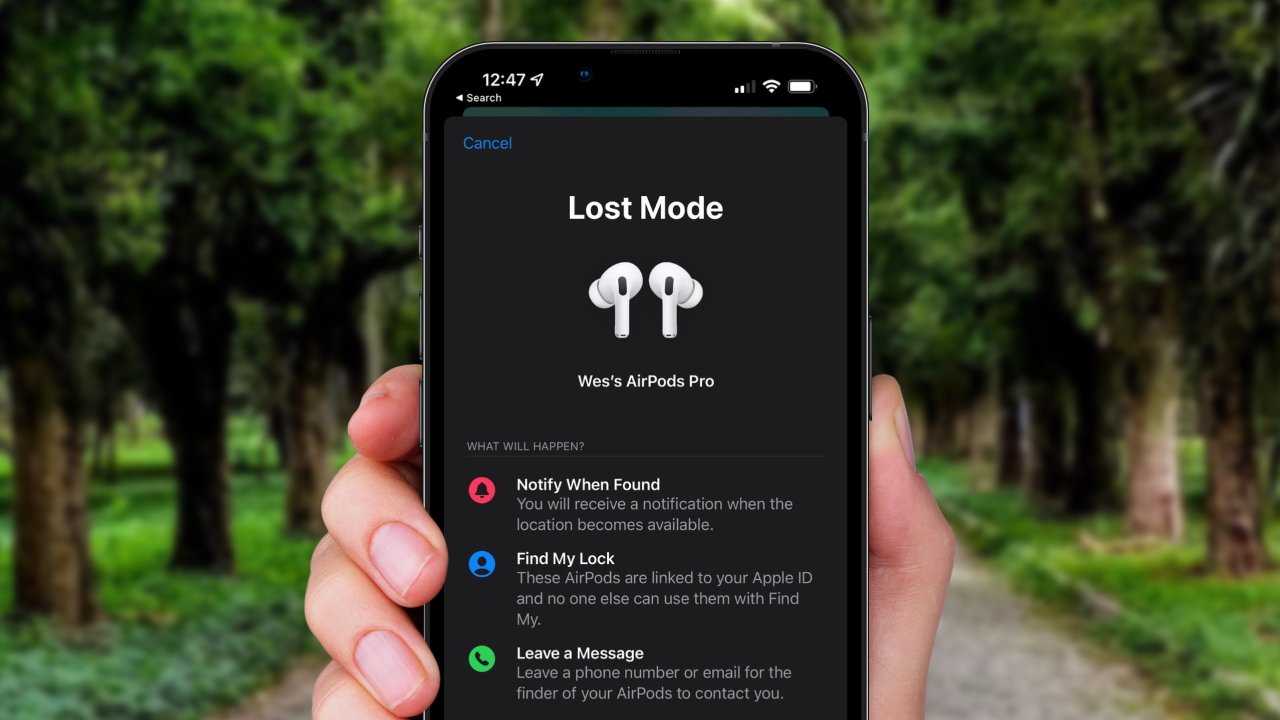
If your AirPods have been stolen, act quickly to protect your data and increase your chances of recovery. Immediately disable Find My, report the theft to authorities, and change your Apple ID password to prevent unauthorized access. Reach out to Apple Support for options on tracking or replacing your earbuds.
In short, start by using the Find My app to locate or lock your AirPods, report the theft to local law enforcement, and secure your digital accounts. Taking swift action can help protect your personal information and improve the chances of recovering your stolen device.
Losing your AirPods can be upsetting, especially if they’re stolen. But don’t panic. The first step is to try locating them using the Find My app on your iPhone or iPad. If tracking fails, report the theft to the police with details like serial numbers and any tracking info. Next, change your Apple ID password and review your account for suspicious activity, as stolen AirPods may be linked to your account. Contact Apple Support for further assistance, such as disabling or replacing the device. Remember, quick and decisive action can make a big difference in safeguarding your data and potentially getting your AirPods back.

What to Do if AirPods Are Stolen
Act Quickly and Stay Calm
When you realize your AirPods are stolen, the first step is to stay calm. Panicking won’t help you find them faster. Take a deep breath and focus on your next actions to increase your chances of recovery.
Use Find My App to Locate Your AirPods
The Apple Find My app is the best tool for locating your missing AirPods. Open the app on your iPhone or iPad and click on your AirPods. If they are nearby and connected, their location will appear on the map.
Check the Last Known Location
If your AirPods are offline, the app will show their last known location. This can help you identify where they might have been stolen or lost. Remember, they need to be connected to a device for real-time tracking.
Play a Sound to Find Your AirPods
If your AirPods are nearby but hidden, use the “Play Sound” feature in the Find My app. This will make your AirPods emit a loud noise, making it easier to locate them within your home or surroundings.
Determine Whether Your AirPods Are Still Active
Check if your AirPods are connected and active in the Find My app. If they are completely offline, it could mean they are turned off or out of battery, which affects your tracking options.
Report the Theft to Authorities
If you suspect your AirPods were stolen, report the incident to the police. Provide them with all relevant information, including the last known location, serial numbers, and any unique identifiers.
Gather Important Information
Before visiting the police, collect details such as:
- Serial number of the AirPods (found on the original packaging or in your Apple account)
- Pictures or descriptions of your AirPods
- The location where they were last seen
Notify Your Insurance Company
If your AirPods are covered under your homeowner’s or renter’s insurance, file a claim. Provide the insurer with proof of purchase and details about the theft. Keep in mind that insurance coverage may vary.
Check for Theft or Loss Protection
Some credit cards offer purchase protection or theft coverage. Contact your credit card provider to see if you qualify for reimbursement for your stolen AirPods.
Secure Your Apple Account and Devices
Protect your personal data by changing your Apple ID password immediately. This helps prevent unauthorized access to your account and linked services.
Remove Paired Devices
If you believe your AirPods were stolen and you want to prevent unauthorized use, remove them from your Apple ID and paired devices via the Find My app or iCloud settings.
Consider Whether to Replace or Report as Lost
Decide if it’s worth replacing your stolen AirPods or proceeding with a report as lost. If you want to recover them, continue monitoring the Find My app regularly.
Option to Mark as Lost
In the Find My app, you can mark your AirPods as lost. This locks the device and notifies you if they are found or connected to a new device.
Prevention Tips for the Future
To prevent future thefts or losses, consider these safety tips:
- Never leave your AirPods unattended in public places
- Use a case with a keyring for extra security
- Enable two-factor authentication on your Apple account
- Regularly back up your device data
Alternative Resources and Support
If you’re unable to locate your AirPods using the Find My app, contact Apple Support for further assistance. They may provide additional options or help verify ownership through serial numbers.
Legal Options and Replacement Strategies
If recovery isn’t possible, explore purchasing new AirPods or compatible wireless earbuds. Look out for deals or discounts, especially during sales periods, to replace your lost item.
Summary of Key Steps
To sum up, if your AirPods are stolen:
- Immediately open the Find My app and locate them
- Use the “Play Sound” feature if nearby
- Report the theft to authorities and your insurance
- Secure your Apple account and remove pairing
- Consider marking the device as lost or replacing it
Additional Tips to Protect Your AirPods
Always stay vigilant and take proactive steps to safeguard your wireless earbuds. Using tracking technology combined with personal security habits can reduce the risk of theft and loss.
By following these detailed strategies and tips, you can maximize your chances of recovering your stolen AirPods or at least protect your personal information from misuse. Keep your devices safe and stay informed about the latest safety features Apple offers, so you’re prepared if the worst happens.
Frequently Asked Questions
Can I track my AirPods after they are stolen?
Yes, you can attempt to locate your AirPods using the Find My app on your Apple device. If your AirPods are within Bluetooth range and connected to your device, their current location appears on the map. However, if they are out of range or turned off, you might see the last known location. Keep in mind that tracking depends on the AirPods being powered and connected to your account.
Should I notify the authorities if my AirPods are stolen?
Yes, reporting the theft to local authorities can help protect your rights and possibly recover your AirPods. Provide them with all relevant information, including the serial number and any tracking details you have. Do not attempt to retrieve the device yourself if you suspect it is stolen, as this could be dangerous.
What steps can I take to prevent unauthorized use of my AirPods?
You should remove your AirPods from your Apple ID account immediately to prevent others from accessing your personal data or tracking them. To do this, open the Find My app, select your AirPods, and choose the option to remove them from your account. This action disables their connection to your Apple ID, rendering them less useful to thieves.
Is it possible to disable my AirPods remotely if they are stolen?
While you cannot directly disable AirPods remotely, removing them from your Apple ID essentially makes them inoperable with your account. This prevents the thief from pairing or accessing features linked to your account. For added security, change your Apple ID password to prevent unauthorized access to your account and associated services.
How can I protect my accounts and personal information if my AirPods are stolen?
Change your Apple ID password immediately to prevent unauthorized access to your account. Review your connected devices and revoke access if necessary. Additionally, monitor your Apple account and other linked services for suspicious activity. Consider enabling two-factor authentication for added security to safeguard your personal data.
Final Thoughts
What to do if AirPods are stolen involves quick action. First, try to locate them using your device’s Find My app. If you can’t find them, change your Apple ID password to protect your account. Report the theft to local authorities with details of your AirPods.
Contact Apple Support to report the loss. They can assist with disabling the device and preventing unauthorized use. Consider replacing your AirPods if recovery seems unlikely.
In conclusion, if airpods are stolen, act swiftly by locating, securing your account, and seeking support. Taking these steps can help minimize loss and protect your personal data.
