

To maximize the bass on your AirPods Pro, ensure they fit snugly in your ears, customize the EQ settings, and keep software updated. Enhancing their bass involves a mix of proper fit, sound adjustments, and device management. With these tweaks, you’ll experience richer, deeper sound that truly brings your music to life.
Getting the most bass out of your AirPods Pro might seem tricky, but a few simple tricks can dramatically improve your listening experience. First, ensure you’re using the right ear tips for a secure fit; a tight seal is key to better bass. Next, tweak your device’s EQ settings — boosting the bass frequencies can make a noticeable difference. Lastly, keep your AirPods Pro and connected device updated to access the latest sound enhancements. Follow these steps and prepare to enjoy a more powerful, immersive sound that hits harder and feels more alive.

How to Get the Most Bass Out of AirPods Pro
Understanding How AirPods Pro Deliver Bass
AirPods Pro are designed to offer a balanced sound profile, but they can sometimes lack deep bass. This is because their small size limits the size of the speaker drivers. However, with some tweaks, you can enhance the bass response to make your listening experience more powerful and richer. Knowing how AirPods Pro process sound can help you optimize their performance.
Proper Fit Is Key for Better Bass
A snug fit allows the AirPods Pro’s drivers to deliver better bass because they create a good seal inside your ears. Without a proper seal, bass frequencies may leak out, reducing sound depth. Use the different ear tip sizes provided to find the best fit for your ears.
- Try the silicon ear tips of various sizes until you find the one that fits snugly.
- A tight fit not only improves comfort but also maximizes bass output.
- Make sure the ear tips are inserted deeply enough for a seal but comfortable enough to wear for extended periods.
Maximize Bass with Custom Ear Tips and Accessories
If standard ear tips do not provide enough bass, consider third-party accessories. There are foam or silicone tips designed for better sound conduction and a more secure fit.
- Foam tips tend to expand and fill the ear canal better, increasing bass response.
- Check compatibility and ensure they fit snugly on your AirPods Pro.
- Regularly clean your tips to maintain sound quality and hygiene.
Adjusting Sound Settings for Enhanced Bass
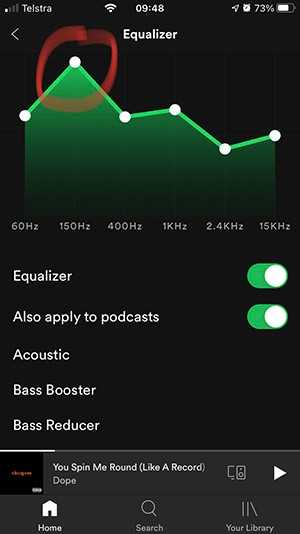
Your device’s equalizer (EQ) settings significantly impact bass levels. Adjusting the EQ on your iPhone or other connected device can make a noticeable difference.
Using Built-in EQ Settings
Most smartphones and music apps have EQ options. Set the EQ to boost low frequencies for more bass.
- Open your music app or device settings.
- Navigate to sound or music settings and select EQ options.
- Choose presets like “Bass Boost” or manually increase the lower frequency bands.
Creating a Custom EQ Profile
If you prefer more control, create a personalized EQ setting tailored to your taste.
- Reduce mid and high frequencies slightly.
- Increase low frequencies to boost bass.
- Test and adjust until you find a satisfying sound balance.
Using Audio Apps to Boost Bass
Third-party apps can offer more advanced EQ controls and presets for maximizing bass. Some popular options include EQAPO and Boom: Bass Booster.
- Download an app compatible with your device.
- Connect your AirPods Pro to the app-supported device or use the app’s system-wide EQ features.
- Select or customize a bass-enhancing preset.
Optimizing Your Listening Environment
Ambient noise and environment can interfere with your perceived bass quality. Listening in quiet surroundings allows you to notice richer bass details.
- Choose a quiet space free from background noise.
- Avoid listening in windy or noisy outdoor environments.
- Use noise-canceling features effectively to block external sounds.
Managing Software and Firmware Updates
Keeping your AirPods Pro firmware up to date can improve sound quality and performance. Apple releases updates that may enhance audio processing.
- Ensure your AirPods Pro are connected to your iPhone or compatible device.
- Update firmware through the device’s settings or via the connected device.
- Regular updates can fix bugs and improve overall sound experience.
Additional Tips for Deep, Powerful Bass
Beyond basic adjustments, you can try other methods to enhance bass.
- Use high-quality audio files rather than compressed formats.
- Adjust volume levels; higher volumes often reveal more bass but avoid damaging your ears.
- Implement spatial audio features if available to improve sound immersion.
Testing and Fine-Tuning Your Setup
Constantly test and adjust different settings to find what sounds best for you.
- Play tracks known for strong basslines.
- Experiment with various EQ settings and ear tips.
- Take notes on what adjustments lead to a richer bass experience.
Related Topics for Better Sound Experience
Exploring additional tools and techniques can further improve your audio quality.
Using External Devices for Better Sound
Connecting your AirPods Pro to DACs or portable amplifiers can boost audio clarity and bass. However, compatibility with wireless earbuds might be limited.
Cleaning Your Ear Tips and AirPods Pro
Dust and earwax buildup can hinder sound quality. Regularly clean the speaker mesh and ear tips with a soft brush or cloth.
Understanding Limitations and Expectations
While these tips can significantly improve bass, keep in mind the hardware constraints of AirPods Pro. They are designed for balanced sound rather than deep bass like over-ear headphones.
Summary of Key Tips to Get the Most Bass Out of AirPods Pro
- Use the right ear tips for a snug, secure fit
- Adjust device EQ settings for enhanced low frequencies
- Utilize third-party apps for additional sound customization
- Listen in optimal environments and keep firmware updated
- Experiment with different tips, settings, and audio sources
Making consistent adjustments and understanding your listening preferences will help you enjoy richer, deeper bass with your AirPods Pro. Remember, patience and experimentation are key to finding your ideal sound profile.
Make your AIRPODS sound better 🎧
Frequently Asked Questions
How can I adjust the EQ settings on my device for better bass performance with AirPods Pro?
To enhance bass, access the EQ settings on your connected device. If using an iPhone, go to Settings > Music > EQ, and select options like “Bass Booster” or “Late Night” which emphasize lower frequencies. On other devices, use compatible apps or equalizer settings to fine-tune the audio, focusing on increasing the bass frequencies for a richer sound experience.
What role does proper fit play in maximizing bass with AirPods Pro?
Ensuring a secure and snug fit with different ear tip sizes helps create a better seal, which is essential for optimal bass response. Try fitting the AirPods Pro with the largest ear tips that comfortably fit your ears. A better seal prevents sound leakage and boosts the bass perception, making your listening experience deeper and more satisfying.
Are there specific accessories that can improve bass output for AirPods Pro?
Using accessories like foam or memory foam ear tips can improve the seal and enhance bass response. Some third-party ear tips are designed to provide a more airtight fit, which amplifies low-frequency sounds. Investing in these can make a noticeable difference in how much bass you experience during listening.
Can adjusting the volume impact bass quality on AirPods Pro?
Yes, increasing the volume can make bass sounds more prominent, but it also risks distortion if set too high. Find a balanced volume level where the bass sounds rich and full without causing distortion or discomfort. Sometimes, a moderate volume combined with EQ adjustments yields the best bass experience.
How can I optimize my environment for better bass perception when using AirPods Pro?
Listening in a quiet environment reduces external noise interference and allows you to appreciate bass more fully. Additionally, minimizing sound reflections and background noise enhances audio clarity, making the bass feel more immersive. Consider using noise isolation features on your AirPods Pro to block out ambient sounds for a richer bass experience.
Final Thoughts
To get the most bass out of AirPods Pro, start by choosing the right ear tips for a snug fit. A proper seal enhances sound quality, especially bass. Adjust equalizer settings in your device to boost low frequencies for richer sound.
Use the built-in transparency mode carefully, as it can sometimes diminish bass. Avoid listening at maximum volume; high volume can distort sound quality. Regularly clean your AirPods Pro to maintain optimal audio performance.
In conclusion, how to get the most bass out of AirPods Pro involves fitting, settings, and maintenance. Focus on these elements to maximize your listening experience.
