

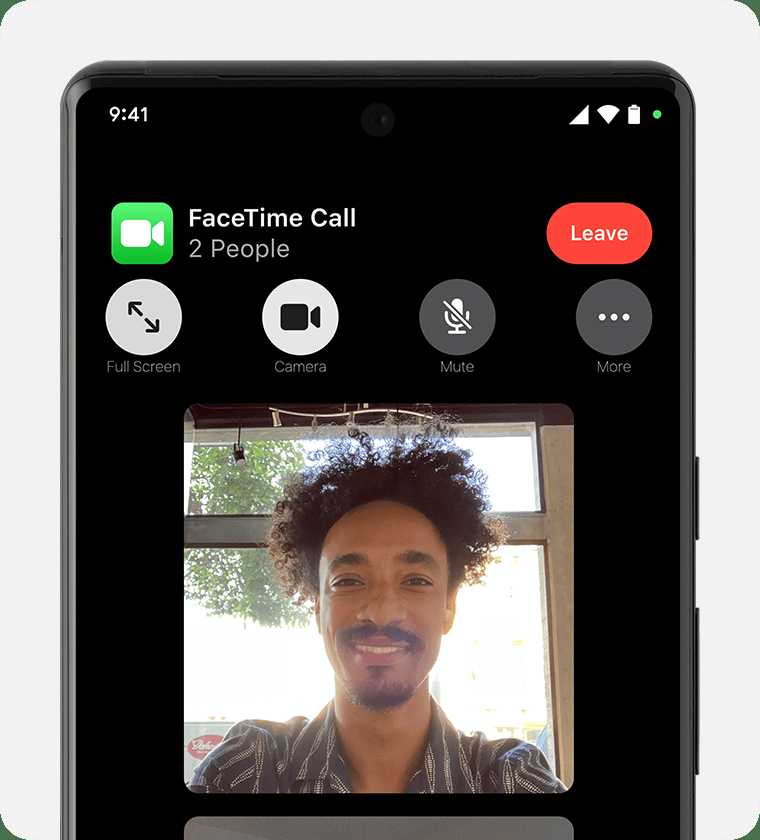
There’s no official FaceTime app available for Android, but several alternatives let Android users join video calls that are similar in quality and ease. Apps like Zoom, Google Meet, and WhatsApp are compatible with Android devices and can serve as effective substitutes, offering seamless video communication with iPhone users.
In short, while FaceTime itself isn’t accessible on Android, apps like Zoom, Google Meet, and WhatsApp allow Android users to connect via video calls with iPhone users effortlessly. These platforms provide reliable, user-friendly options for staying in touch across different devices.
Staying connected in today’s digital age means bridging the gap between Android and iPhone users, especially when it comes to video calls. Apple’s FaceTime is a popular choice among iPhone users because of its simplicity and quality, but it’s exclusive to Apple devices. Luckily, Android users aren’t left out—they can still enjoy high-quality video chats using alternative apps that work across platforms. Whether you’re catching up with friends or collaborating with colleagues, these apps make cross-platform video calling easy and convenient, ensuring you don’t miss out on quality communication just because you’re not on iOS.

What Android App Is Compatible With FaceTime
Many Android users wonder if they can use FaceTime, Apple’s popular video calling app. Since FaceTime is exclusive to Apple devices, Android phones cannot run it directly. However, there are apps and workarounds that let Android users connect with FaceTime users easily.
Understanding FaceTime and Compatibility Limitations
FaceTime was built only for iOS and macOS devices. This means Android phones don’t have access to the app through the Google Play Store or any official platform. Apple keeps FaceTime as a feature for its ecosystem, making cross-platform compatibility limited.
But don’t worry. Technology offers alternatives that enable Android users to engage in video calls with FaceTime users without much trouble.
Popular Apps Offering FaceTime-Like Features for Android
Here are some top apps that work across platforms and provide similar features to FaceTime:
- Google Meet – A reliable video conferencing app integrated with Google accounts.
- Zoom – Widely used for video calls, meetings, and webinars, compatible with all devices.
- Skype – An old but trusted app offering video and voice calls worldwide.
- WhatsApp – Known for messaging, but also supports video calls with end-to-end encryption.
- Facebook Messenger – Allows video chats with friends on Facebook, compatible with Android and iOS.
- Telegram – Offers secure video calls alongside messaging features.
These apps are designed to work seamlessly on Android, iPhone, iPad, and desktop devices, making communication simple. They serve as perfect alternatives to FaceTime when connecting with friends or family on different platforms.
How to Use These Apps to Communicate with FaceTime Users
Step-by-Step Guide for Cross-Platform Video Calling
- Both users should download and install the same app from their device’s app store.
- Create an account or sign in using email, phone number, or social media profiles.
- Add contacts using their email addresses or phone numbers associated with the app.
- Start a video call by selecting the contact and tapping the video call icon.
This process is straightforward and works similarly regardless of the app chosen. It’s essential to ensure both parties have a stable internet connection for quality calls.
Features of Popular Cross-Platform Video Apps
Google Meet
- Supports group calls with up to 250 participants.
- Integrated with Google Workspace for easy scheduling.
- Offers screen sharing and recording options.
Zoom
- Supports meetings with more than 100 participants in the free tier.
- Includes features like breakout rooms and virtual backgrounds.
- Highly reliable for video conferences and webinars.
Skype
- Supports HD video calling and group calls up to 50 people.
- Allows SMS and phone call integration.
- Available on desktops, tablets, and smartphones.
- Supports video calls with up to eight participants.
- End-to-end encrypted for privacy.
- Widely used due to its simplicity and reliability.
Facebook Messenger
- Supports group video chats with up to 50 people.
- Offers fun features like filters and reactions during calls.
- Easy to connect through Facebook profiles.
Telegram
- Supports secure video calls and screen sharing.
- Offers options for self-destructing messages and secret chats.
- Available on various platforms, including Android and iOS.
Additional Considerations When Choosing an App
While selecting the best alternative to FaceTime, consider factors like privacy, call quality, group call capabilities, and ease of use. Also, check if the app supports your device’s operating system version for smooth functioning.
Remember, for a successful video call, both users should have a strong internet connection and updated app versions. Compatibility and functionality are continually improving across all these platforms.
Emerging Technologies and Future Solutions
In recent years, developers have been working on solutions that further bridge the gap between Android and Apple devices. Some experimental apps and browser-based services are emerging that offer FaceTime-like experiences without downloading dedicated apps.
For example, Apple’s FaceTime now supports links that can be opened in browsers like Chrome or Edge, making it accessible to non-Apple users in beta versions. This progress allows Android users to participate in FaceTime calls via shared links, adding to alternatives already available.
Using FaceTime Links for Android Users
Apple introduced a feature allowing FaceTime calls to be shared via links. When an iPhone user sends a FaceTime link, Android users can join through a web browser. This method simplifies cross-platform communication without installing additional software.
To join via FaceTime links, Android users just need to click the shared link and open it in Chrome or Edge. They can then participate in the video call, provided the host starts the session properly.
Limitations and Compatibility Notes
Despite these innovations, some features like high-resolution video and certain integrations might not be available to Android users during FaceTime calls. Also, the experience may depend on browser performance and compatibility.
Therefore, when connecting with FaceTime, it’s best to use the latest browser versions and ensure all devices are updated to their respective OS versions for optimal results.
Summary of Key Points
- FaceTime is exclusive to Apple devices, but alternatives exist for Android users.
- Popular cross-platform apps include Google Meet, Zoom, Skype, WhatsApp, Facebook Messenger, and Telegram.
- FaceTime links now support browser-based Android access in some cases, offering a direct way to join calls.
- Choosing the right app depends on features, privacy, and ease of use.
- Ensuring a good internet connection enhances call quality on all platforms.
While Android can’t run FaceTime directly, these apps and features make it easy to stay connected with friends and family who use Apple devices. Exploring these options ensures you won’t miss out on important conversations, no matter what device you own.
Best Facetime Apps for Android (Which App is Best For Facetime on Android ?)
Frequently Asked Questions
Are there any Android apps that can facilitate FaceTime-like video calls?
While FaceTime itself is exclusive to Apple devices, some Android apps offer video calling features similar to FaceTime. Google Meet, WhatsApp, and Facebook Messenger support high-quality video calls on Android, making it easy to connect with friends and family. These apps may not replicate FaceTime’s seamless integration within the Apple ecosystem but provide reliable alternatives for video communication across platforms.
Can I use third-party apps on Android to join FaceTime calls?
Generally, third-party Android apps can’t directly join FaceTime calls because FaceTime is an Apple-specific protocol. However, some apps like Skype and Zoom allow Android users to connect with iPhone users via video calls, though these do not replicate FaceTime’s specific interface. If someone shares a FaceTime link through a browser or email, Android users can sometimes join a call via a web link, but this depends on the app’s capabilities and the conferencing service used.
Are there any apps that provide FaceTime-like group call features on Android?
Yes, apps like Google Meet, WhatsApp, and Telegram support group video calling with multiple participants. These apps enable Android users to conduct group discussions similar to FaceTime’s group call feature. They are easy to set up and work across different devices, ensuring users can stay connected with groups regardless of the platform they use. While not identical to FaceTime, these options offer similar functionalities for group communication.
Final Thoughts
Il n’existe pas d’application Android officielle compatible avec FaceTime, car cette fonctionnalité est exclusive à Apple. Cependant, plusieurs alternatives permettent de faire des appels vidéo entre différents appareils, comme WhatsApp ou Google Meet. Ces options offrent une compatibilité multiplateforme, facilitant la communication.
En résumé, what android app is compatible with facetime, n’a pas de réponse directe étant donné la restriction d’Apple. Optez pour d’autres applications pour des appels vidéo croisés.
