

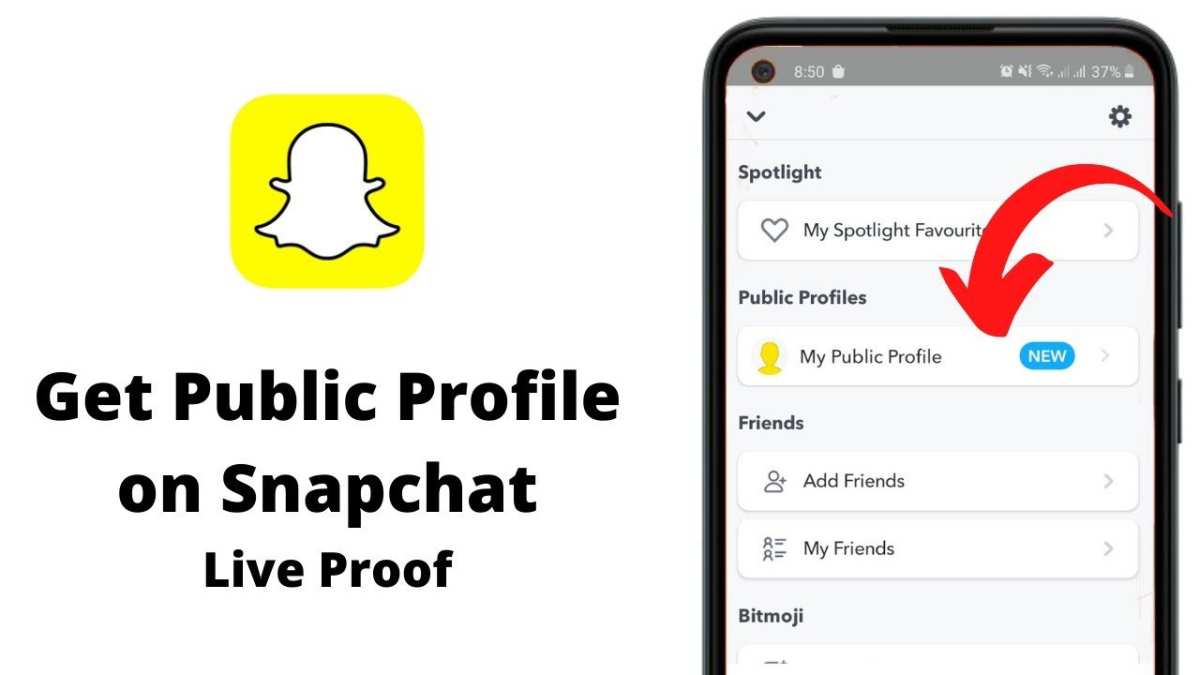
To make a public profile on Snapchat for Android, simply navigate to your settings, select ‘See My Profile,’ and enable the option for a public profile. This process is quick and straightforward, allowing you to share your content easily. If you’re wondering how to make public profile on snapchat android, follow these steps to set it up in just a few taps. It’s perfect for those wanting to reach a broader audience and showcase their snaps more openly. Keep reading to get your profile visible to everyone in no time.

How to Make a Public Profile on Snapchat Android
Creating a public profile on Snapchat for Android devices is a great way to share your content with a broader audience and connect with more people. Unlike private profiles, public profiles allow you to showcase your snaps, stories, and other content openly. This section guides you step-by-step through the entire process for setting up your public profile, ensuring you know exactly how to make your presence on Snapchat more visible. We’ll explore everything from the prerequisites to tips for optimizing your profile for maximum engagement.
Understanding the Benefits of a Public Profile on Snapchat
Before diving into how to create a public profile, it’s helpful to understand what advantages it offers. A public profile gives you the ability to:
- Share your stories with a wider audience beyond your friends.
- Grow your following by attracting new viewers interested in your content.
- Showcase your personality or brand more effectively.
- Participate in Snapchat’s discoverable content ecosystem.
By switching to a public profile, you’re no longer limited to sharing only with your friends. Instead, your content becomes more accessible, allowing potential followers to find and engage with you easily.
Prerequisites for Creating a Public Profile on Snapchat Android
Before you start creating your public profile, it’s important to check a few things:
- Ensure you have the latest version of Snapchat installed on your Android device. You can update the app through the Google Play Store.
- Have an active Snapchat account in good standing. You should verify that your account is fully verified to access all features.
- Be at least 13 years old, as Snapchat enforces age restrictions for public profiles.
Once these requirements are met, you are ready to proceed with the process of setting up your public profile.
Step-by-Step Guide to Making a Public Profile on Snapchat Android
Now, let’s get into the detailed process. Follow these steps carefully:
Open Snapchat and Access Your Profile
– Launch the Snapchat app on your Android device.
– Tap your profile icon or Bitmoji in the top-left corner of the main screen.
– This will open your profile page, which displays your snaps, stories, and account information.
Navigate to the Settings Menu
– In your profile page, look for the gear icon in the top-right corner.
– Tap on this icon to open your settings options.
Find the ‘Public Profile’ Option
– Scroll down the Settings menu until you see the section titled “Who Can…”
– Look for the “Create Public Profile” option. If you see it, tap on it.
– Note: If you do not see this option, make sure your app is updated to the latest version, and your account meets age and eligibility requirements.
Set Up Your Public Profile
– After tapping on “Create Public Profile,” you will be prompted to confirm your choice.
– Follow the instructions to set up your profile, which includes choosing a display name, profile picture, and description.
– You can customize how your profile appears and what information you want to share.
Confirm and Publish
– Once you’ve completed the setup, tap “Publish” or “Create.”
– Your profile will now be visible publicly, and you can start sharing content that reaches a broader audience.
Managing and Customizing Your Public Profile
After creating your public profile, you might want to make adjustments or optimize it for better engagement. Here are some key tips:
Personalize Your Profile Details
– Use a clear, recognizable profile picture.
– Write a compelling and concise bio that describes who you are or what your content is about.
– Include links or contact details if necessary, especially if you’re building a brand.
Share Your Profile with Others
– Tap on your profile icon and select “Share Profile.”
– Send your profile link through other social media platforms, messages, or email.
– Add your public profile link to your email signature or website if you have one.
Post Engaging Content Regularly
– Consistency helps attract followers and keeps your existing audience engaged.
– Use high-quality images and videos to make your profile stand out.
– Post stories frequently and use features like stickers, filters, and text to make your content more interesting.
Tips to Boost Your Public Profile Visibility
Creating a public profile is just the first step. To truly grow your presence, follow these strategies:
Promote Your Profile on Other Platforms
– Share your Snapchat public profile link on Instagram, Facebook, Twitter, or TikTok.
– Encourage your followers on other social media to check out your Snapchat profile.
Engage with Your Audience
– Respond to comments and messages.
– Use polls and question stickers in your stories to encourage interaction.
– Thank your followers for their support and feedback.
Collaborate with Other Creators
– Partner with other users to reach new audiences.
– Participate in Snapchat challenges or themed story series.
Monitor Your Analytics
– Use Snapchat’s insights to see how your content performs.
– Adjust your content strategy based on what your audience prefers.
Common Mistakes to Avoid When Creating a Public Profile
While setting up your profile, steer clear of these common pitfalls:
- Skipping profile customization — a generic profile can reduce engagement.
- Overposting or spamming — cluttering your followers’ feeds can lead to unfollows.
- Ignoring privacy concerns — be cautious with the information you share publicly.
- Neglecting content variety — diversify your stories and snaps to keep viewers interested.
Troubleshooting Tips for Public Profile Issues
Sometimes, things might not work as expected. Here’s how to troubleshoot common problems:
- Public profile option not appearing: Make sure your app is updated, and your account is at least 13 years old.
- Profile not visible to others: Check your privacy settings and ensure you’ve published the profile.
- Unable to share profile link: Restart the app or reinstall it if necessary.
Summary
Turning your Snapchat into a public profile opens up a lot of opportunities to connect with more people and showcase your creativity. The process is straightforward, but it’s essential to follow the steps carefully and customize your profile to reflect your personality or brand. Keep your content engaging, promote your profile across other platforms, and stay consistent to make the most of your public profile on Snapchat Android.
By understanding and implementing these guidelines, you can make your Snapchat profile more accessible, attractive, and compelling to a wider audience. Remember, a well-managed public profile can grow into a powerful tool for sharing your story with the world.
Frequently Asked Questions
What steps should I follow to create a public profile on Snapchat for Android?
To create a public profile on Snapchat using an Android device, first open the Snapchat app and log into your account. Tap on your profile icon at the top left corner, then select ‘Add Profile’ or ‘Create Public Profile’ if available. Follow the prompts to set up your profile, including choosing a display name and adding relevant details. Once completed, navigate to Settings, tap on ‘Public Profile,’ and customize your profile’s visibility and content settings to make it accessible to the public.
How can I ensure my Snapchat public profile is visible to everyone?
After setting up your public profile, you need to adjust your privacy settings to make it visible. Go to your profile, tap the gear icon to access Settings, then select ‘Public Profile.’ Enable the option to allow everyone to view your profile. You can also review who can see your Stories and send you messages, ensuring your content is accessible to a broader audience.
What features are available for managing content on a Snapchat public profile?
On your public profile, you can add Spotlight stories, showcase your best Snaps, and share updates through posts. You can organize your stories into categories, pin featured stories, and enable other users to follow your Profile for updates. These features help you effectively manage and showcase your content to attract followers and engage with a wider audience.
Can I customize who can send me messages on my public profile?
Yes, Snapchat allows you to set controls over who can message you through your public profile. Navigate to Settings, select ‘Privacy,’ and then choose ‘Who Can Message Me.’ You can select options like ‘Everyone,’ ‘My Friends,’ or customize it further based on your preferences. This ensures you maintain control over your interactions while maintaining a public presence.
Is it possible to switch back from a public profile to a private account on Android?
Yes, you can revert your account from a public profile to a private account if you decide to limit your audience. Go to your profile, open Settings, and select ‘Public Profile.’ Toggle off the public profile option to disable it. This action will restrict your content to your friends and followers, helping you maintain a more private presence on Snapchat.
Final Thoughts
Creating a public profile on Snapchat Android allows users to share content more openly and reach a broader audience. First, open the Snapchat app and tap your profile icon. Navigate to settings and select ‘Create Public Profile.’ Fill in the necessary details and customize your profile as you wish.
Once you complete these steps, your public profile is ready for others to view and interact with. Remember, how to make public profile on snapchat android involves straightforward actions within the app. This setup helps you connect with a wider community and showcase your content professionally.
