

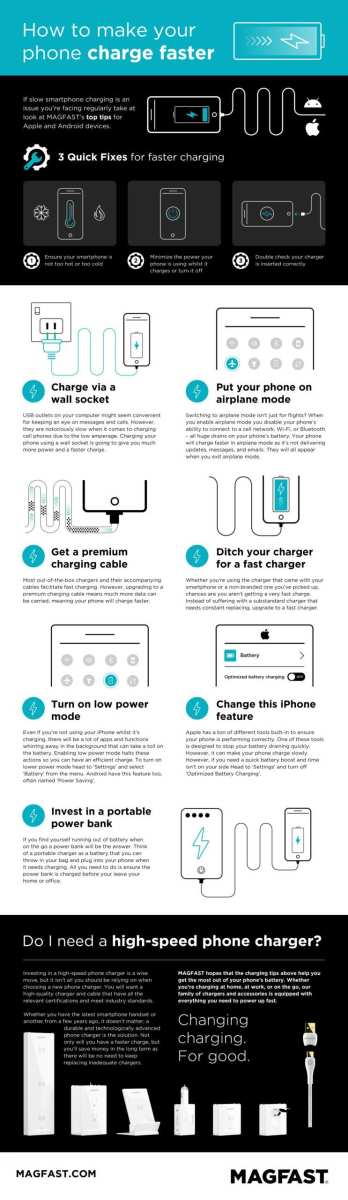
To make your Android phone charge faster, simply enable airplane mode and use a high-quality charger. These quick steps significantly cut down charging time.
Wondering how to make your android phone charge faster? Minimizing background activity and avoiding charging with heavy apps open helps boost speed.
By following these simple tips, you can ensure your device charges quickly and efficiently without extra hassle.

How to Make Your Android Phone Charge Faster
When your phone runs out of power, waiting for it to charge can feel like forever. Luckily, there are several simple ways to speed up the charging process so you can get back to using your device sooner. In this guide, we’ll explore detailed tips and tricks on how to make your Android phone charge faster, ensuring you’re never stuck without your phone for long. Whether you’re rushing out the door or just need a quick boost, these methods are easy to follow and effective.
Understanding How Charging Works on Your Android Phone
Before diving into the specific tips, it’s helpful to understand what happens when your Android charges. When you connect your phone to a charger, electricity flows into the battery, increasing its power level. The charging speed depends on several factors:
- The charger’s wattage: Higher wattage chargers supply more power, resulting in faster charging.
- Battery health and capacity: Newer and healthier batteries usually charge faster than old or damaged ones.
- Charging cable quality: Good-quality cables can transfer power more efficiently.
- Phone’s charging technology: Some Android phones support fast charging, which can significantly reduce charging time.
Knowing these factors helps you understand why some methods work better than others.
Use a Fast Charger Compatible with Your Phone
One of the most straightforward ways to speed up charging is to use a fast charger. Many Android phones support fast charging technology, like Qualcomm Quick Charge, USB Power Delivery, or proprietary solutions from the device manufacturer.
Why use a fast charger?
– It supplies higher wattage, which allows more power to flow into your battery in less time.
– It reduces overall charging time by increasing the rate of power transfer.
How to choose the right fast charger?
– Check your phone’s specifications to see if it supports fast charging.
– Use official chargers from the manufacturer, as third-party chargers might not deliver the correct power output.
– Ensure the charger provides at least the wattage recommended for your device (for example, 18W or higher).
Using the right cable
– Opt for the cable that comes with your fast charger or a certified cable that supports higher wattage.
– Avoid cheap or damaged cables, as they can slow down charging or cause safety issues.
Enable Airplane Mode During Charging
Turning on airplane mode is a simple and effective way to make your Android charge faster. Here’s why:
– It cuts off all wireless signals like Wi-Fi, Bluetooth, and cellular data.
– These signals consume power and draw extra energy from the battery.
– Disabling them allows your phone to focus solely on charging without distractions.
How to enable airplane mode:
– Swipe down from the top of your screen to access quick settings.
– Tap the airplane icon to turn on airplane mode.
– Plug in your charger, and your phone should charge faster.
Remember to disable airplane mode once charging is complete.
Lower Screen Brightness and Turn Off Unnecessary Features
Your screen consumes a significant amount of battery, especially if it’s bright or if you’re using multiple apps. By lowering brightness and turning off features you’re not using, you reduce power drain and help your phone charge faster.
Steps to optimize charging:
– Reduce screen brightness to the lowest comfortable level.
– Turn off Bluetooth, Wi-Fi, and GPS when not needed.
– Close background apps that might be actively consuming power.
– Disable Bluetooth, NFC, or any other features you’re not using during charging.
Use battery saver mode
– Many Android devices have a battery saver or low power mode. Turning this on during charging can decrease background activity and speed up the process.
Avoid Using Your Phone While Charging
Using your phone while it charges can slow down the process because the device consumes power even as it’s being charged. If you want to make your phone charge faster, it’s best to leave it idle.
– Keep your phone in sleep mode or turn off the screen.
– Avoid running apps, playing games, or streaming videos during charging.
Remove the Phone Case While Charging
Many phone cases can interfere with heat dissipation. When your device heats up, the charging rate can slow down to protect the battery.
– Take off thick or poorly ventilated cases before charging.
– This helps keep the phone cool, which supports faster charging and maintains battery health.
Use a Wall Outlet Instead of USB Ports or Power Banks
Charging from a wall outlet generally provides more stable and higher wattage power than USB ports on computers or power banks.
– Connect your charger directly to a wall socket for the best results.
– Avoid using low-quality or degraded power banks, which may deliver less power and slow down charging.
Update Your Software and Battery Drivers
Sometimes, outdated software can affect your phone’s charging efficiency.
– Check for available system updates in your Android settings.
– Keep your device’s firmware up to date, as manufacturers often release improvements for charging and battery management.
Why updates matter:
– They include bug fixes that can improve charging speed.
– Updated drivers optimize hardware performance, including battery charging.
Limit Background Apps and Data Usage
Apps running in the background can drain power and slow your charging process.
– Go to settings and close unnecessary apps.
– Disable background data for apps that don’t need constant updates.
– Use the task manager or recent apps menu to close apps manually.
Set your device to a “do not disturb” mode
This prevents notifications and alerts from waking the screen or consuming power during charging.
Maintain Your Battery Health for Better Charging Performance
Battery health influences charging speed and capacity over time.
– Avoid letting your battery drain completely or charging to 100% constantly.
– Keep your battery between 20% and 80% for longevity and efficiency.
– Use battery management tools available on your device to monitor health.
Utilize Battery Management Apps
Some Android devices come with built-in battery management features and apps.
– Use these to optimize charging settings.
– They can disable unnecessary services or limit background activity during charging.
Getting your Android phone to charge faster doesn’t require complicated steps. By choosing the right charger, enabling airplane mode, reducing screen brightness, avoiding usage, and keeping your device cool, you can significantly cut down charging times. Remember, maintaining your battery’s health over time also ensures it charges efficiently in the long run. Implementing these practical tips will help you minimize waiting time and keep your device ready whenever you need it.
Frequently Asked Questions
What settings can I adjust to speed up my Android phone’s charging time?
Turning on airplane mode disables wireless connections like Wi-Fi, Bluetooth, and cellular data, which reduces background activity and allows your phone to charge faster. Additionally, lowering the screen brightness and turning off unnecessary notifications help minimize power consumption during charging, promoting quicker battery replenishment.
Is it better to use the original charger or a third-party charger for faster charging?
Using the original charger provided by your phone manufacturer ensures compatibility and optimal charging speeds. If you opt for third-party chargers, choose reputable brands that support fast-charging standards compatible with your device. Avoid using cheap or uncertified chargers, as they may deliver inconsistent power and potentially harm your battery.
How can I optimize my charging environment to enhance charging speed?
Charge your phone in a cool, well-ventilated area away from direct sunlight. Excess heat hampers battery efficiency and slows down charging. Also, avoid charging your device in overly humid or dusty places, as extreme conditions can affect battery health and charging performance.
Does using the phone while charging affect charging speed?
Yes, using your phone during charging can slow down the process because it consumes power simultaneously. To charge faster, try to minimize usage, especially high-power activities like gaming, streaming videos, or running intensive apps while the device charges.
Final Thoughts
To make your android phone charge faster, start by enabling airplane mode. This cuts off unnecessary connections, allowing the phone to charge more efficiently. Use a wall charger and avoid charging via a computer port.
Removing phone cases and turning off unused features like Bluetooth or Wi-Fi also boosts charging speed. Always opt for a high-quality charger and cable to ensure optimal power flow.
In conclusion, how to make your android phone charge faster involves simple steps like activating airplane mode, using the right charger, and minimizing background activity. These actions help speed up charging and reduce overall downtime.
