

The best way to extend your Android device’s battery life is by optimizing settings and choosing the right apps. **Android battery best** solutions focus on simple steps like adjusting screen brightness, closing unused apps, and enabling battery saver modes. These quick actions can significantly boost your device’s longevity.
By adopting these strategies, you can enjoy longer use without constantly searching for a charger. Keep your Android running smoothly and efficiently with easy-to-implement tips that make a noticeable difference every day.

Maximizing Your Android Battery: The Best Tips and Tools
Understanding How Android Batteries Work
To keep your Android device running longer, it’s important to first understand how its battery functions. Modern Android smartphones use lithium-ion batteries, which store energy chemically and provide power to run all your apps, calls, games, and more. These batteries have several key components:
- Cells: The core units that store energy
- Charging circuits: Manage how the battery charges and discharges
- Battery management system (BMS): Protects the battery from overcharging or overheating
Knowing these basics helps you understand why certain habits can extend or reduce your battery life. For instance, fast charging can generate heat, which over time, can degrade the battery.
Common Causes of Battery Drain on Android Devices
Android smartphones drain batteries faster due to multiple factors:
- Background apps: Apps running in the background consume data and power without your notice
- High screen brightness: Bright screens use a lot of energy, especially with vivid wallpapers or high refresh rates
- Wi-Fi, Bluetooth, and GPS usage: Keeping these features on constantly can significantly drain your battery
- Heavy media use: Streaming videos or playing games consumes more power than regular tasks
- Battery age: As batteries age, their capacity diminishes, leading to faster drain
Being aware of these causes helps you make smarter choices to conserve your device’s power.
Best Practices for Extending Android Battery Life
Implementing simple habits can make a big difference. Let’s explore some effective strategies:
Adjust Screen Brightness and Display Settings
Since the display consumes the most power, optimizing it is crucial:
- Use auto-brightness to let the device adjust brightness based on ambient light
- Reduce screen timeout duration so the display turns off sooner when not in use
- Lower the brightness manually in bright environments
- Switch to dark or black wallpapers to reduce power consumption on OLED screens
Manage App Usage and Background Activities
Some apps continue to run in the background, eating up your battery:
- Close apps you are not using
- Disable or uninstall unnecessary apps
- Use the battery usage feature in your settings to identify power-hungry apps
- Restrict background data for apps that don’t need to update constantly
Turn Off Unnecessary Features When Not Needed
Activate features only when you truly need them:
- Turn off Wi-Fi, Bluetooth, and GPS when not in use
- Enable airplane mode in areas with no network to save power
- Disable NFC if you don’t use it regularly
Optimize Battery Settings and Use Built-In Power Saving Modes
Almost all Android devices come with battery saver options:
- Activate ‘Battery Saver’ mode to limit background activities and reduce performance
- Adjust screen resolution or limit background app refresh if options are available
- Set alarms to remind you when your battery level is low
Utilizing Battery Management Apps and Tools
Beyond basic settings, some apps help monitor and improve your battery life:
Battery Monitoring Apps
These apps give a detailed look at your battery consumption:
- Identify which apps drain your battery most
- Provide suggestions for better power management
- Allow you to close or restrict power-hungry apps directly from the app
Smart Battery Optimization Features
Most Android phones now come with built-in optimization tools:
- Enable adaptive battery features that learn your usage patterns
- Schedule automatic cleaning or optimization routines
- Use the device’s system updates, as they often include battery efficiency improvements
Replacing Your Battery: When Is It Necessary?
Over time, batteries lose their ability to hold charge. Most batteries last between two to three years depending on usage:
- If your phone’s battery percentage drops quickly even after a full charge
- Experiencing unexpected shutdowns
- Seeing physical signs like swelling or leakage
In such cases, replacing the battery can significantly restore your device’s battery health and prolong its lifespan. Many smartphone repair shops or authorized services offer battery replacement services.
Choosing the Best Android Devices for Battery Performance
If you are considering a new device, battery performance should be a key factor. Here are some features to look for:
- Large capacity battery (measured in mAh): The higher, the better
- Fast charging support: Reduces downtime between charges
- Efficient processor: Consumes less power during operation
- Display type and size: Smaller and OLED screens tend to use less power
- Optimized software: Manufacturers often add power-saving features and customizations
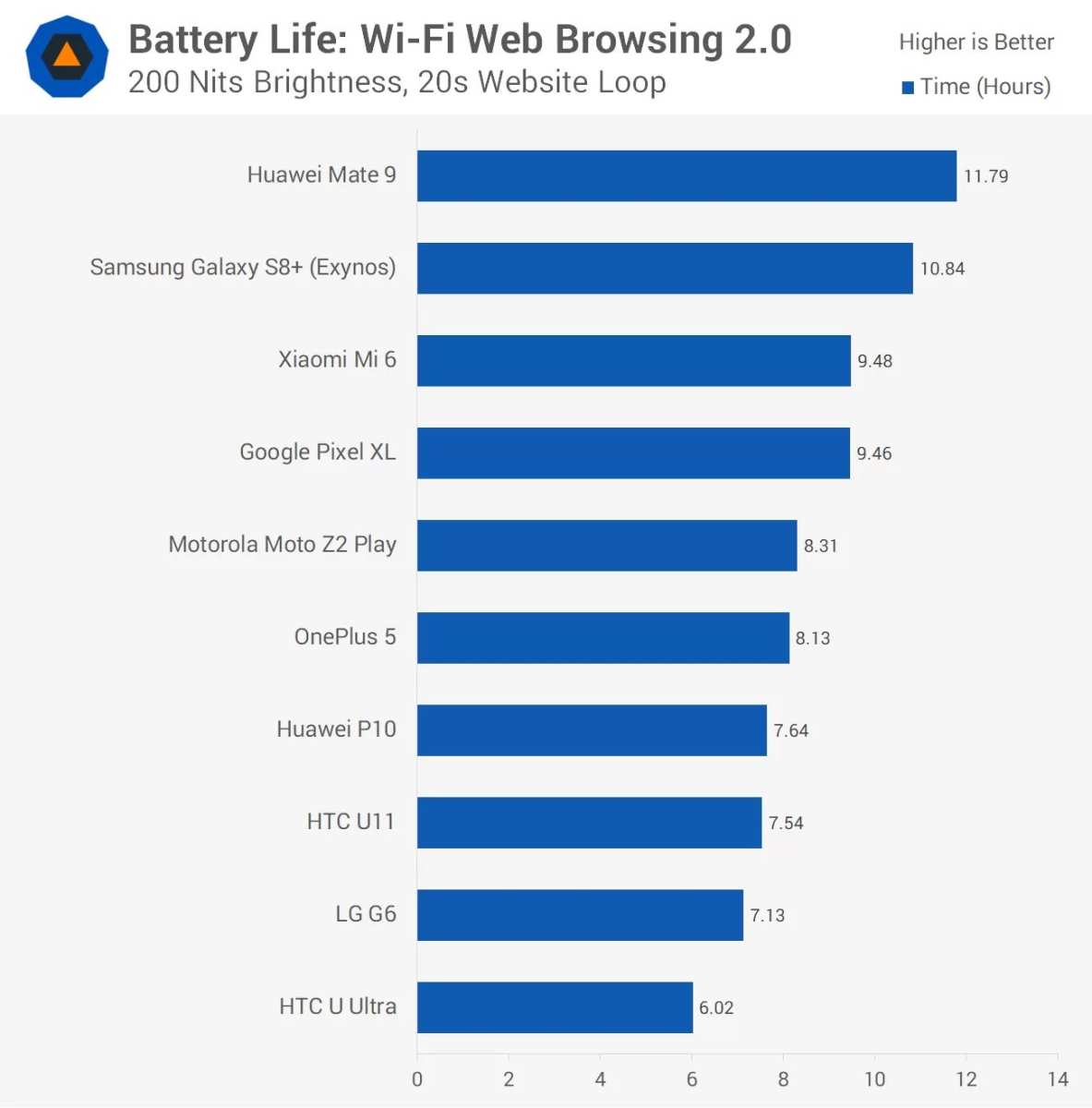
Popular models that excel in battery performance include Samsung Galaxy series, Google Pixel devices, and certain OnePlus phones.
Future Technologies for Better Android Battery Life
Looking forward, advancements are set to improve battery longevity:
- New battery chemistries that hold charge longer and last more cycles
- Efficient chipsets that consume less power while maintaining high performance
- Enhanced software algorithms for smarter power management
- Wireless charging and fast-charging technologies that minimize power waste
These innovations aim to give users more screen time and less time spent tethered to chargers.
Wrapping Up
Taking care of your Android device’s battery doesn’t require complicated steps. simple adjustments, smart choices in app management, and using the right tools can keep your device running longer and more efficiently. Whether it’s reducing screen brightness, managing background apps, or choosing a phone with a high-capacity battery, these tips help you get the most from your device’s power. Remember, maintaining your battery’s health over time is key to enjoying your Android smartphone without frequent interruptions for charging. By staying mindful of your usage habits and leveraging built-in features, you can significantly extend your device’s battery life and ensure it serves you well for years to come.
Frequently Asked Questions
How can I extend my Android device’s battery life throughout the day?
To maximize your Android device’s battery life, reduce screen brightness, limit background app activity, disable unnecessary notifications, and turn off location services when not in use. Additionally, switching to airplane mode in low-signal areas can prevent your device from constantly searching for signals, conserving energy.
What are some effective ways to identify apps that consume the most battery?
You can check your device settings under the Battery section to see detailed usage statistics. This information reveals which apps use the most power, allowing you to close or uninstall those that drain your battery unnecessarily. Regularly monitoring this helps maintain optimal battery health.
Should I use power-saving modes on my Android, and how do they work?
Enabling power-saving modes reduces background activity, lowers screen brightness, and limits network usage, which collectively extend your battery life. Most Android devices have built-in modes that activate automatically or manually, helping you conserve energy when your battery is running low.
Can adjusting screen timeout settings improve battery efficiency?
Yes, setting a shorter screen timeout period prevents your display from staying active longer than necessary. By reducing the time your screen remains on when idle, you decrease power consumption, which can significantly improve your device’s overall battery life.
Are there recommended accessories or settings to enhance Android battery performance?
Using a dark or black wallpaper can reduce power consumption on OLED screens. Additionally, keeping your device’s software updated ensures you benefit from battery optimization improvements. Investing in a quality battery saver app and avoiding excessive background data can also help optimize your device’s energy use.
Final Thoughts
The ‘android battery best’ tips help maximize your device’s performance and longevity. Using power-saving modes and managing app activity can extend battery life significantly. Regular updates and screen brightness adjustments also contribute to better battery health.
Choosing the right settings and apps ensures your Android device runs smoothly throughout the day. Implementing these strategies makes a noticeable difference in battery durability.
In conclusion, focusing on these simple yet effective practices ensures your Android battery remains efficient. The ‘android battery best’ solutions provide a practical way to keep your device powered longer.
