

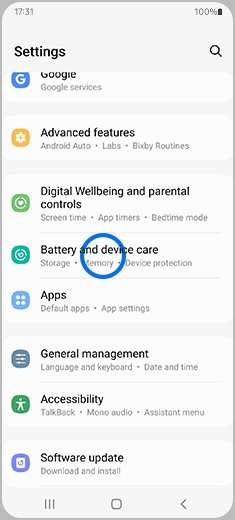
Proper android battery and device care is essential for maintaining optimal performance. **Regularly cleaning cache and closing unused apps can significantly extend battery life.** Avoid overcharging your device and keep software updated to prevent unnecessary drain. Taking these simple steps ensures your device stays reliable and efficient, giving you a smoother experience every day.

Comprehensive Guide to Android Battery and Device Care
Taking good care of your Android device helps it last longer and perform better. Whether you use your phone for work, entertainment, or staying in touch with friends, keeping it in top shape is essential. In this guide, we will explore simple but effective ways to take care of your Android device’s battery and overall health. From understanding how your battery works to practical tips for device maintenance, this article covers everything you need to know.
Understanding Your Android Battery
Before diving into care tips, it’s helpful to understand what makes your Android battery work and why it gets worn out over time.
How Does an Android Battery Work?
Your Android phone typically uses lithium-ion batteries. These batteries store energy that powers your device. When you charge your phone, electrical energy is stored in the battery, and when you use your device, this energy powers your apps, games, calls, and more.
Lithium-ion batteries have a limited number of charge cycles, which is the number of times you can fully charge and then fully use the battery before it begins to lose capacity.
Factors That Affect Battery Life
Many things can influence how long your battery lasts and how quickly it wears out. These include:
- Screen brightness: Higher brightness uses more energy.
- App usage: Running heavy apps or games drains the battery faster.
- Network connection: Poor Wi-Fi or mobile signals make your phone work harder, using more power.
- Background apps: Apps running in the background can consume battery without your notice.
- Charging habits: Incorrect charging practices can reduce battery lifespan.
Understanding these factors helps you make smarter choices to extend your device’s battery life.
Practical Tips to Extend Battery Life
Smart habits can significantly improve how long your Android battery lasts each day. Here are some easy, effective tips:
Adjust Screen Brightness and Timeout
The screen consumes the most power on your phone. To save energy:
- Set your brightness to low or use the automatic brightness feature.
- Reduce the screen timeout duration so your display turns off quickly when not in use.
Limit Background Processes and App Usage
Many apps continue running in the background, draining energy:
- Close apps you aren’t using.
- Use the built-in battery settings to identify and restrict resource-hungry apps.
- Disable location services when not necessary.
Use Battery Saver Mode
Most Android devices come with a battery saver mode:
- Enable it to limit background data, reduce visual effects, and restrict app activity.
- Switch it on when your battery is running low.
Disable Unnecessary Notifications
Notifications can wake your device and increase power consumption:
- Turn off notifications for apps that aren’t important.
- This reduces waking your device from sleep mode.
Charging Best Practices for Your Android Device
Proper charging habits can extend your battery’s overall lifespan and performance.
Avoid Full Discharges and Overcharging
Many people let their battery completely run out before recharging, or leave it plugged in for too long after reaching 100%:
- Charge your battery before it drops below 20%.
- Unplug the charger once the battery reaches 100%.
- Consistent partial charges are better than deep discharges.
Use Quality Chargers and Cables
Cheap or incompatible chargers can harm your battery:
- Use the original charger or certified accessories.
- Avoid using damaged cables or chargers with frayed wires.
Avoid Overnight Charging
Charging overnight can lead to overcharging in some cases:
- Try to unplug your phone once it reaches full capacity.
- If you need to charge overnight, consider using a smart charger with overcharge protection.
Maintaining Your Android Device’s Hardware
Taking care of the physical parts of your device is equally important as caring for the battery.
Keep Your Device Clean and Dry
Dirt, dust, and moisture can damage internal components:
- Use a soft, lint-free cloth to wipe down your device regularly.
- Avoid exposing your phone to water or extreme heat.
Use a Protective Case and Screen Protector
Protective accessories shield your device from accidental drops and scratches:
- Choose a case that absorbs shocks.
- Apply a screen protector to prevent cracks and scratches on the display.
Avoid Overloading Your Device with Apps and Files
Too many apps or stored data can slow your device:
- Uninstall apps you don’t use.
- Regularly delete unnecessary files and photos.
- Use cloud storage options to free up internal space.
Keeping Your Android Device Updated
Software updates often include fixes, security patches, and performance improvements:
- Check regularly for system updates.
- Update all apps through the Google Play Store.
- Installing updates helps your device run smoothly and securely.
Additional Tips for Optimal Device Care
Beyond battery management and hardware maintenance, consider these extra tips:
- Restart your device periodically to clear temporary files and refresh memory.
- Disable unused hardware features like Bluetooth, NFC, or Wi-Fi when not in use.
- Keep your device away from extreme temperatures, which can damage internal components and battery health.
- Use device maintenance apps that can help clear cache and optimize performance safely.
Monitoring Battery Health
Some Android devices or third-party apps allow you to check the health of your battery:
- Keep an eye on battery capacity percentages.
- Observe if your device heats up unusually or drains quickly, as these can be signs of battery issues.
- If your battery health declines significantly, consider replacing it through a professional service.
Summary
Proper care of your Android device involves mindful usage, correct charging habits, regular maintenance, and software updates. Keeping your device clean and protected extends its lifespan, while managing background apps and screen brightness conserves battery power. Monitoring your battery health helps you know when it’s time for a replacement or professional repair. By applying these simple practices, you can enjoy a longer-lasting, more reliable Android experience.
Frequently Asked Questions
How can I optimize my Android device’s battery life throughout the day?
To optimize your Android device’s battery life, reduce screen brightness and timeout duration, disable Wi-Fi and Bluetooth when not in use, and close apps running in the background. Turning off location services for apps that don’t require GPS can also help conserve power. Additionally, activating battery saver mode during the day helps extend usage time without significantly impacting device performance.
What are some common practices to prevent overheating of my Android device?
Avoid exposing your device to direct sunlight or extreme heat for extended periods. Do not run intensive applications for long durations and close unnecessary apps running in the background. Removing cases during heavy use can also prevent heat buildup. Keeping your device updated with the latest software ensures it manages heat more effectively and reduces performance issues related to overheating.
How should I properly care for my Android device’s battery health over time?
To maintain your battery’s health, avoid letting it drain completely before charging, and instead keep it between 20% and 80%. Use the original charger or certified alternatives to prevent damage. Avoid overcharging by unplugging the device once it reaches full capacity. Also, avoid exposing the battery to extreme temperatures and periodically calibrate it to ensure accurate battery readings.
Are there any specific settings I can adjust to prolong my device’s performance?
Adjusting display settings such as reducing screen timeout and lowering the screen brightness can significantly impact battery longevity. Disabling notifications for non-essential apps and limiting background data usage helps conserve power. Turning off unused connectivity features like NFC and location services when not needed also supports longer device performance and reduces unnecessary power drain.
Final Thoughts
Maintaining your Android device’s battery health and overall performance is essential for optimal use. Regularly update your apps and software to prevent unnecessary drain and bugs.
Avoid overcharging your device and unplug it once fully charged. Keep your device clean and protect it from extreme temperatures to ensure longevity.
Prioritizing Android battery and device care helps you get the most out of your smartphone. Consistent habits prevent issues and extend your device’s lifespan, making your experience smoother and more reliable.
