

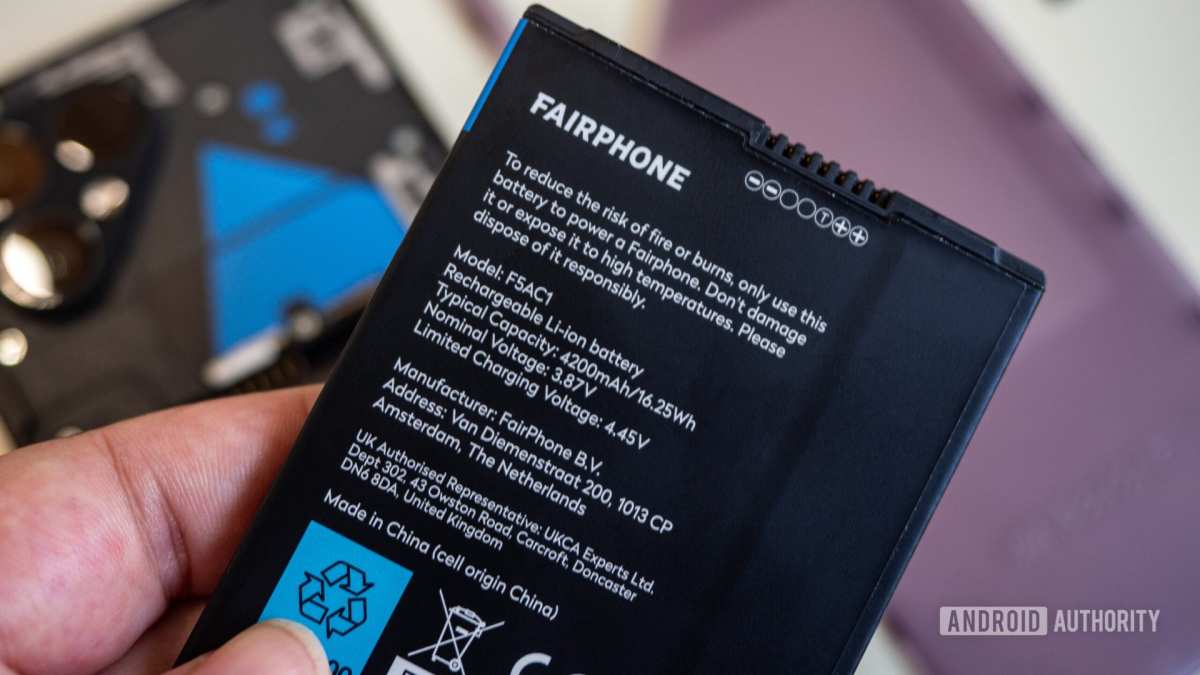
To identify genuine replacement batteries for Android phones, check for proper branding, labels, and packaging. **Always buy from authorized sellers or official stores** to avoid counterfeit products. When examining a battery, look for consistent markings, holograms, and quality seals.
Knowing what to look for helps ensure your phone’s safety and performance. Recognizing authentic batteries prevents performance issues and potential hazards. This simple approach keeps your device running smoothly and prolongs its lifespan.

How to identify genuine replacement batteries for Android phones
When your Android phone’s battery begins to lose its ability to hold a full charge or the device starts to drain quickly, replacing the battery might seem like the best solution. But with so many options available, how can you be sure that the replacement battery you purchase is real and safe to use? Knowing how to identify genuine replacement batteries for Android phones is crucial to ensuring your device remains safe, performs well, and lasts longer. In this guide, you’ll learn detailed steps and tips to help you distinguish authentic batteries from counterfeit or low-quality alternatives.
Understanding the importance of genuine batteries
Using a genuine replacement battery offers several benefits:
- Reliable performance: Original batteries maintain optimal voltage levels, leading to consistent device operation.
- Enhanced safety: Authentic batteries meet strict safety standards, reducing risks like overheating, leakage, or explosions.
- Longer lifespan: Genuine batteries tend to last longer, saving you money over time.
- Device compatibility: Authentic batteries fit perfectly and function seamlessly with your Android phone model.
Conversely, counterfeit or low-quality batteries can harm your device, cause safety issues, and often lead to quicker battery deterioration.
Where to buy genuine replacement batteries
Knowing where to purchase authentic batteries is just as important as knowing how to identify them. The safest options include:
- Authorized service centers and official brand stores
- Reputable electronics retailers and authorized online shops
- Official manufacturer websites
Avoid purchasing batteries from unknown online marketplaces, street vendors, or suspicious third-party sellers. While some third-party batteries may be compatible, they often carry risks related to quality and safety.
Features of authentic replacement batteries
Authentic batteries for Android phones will typically have specific features that set them apart from imitations:
- Manufacturer branding and logos clearly printed or embossed on the battery
- High-quality packaging, often with security seals or holograms
- Model and serial numbers that match the original specifications
- Proper labeling indicating capacity, voltage, and other technical details
Understanding these features helps you quickly identify genuine products at a glance.
Physical inspection of the battery
Before purchasing or installing a replacement, carefully examine the physical attributes of the battery:
Check the labeling and branding
Ensure the battery has clear, crisp printing of the manufacturer’s name, logo, and specifications. Blurry or uneven print quality can be a warning sign of a counterfeit.
Inspect the build quality
Authentic batteries usually have a solid, smooth surface without any cracks or irregularities. The edges should be neat, and the connectors should feel sturdy.
Verify the labels and holograms
Many brand batteries include holographic stickers or security labels that are difficult to replicate. Confirm that these labels are present and intact.
Examine the packaging carefully
Packaging plays a vital role in confirming a battery’s authenticity. Genuine products come with professional, high-quality packaging that may include:
- Brand logos and trademarks printed with sharp details
- Security seals that are tamper-evident
- Clear, detailed product information and handling instructions
- Barcodes or QR codes that can be scanned to verify authenticity
Always avoid batteries that arrive in unbranded, plain, or poorly packaged containers, as these are often counterfeit.
Technical specifications and labels
Authentic batteries will accurately list technical details on the label. Cross-reference these details with your device’s original specifications:
- Capacity (measured in mAh)
- Voltage (V)
- Part number or model number
- Manufacture date or batch number
Any discrepancies or missing information may indicate a fake product.
Using verification tools and apps
Some manufacturers include verification methods to confirm your battery’s authenticity:
- Scanning QR codes or barcodes on the packaging or battery itself
- Using official manufacturer apps designed to verify product serial numbers
- Checking online databases for product authenticity through serial number input
These tools can help you avoid counterfeit products and ensure you purchase a genuine replacement.
Testing the battery’s performance
Once installed, monitor how the replacement battery performs:
- Check if the battery charges normally and holds a full charge
- Observe the temperature during charging and use—genuine batteries tend to stay cooler
- Track the battery’s discharge rate and overall lifespan
Poor performance, rapid draining, or overheating can signal a fake or substandard battery.
Recognizing signs of counterfeit batteries after use
Even after installation, certain signs may reveal the battery isn’t genuine:
- Unexpected swelling or bulging of the battery
- Sudden drops in voltage or erratic charging behavior
- Unusual heat generation during use or charging
- Shortened battery life compared to the original
If you notice any of these issues, immediately remove the battery and contact the seller or manufacturer.
Steps to take if you suspect a fake battery
If you believe you bought a counterfeit or low-quality battery:
- Stop using the battery immediately to prevent potential safety hazards.
- Retain all packaging and receipts as proof of purchase.
- Contact the seller or store where you bought the battery for a refund or exchange.
- Report the seller to consumer protection agencies if you suspect fraudulent activity.
- Buy a replacement only from reputable sources as listed earlier.
Taking these steps helps protect your device and personal safety.
Summary of tips for verifying authenticity
To summarize, always:
- Purchase from authorized retailers or official sources.
- Inspect the physical appearance for quality and branding.
- Verify the packaging and labels, including holograms and security seals.
- Check technical specifications against original battery details.
- Use official verification tools like QR codes or serial number checks.
- Test the battery’s performance after installation—monitor for issues.
Focusing on these details ensures you get a genuine, safe, and reliable replacement battery for your Android phone.
In the end, taking a little extra time to verify a replacement battery can save you from potential device damage, safety risks, and the expense of frequent replacements due to low-quality products. Being vigilant about where and how you purchase and inspecting each element of the product helps you keep your Android phone powered with confidence.
Frequently Asked Questions
What are the key indicators of authentic replacement batteries for Android devices?
Authentic replacement batteries typically display the manufacturer’s logo and proper branding on the packaging and the battery itself. They come with official certification marks, such as CE or similar standards, indicating compliance with safety regulations. Genuine batteries also have high-quality construction with clear labels, contact points, and serial numbers that can be verified with the manufacturer. Always purchase from authorized retailers or directly from the brand to ensure authenticity.
How can I verify the compatibility of a replacement battery with my Android phone model?
Check the model number printed on the battery and compare it with the specifications listed on your device’s official documentation or the manufacturer’s website. Genuine batteries are specifically designed for your phone model, ensuring correct size, connector type, and voltage. Avoid generic or unbranded batteries that do not specify compatibility to prevent potential damage or performance issues.
What visual signs suggest a battery might be counterfeit or low quality?
Counterfeit batteries often have misspelled labels, inconsistent font sizes, or poor print quality. They may feel lighter or cheaper in construction, with uneven edges or misaligned components. Some fake batteries lack safety warnings or certification marks. Carefully inspecting the packaging and the physical appearance of the battery helps identify these signs and avoid using substandard replacements.
Can physical packaging help determine if a replacement battery is genuine?
Yes, authentic batteries typically come in high-quality packaging with official branding, holograms, and security seals. The packaging should include detailed product information, serial numbers, and barcodes that you can verify with the manufacturer. Avoid batteries with generic, damaged, or unbranded packaging, as these often indicate counterfeit items.
Is it necessary to check the battery’s serial number or QR code? How does this aid in identification?
Verifying the serial number or QR code helps confirm the battery’s authenticity. Many manufacturers provide online tools or customer service options to cross-check these identifiers. Authentic batteries with valid serial numbers or QR codes have undergone quality control and meet safety standards. Scanning or entering these codes can reveal details about the production batch and origin, reducing the risk of counterfeit products.
Final Thoughts
To identify genuine replacement batteries for Android phones, check the packaging for official branding and holograms. Verify the seller’s reputation and avoid suspiciously cheap options. Genuine batteries often have clear specifications and safety certifications. Being attentive to these details ensures you choose authentic products that maintain your device’s performance and safety.
