

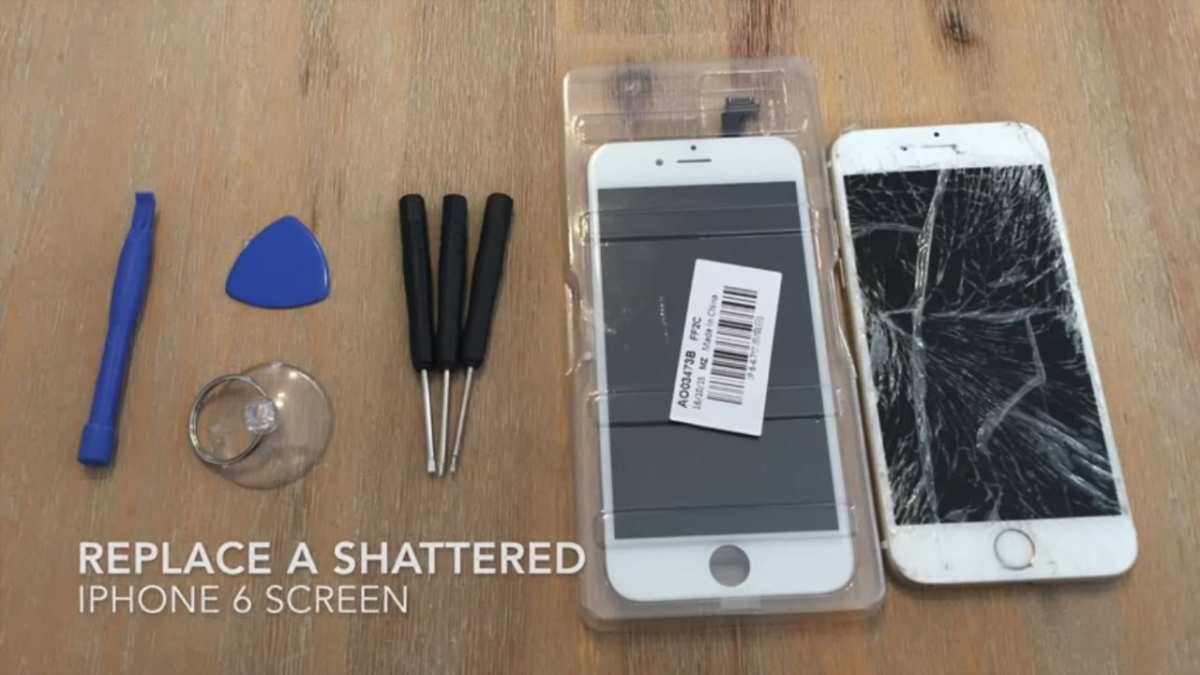
If your iPhone screen is cracked or unresponsive, replacing it is straightforward with the right tools and steps. **The quickest way is to follow a detailed guide to do it yourself or visit a professional repair shop.** Knowing how to iphone screen replacement can save you time and money, especially if you handle minor damages early. The process involves careful disassembly and precise fitting, but with patience, you can restore your device efficiently. Keep reading to understand each step and ensure your iPhone stays in perfect condition.

How to iPhone Screen Replacement: A Step-by-Step Guide
Replacing your iPhone screen might seem like a daunting task, but with the right tools and knowledge, you can do it yourself at home. Whether your screen has cracked after a fall or developed dead pixels, this guide will walk you through every step, helping you save money and time. We’ll cover everything from preparing your workspace to safely installing the new screen, so let’s get started.
Understanding When You Need to Replace Your iPhone Screen
Before diving into the replacement process, it’s essential to recognize signs that indicate your screen needs attention. Here are common issues:
- Cracked or shattered glass
- Unresponsive touch screen
- Dead pixels or discoloration
- Black screen or flickering display
- Visible scratches that interfere with usability
If you notice any of these problems, replacing the screen could restore your iPhone to proper functioning.
Gathering the Necessary Tools and Parts
Having the right tools makes the replacement smoother and reduces the risk of damage. Here’s what you need:
- Replacement screen designed for your iPhone model
- Small Phillips and P2 Pentalobe screwdrivers
- Plastic opening tools or pry tools
- Suction cup
- Tweezers
- Adhesive strips or glue (if necessary)
- Anti-static wrist strap (optional but recommended)
Always ensure your replacement screen is genuine or high-quality to ensure proper fit and display performance.
Preparing Your Workspace Safely
A clean, well-lit workspace makes the process easier and safer. Follow these steps:
- Work on a flat surface with a soft cloth or mat to prevent scratching your phone or parts.
- Keep small parts and screws organized in a container or magnetic mat.
- Disconnect your iPhone from any power source and turn it off completely.
- Consider wearing an anti-static wrist strap to prevent static damage.
Removing the Back Cover and Battery
Many iPhone models require you to open the back case first. Here’s how:
Removing the Pentalobe Screws
– Use the Pentalobe screwdriver to remove screws near the charging port.
– Keep screws safe, as they are tiny and easy to lose.
Opening the Back Cover
– Attach a suction cup near the bottom edge of the back cover.
– Gently pull to create a gap, then insert a plastic pry tool to carefully loosen the casing.
– Carefully lift the back cover away, being cautious of any connectors.
Disconnecting Internal Components
Once the back cover is off, you need to access the screen assembly:
- Remove screws securing the battery connector shield and other internal components.
- Use a plastic tool to disconnect the battery connector, ensuring no power runs through the device.
- Disconnect other flex cables connecting the screen, such as the display data cable, digitizer, and ambient light sensor.
- Handle connectors with care, avoiding pulling or bending them.
Removing the Damaged Screen
The actual screen removal varies depending on the model:
- Use a heat gun or hairdryer on low setting to soften adhesive around the screen if needed.
- Gently lift the damaged screen using a plastic pry tool or spudger, working around the edges.
- Be patient—forcing the screen can crack it further or damage internal parts.
- If the screen is glued or stuck, apply heat periodically to make removal easier.
Installing the New Screen
Once the old screen is out, it’s time to install the new one:
- Prepare the new screen by removing any protective film.
- Connect the flex cables carefully—match each connector to its socket and press gently until it clicks into place.
- Double-check all connections are secure before proceeding.
- If adhesive is needed, apply new strips to secure the screen firmly once assembled.
- Slowly place the new screen onto the device, making sure it aligns correctly with the frame.
Reassembling Your iPhone
Put your device back together in reverse order:
- Reconnect the battery and other internal components.
- Screw back the internal shields and connectors, ensuring everything is snug.
- Carefully snap the back cover into place, applying gentle pressure around the edges.
- Replace the Pentalobe screws near the charging port.
- Press your fingers around the edges to ensure the back cover is securely attached.
Final Checks and Testing
Before powering your iPhone back on, inspect the device:
- Ensure all screws are tight and no parts are loose.
- Remove any protective films or stickers from the new screen.
- Turn on your iPhone and test the touchscreen responsiveness, display clarity, and overall functionality.
- Check for dead pixels, color accuracy, and touch sensitivity.
If everything works fine, you’ve successfully replaced your iPhone screen!
Tips to Ensure a Successful Screen Replacement
– Take your time during each step, especially when disconnecting/installing connectors.
– Keep track of all screws and small parts to avoid losing them.
– Use quality replacement parts to prevent future issues.
– If you feel unsure at any point, consult professional repair services.
When to Seek Professional Help
While DIY screen replacement can save money, some situations warrant expert help:
- The device has other damages, like water damage or a broken motherboard.
- You lack the proper tools or experience.
- The DIY process seems too complex for your comfort level.
Professional repairs typically include warranties and ensure your iPhone’s integrity remains intact.
Replacing your iPhone screen yourself requires patience and care, but it can be rewarding to restore your device. Follow these steps carefully, and you’ll get your iPhone looking and functioning like new. Remember, if ever in doubt, visiting a professional repair shop is a good option.
Frequently Asked Questions
What tools are necessary to replace an iPhone screen safely?
To replace an iPhone screen safely, you need a set of specialized tools including a pentalobe screwdriver, a Phillips screwdriver, a plastic pry tool, a suction cup, tweezers, and an opening pick. Using the right tools prevents damage to delicate components and ensures a proper fit after the repair.
How do I ensure I don’t damage other components during the replacement?
Carefully disconnect the battery before removing the screen to prevent short circuits. Keep track of all screws and connectors, and handle internal parts with an anti-static wrist strap. Follow a step-by-step guide specific to your iPhone model to avoid accidentally damaging the camera, connectors, or the flex cables.
What are the common mistakes to avoid during iPhone screen replacement?
Avoid rushing the process or applying excessive force on fragile parts. Don’t forget to power off the device completely and properly disconnect the battery. Also, ensure that the new screen is compatible with your model and that all connectors are securely attached before closing the device.
How can I test the new screen before sealing my iPhone completely?
Reconnect the battery and turn on your iPhone to check the new screen’s functionality. Confirm that the display responds correctly, the touch sensitivity works, and there are no dead pixels or discoloration. Only proceed to fully reassemble the device once you’re satisfied with the screen’s performance.
Final Thoughts
To conclude, understanding how to iphone screen replacement involves gathering the right tools and following precise steps. Carefully power off your device and remove the broken screen without damaging internal components. Use appropriate tools to ensure a safe and efficient replacement process. Following these guidelines makes the task manageable and saves money.
