

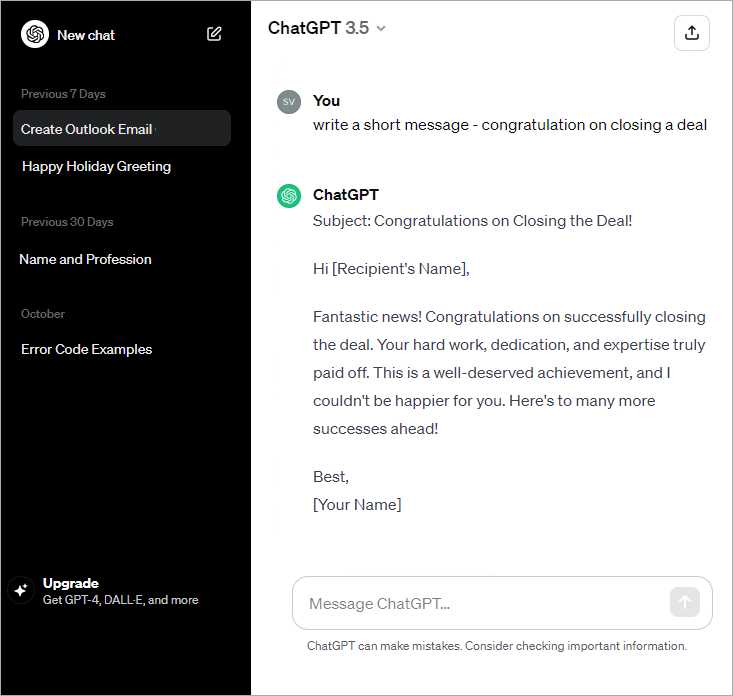
Looking to craft professional email drafts in seconds? Chat GPT is your new best friend, transforming what used to take minutes into mere moments. With its ability to generate clear, personalized, and well-structured emails, you can save time and reduce stress when managing your inbox. Whether you’re responding to clients, colleagues, or setting up appointments, Chat GPT can help you create polished drafts effortlessly. Just provide a few details, and it’ll do the heavy lifting for you. In this article, we’ll explore simple tips to use Chat GPT effectively for quick email draft creation, making your communication faster, smarter, and more efficient. Say goodbye to writer’s block and hello to instant, professional messages every time!

Creating Email Drafts Quickly with Chat GPT
Understanding How Chat GPT Assists in Email Composition
Chat GPT is a powerful AI tool that helps you write emails faster. It can generate text based on your prompts, saving you time and effort. By using Chat GPT, you can create professional and clear email drafts in just a few moments. This tool is especially helpful when you need to reply quickly or start a new email from scratch. Its ability to understand context makes it ideal for drafting different types of emails.
The Benefits of Using Chat GPT for Email Drafts
Using Chat GPT offers many advantages. It reduces the time spent on writing emails so you can focus on other tasks. It also helps improve the quality of your messages with proper grammar and tone. Additionally, it minimizes the stress of figuring out what to say, especially with complex topics. Overall, integrating Chat GPT into your email routine allows for faster, more efficient communication.
How to Get Started with Chat GPT for Emails
Getting started is simple. First, choose a platform that provides Chat GPT access, like OpenAI’s website or compatible apps. Next, think about what you want to write and prepare a clear prompt. For example, “Draft a polite follow-up email to a client about our meeting.” After entering your prompt, Chat GPT generates a draft. Review, edit, and personalize it before sending. This simple process can be repeated for various email types.
Creating Effective Prompts for Better Email Drafts
The key to good AI-generated emails is crafting precise prompts. Be specific about your email’s purpose, tone, and recipient. For example, specify if the email should be formal or casual. Mention any important details or points you want included. The clearer your prompt, the more tailored and useful the draft will be. Practice creating prompts to improve the quality of your AI-generated emails.
Tips for Customizing and Personalizing AI-Generated Email Drafts
Once Chat GPT provides a draft, make it your own. Add personal touches like the recipient’s name or specific details. Adjust the tone to match your style or relationship. Check facts and correct any errors or awkward phrasing. Personalization makes your email feel genuine and professional. Remember, AI drafts are a starting point, and your input enhances their effectiveness.
Best Practices for Efficient Email Drafting with Chat GPT
To maximize efficiency, keep prompts straightforward and consistent. Use bullet points or lists within your prompts for clarity. Save templates for common email types, like inquiries or thank-yous. Review drafts quickly but thoroughly before sending. Practice regularly to develop better prompts and editing skills. These habits will help you create emails faster and more effectively.
Addressing Common Challenges When Using Chat GPT for Emails
Some issues include irrelevant responses or lack of nuance. To avoid this, refine your prompts and provide clear instructions. Sometimes the AI may generate repetitive or overly formal drafts—adjust your prompts or manually edit as needed. Always double-check for accuracy and tone before sending. With practice, you’ll learn how to guide Chat GPT for better results.
Integrating Chat GPT into Your Daily Email Routine
Make Chat GPT a regular part of your workflow by setting specific times for drafting emails. Use it for different purposes, such as scheduling, follow-ups, or quick replies. Keep templates and prompts handy for common tasks. Over time, you’ll become more skilled at prompt creation and editing. This consistent use will make your email communication faster and more efficient.
Additional Tools and Features to Enhance Email Drafting
Many platforms offer features like tone adjustment, formal/informal settings, or email templates. Some tools provide language translation or style suggestions. Integrate Chat GPT with email apps for seamless drafting. Explore plugins or extensions that automate prompts or drafts. These tools can further speed up your workflow and improve email quality.
Related Topics for Better Email Management
To complement quick drafting, learn about email organization tips. Use folders, labels, and filters to keep your inbox tidy. Schedule time for checking and replying to emails. Practice writing concise and clear messages. Combining these habits with Chat GPT can streamline all aspects of your email management.
Future Trends in AI and Email Writing
AI technology continues to evolve, offering smarter, more personalized email drafts. Future tools may incorporate voice commands or real-time editing suggestions. As AI improves, email drafting will become even more intuitive. Staying updated with these trends ensures you use the latest features for maximum efficiency. Embrace these advances to keep your communication sharp and swift.
This detailed overview emphasizes how Chat GPT helps in creating email drafts quickly and effectively. By understanding its capabilities and best practices, you can save time, reduce stress, and produce high-quality emails in a matter of moments. Incorporating Chat GPT into your daily routine transforms how you handle email communication, making the process faster and more effortless.
ChatGPT Zapier Plugins – How to Write A Email Draft (Gmail)
Frequently Asked Questions
How can Chat GPT assist in drafting professional emails quickly?
Chat GPT can help you create professional emails by understanding your key points and generating coherent drafts based on your input. Simply provide a brief outline or main ideas, and the tool will produce a polished email that you can review and personalize further. This process saves time and ensures your message remains clear and effective.
What tips can improve the quality of email drafts created with Chat GPT?
To enhance the quality of your email drafts, be specific with your instructions and include relevant details such as the recipient’s role, the main purpose, and preferred tone. Reviewing and editing the generated content allows you to tailor the message to better suit your style and requirements, leading to more impactful communication.
Can I customize the tone of emails generated by Chat GPT?
Yes, you can specify the desired tone when requesting an email draft. Whether you need a formal, friendly, or casual tone, providing clear instructions helps Chat GPT tailor the language accordingly. This customization ensures your messages resonate appropriately with your audience.
How does Chat GPT help in maintaining consistency across multiple email drafts?
Chat GPT can maintain consistency by applying the same style, tone, and language preferences across different drafts. When you specify your preferences at the outset, the tool consistently produces emails aligned with your communication standards, making it easier to manage large volumes of correspondence.
Is it possible to generate email replies efficiently using Chat GPT?
Absolutely. By inputting the received email or main points you want to address, Chat GPT can generate quick and relevant reply drafts. This feature allows you to respond promptly while ensuring your messages are clear and concise, ultimately saving you valuable time.
Final Thoughts
Creating email drafts quickly with Chat GPT saves time and boosts productivity. It helps you generate clear, professional messages in seconds. This tool adapts to your style and provides relevant suggestions seamlessly. Using Chat GPT makes composing emails faster and more efficient, allowing you to focus on other important tasks.
