

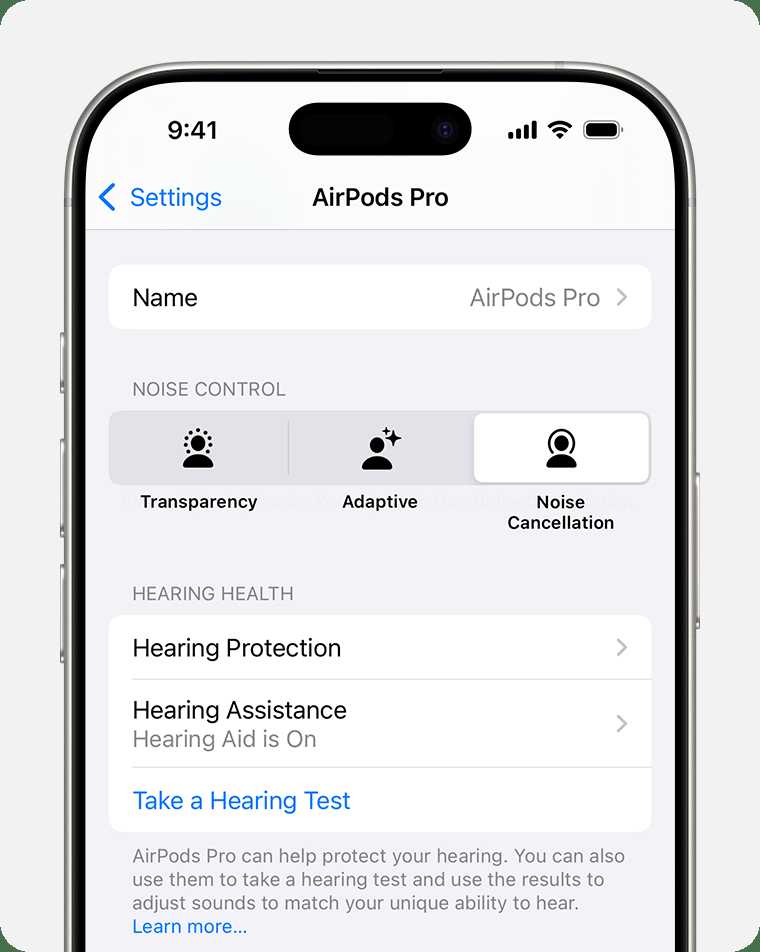
You can use AirPods as hearing aids in specific situations, especially if you have mild to moderate hearing loss or need a discreet way to amplify sounds. However, they aren’t a full replacement for professional hearing aids and should be used with caution.
In short, AirPods can function as makeshift hearing aids for certain users, primarily through the use of built-in sound amplification features and accessibility options. They’re especially handy in quiet environments or for conversational purposes, but they’re not suitable for severe hearing impairments or long-term hearing support.
If you’re wondering when you can rely on AirPods for hearing assistance, the answer depends on your level of hearing loss and your specific needs. While they can be a convenient and quick fix for some situations, consulting an audiologist remains the best way to ensure your hearing health is properly managed. Understanding the limitations and proper use of AirPods can help you decide when they’re appropriate and when professional devices are necessary.

When Can You Use AirPods As Hearing Aids?
Understanding the Basics of AirPods and Hearing Aids
AirPods are popular wireless earbuds designed primarily for listening to music and making calls. They are made by Apple and come with features like noise cancellation and high-quality sound. Hearing aids, on the other hand, are medical devices tailored to improve hearing for people with hearing loss. They amplify sounds and often come with specialized technology for speech clarity and background noise reduction.
How Do AirPods Function as Hearing Devices?
Recent software updates and features have enabled AirPods to serve as hearing assistance tools. Apple introduced the “Live Listen” feature, which uses the iPhone’s microphone to pick up sounds and send them directly to your AirPods. This feature can help amplify nearby sounds, making it easier to hear conversations or environmental noises.
Conditions for Using AirPods as Hearing Aids
AirPods can be used as hearing aids only if certain conditions are met. They are not approved medical devices for hearing loss management but can serve as assistive listening devices in specific situations. Users with mild to moderate hearing challenges may find them helpful, especially with the correct settings.
Type of Hearing Loss Suitable for AirPods
AirPods are most effective for individuals with mild to moderate hearing loss. They are less suitable for profound hearing impairments or complex auditory conditions. If you experience significant hearing difficulties, consulting an audiologist is essential before relying on AirPods as a hearing aid substitute.
Device Compatibility and Software Requirements
To use AirPods as hearing aids, your device must run on iOS 14 or later and support “Live Listen.” Both AirPods (2nd generation and newer) and AirPods Pro work well with this feature. Ensure your device’s Bluetooth is enabled and that the latest software updates are installed for optimal performance.
Activating and Using Live Listen on AirPods
Turning on “Live Listen” is straightforward. First, connect your AirPods to your iPhone. Then, access Control Center, tap on “Hearing,” and enable “Live Listen.” Once activated, your iPhone’s microphone picks up sounds and streams them directly to your AirPods.
Steps to Optimize Sound Quality
Adjust the volume to a comfortable level and minimize background noise. Position yourself close to the sound source for clearer amplification. Using transparency mode with AirPods Pro can help you hear ambient sounds better while listening to amplified audio.
Limitations of Using AirPods as Hearing Aids
While helpful, AirPods have limitations. They lack the customization and calibration of professional hearing aids. They do not offer features like tinnitus management, advanced feedback reduction, or personalized sound profiles. Therefore, they should not replace medical-grade devices for severe hearing loss.
Battery Life and Wearability Considerations
AirPods generally offer about 4 to 6 hours of listening time on a single charge. Battery life can be affected when used for extended periods as hearing aids. Comfort varies based on ear shape, and prolonged wear may lead to discomfort for some users.
Safety and Health Considerations
Prolonged use at high volume levels can risk ear damage. It is essential to limit volume and take breaks during extensive listening sessions. If you experience discomfort, ringing, or worsening hearing, consult a healthcare professional promptly.
Legal and Medical Aspects
In some regions, using consumer electronics like AirPods as hearing aids might not be legally recognized as medical solutions. If you have significant hearing impairment, obtaining a certified hearing aid is important for proper diagnosis and treatment. Always discuss your options with an audiologist or medical professional.
Related Topics and Future Developments
Future updates may enhance AirPods’ capabilities for hearing assistance with personalized sound profiles and better noise reduction. Integration with health monitoring apps could also provide valuable data for managing hearing health. Other brands are developing similar features, expanding options for consumers seeking affordable solutions.
Alternatives to Using AirPods as Hearing Aids
If AirPods do not meet your needs, consider official hearing aids. These devices are custom-fitted and regulated for safety and performance. Over-the-counter hearing devices are also available in some regions, offering an affordable and legal alternative.
Evaluating Your Needs Before Using AirPods as Hearing Aids
Assess your hearing loss severity and daily listening environments. If you frequently require assistance in noisy places or for important communication, professional devices might be better. For casual use or mild difficulties, AirPods with “Live Listen” can be sufficient.
Summary of Key Points
- AirPods can be used as assistive listening devices primarily for mild to moderate hearing loss.
- “Live Listen” feature activates microphone streaming to AirPods for amplified sound.
- Effective for specific listening situations but not a substitute for professional hearing aids.
- Should be used with caution, considering hearing health, device limitations, and legal guidelines.
Using AirPods as hearing aids offers a convenient and affordable option for some individuals with hearing challenges. However, understanding their capabilities and limitations is crucial. Always consult a healthcare professional if you suspect significant hearing issues or need personalized treatment solutions.
I Tested Apple’s Hearing Aid: Exploring AirPods Pro 2 Hearing Health Software
Frequently Asked Questions
Can AirPods be used as hearing aids for temporary hearing loss?
Yes, AirPods can assist with temporary hearing loss in certain situations. When paired with hearing enhancement apps or features like Live Listen on compatible devices, they can amplify sounds nearby. However, they are not designed to replace medical-grade hearing aids and may not provide optimal help for long-term or severe hearing impairments.
Are AirPods suitable for daily use as hearing aids?
While some users find AirPods helpful for everyday listening and mild hearing difficulties, they are not specifically built for regular hearing aid use. For consistent and significant hearing challenges, dedicated hearing aids prescribed by an audiologist offer better sound quality, comfort, and customized settings tailored to your needs.
What should I consider before using AirPods as hearing aids during activities like conversations or walking?
Before relying on AirPods in social or active settings, evaluate their performance in noise reduction and sound clarity. They may not effectively filter background noise or provide the same level of sound processing as specialized hearing devices. For critical listening or noisy environments, consulting an audiologist for proper solutions ensures you hear comfortably and clearly.
Final Thoughts
When can you use airpods as hearing aids? You can use AirPods as hearing aids if you experience mild to moderate hearing loss and have access to compatible apps. These devices work best for situational listening, such as conversations or watching TV. Always consult an audiologist to determine if AirPods meet your specific hearing needs. Proper fitting and settings ensure the best experience.
