

It is one of the worst feelings in the digital world. You try to log into your email, social media, or bank account and get hit with a "wrong password" message you did not type. Can I get back my hacked account?
Yes, in most cases you can, but the path depends entirely on what information you still control.
Aggregate recovery data across major platforms shows that accounts with an accessible recovery email or phone number have a success rate above 90 percent. Accounts with no recovery options at all drop to roughly 40 to 70 percent depending on the platform's verification process. The key is knowing which branch of the recovery tree you are standing on right now.

Image source: Wikimedia Commons / Vusi vilanculos (CC BY-SA)
Contents
Quick Answer
Yes, you can get back your hacked account in most cases. The recovery method depends on what you still have access to. If you still control the recovery email or phone, you can reset the password in minutes.
If not, you must prove your identity with documents or account history. Act fast. Every hour counts.
How Bad Is This? A Quick Self-Diagnosis
Before you panic, take thirty seconds to check where you actually are. This step saves you from wasting time on the wrong recovery path.
Still logged in on one device? Open your account settings immediately. Look for "security" or "sessions" and see if there is a way to change your password while the session is still active. Many platforms let you reset from inside a logged-in session without needing the old password.
Locked out but your recovery email or phone is still yours? You are in a strong position. The standard "forgot password" flow will work. You just need to follow it exactly and avoid triggering lockout timers by guessing wrong.
Locked out with zero access to recovery contacts? This is the hard path. You will need to submit identity documents, answer security questions, or wait for a manual review. Plan on one to fourteen business days depending on the platform.
Hacker changed your recovery information? Some platforms let you revert changes made within a short window. Others require identity verification. Do not try to brute force anything.
That can lock the account permanently.
Hacker enabled two-factor authentication? This is a common tactic to block you out. If you still have your backup codes or access to the recovery email, you can still break in. If not, you will need to submit an identity appeal.
The Three States of Being Hacked
Think of a hacked account like a house with three levels of security. Your recovery path changes based on which floor you are on.
State 1: You Still Have the Password (Session Alive)
This is the best possible scenario. The hacker may have changed the password on the backend, but your active session token is still valid. You can walk right through the front door.
Open the account on your trusted device. Go straight to security settings. Change the password to something long and unique.
Then revoke all other sessions. The hacker gets kicked out instantly. Do this before logging out.
If you log out, you lose that session and might not get back in.
State 2: You Are Locked Out But Have Recovery Access
Your password no longer works. Maybe the hacker changed it. But you still control the email address or phone number tied to the account.
Use the "forgot password" link on the login page. The platform sends a code to your recovery email or phone. Enter the code.
Set a new password. You need to do this within the code expiration window (usually ten to sixty minutes). If you do not receive the code, check your spam folder.
Also check if the hacker changed the recovery address first. Some attacks do exactly that.
State 3: You Are Locked Out With No Recovery Options
The hacker changed your recovery email, phone number, and security questions. You have no codes. No trusted device remains logged in.
This is the deepest hole.
You still have a path. Most major platforms offer an identity verification process. You upload a government-issued ID, answer questions about past account activity, or provide screenshots of previous emails.
Success rates here are lower, but they are not zero. Patience is the only fuel for this route.
Decision Tree: What To Do First (Based On Your Situation)
Use this flowchart to pick your first action. Do not skip steps. Do not guess.
| If you are in this situation | Your first action | What to avoid |
|---|---|---|
| Still logged in on one device | Change password immediately, then revoke all sessions | Logging out before securing the account |
| Have access to recovery email | Use "forgot password" flow | Trying to guess the current password |
| Have access to recovery phone | Use "forgot password" with SMS code | Checking the wrong SIM (SIM swap victims) |
| Have backup codes stored | Enter a backup code during login | Using codes more than once (they are one-time) |
| No recovery access, no codes | Submit identity verification to support | Paying a "hacker for hire" recovery service |
| Account has 2FA enabled by hacker | Use backup codes or appeal via ID | Trying to disable 2FA without proof |
Branch 1: Still logged in on one device. Go to security settings. Look for "password change" or "security key." Change it. Revoke sessions.
Done.
Branch 2: Can access recovery email or phone. Click "forgot password." Follow the link in the email or the code in the text. Reset. Done.
Branch 3: No recovery access at all. Find the platform's "account recovery" or "hacked account" page. Usually this is under "support" or "help." Submit a ticket with as much proof as you have. Attach a photo of your ID.
Mention any recent transactions, old email addresses, or account creation dates you remember.
Branch 4: Hacker changed recovery info. Some platforms let you revert recovery changes made within the last 30 days. Check if there is a "security" section that shows recent changes. If not, go straight to identity verification.
Branch 5: Hacker enabled 2FA. If you have backup codes (you saved them, right?), enter one during login. If not, the only way is to prove your identity to support. They can remove the 2FA from their end after verifying you.
Step-by-Step Recovery Process
Once you know your branch, follow these steps in order. Do not skip. Do not rush.

Step 1: Use a Trusted Device and Network
Log in from a device you have used before. Use your home internet, not a public Wi-Fi. This tells the platform it is really you.
Some platforms skip extra verification when they recognize your device.
Step 2: Try "Forgot Password" First
Even if you think it will not work, try it. Enter your username or email. See if the platform offers to send a code to an email or phone you still control.
If it does, you are in.
Step 3: Enter Backup Codes If You Have Them
Backup codes are usually ten codes, each valid once. They work even when the hacker changed everything else. Find them in your password manager, a photo on your phone, or a printed note.
Enter one during the login process. It will bypass all other checks.
Step 4: Submit Identity Verification
If the automated flow fails, you need human help. Fill out the platform's account recovery form. Most platforms ask for:
- Full name on the account
- Email address used to create the account
- Phone number linked
- Date of account creation (estimate is fine)
- Recent transactions or activity
- A photo of your government ID
Upload everything in one submission. Multiple edits slow the process.
Step 5: Wait and Check Regularly
Recovery can take one to fourteen days. Check your email (including spam) and the platform's support portal every day. Do not submit multiple tickets.
That resets your place in line.
Step 6: Secure the Account After Recovery
This is the most forgotten step. Once you are back in, change the password. Revoke all sessions.
Rotate API keys. Remove any linked third-party apps the hacker added. Set up fresh 2FA.
Save new backup codes somewhere safe. Do this before you do anything else.
When You're Stuck In A Loop
Automated recovery loops are the most frustrating part of this process. You get stuck in a cycle. The platform sends a code to an email you cannot access.
You cannot skip that step. Here is how to break out.
Your recovery email was also hacked. This is common. The attacker used your email account to reset your other accounts. You need to recover your email account first.
Once you get your email back, you can use it to recover everything else. Follow the same decision tree for the email account.
Your recovery email was deleted. Some platforms let you use a "fresh email" option. You provide a new email address that is not linked to the account. The support team sends verification to that new address.
Look for "I no longer have access to this email" on the recovery page.
Hacker changed your security questions. Many platforms have moved away from security questions because they are easy to guess or research. If your account still uses them and the hacker changed them, you cannot answer correctly. Skip questions and go straight to identity verification.
Phone number was SIM swapped. This means the hacker convinced your phone carrier to transfer your number to their SIM card. SMS codes go to them. You cannot use SMS recovery.
Use an authenticator app backup or identity verification instead. File a report with your carrier about the SIM swap.
You are hitting rate limits. If you try too many times, the platform locks you out for 24 to 72 hours. Stop trying. Wait.
Use that time to gather your identity documents. When the window opens, submit exactly one clean attempt.
If none of these work, move to the identity verification route. That is your final escape hatch.
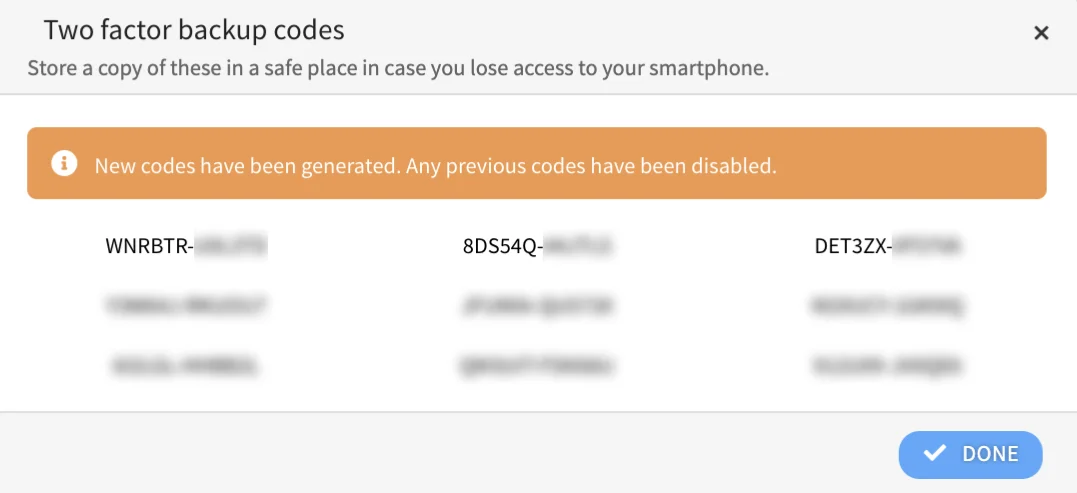
Image source: Bing (Web (fair-use with source credit))
