

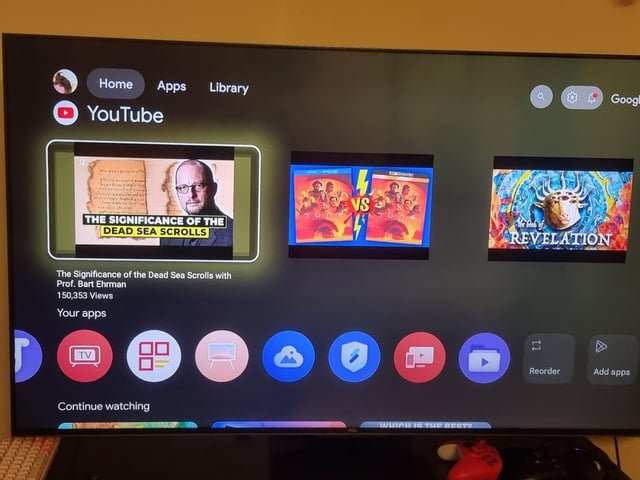
Android TV often frustrates users because of frequent bugs, slow updates, and inconsistent app performance. **The key issue is poorly optimized software and limited support.** Many devices lag behind in software updates, making the experience unreliable. So, why is Android TV so bad? It’s mainly because of these technical shortcomings that hinder smooth operation and user satisfaction. If you’re tired of crashes and delays, understanding these problems helps you make smarter choices.

Why is Android TV So Bad?
Android TV has become a common choice for many people when selecting a smart TV platform. It promises a simple interface, access to a wide range of apps, and integration with Google services. However, many users find that Android TV doesn’t always meet expectations. In this section, we’ll explore the main reasons why Android TV earns its reputation for being less than perfect, breaking down each aspect to see where it falls short.
Clunky User Interface and Navigation Problems
One of the first complaints about Android TV relates to its interface. Many users find the experience to be confusing and slow. The home screen can feel cluttered, with a mix of recommended content, apps, and settings that don’t always seem to flow smoothly.
Difficulty Finding Content
Users often find it difficult to locate their favorite shows or movies quickly. The menu system isn’t always intuitive, and the search function doesn’t always deliver accurate or relevant results. Unlike some other platforms that favor simplicity, Android TV can overwhelm users with options that aren’t clearly organized.
Lag and Slow Response Time
Switching between apps or scrolling through menus can sometimes lag or freeze. This sluggish response can make navigation frustrating, especially on older or lower-spec devices. The interface sometimes feels unresponsive, leading to a poor user experience.
Unreliable App Compatibility and Performance
Apps are a core part of Android TV, yet many users report issues with app stability and compatibility.
Limited App Selection
Although Android TV offers access to most popular streaming services like Netflix, Hulu, and Disney+, some apps are missing or have limited features. Furthermore, many apps aren’t optimized for the TV experience, resulting in poor usability or visual quality.
Frequent App Crashes and Bugs
Users often encounter apps crashing unexpectedly or freezing during use. These bugs can be frustrating, especially when trying to watch a show or use a streaming service without interruptions.
Firmware and Software Update Challenges
Up-to-date software is essential for security and performance, but Android TV users frequently report problems with updates.
Slow or Inconsistent Updates
Manufacturers sometimes delay or skip updates entirely. When updates arrive, they can be slow to install, which leaves users vulnerable to bugs or security issues.
Compatibility Issues Post-Update
Updating Android TV doesn’t always fix existing problems. Sometimes, updates introduce new bugs or cause compatibility issues with apps or devices. Users report cases where their TV becomes slower or unresponsive after updating.
Poor Remote Control and Voice Assistant Features
The remote control is a key aspect of any smart TV experience. Android TV’s remote controls and voice features often disappoint.
Remote Control Design Flaws
Many remote controls come with unresponsive buttons, awkward layouts, or lacking essential shortcuts. This can force users to rely on their smartphones or third-party remotes, which defeats the purpose of a dedicated remote.
Limited Voice Command Accuracy
While Android TV offers voice search via Google Assistant, users complain about its inaccuracy. It often misinterprets commands or struggles to understand accents and speech nuances, making voice controls less practical.
Lack of Customization and Personalization Options
A modern smart TV platform should be flexible enough for users to personalize their experience, but Android TV falls short here.
Rigid Interface
Users cannot change home screen layout easily or add custom shortcuts. This limits how they can organize their favorite apps and content.
Limited Profiles and User Management
Unlike some competitors, Android TV doesn’t offer multiple user profiles. This can be inconvenient for families, as each person may want personalized recommendations and app collections.
Fragmentation and Compatibility Issues Across Devices
Because Android TV is an open-source platform used by many manufacturers, it suffers from fragmentation.
Divergent Hardware and Software Experiences
Different TVs and streaming devices have varying hardware capabilities, which can cause inconsistent performance. Some devices run Android TV smoothly, while others struggle due to lower hardware power or poorly optimized software.
Limited Support for Older Devices
Older Android TV models may not receive updates or new features, leading to performance decline over time. This fragmentation causes frustration for users who want a consistent experience across devices.
The Hidden Costs of Android TV
Many users assume that Android TV is a free platform, but there are costs to consider.
Pre-Installed Bloatware
Manufacturers often load Android TVs with pre-installed apps that users don’t want or need. These apps take up storage space and can’t always be removed easily.
Subscription or Purchase Fees for Some Apps
While Android TV provides access to free content, streaming apps and games often require subscriptions or one-time purchases. This can add up quickly, especially for users who want access to multiple services.
Security and Privacy Concerns
Security issues are another downside of Android TV’s open ecosystem.
Vulnerable to Malware
Because Android TV allows installation from third-party sources, it’s vulnerable to malware if users sideload apps without caution.
Data Privacy
Google’s data collection practices extend to Android TV, which might raise concerns for users wanting more privacy. Some worry about how their viewing habits and personal data are being tracked and used.
Comparison with Competitors
When we compare Android TV to other smart TV platforms, several shortcomings become evident.
Apple TV
Apple TV offers a smoother interface, better app selection, and strong privacy credentials. Its ecosystem integrates well with other Apple devices, providing a more polished experience.
Roku
Roku is often praised for its straightforward user interface and reliable performance. Its app store is well-curated, and it rarely suffers from bugs or lag.
Amazon Fire TV
Fire TV devices are affordable, easy to use, and come with a wide range of apps. They also integrate seamlessly with Amazon services, making them a popular choice.
The Bottom Line
While Android TV offers the allure of flexibility and access to Google’s ecosystem, it often falls short in delivering a smooth, reliable, and user-friendly experience. From navigation issues to app stability, and from hardware fragmentation to privacy concerns, many users feel that Android TV needs significant improvements to truly shine. As technology advances, it remains to be seen whether Android TV can address these persistent problems and become a more competitive choice for smart entertainment.
Frequently Asked Questions
What are the common issues users face with Android TV’s interface?
Many users find Android TV’s interface unintuitive and cluttered, making it difficult to navigate through apps and settings quickly. The interface often lacks consistency across different devices, leading to confusion and frustration, especially for those unfamiliar with Android’s navigation style.
How does Android TV’s app availability impact user experience?
Android TV sometimes lacks access to certain popular apps or updates, limiting entertainment options. Users may encounter delays in app availability or find that some apps are not optimized for the TV experience, which affects overall usability and satisfaction.
What performance issues tend to occur with Android TV devices?
Many Android TV devices experience lag, slow responses, or crashes during use. These performance hiccups often stem from insufficient hardware capabilities or software inefficiencies, which can interrupt viewing and lead to a frustrating experience.
In what ways do software updates affect Android TV’s reliability?
Frequent or poorly timed software updates can cause compatibility problems or bugs that disrupt normal operation. Users may notice apps crashing more often or features not functioning properly after updates, reducing trust in the device’s stability.
Are there compatibility problems with external devices on Android TV?
Compatibility issues arise when Android TV fails to properly recognize or work with external devices such as soundbars, game controllers, or USB drives. These problems can hinder multimedia setup and limit the overall functionality of the TV system.
Final Thoughts
Android TV often struggles with slow updates and inconsistent app support, which frustrates users. Its interface can feel cluttered and unintuitive, making navigation a hassle. Many users face lagging performance and frequent crashes, undermining the viewing experience.
In conclusion, why is android tv so bad? Its sluggish response, poor user interface, and unreliable performance leave many disappointed. These issues highlight why Android TV falls short for those seeking a seamless entertainment experience.
