

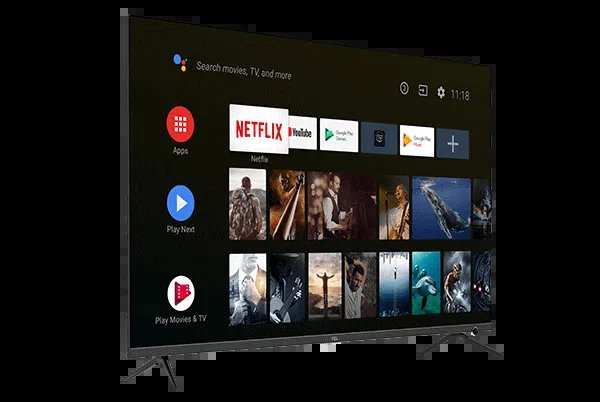
When someone asks, “what does an android tv mean,” they are curious about a smart TV powered by the Android operating system. **It combines the familiarity of Android with the features of a television, creating a versatile entertainment device.** Knowing this helps you understand why Android TVs offer a wide range of apps and a seamless user experience.
Understanding what an Android TV means clarifies how it enhances your viewing options and interaction. It’s about bringing your favorite apps, games, and content right to your screen with simple navigation.

What Does an Android TV Mean?
Understanding what an Android TV is can feel overwhelming at first, especially with so many smart TV options available today. However, at its core, an Android TV is a smart television that runs on the Android operating system, the same software that powers millions of smartphones and tablets around the world. This connection gives Android TVs a unique set of features and capabilities that make them stand out from other smart TVs. In this section, we will explore what exactly makes an Android TV different, and why so many people consider it a smart choice for their entertainment needs.
Defining Android TV
An Android TV is a smart television that operates on the Android platform, developed by Google. Instead of running on proprietary software like many other smart TVs, Android TVs use a version of Android tailored specifically for large screens. This means users benefit from access to a wide variety of apps, games, and streaming services directly on their television.
Key features of an Android TV include:
- Access to the Google Play Store: An Android TV comes with a built-in app store where you can find popular streaming apps like Netflix, Hulu, YouTube, Disney+, and many others.
- Voice Control: With integrated Google Assistant, users can control their TV using voice commands, making it easier to find content or control smart home devices.
- Customizable Home Screen: Android TVs offer a personalized interface where users can organize their favorite apps and content for quick access.
- Compatibility with Google Ecosystem: Android TVs work smoothly with other Google products and services such as Chromecast, Google Photos, and Google Calendar.
This setup provides a seamless entertainment experience, combining the vast app ecosystem of Android with the large screen of your television.
The Difference Between Android TV and Other Smart TVs
While many modern smart TVs feature built-in internet connectivity and apps, Android TVs stand apart because of their operating system and flexibility. Here’s how they compare:
| Feature | Android TV | Other Smart TVs |
|---|---|---|
| Operating System | Runs on customized Android OS | Runs on proprietary or other third-party software |
| App Selection | Access to Google Play Store, thousands of apps and games | Limited app store, fewer apps available |
| Voice Control | Built-in Google Assistant for voice commands | Varies, often includes proprietary voice systems |
| Update Frequency | Regular updates via Android ecosystem | Depends on manufacturer; may be infrequent |
| Integration with Google Ecosystem | Seamless with Google services and devices | Limited or no integration |
Android TV offers more flexibility and access to a broader range of apps, making it a more versatile option for tech-savvy users and entertainment lovers alike.
Hardware Specifications of Android TVs
A good Android TV combines powerful hardware with smart software to provide clear, sharp visuals and smooth performance. Some important hardware features to consider include:
- Display Quality: Look for 4K resolution for crisp images or HD for a more budget-friendly option. Some models also feature OLED or QLED panels for better color and contrast.
- Processor and RAM: Faster processors and higher RAM mean smoother navigation and app performance.
- Connectivity: Multiple HDMI ports, USB ports, Wi-Fi, Bluetooth, and Ethernet options allow for connecting various devices and accessories.
- Sound System: Built-in speakers with support for Dolby Atmos or DTS:X enhance the audio experience.
- Smart Features: Some Android TVs include motion smoothing, ambient lighting, and advanced remote controls.
When choosing an Android TV, matching hardware specifications with your viewing habits ensures you get the best experience.
Benefits of Choosing an Android TV
Opting for an Android TV can significantly change your home entertainment setup for the better. Here’s why many users prefer Android TVs:
- Wide App Availability: With access to the Google Play Store, you can enjoy thousands of streaming services, games, and utility apps.
- Ease of Use: The Android interface is familiar to many, offering intuitive navigation and quick access to your favorite content.
- Voice Search and Commands: Using Google Assistant, you can search for shows, control smart devices, or get weather updates with just your voice.
- Customizable Experience: You can personalize the home screen and app layout to suit your preferences.
- Compatibility with Other Devices: Android TVs easily connect with smartphones, tablets, and smart home devices for a cohesive digital environment.
These advantages make Android TV a compelling choice for anyone looking to upgrade their TV to a smarter, more connected device.
Popular Android TV Brands and Models
Many companies manufacture Android TVs, offering a wide range of options to suit various budgets and preferences. Some of the leading brands include:
- Sony: Known for high-end models with excellent picture quality, sleek designs, and advanced features.
- Philips: Offers budget-friendly options with good performance and smart features.
- Hisense: Combines affordability with solid hardware and user-friendly interfaces.
- TCL: Provides a variety of models with large screens, 4K resolution, and Android TV built-in.
- Sharp and Xiaomi: Emerging brands offering competitive features and attractive prices.
When selecting a model, consider your budget, preferred screen size, and specific features you need—whether it’s gaming capabilities, smart home integration, or picture quality.
Setting Up and Using an Android TV
Getting started with an Android TV is straightforward, thanks to user-friendly setup processes. Here’s a quick overview:
- Unpack the TV and connect all necessary cables, including power, HDMI, and internet.
- Turn on the TV and follow the on-screen prompts to select language and connect to Wi-Fi or Ethernet.
- Sign in with your Google Account to access personalized settings and the Google Play Store.
- Update the software if prompted, ensuring you have the latest features and security patches.
- Download your favorite streaming apps and organize your home screen for easy access.
Once set up, you can control your Android TV with the included remote, voice commands, or compatible mobile apps.
Common Uses of Android TV
An Android TV serves many purposes beyond just watching movies. Here are some popular activities:
- Streaming Content: Watch Netflix, YouTube, Amazon Prime, Disney+, and more.
- Gaming: Play Android games on a big screen using a controller or remote.
- Web Browsing: Browse the internet directly on your TV through apps or browsers.
- Smart Home Control: Manage compatible smart devices like lights, thermostats, and security cameras.
- Video Calls: Use apps like Google Meet or Skype for video conferencing with friends and family.
This multifunctionality makes Android TV a central hub for entertainment and smart home management.
Potential Limitations of Android TV
While Android TVs offer many benefits, they also come with some limitations:
- Software Fragmentation: Not all updates roll out to every model promptly.
- App Compatibility: Some apps may not be optimized for large screens or Android TV specifically.
- Remote Control Dependency: The interface relies heavily on remote controls, which may be less intuitive for some users.
- Price: High-end Android TVs can be more expensive than other smart TV options.
Being aware of these factors can help you choose the right model and set realistic expectations.
The Future of Android TV
The landscape of Android TV continues to evolve, with improvements in hardware, software, and content offerings. Some trends to watch include:
- Artificial Intelligence: Enhanced AI to personalize content recommendations and improve voice recognition.
- Integration with Smart Home Devices: Deeper integration for a fully connected living space.
- Gaming Focus: More Android TV models emphasizing gaming performance with dedicated features and accessories.
- Higher Resolutions and HDR Support: Increasing availability of 8K and advanced HDR technologies for better picture quality.
These innovations promise an even better experience for users in the years ahead.
—
Understanding what an Android TV means helps you make an informed decision when shopping for a new television. Its combination of Android’s versatility, extensive app ecosystem, and smart features set it apart from other options. Whether you are a movie enthusiast, a gamer, or someone who loves to control your smart home devices from the comfort of your sofa, an Android TV provides a flexible and enjoyable way to access all your favorite content.
Frequently Asked Questions
How does an Android TV differ from traditional televisions?
Android TV integrates a smart platform that allows users to access apps, games, and streaming services directly on the television. Unlike standard TVs that rely solely on external devices for smart features, Android TV has built-in internet connectivity and app stores, providing a seamless entertainment experience without extra hardware.
What types of applications can I use on an Android TV?
Android TV supports a wide range of applications, including popular streaming services like Netflix, Hulu, and Amazon Prime Video. Users can also access gaming apps, news platforms, fitness programs, and social media apps through the Google Play Store, offering versatile entertainment options on a single device.
Can I control an Android TV using my smartphone?
Yes, Android TVs often come with compatible mobile apps that let you control the TV using your smartphone. These apps enable you to navigate menus, search for content, and even use your device as a remote control, making it more convenient to operate your TV.
Is an Android TV compatible with smart home devices?
Most Android TVs are compatible with various smart home products, allowing you to integrate and control compatible devices like smart lights, speakers, and security cameras directly from your TV interface. This connectivity simplifies managing your smart home ecosystem from a central entertainment screen.
What hardware specifications should I look for in an Android TV?
When choosing an Android TV, consider factors such as processor speed, RAM, and storage capacity to ensure smooth performance. A higher resolution display, like 4K or HDR, enhances picture quality, while sufficient RAM helps run multiple apps simultaneously without lag.
Final Thoughts
An Android TV combines the versatility of the Android operating system with your television, offering a smart and customizable viewing experience. It provides access to a wide range of apps, streaming services, and games, all from a user-friendly interface.
What does an android tv mean? It means seamless integration of entertainment options and smart features in one device, making your TV more than just a screen. This upgrade enhances your home entertainment and provides convenience at your fingertips.
